






Index
- The Effects of SophiaFramework UNIVERSE
- GUI Framework
- Utilities
- BREW C++ Wrappers

The Effects of SophiaFramework UNIVERSE
GUI environment for BREW is available.  GUI Framework
Useful C++ class libraries for BREW application development are available. Utility
- The procedure for accessing Web services by WSDL / SOAP communication can be programmed with only 10 lines of C++ code. Secure Web services supporting SSL can be easily implemented. Mobile SOAP / XML
- Classes for HTTP / HTTPS, POP3 / SMTP, SSL, TCP / IP and UDP are available. Network
- Operations with files, and directory or file paths are programmed intuitively. File
- File or network stream operations are straightforward. Stream
- Memory is automatically allocated and released. Buffer
- String operations can be programmed intuitively. String
- Programing shape operations becomes straightforward. Shape
- Color operations are very easy. Color
- Mutable data operations are effortless. Collection
- Math functions like floating-point operation, trigonometric functions and exponentials are available. Mathematics
- Classes for date calculation or endian conversion are also implemented. General
- Memory leaks are automatically detected. Debug
C++ wrappers for BREW APIs are available. BREW C++ Wrapper
GUI Framework
GUI Environment
Problem with BREW
It is difficult to implement GUI event handling and window drawing on BREW.
Solution by SophiaFramework UNIVERSE
SophiaFramework UNIVERSE provides a GUI framework that facilitates GUI implementation.
SophiaFramework UNIVERSE GUI environment features:
- Optimized object drawing
- Automated focus movement
- Management of moving UI components and scrolling
- Control over UI component focus and valid / invalid UI management
- Management of parent UI components
SophiaFramework UNIVERSE GUI for BREW ( zip file )
Event Handling Encapsulation
Problem with BREW
Event handling must be implemented in order to use a GUI, but maintenance of programs that include event handling can be complicated.
Solution by SophiaFramework UNIVERSE
SophiaFramework UNIVERSE has pre-registered event handlers that can be used without any need for complicated implementations.
GUI Components
Problem with BREW
UI components must be custom made for every BREW application.
Solution by SophiaFramework UNIVERSE
SophiaFramework UNIVERSE provides flexible window designs and GUI elements such as menus, dialog-boxes and tabs.
SophiaFramework UNIVERSE sample code for adding a button to a window:
 SFRFrameWindow* win = new SFRWindow(this, rect);
 SFRButtonControl* button = new SFRButtonControl(win, rect2, "BUTTON");
Utilities
Mobile SOAP / XML
SOAP / XML
Problem with BREW
Even with SOAP / XML middleware, coding of more than 1000 lines is necessary to implement SOAP communication.
Solution by SophiaFramework UNIVERSE
With SOAP / XML classes included in SophiaFramework 4.0, SOAP communication can be programmed in less than 10 C++ operations.
SophiaFramework UNIVERSE XML for BREW
// class variable

SFXSOAPRPC _rpc

// set a method name of Web service
_rpc.SetMethodName("ItemSearch");

// set a targeted URI

_rpc.SetTargetObjectURI("http://webservices.amazon.com/");

// set parameters of Web service

_rpc.AddParameter("AWSAccessKeyId",
                  SFXBuffer(SFXAnsiString("0FV0D3E595H0FH4P1VR2")));
_rpc.AddParameter("Keywords",
                  SFXBuffer(SFXAnsiString("caviar")));
_rpc.AddParameter("MerchantId",
                  SFXBuffer(SFXAnsiString("Amazon")));
_rpc.AddParameter("SearchIndex",
                  SFXBuffer(SFXAnsiString("GourmetFood")));

// call the Web service
_rpc.Invoke("http://soap.amazon.com/onca/soap?Service=AWSECommerceService",
            "http://soap.amazon.com",
            OnResultSHP_SOAP,
            this);
Secure Web Service over HTTPS
SophiaFramework UNIVERSE has a SFXSOAPRPC class that implements the SOAP-RPC protocol, which can communicate over HTTPS.
SSL socket communication programming ( SFXSSLSocket )
SFXSOAPRPC over HTTPS
// class variable

SFXSOAPRPC _rpc

// set a method name of Web service
_rpc.SetMethodName("ItemSearch");

// set a targeted URI

_rpc.SetTargetObjectURI("https://webservices.amazon.com/");

// set parameters of Web service

_rpc.AddParameter("AWSAccessKeyId",
                  SFXBuffer(SFXAnsiString("0FV0D3E595H0FH4P1VR2")));
_rpc.AddParameter("Keywords",
                  SFXBuffer(SFXAnsiString("caviar")));
_rpc.AddParameter("MerchantId",
                  SFXBuffer(SFXAnsiString("Amazon")));
_rpc.AddParameter("SearchIndex",
                  SFXBuffer(SFXAnsiString("GourmetFood")));

// set a mode of SSL validation

_wsdl.SetTrustMode(SSL_TRUST_MODE_IGNORE);

// call the Web service
_rpc.Invoke("https://soap.amazon.com/onca/soap?Service=AWSECommerceService",
            "https://soap.amazon.com",
            OnResultSHP_SOAP,
            this);
Network
Class Managing Host Names and Port Addresses ( SFXSocketAddress )
Problem with BREW
Addresses for Sockets should be IP addresses, thus host names must be converted into IP addresses.
Solution by SophiaFramework UNIVERSE
Host names are automatically converted into IP addresses. There is no need to manage the context for host name resolution.
// As a host name is automatically resolved with SFXTCPSocket,
// The following code does not need to be programmed.

// class variable

SFXSocketAddress _socket;

CHelloWorld::CHelloWorld(Void) static_throws
{
    // set Host

    _socket.Set("www.s-cradle.com:8080");

    // get the number of resolved IP addresses

    TRACE("ip count = %d", _socket.GetCount());

    // display Host

    TRACE(" host = %s", _socket.Get().GetCString());

    // resolve IP address from Host Name

    _socket.Resolve(CALLBACK_FUNCTION(OnResolve));
    return;
}

CALLBACK_IMPLEMENT_SFXSOCKETADDRESS(CHelloWorld, OnResolve, error)
{
    // get the number of resolved IP addresses

    TRACE("ip count = %d", _socket.GetCount());

    // display Host

    TRACE("host = %s:%d", _socket.GetIP(0).GetCString(),
                                    _socket.GetPort());
    return;
}
TCP Socket Class ( SFXTCPSocket )
Problem with BREW
To implement TCP / IP communication, the interfaces of INetMgr and ISocket should be used to send and receive data asynchronously by callbacks. Programming for creation and restoration of fragmented data is very difficult, and the risk of bugs is high.
Solution by SophiaFramework UNIVERSE
With the SFXTCPSocket class, interfaces of INetMgr and ISocket are automatically controled. As data is sent or received through the buffered Stream class, programming for its context management is very concise.
// class variables

SFXTCPSocket _socket;
SFXAnsiStringStreamWriter _writer;
SFXAnsiStringStreamReader _reader;

CHelloWorld::CHelloWorld(Void) static_throws
{
    SFXSocketAddress host("www.s-cradle.com:80");

    // open Socket

    _socket.Open();

    // connect www.s-cradle.com:80
    // host name is automatically resolved

    _socket.Connect(host, CALLBACK_FUNCTION(OnConnect));
    return;
}

CALLBACK_IMPLEMENT_SFXTCPSOCKET(CHelloWorld, OnConnect, error)
{
    // get SFXAnsiStringStreamWriter from a ring buffer of 1024 bytes

    _socket.GetStreamWriter(1024, &_writer);

    // write data onto a ring buffer

    _writer << "GET / HTTP/1.0\r\n";

    // send data

    _writer.Flush(CALLBACK_FUNCTION(OnFlush));
    return;
}

CALLBACK_IMPLEMENT_SFXANSISTRINGSTREAMWRITER(CHelloWorld,
                                             OnFlush,
                                             error)
{
    // release SFXAnsiStringStreamWriter

    _writer.Release();

    // get SFXAnsiStringStreamReader from a ring buffer of 1024 bytes

    _socket.GetStreamReader(1024, &_reader);

    // receive data

    _reader.Fetch(CALLBACK_FUNCTION(OnFetch));
    return;
}

CALLBACK_IMPLEMENT_SFXANSISTRINGSTREAMREADER(CHelloWorld,
                                             OnFetch,
                                             error)
{
    SFXAnsiString str;

    // read data from a ring buffer

    _reader >> str;

    // display a response

    TRACE("%s", str.GetCString());

    // release SFXAnsiStringStreamReader

    _reader.Release();

    // close Socket

    _socket.Close();
    return;
}
UDP Socket Communication Programming ( SFXUDPSocket )
Problem with BREW
To implement UDP communication, interfaces of TCP / IP, INetMgr and ISocket should be used to manage the sending and receiving of data asynchronously by Callback.
Solution by SophiaFramework UNIVERSE
With the SFXUDPSocket class, interfaces of INetMgr and ISocket are automatically managed. Data is sent or received through the buffered Stream class, and programming for its context management is very concise.
// class variable

SFXUDPSocket _socket;

Void SFXStorageExplainer::_SFXUDPSocket(Void)
{
    // open a socket

	_socket.Open();

    // bind IP address and port number with the socket

    _SFXUDPSocket_OnBind(SFERR_NO_ERROR);
    return;
}

CALLBACK_IMPLEMENT_SFXUDPSOCKET(SFXStorageExplainer,
                                _SFXUDPSocket_OnBind,
                                error)
{
    switch (_socket.Bind(SFXSocketAddress(
             SFXInetAddress::LoopbackInetAddress(), 1024))) {
        case SFERR_NO_ERROR:

            // write data asynchronously

            _SFXUDPSocket_OnSend(SFERR_NO_ERROR);
            break;
        case AEE_NET_WOULDBLOCK:

            // register a callback function

            _socket.ScheduleBind(
                    CALLBACK_FUNCTION(_SFXUDPSocket_OnBind));
        	break;
    }
    return;
}

CALLBACK_IMPLEMENT_SFXUDPSOCKET(SFXStorageExplainer,
                                _SFXUDPSocket_OnSend,
                                error)
{
    static ACharConst data[] = "udp!";
    UInt32 size;

    size = sizeof(data) - 1;
    switch (_socket.Send(SFXSocketAddress(
                         SFXInetAddress::LoopbackInetAddress(), 1024),
                         data,
                         &size)) {
        case SFERR_NO_ERROR:

            // Check whether data of size specified is sent.
            // All the data of size sepecified by Send()
            // is not always sent simultaneously
            // To simplify the logic,
            // if all the data cannot be sent simultaneously,
            // an error will ocurr in the following code.

            if (size == sizeof(data) - 1) {

                // read data asynchronously

                _SFXUDPSocket_OnReceive(SFERR_NO_ERROR);
            }
            else {
                TRACE("...send failed...");
            }
            break;
        case AEE_NET_WOULDBLOCK:

            // register a callback function

            _socket.ScheduleSend(
                    CALLBACK_FUNCTION(_SFXUDPSocket_OnSend));
            break;
    }
    return;
}

CALLBACK_IMPLEMENT_SFXUDPSOCKET(SFXStorageExplainer,
                                _SFXUDPSocket_OnReceive,
                                error)
{
    SFXSocketAddress socket;
    SFXBuffer buffer;
    UInt32 size;

    buffer.SetSize(4);
    size = static_cast<UInt16>(buffer.GetSize());
    switch (_socket.Receive(&socket, buffer.GetBuffer(), &size)) {
        case SFERR_NO_ERROR:

            // Check whether data of size specified is sent.
            // All the data of size sepecified by Send()
            // is not always sent simultaneously
            // To simplify the logic,
            // if all the data cannot be sent simultaneously,
            // an error will ocurr in the following code.

            if (size == buffer.GetSize()) {

                // display data received

                buffer.SetSize(buffer.GetSize() + 1);
                buffer[buffer.GetSize() - 1] = '\0';
                TRACE(":%s", SFXAnsiString(buffer).GetCString());

                // close the socket

                _socket.Close();
            }
            else {
                TRACE("...receive failed...");
            }
            break;
        case AEE_NET_WOULDBLOCK:

            // register a callback function

            _socket.ScheduleReceive(
                    CALLBACK_FUNCTION(_SFXUDPSocket_OnReceive));
            break;
    }
    return;
}
SSL Socket Programming ( SFXSSLSocket )
Problem with BREW
To implement SSL communication, interfaces such as INetMgr, ISocket, ISSL and ISSLRootCerts should be used and their context for communication explicitly managed.
Solution by SophiaFramework UNIVERSE
SSL communication can be programmed in a manner almost identical to that of the SFXTCPSocket class. Its communication context is automatically managed.
* SSL: Secure Socket Layer is an Internet protocol that encrypts data, enabling the transmission and reception of private documents.
Using SFXSSLSocket
// class variables

SFXSSLSocket _socket;
SFXAnsiStringStreamWriter _writer;
SFXAnsiStringStreamReader _reader;

CHelloWorld::CHelloWorld(Void) static_throws
{
    SFXSocketAddress host("rollovertest2.verisign.co.jp:443");

    // open the socket

    _socket.Open();

    // connect rollovertest2.verisign.co.jp:443
    // host name wiil be automatically resolved

    _socket.Connect(host, CALLBACK_FUNCTION(OnConnect));
    return;
}

CALLBACK_IMPLEMENT_SFXSSLSOCKET(CHelloWorld, OnConnect, error)
{
    _socket.Negotiate(CALLBACK_FUNCTION(OnNegotiate));
    return;
}

CALLBACK_IMPLEMENT_SFXSSLSOCKET(CHelloWorld, OnNegotiate, error)
{
    // get SFXAnsiStringStreamWriter by the ring buffer of 1024 bytes

    _socket.GetStreamWriter(1024, &_writer);

    // write data onto the ring buffer

    _writer << "GET / HTTP/1.0\r\n\r\n";

    // send data

    _writer.Flush(CALLBACK_FUNCTION(OnFlush));
    return;
}

CALLBACK_IMPLEMENT_SFXANSISTRINGSTREAMWRITER(CHelloWorld, OnFlush, error)
{
    // release SFXAnsiStringStreamWriter after sendind data

    _writer.Release();

    // get SFXAnsiStringStreamReader by the ring buffer of 1024 bytes

    _socket.GetStreamReader(1024, &_reader);

    // receive data

    _reader.Fetch(CALLBACK_FUNCTION(OnFetch));
    return;
}

CALLBACK_IMPLEMENT_SFXANSISTRINGSTREAMREADER(CHelloWorld, OnFetch, error)
{
    SFXAnsiString str;

    // read data from the ring buffer

    _reader >> str;

    // display the response

    TRACE("%s", str.GetCString());

    // release SFXAnsiStringStreamReader after receiving data

    _reader.Release();

    // close the socket

    _socket.Close();
    return;
}
Using SFXTCPSocket
// class variables

SFXTCPSocket _socket;
SFXAnsiStringStreamWriter _writer;
SFXAnsiStringStreamReader _reader;

CHelloWorld::CHelloWorld(Void) static_throws
{
    SFXSocketAddress host("www.verisign.co.jp:80");

    // open socket

    _socket.Open();

    // connect www.verisign.co.jp:80
    // host name wiil be automatically resolved

    _socket.Connect(host, CALLBACK_FUNCTION(OnConnect));
    return;
}

CALLBACK_IMPLEMENT_SFXTCPSOCKET(CHelloWorld, OnConnect, error)
{
    // get SFXAnsiStringStreamWriter by the ring buffer of 1024 bytes

    _socket.GetStreamWriter(1024, &_writer);

   // write data onto the ring buffer

    _writer << "GET / HTTP/1.0\r\n\r\n";

    // send data

    _writer.Flush(CALLBACK_FUNCTION(OnFlush));
    return;
}

CALLBACK_IMPLEMENT_SFXANSISTRINGSTREAMWRITER(CHelloWorld, OnFlush, error)
{
    // release SFXAnsiStringStreamWriter after sendind data

    _writer.Release();

    // get SFXAnsiStringStreamReader by the ring buffer of 1024 bytes

    _socket.GetStreamReader(1024, &_reader);

    // receive data

    _reader.Fetch(CALLBACK_FUNCTION(OnFetch));
    return;
}

CALLBACK_IMPLEMENT_SFXANSISTRINGSTREAMREADER(CHelloWorld, OnFetch, error)
{
    SFXAnsiString str;

    // read data from the ring buffer

    _reader >> str;

    // display the response

    TRACE("%s", str.GetCString());

    // release SFXAnsiStringStreamReader after receiving data

    _reader.Release();

    // close the socket

    _socket.Close();
    return;
}
HTTP / HTTPS Communication Class ( SFXHTTPConnection )
Problem with BREW
To implement HTTP / HTTPS communication, interfaces such as IWeb, IWebResp, ISSLRootCerts, ISource should be used, and the sending / receiving of data should be explicitly managed until the communication is over.
Solution by SophiaFramework UNIVERSE
All interfaces and sent / received data are automatically managed. HTTP / HTTPS communication can be implemented in a way similar to the HttpURLConnection in Java.
// class variables

SFXHTTPConnection _http;
SFXAnsiStringStreamReader _reader;

CHelloWorld::CHelloWorld(Void) static_throws
{
    // open

    _http.Open();

    // set the User-Agent field

    _http.SetUserAgent("SophiaFramework 4.0");

    // connect the web site

    _http.Connect("/index.html",
                  CALLBACK_FUNCTION(OnConnect));
    return;
}

CALLBACK_IMPLEMENT_SFXHTTPCONNECTION(CHelloWorld, OnConnect, error)
{
    SFXPropertyConstPtr header;
    SInt16 i;

    // get the result code

    TRACE("result = %d", _http.GetResultCode());

    // get the Content-Length field

    TRACE("length = %d", _http.GetLength());

    // get Date field

    TRACE("date = %s",
          _http.GetDate().Format("YYYY/MM/DD hh:mm:ss (Wek)").GetCString());

    // display header information of received data

    TRACE("---header dump---");

    header = &_http.GetResponseHeader();
    for (i = 0; i < header->GetSize(); ++i) {
        TRACE("%s: %s",
              header->GetKey(i).GetCString(),
              header->GetValue(i).GetCString());
    }

    TRACE("---header dump---");

    // get SFXAnsiStringStreamReader from a ring buffer of 1024 bytes

    _http.GetStreamReader(1024, &_reader);

    // receive body of data

    _reader.Fetch(CALLBACK_FUNCTION(OnFetch));
    return;
}

CALLBACK_IMPLEMENT_SFXANSISTRINGSTREAMREADER(CHelloWorld, OnFetch, error)
{
    SFXAnsiString str;

    // read received data from a ring buffer

    _reader >> str;

    TRACE("%s", str.GetCString());

    // release after data is received
    // note : if data body is bigger than ring buffer,
    //        you can receive more data by Fetch() function

    _reader.Release();

    // close

    _http.Close();
    return;
}
POP3 / SMTP ( SFXPOP3Receiver / SFXSMTPSender ) Mail Transmission / Reception
Problem with BREW
There is no interfaces for POP3 or SMTP protocol. Procedures such as sending and receiving data with a server, or management of mail data must be implemented by the developer.
Solution by SophiaFramework UNIVERSE
With the POP3 or SMTP classes, implementing the process of sending and receiving mail only takes a few lines program code. Other useful classes such as management of mail data and encoding conversion are also provided.
Sending Mail ( SFXSMTPSender )
class MyClass {
private:
    SFXSMTPSender _sender;
    CALLBACK_DECLARE_SFXSMTPSENDER(SMTPCallback)
public:
    Void Function(Void);
};

Void MyClass::Function(Void)
{
    SFXMailMessage message;

    // set "From" Address

    message.SetFromField("fromaddress@example.com");

    // set "To" Address

    message.AddToField("toaddress1@example.com");
    message.AddToField("toaddress2@example.com");

    // set Title

    message.SetSubjectField("Mail Subject");

    // set Text

    message.SetBody("Mail test\r\nThis mail is sent by SFXSMTPSender.\r\n");

    // set Mail Server for sending and Port Number
    // ( domain is automatically resolved )

    _sender.SetServer(SFXSocketAddress("smtpserver.example.com:25"));

    // send a mail ( register callback function )

    _sender.SendMessage(&message, CALLBACK_FUNCTION(SMTPCallback));
}

// callback funtion for sending a mail
CALLBACK_IMPLEMENT_SFXSMTPSENDER(MyClass, SMTPCallback, error)
{
    TRACE("Your mail has been sent.");
}
Receiving Mail ( SFXPOP3Receiver )
class MyClass {
private:
    SFXPOP3Receiver _receiver;
    CALLBACK_DECLARE_SFXPOP3RECEIVER(POP3Callback)
public:
    Void Function(Void);
};

Void MyClass::Function(Void)
{
    // set an account

    _receiver.SetAccount("user", "password");

    // set Mail Server for receiving a mail and Port Number
    // ( domain is automatically resolved )

    _receiver.SetServer(SFXSocketAddress("pop3server.example.com:110"));

    // receive a mail  ( register a callback function )

    _receiver.Receive(CALLBACK_FUNCTION(POP3Callback));
}

// callback funtion for receiving a mail
CALLBACK_IMPLEMENT_SFXPOP3RECEIVER(MyClass, POP3Callback, error)
{
    SInt32 i;

    if (error == SFERR_NO_ERROR) { // if reveiving a mail is successful
        const SFXArray<SFXPOP3Receiver::MailInfoPtr>& mailArray =
            receiver.GetReceivedMailArray();
        TRACE("received %d mails", mailArray.GetSize()); // display numbers

        for (i = 0; i < mailArray.GetSize() ; i++) {
            SFXPOP3Receiver::MailInfoPtr minfo = mailArray[i];

            // get mail size, UIDL, mail text including a header
            // one by one from the left

            TRACE("%d, %s, %s", minfo->size,
                                minfo->uidl.GetCString(),
                                minfo->mail.GetCString());

        }
    }
}
File
File Path Class ( SFXPath )
Problem with BREW
There is no interface for handling a file path. The procedure to get a parent directory or change an attribute must be programmed by the developer.
Solution by SophiaFramework UNIVERSE
The SFXPath class eliminates the need to allocate or release memory for String operations. Pre-defined functions are used to get a parent directory or change an attribute.
SFXPath path;
SFXPath temp;

// get an absolute path

path.Set("/user/admin/log.txt");
TRACE("path = %s", path.GetAbsolute().GetCString());

// get a parent directory

temp = path.GetParentPath();
TRACE("parent = %s", temp.GetAbsolute().GetCString());

// update an attribute of ".txt" into ".html"

if (path.GetExtension("txt")) {
    path.SetExtension("html");
    TRACE("path = %s", path.GetAbsolute().GetCString());
}

// set a complex path

path.Set("/user/admin/log/../../guest/./log.txt");
TRACE("path = %s", path.GetAbsolute().GetCString());

// normalize a complex path

temp = path.NormalizePath();
TRACE("normalize = %s", temp.GetAbsolute().GetCString());
Directory Class ( SFXDirectory )
Problem with BREW
There is no interface for handling a file paths, and complex programming for file path operations is necessary. Also to delete a non-empty directory, all the files inside it must first be deleted recursively.
Solution by SophiaFramework UNIVERSE
With the SFXPath class, programming for file path operation is very easy. Recursive deletion is supported, and files or directories can be enumarated by an iterator.
SFXPath path("/user/admin/apps/");
SFXDirectory::Enumerator en;

// Only if "/user/admin/" exists, make a directory for apps

SFXDirectory::Create(path, false);

// get a directory iterator

SFXDirectory::GetDirectoryEnumerator(SFXPath::HomeDirectoryPath(), &en);

// enumerate directories with an iterator

while (en.HasNext()) {
    path = en.GetNext();
    TRACE("dir = %s", path.Get().GetCString());
}

// get a file iterator

SFXDirectory::GetFileEnumerator(SFXPath::HomeDirectoryPath(), &en);

// enumerate files with an iterator

while (en.HasNext()) {
    path = en.GetNext();
    TRACE("file = %s", path.Get().GetCString());
}

// delete directories recursively

SFXDirectory::Remove(path, true);
File Class ( SFXFile )
Problem with BREW
There is no interface for handling a file path, and complex programming for file path operation is necessary. As was the case with the TCP / IP Socket, programming for creation and restoration of fragmented data is very difficult error-prone.
Solution by SophiaFramework UNIVERSE
With the SFXPath class, programming for file path operations is very easy. As data is read or written through buffered Stream classes, its programming is very concise.
SFXPath path("/sample.txt");
SFXFile file;
SFXAnsiStringStreamWriter writer;
SFXDate date(0);

// get the date when file was created

SFXFile::GetCreateDate(path, &date);

// output a date and  a time with the following format

TRACE("create = %s", date.Format("YYYY/MM/DD hh:mm:ss (Wek)").GetCString());

// delete the file

SFXFile::Remove(path);

// create a new file and write date onto the file

file.OpenReadWrite(path);
file.GetStreamWriter(1024, &writer);

writer << "sophiaframework";
writer.Flush();

file.Close();
Stream
I / O Class for Binary Data ( SFXBinaryStreamReader / SFXBinaryStreamWriter )
Problem with BREW
In case of I / O with IFile or ISocket interface, there is a possibility that all the requested data cannot be inputted / outputted at once. The restoration procedure for the fragmented data must be programmed explicitly.
Solution by SophiaFramework UNIVERSE
An internal ring buffer, allows for the input or output of data of any size. Also data is read and written more efficiently by automatic buffering.
SFXFile file;
SFXBinaryStreamReader reader;
UInt16 index;
SFXAnsiString str;

// open a file

file.OpenReadOnly(SFXPath("/sample.txt"));

// get SFXBinaryStreamReader from a ring buffer of 1024 bytes

file.GetStreamReader(1024, &reader);

// read data from a file

reader.Fetch();

// read data from a ring buffer

reader >> index >> str;

// display data

TRACE("index = %d", index);
TRACE("str = %s", str.GetCString());
I / O Class for String Data ( SFXAnsiStringStreamReader / SFXAnsiStringStreamWriter / SFXWideStringStreamReader / SFXWideStringStreamWriter)
Problem with BREW
In case of I/O with IFile or ISocket interface, there is a possibility that all the requested data cannot be inputtd or outputtd at the same time. The restoration procedure for the fragmented data must be programmed explicitly.
Solution by SophiaFramework UNIVERSE
Similar to an I / O class for Binary Data, using internal ring buffers, input or output of data of any size can be achieved. Also data is read and written more efficiently by automatic buffering. A function to input and output integers or objects automatically converting them into characters is provided.
Buffer
Automatic Management of Buffers
Problem with BREW
- Failure to release memory
- Inappropriate memory release
- Buffer overflow
Solution by SophiaFramework UNIVERSE
The buffer class allocates and deallocates memory automatically, therefore no memory leaks occur.
String
Intuitive Handling of Strings
Problem with BREW
Programming string processing is complicated.
Solution by SophiaFramework UNIVERSE
With SophiaFramework UNIVERSE, programming string processing becomes intuitive.
e.g. Code for concatenating strings.
BREW:
const char* str1 = "ABC";
const char* str2 = "DEF";
int len1 = STRLEN(str1);
int len2 = STRLEN(str2);
int len3 = len1 + len2;
char* str3 = MALLOC(len3 + 1);
STRCPY(str3, str1, len1);
STRCAT(str3, str2, len3);
 .... Use str3 ....
FREE(str3); // Release memory after using it.
SophiaFramework UNIVERSE:
SFXAnsiString str1("ABC");
SFXAnsiString str2("DEF");
SFXAnsiString str3 = str1 + str2;
 .... Use str3 ....
// NO need to release memory.
Converting ANSI Strings and Wide Strings
Problem with BREW ]
BREW does not support conversion of ANSI strings and Wide strings. Memory must be managed manually.
Solution by SophiaFramework UNIVERSE
With SophiaFramework UNIVERSE, ANSI strings and Wide strings are converted automatically. There is no need to manage memory.
e.g. Code for converting strings
BREW:
- Calculate the length of an ANSI string
- Allocate a buffer for a Wide string
- Convert the ANSI string into a Wide string
- Free the buffer
char* astr = "ABC";
int astrLen = STRLEN(astr);
int wstrBufSize = sizeof(AECHAR) * (astrLen + 1);
AECHAR* wstr = MALLOC(wstrBufSize);
STREXPAND((byte*)astr, STRLEN(astr), wstr, wstrBufSize);
 .... Use Wide string wstr ....
FREE(wstr);
SophiaFramework UNIVERSE:
char* astr = "ABC";
SFXWideString wstr(astr);
.... Use the Wide string "wstr" ....
.... No need to deallocate the converted string ....
Functions for String Operations
Problem with BREW
String processing must be implemented by the developer.
Solution by SophiaFramework UNIVERSE
The SophiaFramework UNIVERSE string class eliminates the need to implement string processing.
e.g. Codes for replacing strings
BREW:
There is no function for substituting strings.
SophiaFramework UNIVERSE:
SFXAnsiString str("I like oranges.");
str = str.Replace("oranges", "apples");
Shapes (Graphics)
Problem with BREW
The developer must implement graphics processing.
Solution by SophiaFramework UNIVERSE
There is no need to implement shape processing, because it is provided in Shape classes.
Ex1. Code for moving a rectangle
BREW:
AEERect rect;
rect.x += 10;
rect.y += 10;
SophiaFramework UNIVERSE:
SFXRectangle rectangle;
rectangle.Offset(10,10);
Ex2. Codes for obtaining information about the top edge of a rectangle
BREW:
AEERect rect;
AEELine line;
line.sx = rect.x;
line.sy = rect.y;
line.ex = rect.x + rect.dx - 1;
line.ey = rect.y + rect.dy - 1;
SophiaFramework UNIVERSE:
SFXRectangle rectangle;
SFXLine line;
line = rectangle.GetEdgeTop();
Color
Same as Shape.
Color operations are straightforward with SophiaFramework UNIVERSE.
Collection
Problem with BREW
Processing for dynamic data, which can be very complicated, must be implemented by the developer.
Solution by SophiaFramework UNIVERSE
No need to implement dynamic data processing, since it is provided through the Collection classes.
Ex. Code for dynamic array
BREW:
int* ar = NULL;
int arSize = 0;
ar = REALLOC(ar, sizeof(int) * (arSize + 1));
ar[arSize++] = 100;
ar = REALLOC(ar, sizeof(int) * (arSize + 1));
ar[arSize++] = 200;
ar = REALLOC(ar, sizeof(int) * (arSize + 1));
ar[arSize++] = 300;
DBGPRINTF("%d", ar[0] + ar[1] + ar[2]);
FREE(ar); // Release after use.
  // Forgetting the "+ 1" is a bug that is hard to find.
SophiaFramework UNIVERSE:
SFXArray<SInt32> ar;
ar.Append(100);
ar.Append(200);
ar.Append(300);
DBGPRINTF("%d", ar[0] + ar[1] + ar[2]);
// You can access as if it is a normal array.
// Memory is released automatically.
Mathematical Operations
Floating-point Type ( Float32, Float64 )
Problem with BREW
Floating-point operations require function calls. There are no trigonometric functions or exponential functions available.
Solution by SophiaFramework UNIVERSE
Floating-point operations can be used in the form of general numerical expressions. Trigonometric and exponential functions are also included.
Ex. Code for ( x + y ) * z
BREW:
double x, y, z;
z = FMUL(FADD(x, y), z);
SophiaFramework UNIVERSE:
Float x, y, z;
z = ( x  +  y )  *  z;
Random Number Classes (SFXBrewRandom, SFXLCGRandom, SFXMTRandom)
Problem with BREW
The random numbers function cannot be used to initialize variables.
Solution by SophiaFramework UNIVERSE
The random numbers function can be used to set initial values. There are three types of random number functions: BREW native, linear congruential generators (LCG), and Mersenne Twister algorithms.
Trigonometric Function Table Class (SFXTrigonometric)
Problem with BREW
There are no trigonometric funcions.
Solution by SophiaFramework UNIVERSE
Calculation of trigonometric functions is accelerated by use of the Trigonometric Funtion Table.
General Purpose Utilities
Date Class (SFXDate)
Problem with BREW
Date calculations must be managed by the developer
Solution by SophiaFramework UNIVERSE
The need to implement date calculations is eliminated through use of SophiaFramework UNIVERSE date functions.
Class (SFXHelper)
Problem with BREW
Calls to helper functions increases the size of a program due to BREW added functionalities.
Solution by SophiaFramework UNIVERSE
Calling a helper function with SophiaFramework UNIVERSE does not augment program size.
Ex. Code for allocating memory
BREW:
void* buffer = MALLOC(256);// 28 bytes after compilation
SophiaFramework UNIVERSE:
void* buffer = SFUHelper::malloc(256);//8 bytes after compilation ( 20 bytes saved )
Class for Saving Settings (SFXConfig)
Problem with BREW
There is no class for loading and saving settings.
Solution by SophiaFramework UNIVERSE
SophiaFramework UNIVERSE provides a class that loads and saves settings automatically.
Graphics Drawing Class (SFXGraphics)
Problem with BREW
Both the IDisplay and IGraphics drawing interfaces must be managed by the developer.
Solution by SophiaFramework UNIVERSE
The IDisplay and IGraphics drawing interfaces are combined into a single class.
Ex. Code for drawing strings in a rectangle
BREW:
Requires custom implementation.
SophiaFramework UNIVERSE:
Simply call the SFXGraphics::DrawString() function.
Debugging
Memory Leak Detection
Problem with BREW
BREW's memory leak detection system is not compatible with C++.
Solution by SophiaFramework UNIVERSE
Memory leaks can be detected even when using C++.
BREW C++ Wrappers
Problem with BREW
Programs in C language are less comprehensible than those in C++. Memory leaks occur when you the release interfaces is forgotten.
Solution by SophiaFramework UNIVERSE
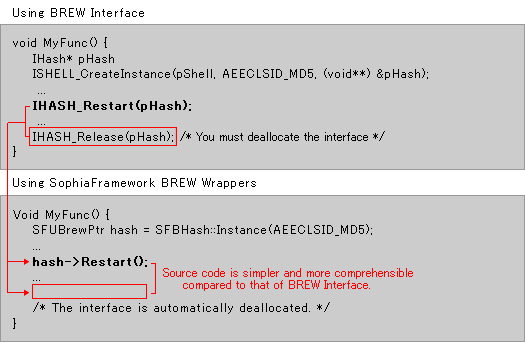
SophiaFramework UNIVERSE's C++ wrappers allow an application to be coded in a complete Object-Oriented style. Interfaces are automatically released following their use.
Ex. Calling the Restart function of the of BREW API's Hash interface
Using C++ Wrappers with Utility Libraries
In SophiaFramework UNIVERSE, BREW API wrappers can communicate with Utility Libraries such as String and Buffer.
e.g. Calling the Update function of of BREW APIs Hash interface
BREW:
Both a buffer object and its size must be passed.
SophiaFramework UNIVERSE:
Only the buffer object needs to be passed.