


|
|
SophiaFramework UNIVERSE 5.3 |
#include <SFZTitleBevelFrame.h.hpp>
class SFZTitleBevelFrame : public SFYBevelFrame;
SFMTYPEDEFCLASS(SFZTitleBevelFrame)
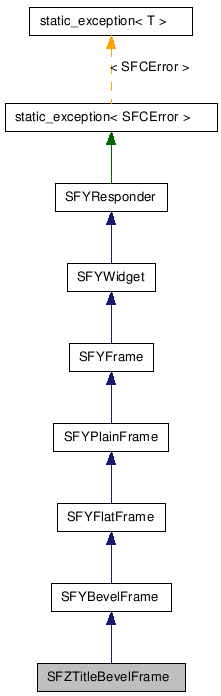
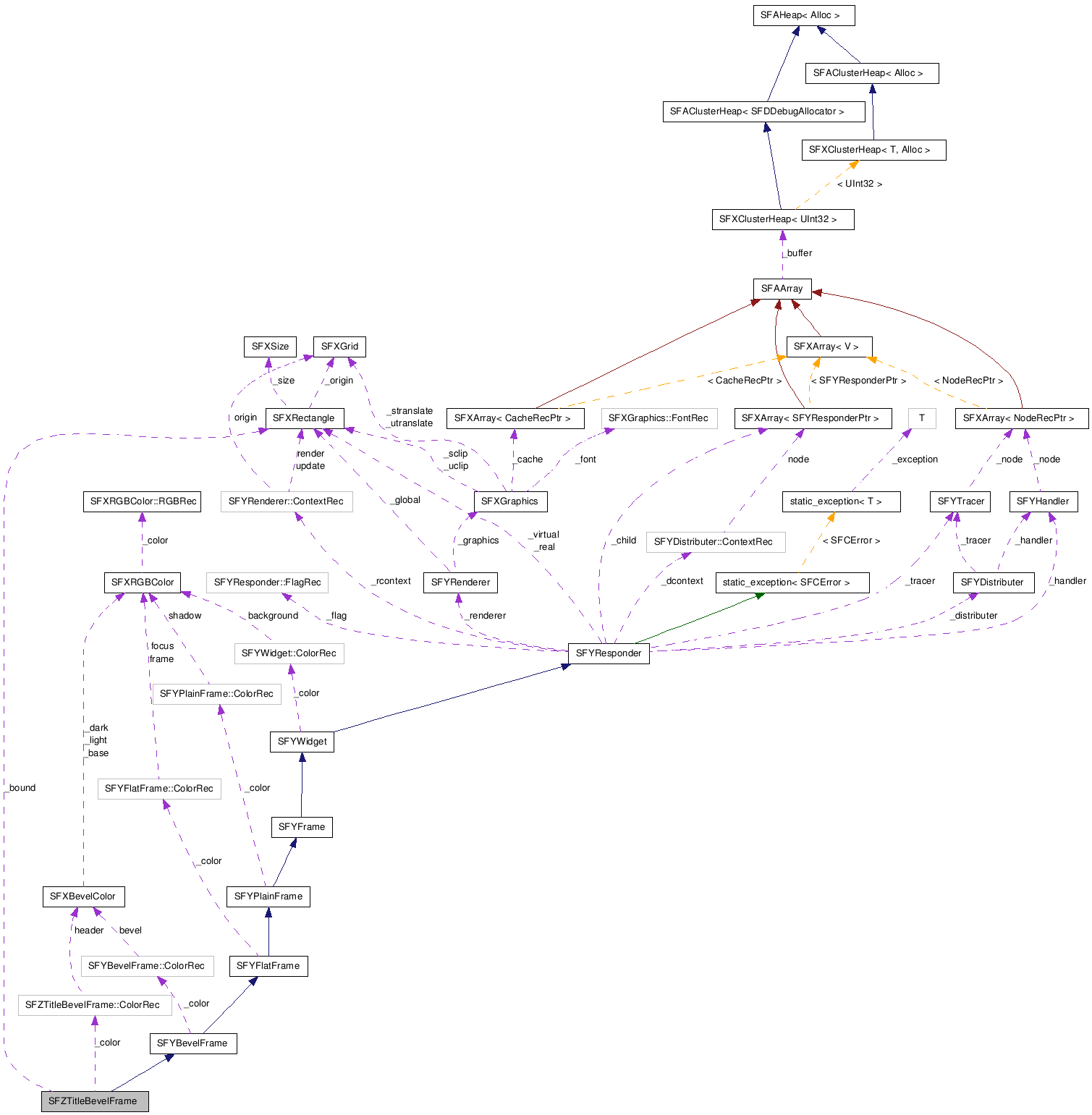
■ 仕様と使い方
タイトル付きベベルフレームとは、 影領域とフラットフレーム領域とベベルフレーム領域[SFXMargin(2, 2, 3, 3)]に、 タイトルを表示するためのヘッダー領域を加えた領域を枠領域とするフレームです。
![[Note]](images/note.png) |
枠領域の取得方法 |
|---|---|
フレームの枠領域は、SFYResponder::GetSuitableMargin 関数を呼び出すことで取得できます。 | |
図 445. タイトル付きベベルフレーム動作例[SFZTitleBevelFrame]
![タイトル付きベベルフレーム動作例[SFZTitleBevelFrame]](figure/new-responder/titlebevelframe.png)
タイトル付きベベルフレームの枠領域は、 影領域とフラットフレーム領域とベベルフレーム領域[SFXMargin(2, 2, 3, 3)]に、 タイトルを表示するためのヘッダー領域を加えたマージン領域です。
図 446. タイトル付きベベルフレーム拡大図[SFZTitleBevelFrame]
![タイトル付きベベルフレーム拡大図[SFZTitleBevelFrame]](figure/new-responder/titlebevelframe_blue_ex.png)
黒色の線が影領域、青色(デフォルトは黒色)の線がフラットフレーム領域、白と灰色の線がベベルフレーム領域、 中央に文字列 "Title" が描画されている灰色系のベベルカラー矩形領域がヘッダー領域です。 この4つの領域の和集合がタイトル付きベベルフレームの枠領域です。そして、枠領域で囲まれた矩形領域はコンテンツ領域です。
ヘッダー領域の高さ(HeaderHeight)は
HeaderHeight = FontHeight + 2 * BevelFrameWidth + 2 * FrameMarginSize

FontHeight      : 使用しているフォントの高さ
BevelFrameWidth : ベベル枠の幅(1ピクセル)
FrameMarginSize : SetFrameSize 関数で設定するヘッダー領域のマージン(デフォルトは 1 ピクセル)
です。
ヘッダー領域の横幅(HeaderWidth)は
HeaderWidth = SFZTitleBevelFrameWidth - FlatFrameWidth - ShadowWidth

SFZTitleBevelFrameWidth : SFZTitleBevelFrame に設定されたローカル領域の幅
FlatFrameWidth          : フラットフレーム領域の幅(1ピクセル)
ShadowWidth             : 影領域の幅(1ピクセル)
です。
ヘッダー領域の背景は、 SFZTitleBevelFrame::SetHeaderColor 関数で設定したベベルカラー(SFXBevelColor)で塗り潰されます。
ヘッダーフレーム領域の上辺はヘッダー領域の直下に配置されます。
影領域、フラットフレーム領域、ベベルフレーム領域の幅は、それぞれ1ピクセルです。
|
タイトル枠付きのレスポンダ |
|---|---|
タイトル付きベベルフレームをウィンドウやダイアログに装着することで、枠付きウィンドウや枠付きダイアログを実現することが可能になります。 装着はウィンドウやダイアログの SFYResponder::SetFrame 関数を呼び出すことによって行います。 ウィンドウやダイアログの実領域はタイトル付きベベルフレームの枠(マージン領域)で囲まれるコンテンツ領域となります。 | |
例 910. サンプルコード : ウィンドウにフレームを付ける[SFZTitleBevelFrame と SFZWindow]
// クラスの定義
SFMTYPEDEFCLASS(USRApplication)
class USRApplication : public SFYApplication {
  SFMSEALCOPY(USRApplication)
public:
  static SFCInvokerPtr Factory(Void);
private:
  explicit USRApplication(Void) static_throws;
  virtual ~USRApplication(Void);

  XANDLER_DECLARE_VOIDRENDER(OnRenderRequestSFZWindow) // ウィンドウの描画ハンドラ
  XANDLER_DECLARE_BOOLEVENT(OnKeySFZWindow)            // ウィンドウのキーハンドラ
};


// コンストラクタ
USRApplication::USRApplication(Void) static_throws
{
 // ... (省略) ...

  SFZTitleBevelFrameSmp frame;  // SFZTitleBevelFrame のスマートポインタ
  SFZWindowSmp          window; // SFZWindow のスマートポインタ
  SFCError              error(SFERR_NO_ERROR);

  // フレームを生成する
  if ((frame = SFZTitleBevelFrame::NewInstance(&error)) != null) {

    // フレームのタイトルを設定する
    frame->SetText("Title for SFZWindow");

    // 通常、フレームの状態は「可視+活性+操作可能+フォーカス」に設定する
    frame->SetState(true, true, true, true);

    // ウィンドウを生成する
    if ((window = SFZWindow::NewInstance(&error)) != null) {

      // ウィンドウの描画ハンドラを登録する : 文字列 "Hello World!" を描画する
      error = window->RegisterHandler(
        SFXEventRange(SFEVT_RESPONDER_RENDER, SFEVT_RESPONDER_RENDER, SFP16_RENDER_REQUEST, SFP16_RENDER_REQUEST),
        XANDLER_INTERNAL(OnRenderRequestSFZWindow)
      );
      if (error == SFERR_NO_ERROR) {

        // ウィンドウのキーハンドラを登録する : セレクトキーが押下されるとフレームを閉じる
        error = window->RegisterHandler(
          SFXEventRange(SFEVT_KEY, SFEVT_KEY, SFP16_BEGIN, SFP16_END),
          XANDLER_INTERNAL(OnKeySFZWindow)
        );
        if (error == SFERR_NO_ERROR) {

          // ウィンドウの親をアプリケーションクラス(ルート)に設定する
          error = window->SetParent(GetThis());
          if (error == SFERR_NO_ERROR) {

            // ウィンドウにフレームを装着する
            error = window->SetFrame(frame);
            if (error == SFERR_NO_ERROR) {

              // フレームの実領域をルートのローカル領域から (30, 30) だけ縮小した領域に設定する
              // ※自動的にフレームの実領域をフレーム余白領域だけ縮小した領域がウィンドウの実領域に設定される
              frame->SetRealBound(GetLocalBound().Deflate(30, 30));

              // ウィンドウの状態を「可視+活性+操作可能+フォーカス」にまとめて設定する
              window->SetState(true, true, true, true);

              // ウィンドウを最前面に移動する
              // ※自動的にフレームも最前面に移動する
              window->ToFront();
            }
          }
        }
      }
    }
  }
  static_throw(error);
}


// SFZWindow の描画ハンドラの実装
#define TROPICALBLUE_COLOR (SFXRGBColor(0xCE, 0xD8, 0xF8, 0x00))
#define COLOR_BLACK        (SFXRGBColor(0x00, 0x00, 0x00, 0x00))
XANDLER_IMPLEMENT_VOIDRENDER(helloworld, OnRenderRequestSFZWindow, invoker, reason, graphics)
{
  unused(invoker);
  unused(reason);

  // ウィンドウのローカル領域をトロピカルブルーで描画する
  graphics->FillRectangle(GetLocalBound(), TROPICALBLUE_COLOR);

  // ウィンドウの中央に文字列 "Hello World!" を黒色で描画する
  graphics->DrawSingleText("Hello World!", invoker->GetLocalBound(), COLOR_BLACK);

  return;
}

// SFZWindow のキーハンドラの実装
XANDLER_IMPLEMENT_BOOLEVENT(helloworld, OnKeySFZWindow, invoker, event)
{
  Bool result(false);
  unused(invoker);

  switch (event.GetP16()) {

    case AVK_SELECT:  // セレクトキーのキーイベントを受信したとき

         // ウィンドウだけを閉じる
         // ※自動的にフレームはウィンドウから切り離されて見えなくなる
         invoker->Terminate();

         result = true;  // イベントを処理したので true をセットする

         break;
  }

  return result;
}
SFZBevelFrame | SFYBevelFrame | SFYFlatFrame | SFYPlainFrame | SFYFrame | SFXMargin | 実領域 | SFYSingleTextWidget | SFYResponder::GetSuitableMargin | フレーム | SFYResponder::ToFront | SFYResponder::Terminate
| コンストラクタ/デストラクタ |
|---|
|
SFZTitleBevelFrame( Void ) SFZTitleBevelFrame クラスのコンストラクタです。
|
|
~SFZTitleBevelFrame( Void ) SFZTitleBevelFrame クラスのデストラクタです。
|
| パブリック関数 | |
|---|---|
| AEEFont |
GetFont( Void ) タイトルのフォントを取得します。
|
| SInt16 |
GetFrameSize( Void ) ヘッダー領域の枠とタイトル文字表示領域間の余白を取得します。[単位:ピクセル]
|
| SFXBevelColorConstRef |
GetHeaderColor( Void ) ヘッダーの色を取得します。
|
| HorizontalEnum |
GetHorizontalAlign( Void ) タイトルの水平アライメントの値を取得します。
|
| DirectionEnum |
GetScrollDirection( Void ) タイトルのスクロール移動方向を取得します。
|
| UInt32 |
GetScrollInterval( Void ) タイトルのスクロールインターバルを取得します。[単位:ミリ秒]
|
| SInt16 |
GetScrollStep( Void ) タイトルのスクロール移動量を取得します。[単位:ピクセル]
|
| SFXWideStringConstRef |
GetText( Void ) タイトルを取得します。
|
| SFXRGBColorConstRef |
GetTextColor( Void ) タイトルの色を取得します。
|
| VerticalEnum |
GetVerticalAlign( Void ) タイトルの垂直アライメントの値を取得します。
|
| UInt32 |
GetWaitInterval( Void ) タイトルのスクロール開始までの待ち時間を取得します。[単位:ミリ秒]
|
| static SFZTitleBevelFrameSmp |
NewInstance(
SFCErrorPtr exception = null
) 新しいインスタンスを作成します。
|
| Void |
SetFont(
AEEFont param
) タイトルのフォントを設定します。
|
| Void |
SetFrameSize(
SInt16 param
) ヘッダー領域の枠とタイトル文字表示領域間の余白を設定します。[単位:ピクセル]
|
| Void |
SetHeaderColor(
SFXBevelColorConstRef param
) ヘッダーの色を設定します。
|
| Void |
SetHorizontalAlign(
HorizontalEnum param
) タイトルの水平アライメントを設定します。
|
| Void |
SetScrollDirection(
DirectionEnum param
) タイトルのスクロール移動方向を設定します。
|
| Void |
SetScrollInterval(
UInt32 param
) タイトルのスクロールインターバルを設定します。[単位:ミリ秒]
|
| Void |
SetScrollStep(
SInt16 param
) タイトルのスクロール移動量を設定します。[単位:ピクセル]
|
| SFCError |
SetText(
SFXPathConstRef path
, UInt16 id
) タイトルを設定します。
|
| SFCError |
SetText(
SFXWideStringConstRef param
) タイトルを設定します。
|
| Void |
SetTextColor(
SFXRGBColorConstRef param
) タイトルの色を設定します。
|
| Void |
SetVerticalAlign(
VerticalEnum param
) タイトルの垂直アライメントを設定します。
|
| Void |
SetWaitInterval(
UInt32 param
) タイトルのスクロール開始までの待ち時間を設定します。[単位:ミリ秒]
|
| Void |
StartScroll( Void ) タイトルのスクロールを開始します。
|
| Void |
StopScroll( Void ) タイトルのスクロールを停止します.
|
| Void |
ClearHandler( Void )
(SFYResponder から継承)
このレスポンダのハンドラの登録をすべて解除します。
|
| Void |
ClearTracer( Void )
(SFYResponder から継承)
このレスポンダのトレーサの配信規則の登録をすべて解除します。
|
| SFCError |
Distribute(
SFXEventConstRef event
, BoolPtr result = null
)
(SFYResponder から継承)
指定された配信型イベントを
SFYDistributer インスタンスと、このレスポンダ以下のレスポンダツリーに配信します。
|
| SFXRGBColorConstRef |
GetBackgroundColor( Void )
(SFYWidget から継承)
背景の色を取得します。
|
| SFXBevelColorConstRef |
GetBevelColor( Void )
(SFYBevelFrame から継承)
ベベルカラーを取得します。
|
| Bool |
GetBevelEnable( Void )
(SFYBevelFrame から継承)
ベベルの有無を取得します。
|
| SFYResponderSmp |
GetChildBack( Void )
(SFYResponder から継承)
最背面に位置するこのレスポンダの子レスポンダを取得します。
|
| SFYResponderSmp |
GetChildBack(
Bool visible
, Bool active
, Bool enable
, Bool focus
)
(SFYResponder から継承)
最背面に位置するこのレスポンダの子レスポンダを取得します。
|
| SFYResponderSmp |
GetChildBack(
UInt32 id
)
(SFYResponder から継承)
最背面に位置するこのレスポンダの子レスポンダを取得します。
|
| SFYResponderSmp |
GetChildBack(
UInt32 id
, Bool visible
, Bool active
, Bool enable
, Bool focus
)
(SFYResponder から継承)
最背面に位置するこのレスポンダの子レスポンダを取得します。
|
| SFYResponderSmp |
GetChildBackward(
SInt32 index
)
(SFYResponder から継承)
背面から数えて指定された順番に位置するこのレスポンダの子レスポンダを取得します。
|
| SFYResponderSmp |
GetChildBackward(
SInt32 index
, Bool visible
, Bool active
, Bool enable
, Bool focus
)
(SFYResponder から継承)
背面から数えて指定された順番に位置するこのレスポンダの子レスポンダを取得します。
|
| SFYResponderSmp |
GetChildBackward(
SInt32 index
, UInt32 id
)
(SFYResponder から継承)
背面から数えて指定された順番に位置するこのレスポンダの子レスポンダを取得します。
|
| SFYResponderSmp |
GetChildBackward(
SInt32 index
, UInt32 id
, Bool visible
, Bool active
, Bool enable
, Bool focus
)
(SFYResponder から継承)
背面から数えて指定された順番に位置するこのレスポンダの子レスポンダを取得します。
|
| SInt32 |
GetChildCount( Void )
(SFYResponder から継承)
このレスポンダの子レスポンダの数を取得します。
|
| SInt32 |
GetChildCount(
Bool visible
, Bool active
, Bool enable
, Bool focus
)
(SFYResponder から継承)
このレスポンダの子レスポンダの数を取得します。
|
| SInt32 |
GetChildCount(
UInt32 id
)
(SFYResponder から継承)
このレスポンダの子レスポンダの数を取得します。
|
| SInt32 |
GetChildCount(
UInt32 id
, Bool visible
, Bool active
, Bool enable
, Bool focus
)
(SFYResponder から継承)
このレスポンダの子レスポンダの数を取得します。
|
| SFYResponderSmp |
GetChildForward(
SInt32 index
)
(SFYResponder から継承)
前面から数えて指定された順番に位置するこのレスポンダの子レスポンダを取得します。
|
| SFYResponderSmp |
GetChildForward(
SInt32 index
, Bool visible
, Bool active
, Bool enable
, Bool focus
)
(SFYResponder から継承)
前面から数えて指定された順番に位置するこのレスポンダの子レスポンダを取得します。
|
| SFYResponderSmp |
GetChildForward(
SInt32 index
, UInt32 id
)
(SFYResponder から継承)
前面から数えて指定された順番に位置するこのレスポンダの子レスポンダを取得します。
|
| SFYResponderSmp |
GetChildForward(
SInt32 index
, UInt32 id
, Bool visible
, Bool active
, Bool enable
, Bool focus
)
(SFYResponder から継承)
前面から数えて指定された順番に位置するこのレスポンダの子レスポンダを取得します。
|
| SFYResponderSmp |
GetChildFront( Void )
(SFYResponder から継承)
最前面に位置するこのレスポンダの子レスポンダを取得します。
|
| SFYResponderSmp |
GetChildFront(
Bool visible
, Bool active
, Bool enable
, Bool focus
)
(SFYResponder から継承)
最前面に位置するこのレスポンダの子レスポンダを取得します。
|
| SFYResponderSmp |
GetChildFront(
UInt32 id
)
(SFYResponder から継承)
最前面に位置するこのレスポンダの子レスポンダを取得します。
|
| SFYResponderSmp |
GetChildFront(
UInt32 id
, Bool visible
, Bool active
, Bool enable
, Bool focus
)
(SFYResponder から継承)
最前面に位置するこのレスポンダの子レスポンダを取得します。
|
| SFYDistributerPtr |
GetDistributer( Void )
(SFYResponder から継承)
このレスポンダに設定されている配信エンジンを取得します。
|
| SFXRGBColorConstRef |
GetFocusColor( Void )
(SFYFlatFrame から継承)
フォーカス状態にあるときのフラットフレーム領域の色を取得します。
|
| SFYResponderSmp |
GetFrame( Void )
(SFYResponder から継承)
このレスポンダに装着されたフレームを取得します。
|
| SFXRGBColorConstRef |
GetFrameColor( Void )
(SFYFlatFrame から継承)
フラットフレーム領域の色を取得します。
|
| Bool |
GetFrameEnable( Void )
(SFYFlatFrame から継承)
フレームの有無を取得します。
|
| SFXRectangle |
GetGlobalBound( Void )
(SFYResponder から継承)
このレスポンダのグローバル領域を取得します。
|
| UInt32 |
GetID( Void )
(SFYResponder から継承)
このレスポンダの ID を取得します。
|
| SFXRectangle |
GetLocalBound( Void )
(SFYResponder から継承)
このレスポンダのローカル領域を取得します。
|
| SInt32 |
GetNthBackward( Void )
(SFYResponder から継承)
このレスポンダが背面から数えて何番目に位置するかを取得します。
|
| SInt32 |
GetNthBackward(
Bool visible
, Bool active
, Bool enable
, Bool focus
)
(SFYResponder から継承)
このレスポンダが背面から数えて何番目に位置するかを取得します。
|
| SInt32 |
GetNthBackward(
UInt32 id
)
(SFYResponder から継承)
このレスポンダが背面から数えて何番目に位置するかを取得します。
|
| SInt32 |
GetNthBackward(
UInt32 id
, Bool visible
, Bool active
, Bool enable
, Bool focus
)
(SFYResponder から継承)
このレスポンダが背面から数えて何番目に位置するかを取得します。
|
| SInt32 |
GetNthForward( Void )
(SFYResponder から継承)
このレスポンダが前面から数えて何番目に位置するかを取得します。
|
| SInt32 |
GetNthForward(
Bool visible
, Bool active
, Bool enable
, Bool focus
)
(SFYResponder から継承)
このレスポンダが前面から数えて何番目に位置するかを取得します。
|
| SInt32 |
GetNthForward(
UInt32 id
)
(SFYResponder から継承)
このレスポンダが前面から数えて何番目に位置するかを取得します。
|
| SInt32 |
GetNthForward(
UInt32 id
, Bool visible
, Bool active
, Bool enable
, Bool focus
)
(SFYResponder から継承)
このレスポンダが前面から数えて何番目に位置するかを取得します。
|
| SFYResponderSmp |
GetParent( Void )
(SFYResponder から継承)
このレスポンダの親レスポンダを取得します。
|
| Bool |
GetPropertyTransparent( Void )
(SFYResponder から継承)
このレスポンダの透過属性を取得します。
|
| SFXRectangleConstRef |
GetRealBound( Void )
(SFYResponder から継承)
このレスポンダの実領域を取得します。
|
| VoidPtr |
GetReference( Void )
(SFYResponder から継承)
このレスポンダのリファレンス値を取得します。
|
| SFYRendererPtr |
GetRenderer( Void )
(SFYResponder から継承)
このレスポンダに設定されている描画エンジンを取得します。
|
| SFYResponderSmp |
GetRoot( Void )
(SFYResponder から継承)
このレスポンダが所属するレスポンダツリーのルートレスポンダを取得します。
|
| SFXRGBColorConstRef |
GetShadowColor( Void )
(SFYPlainFrame から継承)
影領域の色を取得します。
|
| Bool |
GetShadowEnable( Void )
(SFYPlainFrame から継承)
影の有無を取得します。
|
| Bool |
GetStateActive(
Bool inherit = false
)
(SFYResponder から継承)
このレスポンダの活性状態を取得します。
|
| Bool |
GetStateEnable(
Bool inherit = false
)
(SFYResponder から継承)
このレスポンダの操作可能状態を取得します。
|
| Bool |
GetStateFocus(
Bool inherit = false
)
(SFYResponder から継承)
このレスポンダのフォーカス状態を取得します。
|
| Bool |
GetStateValid(
Bool inherit = false
)
(SFYResponder から継承)
このレスポンダの有効状態を取得します。
|
| Bool |
GetStateVisible(
Bool inherit = false
)
(SFYResponder から継承)
このレスポンダの可視状態を取得します。
|
| SFXRectangle |
GetSuitableBound( Void )
(SFYResponder から継承)
このレスポンダの最適な領域(サイズ)を取得します。
|
| SFXRectangle |
GetSuitableBound(
SFXRectangleConstRef rectangle
)
(SFYResponder から継承)
このレスポンダの最適な領域(サイズ)を取得します。
|
| SFXRectangle |
GetSuitableBound(
SFXRectangleConstRef param
, HorizontalEnum horizontal
, VerticalEnum vertical
)
(SFYResponder から継承)
このレスポンダの最適な領域(サイズ)を取得します。
|
| SFXMargin |
GetSuitableMargin( Void )
(SFYResponder から継承)
このレスポンダのフレーム余白領域を取得します。
|
| SFCType |
GetType( Void )
(SFYResponder から継承)
このレスポンダのタイプを取得します。
|
| SFXRectangleConstRef |
GetVirtualBound( Void )
(SFYResponder から継承)
このレスポンダの仮想領域を取得します。
|
| Bool |
HasFrame( Void )
(SFYResponder から継承)
このレスポンダがコンテントレスポンダであるかどうかを判定します。
|
| Void |
Initialize( Void )
(SFYResponder から継承)
このレスポンダを初期化します。
|
| Void |
Invalidate( Void )
(SFYResponder から継承)
指定された領域を再描画領域に登録します。
|
| Void |
Invalidate(
SFXRectangleConstRef param
)
(SFYResponder から継承)
指定された領域を再描画領域に登録します。
|
| Void |
InvokeBackward(
SFXEventConstRef event
, Bool overload
, BoolPtr result = null
)
(SFYResponder から継承)
指定されたコールバック型イベントをこのレスポンダに送信します
(ハンドラは登録順に起動されます)。
|
| Void |
InvokeForward(
SFXEventConstRef event
, Bool overload
, BoolPtr result = null
)
(SFYResponder から継承)
指定されたコールバック型イベントをこのレスポンダに送信します
(ハンドラは登録の逆順に起動されます)。
|
| Bool |
IsBack( Void )
(SFYResponder から継承)
このレスポンダが最背面に位置するかどうかを判定します。
|
| Bool |
IsBack(
Bool visible
, Bool active
, Bool enable
, Bool focus
)
(SFYResponder から継承)
このレスポンダが最背面に位置するかどうかを判定します。
|
| Bool |
IsBack(
UInt32 id
)
(SFYResponder から継承)
このレスポンダが最背面に位置するかどうかを判定します。
|
| Bool |
IsBack(
UInt32 id
, Bool visible
, Bool active
, Bool enable
, Bool focus
)
(SFYResponder から継承)
このレスポンダが最背面に位置するかどうかを判定します。
|
| Bool |
IsFrame( Void )
(SFYResponder から継承)
このレスポンダがアタッチメントフレームであるかどうかを判定します。
|
| Bool |
IsFront( Void )
(SFYResponder から継承)
このレスポンダが最前面に位置するかどうかを判定します。
|
| Bool |
IsFront(
Bool visible
, Bool active
, Bool enable
, Bool focus
)
(SFYResponder から継承)
このレスポンダが最前面に位置するかどうかを判定します。
|
| Bool |
IsFront(
UInt32 id
)
(SFYResponder から継承)
このレスポンダが最前面に位置するかどうかを判定します。
|
| Bool |
IsFront(
UInt32 id
, Bool visible
, Bool active
, Bool enable
, Bool focus
)
(SFYResponder から継承)
このレスポンダが最前面に位置するかどうかを判定します。
|
| Bool |
IsNthBackward(
SInt32 index
)
(SFYResponder から継承)
このレスポンダが背面から数えて指定された順番に位置するかどうかを判定します。
|
| Bool |
IsNthBackward(
SInt32 index
, Bool visible
, Bool active
, Bool enable
, Bool focus
)
(SFYResponder から継承)
このレスポンダが背面から数えて指定された順番に位置するかどうかを判定します。
|
| Bool |
IsNthBackward(
SInt32 index
, UInt32 id
)
(SFYResponder から継承)
このレスポンダが背面から数えて指定された順番に位置するかどうかを判定します。
|
| Bool |
IsNthBackward(
SInt32 index
, UInt32 id
, Bool visible
, Bool active
, Bool enable
, Bool focus
)
(SFYResponder から継承)
このレスポンダが背面から数えて指定された順番に位置するかどうかを判定します。
|
| Bool |
IsNthForward(
SInt32 index
)
(SFYResponder から継承)
このレスポンダが前面から数えて指定された順番に位置するかどうかを判定します。
|
| Bool |
IsNthForward(
SInt32 index
, Bool visible
, Bool active
, Bool enable
, Bool focus
)
(SFYResponder から継承)
このレスポンダが前面から数えて指定された順番に位置するかどうかを判定します。
|
| Bool |
IsNthForward(
SInt32 index
, UInt32 id
)
(SFYResponder から継承)
このレスポンダが前面から数えて指定された順番に位置するかどうかを判定します。
|
| Bool |
IsNthForward(
SInt32 index
, UInt32 id
, Bool visible
, Bool active
, Bool enable
, Bool focus
)
(SFYResponder から継承)
このレスポンダが前面から数えて指定された順番に位置するかどうかを判定します。
|
| Bool |
IsRoot( Void )
(SFYResponder から継承)
このレスポンダがルートレスポンダであるかどうかを判定します。
|
| SFCError |
Recover( Void )
(SFYResponder から継承)
デバイス画面保存用ビットマップを使用してこのレスポンダとレスポンダ空間との交差領域を復元します。
|
| SFCError |
RegisterHandler(
SFXEventRangeConstRef range
, SFYHandler::RuleRecConstRef rule
)
(SFYResponder から継承)
指定されたハンドラをこのレスポンダに登録します。
|
| SFCError |
RegisterHandler(
SFXEventRangeConstRef range
, SFYHandler::HandlerSPP spp
, VoidPtr reference
)
(SFYResponder から継承)
指定されたハンドラをこのレスポンダに登録します。
|
| SFCError |
RegisterHandler(
SFXEventRangeConstPtr range
, SFYHandler::RuleRecConstPtr rule
, SInt32 length
)
(SFYResponder から継承)
指定されたハンドラをこのレスポンダに登録します。
|
| SFCError |
RegisterHandler(
SFXEventRangeConstPtr range
, SFYHandler::HandlerSPPConstPtr spp
, VoidPtrConstPtr reference
, SInt32 length
)
(SFYResponder から継承)
指定されたハンドラをこのレスポンダに登録します。
|
| SFCError |
RegisterTracer(
SFXEventRangeConstRef range
, SFYTracer::RuleRecConstRef rule
)
(SFYResponder から継承)
指定された配信規則をこのレスポンダのトレーサに登録します。
|
| SFCError |
RegisterTracer(
SFXEventRangeConstRef range
, SFYTracer::OrderEnum order
, SFYTracer::StateEnum state
, Bool overload
)
(SFYResponder から継承)
指定された配信規則をこのレスポンダのトレーサに登録します。
|
| SFCError |
RegisterTracer(
SFXEventRangeConstPtr range
, SFYTracer::RuleRecConstPtr rule
, SInt32 length
)
(SFYResponder から継承)
指定された配信規則をこのレスポンダのトレーサに登録します。
|
| SFCError |
RegisterTracer(
SFXEventRangeConstPtr range
, SFYTracer::OrderEnumConstPtr order
, SFYTracer::StateEnumConstPtr state
, BoolConstPtr overload
, SInt32 length
)
(SFYResponder から継承)
指定された配信規則をこのレスポンダのトレーサに登録します。
|
| SFCError |
Render(
Bool force = false
)
(SFYResponder から継承)
このレスポンダ以下のレスポンダツリーをレスポンダ空間に再描画します。
|
| Void |
SetBackgroundColor(
SFXRGBColorConstRef param
)
(SFYWidget から継承)
背景の色を設定します。
|
| Void |
SetBevelColor(
SFXBevelColorConstRef param
)
(SFYBevelFrame から継承)
ベベルカラーを設定します。
|
| Void |
SetBevelEnable(
Bool param
)
(SFYBevelFrame から継承)
フレームの有無を設定します。
|
| Void |
SetDistributer(
SFYDistributerPtr param
)
(SFYResponder から継承)
指定された配信エンジンをこのレスポンダに設定します。
|
| Void |
SetFocusColor(
SFXRGBColorConstRef param
)
(SFYFlatFrame から継承)
フォーカス状態にあるときのフラットフレーム領域の色を設定します。
|
| SFCError |
SetFrame(
SFYResponderSmpConstRef param
)
(SFYResponder から継承)
このレスポンダにフレームを装着します。
|
| Void |
SetFrameColor(
SFXRGBColorConstRef param
)
(SFYFlatFrame から継承)
フラットフレーム領域の色を設定します。
|
| Void |
SetFrameEnable(
Bool param
)
(SFYFlatFrame から継承)
フレームの有無を設定します。
|
| Void |
SetID(
UInt32 param
)
(SFYResponder から継承)
指定された ID をこのレスポンダに設定します。
|
| SFCError |
SetParent(
SFYResponderSmpConstRef param
)
(SFYResponder から継承)
指定されたレスポンダをこのレスポンダの親レスポンダに設定します。
|
| Void |
SetProperty(
Bool transparent
)
(SFYResponder から継承)
指定された属性をこのレスポンダに設定します。
|
| Void |
SetPropertyTransparent(
Bool param
)
(SFYResponder から継承)
指定された透過属性をこのレスポンダに設定します。
|
| Void |
SetRealBound(
SFXRectangleConstRef param
)
(SFYResponder から継承)
指定された領域をこのレスポンダの実領域に設定します。
|
| Void |
SetReference(
VoidPtr param
)
(SFYResponder から継承)
指定された値をこのレスポンダのリファレンスに設定します。
|
| Void |
SetRenderer(
SFYRendererPtr param
)
(SFYResponder から継承)
指定された描画エンジンをこのレスポンダに設定します。
|
| Void |
SetShadowColor(
SFXRGBColorConstRef param
)
(SFYPlainFrame から継承)
影領域の色を設定します。
|
| Void |
SetShadowEnable(
Bool param
)
(SFYPlainFrame から継承)
影の有無を設定します。
|
| Void |
SetState(
Bool visible
, Bool active
, Bool enable
, Bool focus
)
(SFYResponder から継承)
指定された値をこのレスポンダの可視、活性、操作可能、フォーカスの各状態フラグに設定します。
|
| Void |
SetStateActive(
Bool param
)
(SFYResponder から継承)
指定された値をこのレスポンダの活性状態フラグに設定します。
|
| Void |
SetStateEnable(
Bool param
)
(SFYResponder から継承)
指定された値をこのレスポンダの操作可能状態フラグに設定します。
|
| Void |
SetStateFocus(
Bool param
)
(SFYResponder から継承)
指定された値をこのレスポンダのフォーカス状態フラグに設定します。
|
| Void |
SetStateVisible(
Bool param
)
(SFYResponder から継承)
指定された値をこのレスポンダの可視状態フラグに設定します。
|
| Void |
SetVirtualBound(
SFXRectangleConstRef param
)
(SFYResponder から継承)
指定された領域をこのレスポンダの仮想領域に設定します。
|
| SFCError |
Snapshot(
SFBBitmapSmpConstRef bitmap
)
(SFYResponder から継承)
デバイス画面保存用ビットマップからこのレスポンダとレスポンダ空間との交差領域のスナップショットを取得します。
|
| Void |
Terminate( Void )
(SFYResponder から継承)
このレスポンダの終了処理を行います。
|
| Void |
ToBack( Void )
(SFYResponder から継承)
このレスポンダを指定された条件の姉妹レスポンダのなかで最背面に移動します。
|
| Void |
ToBack(
Bool visible
, Bool active
, Bool enable
, Bool focus
)
(SFYResponder から継承)
このレスポンダを指定された条件の姉妹レスポンダのなかで最背面に移動します。
|
| Void |
ToBack(
UInt32 id
)
(SFYResponder から継承)
このレスポンダを指定された条件の姉妹レスポンダのなかで最背面に移動します。
|
| Void |
ToBack(
UInt32 id
, Bool visible
, Bool active
, Bool enable
, Bool focus
)
(SFYResponder から継承)
このレスポンダを指定された条件の姉妹レスポンダのなかで最背面に移動します。
|
| Void |
ToFront( Void )
(SFYResponder から継承)
このレスポンダを指定された条件の姉妹レスポンダのなかで最前面に移動します。
|
| Void |
ToFront(
Bool visible
, Bool active
, Bool enable
, Bool focus
)
(SFYResponder から継承)
このレスポンダを指定された条件の姉妹レスポンダのなかで最前面に移動します。
|
| Void |
ToFront(
UInt32 id
)
(SFYResponder から継承)
このレスポンダを指定された条件の姉妹レスポンダのなかで最前面に移動します。
|
| Void |
ToFront(
UInt32 id
, Bool visible
, Bool active
, Bool enable
, Bool focus
)
(SFYResponder から継承)
このレスポンダを指定された条件の姉妹レスポンダのなかで最前面に移動します。
|
| Void |
ToNthBackward(
SInt32 index
)
(SFYResponder から継承)
このレスポンダを指定された条件の姉妹レスポンダのなかで背面から数えて指定された位置に移動します。
|
| Void |
ToNthBackward(
SInt32 index
, Bool visible
, Bool active
, Bool enable
, Bool focus
)
(SFYResponder から継承)
このレスポンダを指定された条件の姉妹レスポンダのなかで背面から数えて指定された位置に移動します。
|
| Void |
ToNthBackward(
SInt32 index
, UInt32 id
)
(SFYResponder から継承)
このレスポンダを指定された条件の姉妹レスポンダのなかで背面から数えて指定された位置に移動します。
|
| Void |
ToNthBackward(
SInt32 index
, UInt32 id
, Bool visible
, Bool active
, Bool enable
, Bool focus
)
(SFYResponder から継承)
このレスポンダを指定された条件の姉妹レスポンダのなかで背面から数えて指定された位置に移動します。
|
| Void |
ToNthForward(
SInt32 index
)
(SFYResponder から継承)
このレスポンダを指定された条件の姉妹レスポンダのなかで前面から数えて指定された位置に移動します。
|
| Void |
ToNthForward(
SInt32 index
, Bool visible
, Bool active
, Bool enable
, Bool focus
)
(SFYResponder から継承)
このレスポンダを指定された条件の姉妹レスポンダのなかで前面から数えて指定された位置に移動します。
|
| Void |
ToNthForward(
SInt32 index
, UInt32 id
)
(SFYResponder から継承)
このレスポンダを指定された条件の姉妹レスポンダのなかで前面から数えて指定された位置に移動します。
|
| Void |
ToNthForward(
SInt32 index
, UInt32 id
, Bool visible
, Bool active
, Bool enable
, Bool focus
)
(SFYResponder から継承)
このレスポンダを指定された条件の姉妹レスポンダのなかで前面から数えて指定された位置に移動します。
|
| Void |
UnregisterHandler(
SFXEventRangeConstRef range
, SFYHandler::RuleRecConstRef rule
)
(SFYResponder から継承)
このレスポンダから指定されたハンドラの登録を解除します。
|
| Void |
UnregisterHandler(
SFXEventRangeConstRef range
, SFYHandler::HandlerSPP spp
, VoidPtr reference
)
(SFYResponder から継承)
このレスポンダから指定されたハンドラの登録を解除します。
|
| Void |
UnregisterHandler(
SFXEventRangeConstPtr range
, SFYHandler::RuleRecConstPtr rule
, SInt32 length
)
(SFYResponder から継承)
このレスポンダから指定されたハンドラの登録を解除します。
|
| Void |
UnregisterHandler(
SFXEventRangeConstPtr range
, SFYHandler::HandlerSPPConstPtr spp
, VoidPtrConstPtr reference
, SInt32 length
)
(SFYResponder から継承)
このレスポンダから指定されたハンドラの登録を解除します。
|
| Void |
UnregisterTracer(
SFXEventRangeConstRef range
)
(SFYResponder から継承)
このレスポンダのトレーサから指定された配信規則の登録を解除します。
|
| Void |
UnregisterTracer(
SFXEventRangeConstPtr range
, SInt32 length
)
(SFYResponder から継承)
このレスポンダのトレーサから指定された配信規則の登録を解除します。
|
| プロテクト関数 | |
|---|---|
| Void |
DrawHeader(
SFXGraphicsPtr graphics
, SFXRectangleConstRef rectangle
) ヘッダーを描画します。
|
| SFXRectangleConstRef |
GetHeaderBound( Void ) ヘッダー領域を取得します。
|
| SFYSingleTextWidgetSmpConstRef |
GetWidget( Void ) タイトル描画用に内部で保持しているテキストウィジェットを取得します。
|
| Void |
HandleBoundVirtual( Void )
(SFEVT_RESPONDER_BOUND, SFP16_BOUND_VIRTUAL) イベントを受信したときに呼び出される関数です
(仮想領域が変化したときの処理を行います)。
|
| Void |
HandleMarginRequest(
SFXMarginPtr margin
)
(SFEVT_RESPONDER_MARGIN, SFP16_MARGIN_REQUEST) イベントを受信したときに呼び出される関数です
(フレーム余白領域を計算します)。
|
| Void |
HandleRenderRequest(
SFXGraphicsPtr graphics
) 描画イベントを受信したときに呼び出される関数です(レスポンダを描画します)。
|
| SFXRectangle |
DrawBevel(
SFXGraphicsPtr graphics
, SFXRectangleConstRef rectangle
)
(SFYBevelFrame から継承)
ベベルフレーム領域を描画します。
|
| SFXRectangle |
DrawFrame(
SFXGraphicsPtr graphics
, SFXRectangleConstRef rectangle
)
(SFYFlatFrame から継承)
フラットフレーム領域を描画します。
|
| SFXRectangle |
DrawShadow(
SFXGraphicsPtr graphics
, SFXRectangleConstRef rectangle
)
(SFYPlainFrame から継承)
影領域を描画します。
|
| static SFYResponderSmp |
Factory(
SFYResponderPtr responder
, SFCErrorPtr exception = null
)
(SFYResponder から継承)
NewInstance 関数の実装を補助します。
|
| SFXMarginConstRef |
GetBevelMargin( Void )
(SFYBevelFrame から継承)
ベベルフレーム領域のマージンを取得します。
|
| SFXMarginConstRef |
GetFrameMargin( Void )
(SFYFlatFrame から継承)
フラットフレーム領域のマージンを取得します。
|
| SFXMarginConstRef |
GetShadowMargin( Void )
(SFYPlainFrame から継承)
影領域のマージンを取得します。
|
| SFYResponderSmp |
GetThis( Void )
(SFYResponder から継承)
このレスポンダのスマートポインタを取得します。
|
| Void |
HandleBoundGlobal(
SFXRectangleConstRef rectangle
)
(SFYWidget から継承)
[非推奨(廃止予定 API)] グローバル領域が変化したときに呼び出される関数です。
|
| Void |
HandleBoundOptimize(
SFXRectanglePtr rectangle
)
(SFYWidget から継承)
(SFEVT_RESPONDER_BOUND, SFP16_BOUND_OPTIMIZE) イベントを受信したときに呼び出される関数です(指定した矩形に収まる範囲内で最適な領域を計算します)。
|
| Void |
HandleBoundReal( Void )
(SFYFrame から継承)
(SFEVT_RESPONDER_BOUND, SFP16_BOUND_REAL) イベントを受信したときに呼び出される関数です
(実領域が変化したときの処理を行います)。
|
| Void |
HandleBoundRequest(
SFXRectanglePtr rectangle
)
(SFYWidget から継承)
(SFEVT_RESPONDER_BOUND, SFP16_BOUND_REQUEST) イベントを受信したときに呼び出される関数です(最適な領域を計算します)。
|
| Void |
SetType(
SFCType param
)
(SFYResponder から継承)
指定された値をこのレスポンダのタイプに設定します。
|
| 型 |
|---|
|
CodeEnum SFZTitleBevelFrame クラスを表す定数です。
|
|
DefaultEnum 各種パラメータのデフォルト値を表します。
|
|
DirectionEnum タイトルのスクロール移動方向を表します。
|
|
HorizontalEnum タイトルの水平方向のアライメントを表す定数です。
|
|
VerticalEnum タイトルの垂直方向のアライメントを表す定数です。
|
[ protected, explicit ]
SFZTitleBevelFrame(Void);
このコンストラクタは、以下の初期化処理を行います。
static SFXBevelColor::AtomRecConst bevel[] = {
      {{{{0x00, 0xEE, 0xEE, 0xEE}}},     // ライトカラー
      {{{0x00, 0xDD, 0xDD, 0xDD}}},      // ベースカラー
      {{{0x00, 0x88, 0x88, 0x88}}}}      // ダークカラー
};
表 276. イベントハンドラ
| イベント | ハンドラの内容 |
|---|---|
| フォーカス状態になったときの状態イベント[SFEVT_RESPONDER_STATE] | タイトルのスクロールを開始します。 |
| 非フォーカス状態になったときの状態イベント[SFEVT_RESPONDER_STATE] | タイトルのスクロールを停止します。 |
|
注意 |
|---|---|
| SFZTitleBevelFrame クラスを継承するレスポンダでは、 上記イベントが発生すると、それに対応するハンドラが呼び出されます。 | |
このコンストラクタの内部実装は以下の通りです。
/*protected */SFZTitleBevelFrame::SFZTitleBevelFrame(Void) static_throws
{
    static SFXBevelColor::AtomRecConst          bevel[] = {
        {{{{0x00, 0xEE, 0xEE, 0xEE}}}, {{{0x00, 0xDD, 0xDD, 0xDD}}}, {{{0x00, 0x88, 0x88, 0x88}}}}
    };
    static SFXEventRange::AtomRecConst          trange[] = {
        { SFEVT_RESPONDER_STATE,  SFEVT_RESPONDER_STATE,    SFP16_STATE_FOCUS,    SFP16_STATE_FOCUS}
    };
    static SFXEventRange::AtomRecConst          urange[] = {
        { SFEVT_RESPONDER_STYLE,  SFEVT_RESPONDER_STYLE,    SFP16_STYLE_ALIGN,    SFP16_STYLE_ALIGN}
    };
    static SFXEventRange::AtomRecConst          crange[] = {
        { SFEVT_RESPONDER_STYLE,  SFEVT_RESPONDER_STYLE,          SFP16_BEGIN,            SFP16_END}
    };
    SFYHandler::RuleRec                         trule[lengthof(trange)];
    SFYHandler::RuleRec                         urule[lengthof(urange)];
    SFYHandler::RuleRec                         crule[lengthof(crange)];
    SFCError                                    error;

    if (static_try()) {
        SetType(CODE_TYPE);
        trule[0].spp = XANDLER_FUNCTION(OnStateFocus);
        trule[0].reference = this;
        static_throw(RegisterHandler(atomic_cast(trange), trule, lengthof(trange)));
        if (static_try()) {
            urule[0].spp = XANDLER_FUNCTION(OnStyleAlign);
            urule[0].reference = this;
            static_throw(RegisterHandler(atomic_cast(urange), urule, lengthof(urange)));
            if (static_try()) {
                if ((_widget = SFYSingleTextWidget::NewInstance(&error)) != null) {
                    crule[0].spp = XANDLER_FUNCTION(OnWidgetStyle);
                    crule[0].reference = this;
                    static_throw(_widget->RegisterHandler(atomic_cast(crange), crule, lengthof(crange)));
                    if (static_try()) {
                        static_throw(_widget->SetParent(GetThis()));
                        if (static_try()) {
                            _widget->SetState(true, true, false, false);
                            _frame = DEFAULT_FRAME;
                            _color.header.Set(bevel[0]);
                            Relocate();
                        }
                    }
                }
                else {
                    static_throw(error);
                }
            }
        }
    }
}// SFZTitleBevelFrame::SFZTitleBevelFrame //

/*private */XANDLER_IMPLEMENT_VOIDSTATE(SFZTitleBevelFrame, OnStateFocus, invoker, reason, state)
{
    unused(invoker);
    unused(reason);
    (state) ? (_widget->StartScroll()) : (_widget->StopScroll());
    return;
}// XANDLER_IMPLEMENT_VOIDSTATE(SFZTitleBevelFrame, OnStateFocus) //

/*private */XANDLER_IMPLEMENT_VOIDSTYLE(SFZTitleBevelFrame, OnStyleAlign, invoker, reason)
{
    unused(invoker);
    unused(reason);
    Relocate();
    return;
}// XANDLER_IMPLEMENT_VOIDSTYLE(SFZTitleBevelFrame, OnStyleAlign) //

/*private */XANDLER_IMPLEMENT_VOIDSTYLE(SFZTitleBevelFrame, OnWidgetStyle, invoker, reason)
{
    unused(invoker);
    switch (reason) {
        case SFP16_STYLE_FONT:
            Relocate();
            break;
        default:
            break;
    }
    InvokeBackward(SFXEvent(SFEVT_RESPONDER_STYLE, reason, 0), true);
    return;
}// XANDLER_IMPLEMENT_VOIDSTYLE(SFZTitleBevelFrame, OnWidgetStyle) //

/*private */Void SFZTitleBevelFrame::Relocate(Void)
{
    SFXRectangle                                lx;

    lx.Set(GetLocalBound());
    lx.Deflate(GetShadowMargin());
    lx.Deflate(GetFrameMargin());
    lx.Deflate(GetBevelMargin());
    lx.Deflate(_frame, _frame);
    lx.SetHeight(_widget->GetFontSize().GetHeight());
    _bound.Set(lx);
    _bound.Inflate(_frame, _frame);
    _bound.Inflate(GetBevelMargin());
    _widget->SetRealBound(lx);
    return;
}// SFZTitleBevelFrame::Relocate //
SFYResponder::SetType | SFZTitleBevelFrame::CodeEnum | SFZTitleBevelFrame::SetFrameSize | SFZTitleBevelFrame::SetHeaderColor | SFZTitleBevelFrame::GetWidget | SFYResponder::SetState | SFZTitleBevelFrame::SetText | SFZTitleBevelFrame::SetTextColor | SFZTitleBevelFrame::SetFont | SFZTitleBevelFrame::SetHorizontalAlign | SFZTitleBevelFrame::SetScrollDirection | SFZTitleBevelFrame::SetScrollInterval | SFZTitleBevelFrame::SetScrollStep | SFZTitleBevelFrame::SetTextColor | SFZTitleBevelFrame::SetVerticalAlign | SFZTitleBevelFrame::SetWaitInterval | SFYSingleTextWidget::NewInstance | SFYSingleTextWidget::DirectionEnum | SFYSingleTextWidget::DefaultEnum | SFYSingleTextWidget | SFXBevelColor | SFXRGBColor | タイプ | 状態 | イベント | 状態イベント[SFEVT_RESPONDER_STATE]
[ protected, virtual ]
virtual ~SFZTitleBevelFrame(Void);
このデストラクタは、何も行いません。
このデストラクタの内部実装は以下の通りです。
/*protected virtual */SFZTitleBevelFrame::~SFZTitleBevelFrame(Void)
{
}// SFZTitleBevelFrame::~SFZTitleBevelFrame //
[ protected, const ]
Void DrawHeader(
    SFXGraphicsPtr graphics          // グラフィックスオブジェクト
    SFXRectangleConstRef rectangle   // ヘッダー領域
);
この関数は、タイトル付きベベルフレームのヘッダーを設定された色で塗り潰します。
独自の処理を行う場合は、この関数をオーバーライドします。
![[Caution]](images/caution.png) |
注意 |
|---|---|
| 非活性状態の場合は、ベベルカラーのライトカラーとダークカラーはベースカラーに変更されて描画されます。 | |
この関数の内部実装は以下の通りです。
/*protected */Void SFZTitleBevelFrame::DrawHeader(SFXGraphicsPtr graphics, SFXRectangleConstRef rectangle) const
{
    SFXBevelColor                               bevel;

    bevel.Set(_color.header);
    if (!GetStateActive(true)) {
        bevel.SetLight(bevel.GetBase());
        bevel.SetDark(bevel.GetBase());
    }
    graphics->FillBevelRectangle(rectangle, bevel);
    return;
}// SFZTitleBevelFrame::DrawHeader //
[ public, const ]
AEEFont GetFont(Void);
[ public, const ]
SInt16 GetFrameSize(Void);
ヘッダー領域の枠とタイトル文字表示領域間の余白。[単位:ピクセル]
この関数は、ヘッダー領域の枠とタイトル文字表示領域間の余白を取得します。[単位:ピクセル]
[ protected, const ]
SFXRectangleConstRef GetHeaderBound(Void);
タイトル付きベベルフレームのヘッダー領域。
この関数は、 タイトル付きベベルフレームのタイトルを表示するためのヘッダー領域を取得します。
独自の処理を行いたい場合は、この関数をオーバーライドします。
デフォルトの実装は以下の通りです。
ヘッダー領域の幅は、タイトル付きベベルフレームから影領域とフラットフレーム領域を取り除いた矩形領域の幅になります。
ヘッダー領域の高さは、SFZTitleBevelFrame::SetFrameSize 関数で設定する値の2倍に、 使用するフォントの高さとヘッダー領域ベベル枠の幅2ピクセルを加えた値になります。
この関数は、SFZTitleBevelFrame::HandleMarginRequest 関数の中でヘッダー領域を計算するときに呼び出されます。
[ public, const ]
SFXBevelColorConstRef GetHeaderColor(Void);
タイトル付きベベルフレームに設定された色(SFXBevelColor)。
この関数は、タイトル付きベベルフレームに設定された色を取得します。
[ public, const ]
HorizontalEnum GetHorizontalAlign(Void);
タイトルの水平アライメントの値。
この関数は、タイトルの水平アライメントの値を取得します。
[ public, const ]
DirectionEnum GetScrollDirection(Void);
タイトルのスクロール移動方向
この関数は、タイトルのスクロール移動方向を取得します。
[ public, const ]
UInt32 GetScrollInterval(Void);
スクロールインターバル。[単位:ミリ秒]
この関数は、タイトルのスクロールインターバルを取得します。[単位:ミリ秒]
[ public, const ]
SInt16 GetScrollStep(Void);
スクロール移動量。[単位:ピクセル]
この関数は、タイトルのスクロール移動量を取得します。[単位:ピクセル]
[ public, const ]
SFXWideStringConstRef GetText(Void);
タイトル。
この関数は、タイトルを取得します。
[ public, const ]
SFXRGBColorConstRef GetTextColor(Void);
タイトルの色。
この関数は、タイトルの色を取得します。
[ public, const ]
VerticalEnum GetVerticalAlign(Void);
タイトルの垂直アライメントの値。
この関数は、タイトルの垂直アライメントの値を取得します。
[ public, const ]
UInt32 GetWaitInterval(Void);
スクロール開始までの待ち時間。[単位:ミリ秒]
この関数は、タイトルのスクロール開始までの待ち時間を取得します。[単位:ミリ秒]
[ protected, const ]
SFYSingleTextWidgetSmpConstRef GetWidget(Void);
タイトル描画用に子レスポンダとして内部で保持する SFYSingleTextWidget インスタンス。
この関数は、 タイトル描画用に子レスポンダとして内部で保持する SFYSingleTextWidget インスタンスを取得します。
タイトルの描画は、SFYSingleTextWidget インスタンスに委譲して処理します。
[ protected, virtual ]
Void HandleBoundVirtual(Void);
この関数は、領域イベント [SFXEvent(SFEVT_RESPONDER_BOUND, SFP16_BOUND_VIRTUAL, rectangle)] を受信したときに呼び出されます。
仮想領域の変更時に追加の処理を行いたい場合は、この関数をオーバーライドします。
デフォルトの実装は、 タイトル表示領域を内部で保持するテキストウィジェット(SFYSingleTextWidget)の実領域として設定します。
SFZTitleBevelFrame::SetText 関数によって設定されたタイトルは、 内部でテキストウィジェット(SFYSingleTextWidget)として保持されます。
タイトル表示領域は、 SFZTitleBevelFrame::GetHeaderBound 関数で取得できるヘッダー領域から SFZTitleBevelFrame::SetFrameSize 関数で設定するヘッダー領域のマージンを取り除いた領域です。
|
領域イベント[(SFEVT_RESPONDER_BOUND, SFP16_BOUND_VIRTUAL) イベント] |
|---|---|
|
SFYResponder::SetRealBound / SFYResponder::SetVirtualBound 関数は、 この関数内の処理により仮想領域が変化すると、 領域イベント [SFXEvent(SFEVT_RESPONDER_BOUND, SFP16_BOUND_VIRTUAL, rectangle)] をレスポンダに送信します。 SFYWidget クラスを継承するレスポンダが領域イベントを受信すると、 SFYWidget::SFYWidget コンストラクタで最初に登録した領域イベント専用ハンドラの処理により、 SFYWidget::HandleBoundVirtual 仮想関数が呼び出されます。 ※ 領域イベントの P32 パラメータ rectangle には変更後の仮想領域が設定されています。 | |
|
仮想領域の変更処理 |
|---|---|
|
SFYWidget::HandleBoundVirtual 仮想関数をオーバーライドする以外に、 領域イベント専用ハンドラ[XANDLER_DECLARE_VOIDBOUND]を定義・実装し レスポンダに登録して行うことも可能です。 仮想領域の変更処理は、最初に SFYWidget::HandleBoundVirtual 仮想関数を実行し、 次に領域イベント専用ハンドラを登録した順に実行して行われます。 領域イベント専用ハンドラを宣言し登録する手間が省けるので、 通常は SFYWidget::HandleBoundVirtual 仮想関数をオーバーライドして処理を記述します。 | |
この関数の内部実装は以下の通りです。
/*protected virtual */Void SFZTitleBevelFrame::HandleBoundVirtual(Void)
{
    Relocate();
    return;
}// SFZTitleBevelFrame::HandleBoundVirtual //

/*private */Void SFZTitleBevelFrame::Relocate(Void)
{
    SFXRectangle                                lx;

    lx.Set(GetLocalBound());
    lx.Deflate(GetShadowMargin());
    lx.Deflate(GetFrameMargin());
    lx.Deflate(GetBevelMargin());
    lx.Deflate(_frame, _frame);
    lx.SetHeight(_widget->GetFontSize().GetHeight());
    _bound.Set(lx);
    _bound.Inflate(_frame, _frame);
    _bound.Inflate(GetBevelMargin());
    _widget->SetRealBound(lx);
    return;
}// SFZTitleBevelFrame::Relocate //
SFYSingleTextWidget | SFZTitleBevelFrame::SetText | SFZTitleBevelFrame::GetHeaderBound | SFZTitleBevelFrame::SetFrameSize | SFYResponder::SetRealBound | SFYResponder::SetVirtualBound | 領域イベント[SFEVT_RESPONDER_BOUND]
[ protected, virtual, const ]
Void HandleMarginRequest(
    SFXMarginPtr margin   // 計算されたフレーム余白領域
);
この関数は、 余白イベント [SFXEvent(SFEVT_RESPONDER_MARGIN, SFP16_MARGIN_REQUEST, rectangle)] を受信したときに呼び出されます。
フレーム余白領域を計算する場合は、この関数をオーバーライドします。
なお、この枠領域は、SFZTitleBevelFrame::HandleRenderRequest 関数によって描画されます。
デフォルトの実装は、影領域、フラットフレーム領域、ベベルフレーム領域、ヘッダー領域から構成されるマージン領域を計算します。
影領域、フラットフレーム領域、ベベルフレーム領域、ヘッダー領域は、それぞれ SFYPlainFrame::GetShadowMargin 関数、 SFYFlatFrame::GetFrameMargin 関数、 SFYBevelFrame::GetBevelMargin 関数、 SFZTitleBevelFrame::GetHeaderBound 関数を呼び出すことで取得できます。
図 450. タイトル付きベベルフレーム拡大図[SFZTitleBevelFrame]
ヘッダー領域の高さ HeaderHeight は
HeaderHeight = FontHeight + 2 * BevelFrameWidth + 2 * FrameMarginSize

FontHeight      : 使用しているフォントの高さ
BevelFrameWidth : ベベル枠の幅(1ピクセル)
FrameMarginSize : SetFrameSize 関数で設定するヘッダー領域のマージン(デフォルトは 1 ピクセル)
です。
ヘッダー領域の横幅は HeaderWidth は
HeaderWidth = SFZTitleBevelFrameWidth - FlatFrameWidth - ShadowWidth

SFZTitleBevelFrameWidth : SFZTitleBevelFrame に設定されたローカル領域の幅
FlatFrameWidth          : フラットフレーム領域の幅(1ピクセル)
ShadowWidth             : 影領域の幅(1ピクセル)
です。
ヘッダー領域の背景は、 SFZTitleBevelFrame::SetHeaderColor 関数で設定したベベルカラー(SFXBevelColor)で塗り潰されます。
ベベルフレーム領域の上辺はヘッダー領域の直下に配置されます。
影領域、フラットフレーム領域、ベベルフレーム領域の幅は、それぞれ1ピクセルです。
|
余白イベント[(SFEVT_RESPONDER_MARGIN, SFP16_MARGIN_REQUEST) イベント] |
|---|---|
|
SFYResponder::GetSuitableMargin 関数は、 余白イベント [SFXEvent(SFEVT_RESPONDER_MARGIN, SFP16_MARGIN_REQUEST, margin)] をレスポンダに送信します。 SFYFrame クラスを継承するレスポンダが余白イベントを受信すると、 SFYFrame::SFYFrame コンストラクタで最初に登録した余白イベント専用ハンドラの処理により、 SFYFrame::HandleMarginRequest 仮想関数が呼び出されます。 ※ 余白イベントの P32 パラメータ margin には SFXMargin::ZeroInstance() が初期設定されています。 | |
|
(SFEVT_RESPONDER_MARGIN, SFP16_MARGIN_REQUEST) イベント受信時の余白領域計算 |
|---|---|
|
SFYFrame::HandleMarginRequest 仮想関数をオーバーライドする以外に、 余白イベント専用ハンドラを定義・実装し レスポンダに登録して行うことも可能です。 フレーム余白領域の計算は、最初に SFYFrame::HandleMarginRequest 仮想関数を実行し、 次に余白イベント専用ハンドラを登録した順に実行して行われます。 余白イベント専用ハンドラを宣言し登録する手間が省けるので、 通常は SFYFrame::HandleMarginRequest 仮想関数をオーバーライドして処理を記述します。 | |
この関数の内部実装は以下の通りです。
/*protected virtual */Void SFZTitleBevelFrame::HandleMarginRequest(SFXMarginPtr margin) const
{
    margin->Add(GetShadowMargin());
    margin->Add(GetFrameMargin());
    margin->AddTop(_bound.GetHeight());
    margin->Add(GetBevelMargin());
    return;
}// SFZTitleBevelFrame::HandleMarginRequest //
SFYResponder::GetSuitableMargin | SFYPlainFrame::GetShadowMargin | SFYFlatFrame::GetFrameMargin | SFYBevelFrame::GetBevelMargin | SFZTitleBevelFrame::GetHeaderBound | SFZTitleBevelFrame::HandleRenderRequest | SFXMargin | 余白イベント[SFEVT_RESPONDER_MARGIN]
[ protected, virtual, const ]
Void HandleRenderRequest(
    SFXGraphicsPtr graphics   // グラフィックスオブジェクト
);
この関数は、 描画イベント [SFXEvent(SFEVT_RESPONDER_RENDER, SFP16_RENDER_REQUEST, graphics)] を受信したときに呼び出されます。
独自の描画処理を行いたい場合は、この関数をオーバーライドします。
デフォルトの実装は、タイトル付きベベルフレームを描画します。
デフォルトの実装は以下の通りです。
図 451. タイトル付きベベルフレーム[SFZBevelFrame]
![タイトル付きベベルフレーム[SFZBevelFrame]](figure/new-responder/titlebevelframe_blue.png)
タイトル付きベベルフレームの枠領域は、 影領域とフラットフレーム領域フレームとベベルフレーム領域[SFXMargin(2, 2, 3, 3)]に、 タイトルを表示するためのヘッダー領域を加えたマージン領域です。
図 452. タイトル付きベベルフレーム拡大図[SFZTitleBevelFrame]
黒色の線が影領域、青色(デフォルトは黒色)の線がフラットフレーム領域、白と灰色の線がベベルフレーム領域、 中央に文字列 "Title" が描画されているベベルカラーの矩形領域がヘッダー領域です。 この4つの領域の和集合がタイトル付きベベルフレームの枠領域です。そして、枠領域で囲まれた矩形領域はコンテンツ領域です。
影領域、フラットフレーム領域、ベベルフレーム領域の幅は、それぞれ1ピクセルです。
|
レスポンダの描画手順 | ||||
|---|---|---|---|---|---|
|
| |||||
この関数の内部実装は以下の通りです。
/*protected virtual */Void SFZTitleBevelFrame::HandleRenderRequest(SFXGraphicsPtr graphics) const
{
    SFXRectangle                                lx;

    lx.Set(DrawFrame(graphics, DrawShadow(graphics, GetLocalBound())));
    DrawHeader(graphics, _bound);
    lx.AddTop(_bound.GetHeight());
    DrawBevel(graphics, lx);
    return;
}// SFZTitleBevelFrame::HandleRenderRequest //
SFYPlainFrame::DrawShadow | SFYPlainFrame::SetShadowColor | SFYFlatFrame::DrawFrame | SFYFlatFrame::SetFrameColor | SFYFlatFrame::SetFocusColor | SFZTitleBevelFrame::DrawHeader | SFZTitleBevelFrame::SetHeaderColor | SFZTitleBevelFrame::SetText | SFZTitleBevelFrame::SetHorizontalAlign | SFZTitleBevelFrame::SetVerticalAlign | SFZTitleBevelFrame::SetFont | SFZTitleBevelFrame::SetTextColor | SFYBevelFrame::DrawBevel | SFYBevelFrame::SetBevelColor | SFXBevelColor | SFYSingleTextWidget | SFYSingleTextWidget::HandleRenderRequest | SFYResponder::Invalidate | SFYResponder::Render | SFYResponder::InvokeBackward | 描画イベント[SFEVT_RESPONDER_RENDER] | 描画イベント専用ハンドラ[XANDLER_DECLARE_VOIDRENDER] | 描画処理
[ public, static ]
SFZTitleBevelFrameSmp NewInstance(
    SFCErrorPtr exception = null   // エラー値
);
関数内部で発生したエラー値を返します。
この関数は、SFZTitleBevelFrame クラスの新しいインスタンスを作成します。
インスタンスの作成に成功した場合は null 以外のポインタを返します。 失敗した場合は、null ポインタを返します。
exception 引数を指定した場合、 この引数にはエラー値が返ります。
以下は、タイトルベベルフレームのインスタンスを生成するためのコードです。
SFZTitleBevelFrameSmp _titlebevelframe;
SFCError error;

if ((_titlebevelflame = SFZTitleBevelFrame::NewInstance(&error)) != null) {
    // ...
}
この関数は、タイトルのフォントを設定します。
デフォルト値: AEE_FONT_NORMAL
ヘッダー領域の枠とタイトル文字表示領域間の余白を設定します。[単位:ピクセル]
タイトル付きベベルフレームのヘッダー領域の枠と、 タイトル文字を表示するための領域間の余白を設定します。[単位:ピクセル]
デフォルト値: 1 ピクセル。
|
ヘッダー領域の高さ |
|---|---|
| この関数で指定する値を2倍した数値に、 使用しているフォントの高さを加えた値がヘッダー領域の高さになります。 | |
|
ヘッダー領域の1ピクセル枠 |
|---|---|
タイトル付きベベルフレームのヘッダー領域をベベルカラーで描画する幅1ピクセルの枠線は余白に含まれません。 | |
[ public ]
Void SetHeaderColor(
    SFXBevelColorConstRef param   // 設定するベベルカラー
);
この関数は、タイトル付きベベルフレームのヘッダー領域の色を設定します。
デフォルトでは、下記の設定になっています。
static SFXBevelColor::AtomRecConst bevel[] = {
      {{{{0x00, 0xEE, 0xEE, 0xEE}}},     // ライトカラー
      {{{0x00, 0xDD, 0xDD, 0xDD}}},      // ベースカラー
      {{{0x00, 0x88, 0x88, 0x88}}}}      // ダークカラー
};
|
非活性状態のときのヘッダー領域の色 |
|---|---|
ベベルフレームが非活性状態にあるとき、 ライトカラーとダークカラーはベベルカラー(SFXBevelColor)のベースカラーに設定されます。 ヘッダー領域はベベルカラーのベースカラーだけで描画されるので平面的に見えます。 | |
[ public ]
Void SetHorizontalAlign(
    HorizontalEnum param   // 設定する値
);
この関数は、タイトルの水平アライメントを設定します。
SFZTitleBevelFrame::SetText 関数によって設定されたタイトルは、 内部でテキストウィジェット(SFYSingleTextWidget)として保持されます。
デフォルト値: SFYSingleTextWidget::DEFAULT_HORIZONTAL
SFYSingleTextWidget::DEFAULT_HORIZONTAL の値は SFYSingleTextWidget::HorizontalEnum を参照してください。
SFYSingleTextWidget | SFZTitleFlatFrame::SetText | SFZTitleBevelFrame::GetHorizontalAlign | SFZTitleBevelFrame::HorizontalEnum | SFYSingleTextWidget::HorizontalEnum
[ public ]
Void SetScrollDirection(
    DirectionEnum param   // 設定する値
);
タイトルのスクロール移動方向を設定します。
デフォルト値: SFYSingleTextWidget::DEFAULT_DIRECTION
SFYSingleTextWidget::DEFAULT_DIRECTION の値は SFYSingleTextWidget::DirectionEnum を参照してください。
SFZTitleBevelFrame::GetScrollDirection | SFZTitleBevelFrame::DirectionEnum | SFYSingleTextWidget::DirectionEnum
この関数は、タイトルのスクロールインターバルを設定します。
デフォルト値: SFYSingleTextWidget::DEFAULT_SCROLL ミリ秒
SFYSingleTextWidget::DEFAULT_SCROLL の値は SFYSingleTextWidget::DefaultEnum を参照してください。
SFZTitleBevelFrame::GetScrollInterval | SFZTitleBevelFrame::DefaultEnum | SFYSingleTextWidget::DefaultEnum
この関数は、タイトルのスクロール移動量を設定します。[単位:ピクセル]
-1(デフォルト値)を設定すると、使用しているフォントの半角空白文字 1 文字分(" ")の幅がスクロール移動量となります。
デフォルト値: SFYSingleTextWidget::DEFAULT_STEP [単位:ピクセル]
SFYSingleTextWidget::DEFAULT_STEP の値は SFYSingleTextWidget::DefaultEnum を参照してください。
SFZTitleBevelFrame::GetScrollStep | SFZTitleBevelFrame::DefaultEnum | SFYSingleTextWidget::DefaultEnum
[ public ]
SFCError SetText(
    SFXPathConstRef path   // リソースファイルパス
    UInt16 id              // リソース ID
);
[ public ]
SFCError SetText(
    SFXWideStringConstRef param   // 文字列
);
この関数は、タイトルを設定します。
文字列を直接、あるいは、リソースファイルから読み込むように指定します。
デフォルト値: ""[空文字列]
SFZTitleBevelFrame::GetText | SFZTitleBevelFrame::SetHorizontalAlign | SFZTitleBevelFrame::SetVerticalAlign SFZTitleBevelFrame::SetTextColor | SFZTitleBevelFrame::SetFont
[ public ]
Void SetTextColor(
    SFXRGBColorConstRef param   // 設定する値
);
この関数は、タイトルの色を設定します。
デフォルト値: SFXRGBColor(0x00, 0x00, 0x00, 0x00)[黒色]
非活性状態にあるときは、この関数で設定された色の明度が 0x7F より大きい場合はこの色の RGB 値からそれぞれ 0x44 を減算した色、 0x7F 以下の場合はこの色の RGB 値にそれぞれ 0x44 を加算した色でテキストは描画されます。
色の明度とは、SFXRGBColor::GetBrightness 関数によって得られる値です。
[ public ]
Void SetVerticalAlign(
    VerticalEnum param   //
);
この関数は、タイトルの垂直アライメントを設定します。
SFZTitleBevelFrame::SetText 関数によって設定されたタイトルは、 内部でテキストウィジェット(SFYSingleTextWidget)として保持されます。
デフォルト値: SFYSingleTextWidget::DEFAULT_VERTICAL
SFYSingleTextWidget::DEFAULT_VERTICAL の値は SFYSingleTextWidget::VerticalEnum を参照してください。
SFZTitleBevelFrame::GetVerticalAlign | SFYSingleTextWidget | SFZTitleFlatFrame::SetText | SFZTitleBevelFrame::VerticalEnum | SFYSingleTextWidget::VerticalEnum
この関数は、タイトルのスクロール開始までの待ち時間を設定します。[単位:ミリ秒]
デフォルト値: SFYSingleTextWidget::DEFAULT_WAIT ミリ秒
SFYSingleTextWidget::DEFAULT_WAIT の値は SFYSingleTextWidget::DefaultEnum を参照してください。
SFZTitleBevelFrame::GetWaitInterval | SFZTitleBevelFrame::DefaultEnum | SFYSingleTextWidget::DefaultEnum
[ public ]
Void StartScroll(Void);
この関数は、タイトルのスクロールを開始します。
仮想領域の幅がタイトルの幅よりも大きいときは何もしません。
SFEVT_APP_SUSPEND イベントと SFEVT_APP_RESUME イベントに自動的に応答しますが、 SFEVT_APP_SUSPEND イベントの受信後から SFEVT_APP_RESUME イベントの受信までの間にこの関数を呼び出したときの動作は未定です。
[ public ]
Void StopScroll(Void);
この関数は、タイトルのスクロールを停止します。
enum CodeEnum {
    CODE_TYPE = four_char_code('f', 't', 'b', 'l')
};
SFMTYPEDEFTYPE(CodeEnum)
enum DefaultEnum {
    DEFAULT_WAIT   = SFYSingleTextWidget::DEFAULT_WAIT,    // スクロール開始までの待ち時間(単位:ミリ秒)
    DEFAULT_SCROLL = SFYSingleTextWidget::DEFAULT_SCROLL,  // スクロールインターバル(単位:ミリ秒)
    DEFAULT_STEP   = SFYSingleTextWidget::DEFAULT_STEP     // スクロール移動量(単位:ピクセル)
};
SFMTYPEDEFTYPE(DefaultEnum)
enum DirectionEnum {
    DIRECTION_LEFT    = SFYSingleTextWidget::DIRECTION_LEFT,    // 左へスクロール
    DIRECTION_RIGHT   = SFYSingleTextWidget::DIRECTION_RIGHT,   // 右へスクロール
    DEFAULT_DIRECTION = SFYSingleTextWidget::DEFAULT_DIRECTION  // デフォルト値: 左へスクロール
};
SFMTYPEDEFTYPE(DirectionEnum)
enum HorizontalEnum {
    HORIZONTAL_LEFT    = SFYSingleTextWidget::HORIZONTAL_LEFT,   // 左詰め
    HORIZONTAL_CENTER  = SFYSingleTextWidget::HORIZONTAL_CENTER, // 中央揃え
    HORIZONTAL_RIGHT   = SFYSingleTextWidget::HORIZONTAL_RIGHT,  // 右詰め
    DEFAULT_HORIZONTAL = SFYSingleTextWidget::DEFAULT_HORIZONTAL // デフォルト設定: 中央揃え
};
SFMTYPEDEFTYPE(HorizontalEnum)
enum VerticalEnum {
    VERTICAL_TOP     = SFYSingleTextWidget::VERTICAL_TOP,     // 上詰め
    VERTICAL_MIDDLE  = SFYSingleTextWidget::VERTICAL_MIDDLE,  // 中央揃え
    VERTICAL_BOTTOM  = SFYSingleTextWidget::VERTICAL_BOTTOM,  // 下詰め
    DEFAULT_VERTICAL = SFYSingleTextWidget::DEFAULT_VERTICAL  // デフォルト値: 中央揃え
};
SFMTYPEDEFTYPE(VerticalEnum)
|
Copyright(c) 2002 - 2024 Sophia Cradle Incorporated All Rights Reserved. |
|
![サンプルコードの実行結果 : ウィンドウにフレームを付ける[SFZTitleBevelFrame と SFZWindow]](figure/new-responder/titlebevelframe_sample.png)
![[Tip]](images/tip.png)