


|
|
SophiaFramework UNIVERSE 5.3 |
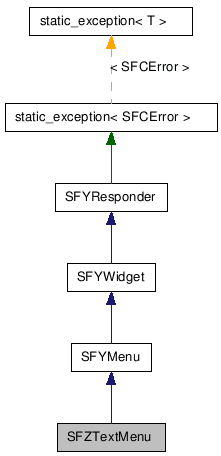
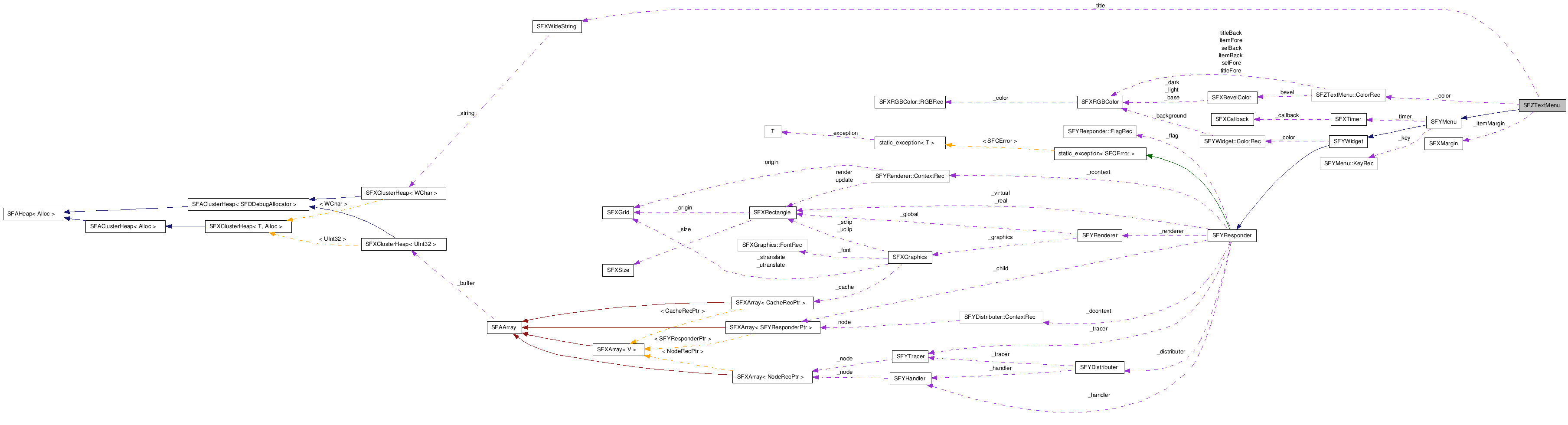
■ 仕様と使い方
SFZTextMenu は、 テキスト形式のメニュー(テキストメニュー)のユーザーインターフェースを提供するクラスです。
テキストメニューには、ページ形式(デフォルト)とスクロール形式の 2 種類があります。
SFZTextMenu クラスは、 テキストメニューのデザイン用に外枠のベベルカラー、 項目とタイトルの色と高さ、 項目領域とテキスト表示領域の余白、フォントなどのプロパティを設定する関数を提供します。
また、項目にテキスト、絵文字、イメージを設定する関数や、 タイトルテキストを設定する関数も提供します。
メニューに項目を追加するには、 SFZTextMenu::Insert / SFZTextMenu::InsertFirst / SFZTextMenu::InsertLast 関数を使います。 メニューから項目を削除するには、 SFZTextMenu::Remove / SFZTextMenu::RemoveFirst / SFZTextMenu::RemoveLast 関数を使います。
SFZTextMenu::Clear 関数を呼び出すと、すべての項目がメニューから削除されます。
選択キーは、 SFYMenu::SetSelectUpKey / SFYMenu::SetSelectDownKey / SFYMenu::SetSelectRightKey / SFYMenu::SetSelectLeftKey 関数を使用して設定します。 デフォルトでは、↑キー、↓キー、→キー、←キーが上下左右の選択キーとして割り当てられています。
デフォルトの実装では、 テキストメニュー[SFZTextMenu]は 下記の結果イベント[SFEVT_RESPONDER_RESULT]を受信します。
開発者は、これらの結果イベントを受信するハンドラを登録できます。
ハンドラを登録しない場合、上記結果イベントを受信するとデフォルトのハンドラが起動されます。 デフォルトのハンドラは、メニューを閉じる処理だけを行います。
操作キーは、SFYMenu::SetOperateKey 関数を使用して設定します。 デフォルトでは、セレクトキーが操作キーとして割り当てられています。
アクセスキーは、SFZTextMenu::SetItemAccessKey 関数を使用して設定します。
ESCAPE キーは、SFYMenu::SetEscapeKey 関数を使用して設定します。 デフォルトでは、クリアキーが ESCAPE キーとして割り当てられています。
![[Caution]](images/caution.png) |
注意 |
|---|---|
| 選択項目が SFZTextMenu::SetItemEnable 関数により無効化("false" が設定)されているとき、 結果イベントは発生しません。 | |
![[Note]](images/note.png) |
タイマーのキャンセル |
|---|---|
|
SFYMenu::ScheduleTimer 関数で設定したタイマー処理は、 操作キーまたは ESCAPE キーを押したときに自動的にキャンセルされます。 サスペンド時もタイマーはキャンセルされますが、 レジューム時に SFYMenu::ScheduleTimer 関数の引数に指定した時間でタイマー処理は再開されます。 メニューの有効状態が無効になったときもタイマーはキャンセルされます。 | |
参照: 結果イベント[SFEVT_RESPONDER_RESULT] | SFZTextMenu::HandleOperateKey | SFZTextMenu::HandleEscapeKey | SFZTextMenu::HandleSelectUpKey | SFZTextMenu::HandleSelectDownKey | SFZTextMenu::HandleSelectRightKey | SFZTextMenu::HandleSelectLeftKey
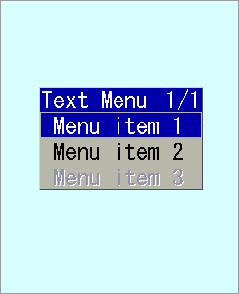
以下は、テキストメニューを利用するためのサンプルコードです。
|
注意 |
|---|---|
簡略化のため、エラー処理は省略されています。 | |
Void USRApplication::Main(Void)
{
     SFCError error;

     // ウインドウを生成する
     _window = SFZWindow::NewInstance();
     _window->SetParent(GetThis());
     _window->SetRealBound(GetLocalBound());
     _window->SetVirtualBound(SFXRectangle(_window->GetVirtualBound()).SetHeight(640));
     _window->SetState(true, true, true, true);
     _window->SetBackgroundColor(SFXRGBColor(0xDD, 0xFF, 0xDD, 0x00));

     // テキストメニューを生成する
     SFZTextMenuSmp _textmenu = SFZTextMenu::NewInstance(&error);

     // 結果イベントを受信する結果ハンドラをテキストメニューに登録する
     _textmenu->RegisterHandler(SFXEventRange(SFEVT_RESPONDER_RESULT, SFEVT_RESPONDER_RESULT, SFP16_BEGIN, SFP16_END),
                                   XANDLER_INTERNAL(OnTextMenu));

     _textmenu->SetState(true, true, true, true);
     _textmenu->SetParent(_window);
     _textmenu->SetTitle("Text Menu");
     _textmenu->ToFront();

     SFXRectangle menuRect(30,95,165,135);
     menuRect.SetHeight(_textmenu->GetTitleHeight() + 3 * _textmenu->GetItemHeight());
     _textmenu->SetRealBound(menuRect);

     _textmenu->InsertLast("Menu item 1");
     _textmenu->InsertLast("Menu item 2");
     _textmenu->InsertLast("Menu item 3");

     // 3 番目の項目を無効にする
     _textmenu->SetItemEnable(2, false);

     return;
}

// 結果イベントを受信する結果ハンドラ
XANDLER_IMPLEMENT_VOIDRESULT(USRApplication, OnTextMenu, invoker, reason, result)
{
    // invoker にはテキストメニューが渡される
    // reason には結果イベントの P16 値が渡される


    switch (reason) {

        case SFP16_RESULT_OK:  // 操作キー押下時[ SetItemEnable() により項目が有効化されている必要がある]

            // result には選択された項目のインデックスが渡される

            if (result == 0) {       // 1 番目の項目が選択されたとき

                // ...(省略)...

            }
            else if (result == 1) {  // 2 番目の項目が押されたときの処理

                // ...(省略)...

            }
            else if (result == 2) {  // 3 番目の項目が押されたときの処理

                // ...(省略)...

            }

            break;

        case SFP16_RESULT_ESCAPE:  // ESCAPE キー押下時、または ScheduleTimer 関数で設定した時間が経過した時

            // result には 0 が渡される

            // テキストメニューを閉じる
            invoker->Terminate();
            // "_textmenu->Terminate();" と記述しても良い

            break;
    }

     return;
}
実行結果:
| コンストラクタ/デストラクタ |
|---|
|
SFZTextMenu( Void ) SFZTextMenu クラスのコンストラクタです。
|
|
~SFZTextMenu( Void ) SFZTextMenu クラスのデストラクタです。
|
| パブリック関数 | |
|---|---|
| SFCError |
AppendItem(
SFXPathConstRef path
, UInt16 id
) [非推奨 (廃止予定 API)] 項目を追加します。(InsertLast 関数を使用してください。)
|
| SFCError |
AppendItem(
SFXPathConstRef path
, UInt16 id
, AVKType key
, WChar keyIcon = 0
) [非推奨 (廃止予定 API)] 項目を追加します。(InsertLast 関数を使用してください。)
|
| SFCError |
AppendItem(
SFXWideStringConstRef text
) [非推奨 (廃止予定 API)] 項目を追加します。(InsertLast 関数を使用してください。)
|
| SFCError |
AppendItem(
SFXWideStringConstRef text
, AVKType key
, WChar keyIcon = 0
) [非推奨 (廃止予定 API)] 項目を追加します。(InsertLast 関数を使用してください。)
|
| Void |
Clear( Void ) メニューからすべての項目を削除します。
|
| SFXBevelColorConstRef |
GetBevelColor( Void ) 外枠のベベルカラーを取得します。
|
| SFXRGBColorConstRef |
GetDefaultItemBackColor( Void ) 非選択項目のデフォルトの背景色を取得します。
|
| SFXRGBColorConstRef |
GetDefaultItemForeColor( Void ) 非選択項目のデフォルトの前景色を取得します。
|
| AEEFont |
GetFont( Void ) フォントを取得します。
|
| AVKType |
GetItemAccessKey(
SInt32 index
) 指定された項目のアクセスキーを取得します。
|
| SFXRGBColorConstRef |
GetItemBackColor(
SInt32 index
) 指定された項目の非選択時の背景色を取得します。
|
| SInt32 |
GetItemCount( Void ) 項目数を取得します。
|
| Bool |
GetItemEnable(
SInt32 index
) 指定された項目の有効フラグの値を取得します。
|
| SFXRGBColorConstRef |
GetItemForeColor(
SInt32 index
) 指定された項目の非選択時の前景色を取得します。
|
| SInt16 |
GetItemHeight( Void ) 項目の高さを取得します。[単位:ピクセル]
|
| SFBImageSmpConstRef |
GetItemImage(
SInt32 index
) 指定された項目のアイコン画像を取得します。
|
| SFXMarginConstRef |
GetItemMargin( Void ) 項目領域とテキスト表示領域の間のマージンを取得します。
|
| SFZTextMenuSmp |
GetItemSubMenu(
SInt32 index
) 指定された項目のサブメニューを取得します。
|
| SFXWideStringConstRef |
GetItemText(
SInt32 index
) 指定された項目の文字列を取得します。
|
| MenuStyleEnum |
GetMenuStyle( Void ) メニュースタイルを取得します。
|
| SFZTextMenuSmp |
GetRootMenu( Void ) ルートメニューを取得します。
|
| SFXRGBColorConstRef |
GetSelBackColor( Void ) 選択項目の背景色を取得します。
|
| SFXRGBColorConstRef |
GetSelForeColor( Void ) 選択項目の前景色を取得します。
|
| SInt32 |
GetSelect( Void ) 選択された項目のインデックスを取得します。
|
| SFXWideStringConstRef |
GetTitle( Void ) タイトル(文字列)を取得します。
|
| SFXRGBColorConstRef |
GetTitleBackColor( Void ) タイトルの背景色を取得します。
|
| SFXRGBColorConstRef |
GetTitleForeColor( Void ) タイトルの前景色を取得します。
|
| SInt16 |
GetTitleHeight( Void ) タイトルの高さを取得します。
|
| Bool |
HasParentMenu( Void ) 親メニューを持つかどうかを判定します。
|
| SFCError |
Insert(
SInt32 index
, SFXPathConstRef path
, UInt16 id
) 項目を挿入します。
|
| SFCError |
Insert(
SInt32 index
, SFXPathConstRef path
, UInt16 id
, AVKType key
, WChar keyIcon
) 項目を挿入します。
|
| SFCError |
Insert(
SInt32 index
, SFXWideStringConstRef text
) 項目を挿入します。
|
| SFCError |
Insert(
SInt32 index
, SFXWideStringConstRef text
, AVKType key
, WChar keyIcon
) 項目を挿入します。
|
| SFCError |
InsertFirst(
SFXPathConstRef path
, UInt16 id
) 項目を先頭に挿入します。
|
| SFCError |
InsertFirst(
SFXPathConstRef path
, UInt16 id
, AVKType key
, WChar keyIcon
) 項目を先頭に挿入します。
|
| SFCError |
InsertFirst(
SFXWideStringConstRef text
) 項目を先頭に挿入します。
|
| SFCError |
InsertFirst(
SFXWideStringConstRef text
, AVKType key
, WChar keyIcon
) 項目を先頭に挿入します。
|
| SFCError |
InsertLast(
SFXPathConstRef path
, UInt16 id
) 項目を末尾に挿入します。
|
| SFCError |
InsertLast(
SFXPathConstRef path
, UInt16 id
, AVKType key
, WChar keyIcon
) 項目を末尾に挿入します。
|
| SFCError |
InsertLast(
SFXWideStringConstRef text
) 項目を末尾に挿入します。
|
| SFCError |
InsertLast(
SFXWideStringConstRef text
, AVKType key
, WChar keyIcon
) 項目を末尾に挿入します。
|
| static SFZTextMenuSmp |
NewInstance(
SFCErrorPtr exception = null
) 新しいインスタンスを作成します。
|
| Void |
Remove(
SInt32 index
) 指定されたインデックスの位置または範囲の項目を削除します。
|
| Void |
Remove(
SInt32 begin
, SInt32 end
) 指定されたインデックスの位置または範囲の項目を削除します。
|
| Void |
RemoveFirst( Void ) 先頭の項目を削除します。
|
| Void |
RemoveItem(
SInt32 index
) [非推奨 (廃止予定 API)] 指定された項目を削除します。
|
| Void |
RemoveLast( Void ) 末尾の項目を削除します。
|
| Void |
SetBevelColor(
SFXBevelColorConstRef param
) 外枠のベベルカラーを設定します。
|
| Void |
SetDefaultItemBackColor(
SFXRGBColorConstRef param
) 非選択項目のデフォルトの背景色を設定します。
|
| Void |
SetDefaultItemForeColor(
SFXRGBColorConstRef param
) 非選択項目のデフォルトの前景色を設定します。
|
| Void |
SetFont(
AEEFont param
) フォントを設定します。
|
| Void |
SetItemAccessKey(
SInt32 index
, AVKType key
, WChar keyIcon = 0
) 指定された項目にアクセスキーとキーアイコンを設定します。
|
| SFCError |
SetItemBackColor(
SInt32 index
, SFXRGBColorConstRef param
) 指定された項目の非選択時の背景色を設定します。
|
| SFCError |
SetItemEnable(
SInt32 index
, Bool param
) 指定された項目の有効フラグを設定します。
|
| SFCError |
SetItemForeColor(
SInt32 index
, SFXRGBColorConstRef param
) 指定された項目の非選択時の前景色を設定します。
|
| Void |
SetItemHeight(
SInt16 param
) 項目の高さを設定します。
|
| SFCError |
SetItemImage(
SInt32 index
, SFXPathConstRef path
) 指定された項目のアイコン画像を設定します。
|
| SFCError |
SetItemImage(
SInt32 index
, SFXPathConstRef path
, UInt16 id
) 指定された項目のアイコン画像を設定します。
|
| SFCError |
SetItemImage(
SInt32 index
, SFBImageSmpConstRef param
) 指定された項目のアイコン画像を設定します。
|
| Void |
SetItemMargin(
SFXMarginConstRef param
) 項目領域とテキスト表示領域の間のマージンを設定します。
|
| SFCError |
SetItemSubMenu(
SInt32 index
, SFZTextMenuSmp subMenu
) 指定された項目にサブメニューを設定します。
|
| SFCError |
SetItemText(
SInt32 index
, SFXPathConstRef index
, UInt16 id
) 指定された項目の文字列を設定します。
|
| SFCError |
SetItemText(
SInt32 index
, SFXWideStringConstRef param
) 指定された項目の文字列を設定します。
|
| Void |
SetMenuStyle(
MenuStyleEnum param
) メニュースタイルを設定します。
|
| Void |
SetSelBackColor(
SFXRGBColorConstRef param
) 選択項目の背景色を設定します。
|
| Void |
SetSelForeColor(
SFXRGBColorConstRef param
) 選択項目の前景色を設定します。
|
| Void |
SetSelect(
SInt32 param
) 指定された項目を選択状態に設定します。
|
| SFCError |
SetTitle(
SFXPathConstRef path
, UInt16 id
) タイトル(文字列)を設定します。
|
| SFCError |
SetTitle(
SFXWideStringConstRef param
) タイトル(文字列)を設定します。
|
| Void |
SetTitleBackColor(
SFXRGBColorConstRef param
) タイトルの背景色を設定します。
|
| Void |
SetTitleForeColor(
SFXRGBColorConstRef param
) タイトルの前景色を設定します。
|
| Void |
SetTitleHeight(
SInt16 param
) タイトルの高さを設定します。
|
| Void |
CancelTimer( Void )
(SFYMenu から継承)
タイマーをキャンセルします。
|
| Void |
ClearHandler( Void )
(SFYResponder から継承)
このレスポンダのハンドラの登録をすべて解除します。
|
| Void |
ClearTracer( Void )
(SFYResponder から継承)
このレスポンダのトレーサの配信規則の登録をすべて解除します。
|
| SFCError |
Distribute(
SFXEventConstRef event
, BoolPtr result = null
)
(SFYResponder から継承)
指定された配信型イベントを
SFYDistributer インスタンスと、このレスポンダ以下のレスポンダツリーに配信します。
|
| SFXRGBColorConstRef |
GetBackgroundColor( Void )
(SFYWidget から継承)
背景の色を取得します。
|
| SFYResponderSmp |
GetChildBack( Void )
(SFYResponder から継承)
最背面に位置するこのレスポンダの子レスポンダを取得します。
|
| SFYResponderSmp |
GetChildBack(
Bool visible
, Bool active
, Bool enable
, Bool focus
)
(SFYResponder から継承)
最背面に位置するこのレスポンダの子レスポンダを取得します。
|
| SFYResponderSmp |
GetChildBack(
UInt32 id
)
(SFYResponder から継承)
最背面に位置するこのレスポンダの子レスポンダを取得します。
|
| SFYResponderSmp |
GetChildBack(
UInt32 id
, Bool visible
, Bool active
, Bool enable
, Bool focus
)
(SFYResponder から継承)
最背面に位置するこのレスポンダの子レスポンダを取得します。
|
| SFYResponderSmp |
GetChildBackward(
SInt32 index
)
(SFYResponder から継承)
背面から数えて指定された順番に位置するこのレスポンダの子レスポンダを取得します。
|
| SFYResponderSmp |
GetChildBackward(
SInt32 index
, Bool visible
, Bool active
, Bool enable
, Bool focus
)
(SFYResponder から継承)
背面から数えて指定された順番に位置するこのレスポンダの子レスポンダを取得します。
|
| SFYResponderSmp |
GetChildBackward(
SInt32 index
, UInt32 id
)
(SFYResponder から継承)
背面から数えて指定された順番に位置するこのレスポンダの子レスポンダを取得します。
|
| SFYResponderSmp |
GetChildBackward(
SInt32 index
, UInt32 id
, Bool visible
, Bool active
, Bool enable
, Bool focus
)
(SFYResponder から継承)
背面から数えて指定された順番に位置するこのレスポンダの子レスポンダを取得します。
|
| SInt32 |
GetChildCount( Void )
(SFYResponder から継承)
このレスポンダの子レスポンダの数を取得します。
|
| SInt32 |
GetChildCount(
Bool visible
, Bool active
, Bool enable
, Bool focus
)
(SFYResponder から継承)
このレスポンダの子レスポンダの数を取得します。
|
| SInt32 |
GetChildCount(
UInt32 id
)
(SFYResponder から継承)
このレスポンダの子レスポンダの数を取得します。
|
| SInt32 |
GetChildCount(
UInt32 id
, Bool visible
, Bool active
, Bool enable
, Bool focus
)
(SFYResponder から継承)
このレスポンダの子レスポンダの数を取得します。
|
| SFYResponderSmp |
GetChildForward(
SInt32 index
)
(SFYResponder から継承)
前面から数えて指定された順番に位置するこのレスポンダの子レスポンダを取得します。
|
| SFYResponderSmp |
GetChildForward(
SInt32 index
, Bool visible
, Bool active
, Bool enable
, Bool focus
)
(SFYResponder から継承)
前面から数えて指定された順番に位置するこのレスポンダの子レスポンダを取得します。
|
| SFYResponderSmp |
GetChildForward(
SInt32 index
, UInt32 id
)
(SFYResponder から継承)
前面から数えて指定された順番に位置するこのレスポンダの子レスポンダを取得します。
|
| SFYResponderSmp |
GetChildForward(
SInt32 index
, UInt32 id
, Bool visible
, Bool active
, Bool enable
, Bool focus
)
(SFYResponder から継承)
前面から数えて指定された順番に位置するこのレスポンダの子レスポンダを取得します。
|
| SFYResponderSmp |
GetChildFront( Void )
(SFYResponder から継承)
最前面に位置するこのレスポンダの子レスポンダを取得します。
|
| SFYResponderSmp |
GetChildFront(
Bool visible
, Bool active
, Bool enable
, Bool focus
)
(SFYResponder から継承)
最前面に位置するこのレスポンダの子レスポンダを取得します。
|
| SFYResponderSmp |
GetChildFront(
UInt32 id
)
(SFYResponder から継承)
最前面に位置するこのレスポンダの子レスポンダを取得します。
|
| SFYResponderSmp |
GetChildFront(
UInt32 id
, Bool visible
, Bool active
, Bool enable
, Bool focus
)
(SFYResponder から継承)
最前面に位置するこのレスポンダの子レスポンダを取得します。
|
| SFYDistributerPtr |
GetDistributer( Void )
(SFYResponder から継承)
このレスポンダに設定されている配信エンジンを取得します。
|
| AVKType |
GetEscapeKey( Void )
(SFYMenu から継承)
ESCAPE キーを取得します。
|
| SFYResponderSmp |
GetFrame( Void )
(SFYResponder から継承)
このレスポンダに装着されたフレームを取得します。
|
| SFXRectangle |
GetGlobalBound( Void )
(SFYResponder から継承)
このレスポンダのグローバル領域を取得します。
|
| UInt32 |
GetID( Void )
(SFYResponder から継承)
このレスポンダの ID を取得します。
|
| SFXRectangle |
GetLocalBound( Void )
(SFYResponder から継承)
このレスポンダのローカル領域を取得します。
|
| SInt32 |
GetNthBackward( Void )
(SFYResponder から継承)
このレスポンダが背面から数えて何番目に位置するかを取得します。
|
| SInt32 |
GetNthBackward(
Bool visible
, Bool active
, Bool enable
, Bool focus
)
(SFYResponder から継承)
このレスポンダが背面から数えて何番目に位置するかを取得します。
|
| SInt32 |
GetNthBackward(
UInt32 id
)
(SFYResponder から継承)
このレスポンダが背面から数えて何番目に位置するかを取得します。
|
| SInt32 |
GetNthBackward(
UInt32 id
, Bool visible
, Bool active
, Bool enable
, Bool focus
)
(SFYResponder から継承)
このレスポンダが背面から数えて何番目に位置するかを取得します。
|
| SInt32 |
GetNthForward( Void )
(SFYResponder から継承)
このレスポンダが前面から数えて何番目に位置するかを取得します。
|
| SInt32 |
GetNthForward(
Bool visible
, Bool active
, Bool enable
, Bool focus
)
(SFYResponder から継承)
このレスポンダが前面から数えて何番目に位置するかを取得します。
|
| SInt32 |
GetNthForward(
UInt32 id
)
(SFYResponder から継承)
このレスポンダが前面から数えて何番目に位置するかを取得します。
|
| SInt32 |
GetNthForward(
UInt32 id
, Bool visible
, Bool active
, Bool enable
, Bool focus
)
(SFYResponder から継承)
このレスポンダが前面から数えて何番目に位置するかを取得します。
|
| AVKType |
GetOperateKey( Void )
(SFYMenu から継承)
操作キーを取得します。
|
| SFYResponderSmp |
GetParent( Void )
(SFYResponder から継承)
このレスポンダの親レスポンダを取得します。
|
| Bool |
GetPropertyTransparent( Void )
(SFYResponder から継承)
このレスポンダの透過属性を取得します。
|
| SFXRectangleConstRef |
GetRealBound( Void )
(SFYResponder から継承)
このレスポンダの実領域を取得します。
|
| VoidPtr |
GetReference( Void )
(SFYResponder から継承)
このレスポンダのリファレンス値を取得します。
|
| SFYRendererPtr |
GetRenderer( Void )
(SFYResponder から継承)
このレスポンダに設定されている描画エンジンを取得します。
|
| SFYResponderSmp |
GetRoot( Void )
(SFYResponder から継承)
このレスポンダが所属するレスポンダツリーのルートレスポンダを取得します。
|
| AVKType |
GetSelectDownKey( Void )
(SFYMenu から継承)
DOWN キーを取得します。
|
| AVKType |
GetSelectLeftKey( Void )
(SFYMenu から継承)
LEFT キーを取得します。
|
| AVKType |
GetSelectRightKey( Void )
(SFYMenu から継承)
RIGHT キーを取得します。
|
| AVKType |
GetSelectUpKey( Void )
(SFYMenu から継承)
UP キーを取得します。
|
| Bool |
GetStateActive(
Bool inherit = false
)
(SFYResponder から継承)
このレスポンダの活性状態を取得します。
|
| Bool |
GetStateEnable(
Bool inherit = false
)
(SFYResponder から継承)
このレスポンダの操作可能状態を取得します。
|
| Bool |
GetStateFocus(
Bool inherit = false
)
(SFYResponder から継承)
このレスポンダのフォーカス状態を取得します。
|
| Bool |
GetStateValid(
Bool inherit = false
)
(SFYResponder から継承)
このレスポンダの有効状態を取得します。
|
| Bool |
GetStateVisible(
Bool inherit = false
)
(SFYResponder から継承)
このレスポンダの可視状態を取得します。
|
| SFXRectangle |
GetSuitableBound( Void )
(SFYResponder から継承)
このレスポンダの最適な領域(サイズ)を取得します。
|
| SFXRectangle |
GetSuitableBound(
SFXRectangleConstRef rectangle
)
(SFYResponder から継承)
このレスポンダの最適な領域(サイズ)を取得します。
|
| SFXRectangle |
GetSuitableBound(
SFXRectangleConstRef param
, HorizontalEnum horizontal
, VerticalEnum vertical
)
(SFYResponder から継承)
このレスポンダの最適な領域(サイズ)を取得します。
|
| SFXMargin |
GetSuitableMargin( Void )
(SFYResponder から継承)
このレスポンダのフレーム余白領域を取得します。
|
| SFCType |
GetType( Void )
(SFYResponder から継承)
このレスポンダのタイプを取得します。
|
| SFXRectangleConstRef |
GetVirtualBound( Void )
(SFYResponder から継承)
このレスポンダの仮想領域を取得します。
|
| Bool |
HasFrame( Void )
(SFYResponder から継承)
このレスポンダがコンテントレスポンダであるかどうかを判定します。
|
| Void |
Initialize( Void )
(SFYResponder から継承)
このレスポンダを初期化します。
|
| Void |
Invalidate( Void )
(SFYResponder から継承)
指定された領域を再描画領域に登録します。
|
| Void |
Invalidate(
SFXRectangleConstRef param
)
(SFYResponder から継承)
指定された領域を再描画領域に登録します。
|
| Void |
InvokeBackward(
SFXEventConstRef event
, Bool overload
, BoolPtr result = null
)
(SFYResponder から継承)
指定されたコールバック型イベントをこのレスポンダに送信します
(ハンドラは登録順に起動されます)。
|
| Void |
InvokeForward(
SFXEventConstRef event
, Bool overload
, BoolPtr result = null
)
(SFYResponder から継承)
指定されたコールバック型イベントをこのレスポンダに送信します
(ハンドラは登録の逆順に起動されます)。
|
| Bool |
IsBack( Void )
(SFYResponder から継承)
このレスポンダが最背面に位置するかどうかを判定します。
|
| Bool |
IsBack(
Bool visible
, Bool active
, Bool enable
, Bool focus
)
(SFYResponder から継承)
このレスポンダが最背面に位置するかどうかを判定します。
|
| Bool |
IsBack(
UInt32 id
)
(SFYResponder から継承)
このレスポンダが最背面に位置するかどうかを判定します。
|
| Bool |
IsBack(
UInt32 id
, Bool visible
, Bool active
, Bool enable
, Bool focus
)
(SFYResponder から継承)
このレスポンダが最背面に位置するかどうかを判定します。
|
| Bool |
IsFrame( Void )
(SFYResponder から継承)
このレスポンダがアタッチメントフレームであるかどうかを判定します。
|
| Bool |
IsFront( Void )
(SFYResponder から継承)
このレスポンダが最前面に位置するかどうかを判定します。
|
| Bool |
IsFront(
Bool visible
, Bool active
, Bool enable
, Bool focus
)
(SFYResponder から継承)
このレスポンダが最前面に位置するかどうかを判定します。
|
| Bool |
IsFront(
UInt32 id
)
(SFYResponder から継承)
このレスポンダが最前面に位置するかどうかを判定します。
|
| Bool |
IsFront(
UInt32 id
, Bool visible
, Bool active
, Bool enable
, Bool focus
)
(SFYResponder から継承)
このレスポンダが最前面に位置するかどうかを判定します。
|
| Bool |
IsNthBackward(
SInt32 index
)
(SFYResponder から継承)
このレスポンダが背面から数えて指定された順番に位置するかどうかを判定します。
|
| Bool |
IsNthBackward(
SInt32 index
, Bool visible
, Bool active
, Bool enable
, Bool focus
)
(SFYResponder から継承)
このレスポンダが背面から数えて指定された順番に位置するかどうかを判定します。
|
| Bool |
IsNthBackward(
SInt32 index
, UInt32 id
)
(SFYResponder から継承)
このレスポンダが背面から数えて指定された順番に位置するかどうかを判定します。
|
| Bool |
IsNthBackward(
SInt32 index
, UInt32 id
, Bool visible
, Bool active
, Bool enable
, Bool focus
)
(SFYResponder から継承)
このレスポンダが背面から数えて指定された順番に位置するかどうかを判定します。
|
| Bool |
IsNthForward(
SInt32 index
)
(SFYResponder から継承)
このレスポンダが前面から数えて指定された順番に位置するかどうかを判定します。
|
| Bool |
IsNthForward(
SInt32 index
, Bool visible
, Bool active
, Bool enable
, Bool focus
)
(SFYResponder から継承)
このレスポンダが前面から数えて指定された順番に位置するかどうかを判定します。
|
| Bool |
IsNthForward(
SInt32 index
, UInt32 id
)
(SFYResponder から継承)
このレスポンダが前面から数えて指定された順番に位置するかどうかを判定します。
|
| Bool |
IsNthForward(
SInt32 index
, UInt32 id
, Bool visible
, Bool active
, Bool enable
, Bool focus
)
(SFYResponder から継承)
このレスポンダが前面から数えて指定された順番に位置するかどうかを判定します。
|
| Bool |
IsRoot( Void )
(SFYResponder から継承)
このレスポンダがルートレスポンダであるかどうかを判定します。
|
| SFCError |
Recover( Void )
(SFYResponder から継承)
デバイス画面保存用ビットマップを使用してこのレスポンダとレスポンダ空間との交差領域を復元します。
|
| SFCError |
RegisterHandler(
SFXEventRangeConstRef range
, SFYHandler::RuleRecConstRef rule
)
(SFYResponder から継承)
指定されたハンドラをこのレスポンダに登録します。
|
| SFCError |
RegisterHandler(
SFXEventRangeConstRef range
, SFYHandler::HandlerSPP spp
, VoidPtr reference
)
(SFYResponder から継承)
指定されたハンドラをこのレスポンダに登録します。
|
| SFCError |
RegisterHandler(
SFXEventRangeConstPtr range
, SFYHandler::RuleRecConstPtr rule
, SInt32 length
)
(SFYResponder から継承)
指定されたハンドラをこのレスポンダに登録します。
|
| SFCError |
RegisterHandler(
SFXEventRangeConstPtr range
, SFYHandler::HandlerSPPConstPtr spp
, VoidPtrConstPtr reference
, SInt32 length
)
(SFYResponder から継承)
指定されたハンドラをこのレスポンダに登録します。
|
| SFCError |
RegisterTracer(
SFXEventRangeConstRef range
, SFYTracer::RuleRecConstRef rule
)
(SFYResponder から継承)
指定された配信規則をこのレスポンダのトレーサに登録します。
|
| SFCError |
RegisterTracer(
SFXEventRangeConstRef range
, SFYTracer::OrderEnum order
, SFYTracer::StateEnum state
, Bool overload
)
(SFYResponder から継承)
指定された配信規則をこのレスポンダのトレーサに登録します。
|
| SFCError |
RegisterTracer(
SFXEventRangeConstPtr range
, SFYTracer::RuleRecConstPtr rule
, SInt32 length
)
(SFYResponder から継承)
指定された配信規則をこのレスポンダのトレーサに登録します。
|
| SFCError |
RegisterTracer(
SFXEventRangeConstPtr range
, SFYTracer::OrderEnumConstPtr order
, SFYTracer::StateEnumConstPtr state
, BoolConstPtr overload
, SInt32 length
)
(SFYResponder から継承)
指定された配信規則をこのレスポンダのトレーサに登録します。
|
| SFCError |
Render(
Bool force = false
)
(SFYResponder から継承)
このレスポンダ以下のレスポンダツリーをレスポンダ空間に再描画します。
|
| Void |
RewindTimer( Void )
(SFYMenu から継承)
メニューが自動的に閉じるまでの時間を再設定します。
|
| Void |
ScheduleTimer(
UInt32 param
)
(SFYMenu から継承)
指定時間経過後に、
ESCAPE キー押下と同等の処理が行われるようにタイマーをスケジュールします。
|
| Void |
SetBackgroundColor(
SFXRGBColorConstRef param
)
(SFYWidget から継承)
背景の色を設定します。
|
| Void |
SetDistributer(
SFYDistributerPtr param
)
(SFYResponder から継承)
指定された配信エンジンをこのレスポンダに設定します。
|
| Void |
SetEscapeKey(
AVKType param
)
(SFYMenu から継承)
ESCAPE キーを設定します。
|
| SFCError |
SetFrame(
SFYResponderSmpConstRef param
)
(SFYResponder から継承)
このレスポンダにフレームを装着します。
|
| Void |
SetID(
UInt32 param
)
(SFYResponder から継承)
指定された ID をこのレスポンダに設定します。
|
| Void |
SetOperateKey(
AVKType param
)
(SFYMenu から継承)
操作キーを設定します。
|
| SFCError |
SetParent(
SFYResponderSmpConstRef param
)
(SFYResponder から継承)
指定されたレスポンダをこのレスポンダの親レスポンダに設定します。
|
| Void |
SetProperty(
Bool transparent
)
(SFYResponder から継承)
指定された属性をこのレスポンダに設定します。
|
| Void |
SetPropertyTransparent(
Bool param
)
(SFYResponder から継承)
指定された透過属性をこのレスポンダに設定します。
|
| Void |
SetRealBound(
SFXRectangleConstRef param
)
(SFYResponder から継承)
指定された領域をこのレスポンダの実領域に設定します。
|
| Void |
SetReference(
VoidPtr param
)
(SFYResponder から継承)
指定された値をこのレスポンダのリファレンスに設定します。
|
| Void |
SetRenderer(
SFYRendererPtr param
)
(SFYResponder から継承)
指定された描画エンジンをこのレスポンダに設定します。
|
| Void |
SetSelectDownKey(
AVKType param
)
(SFYMenu から継承)
DOWN キーを設定します。
|
| Void |
SetSelectLeftKey(
AVKType param
)
(SFYMenu から継承)
LEFT キーを設定します。
|
| Void |
SetSelectRightKey(
AVKType param
)
(SFYMenu から継承)
RIGHT キーを設定します。
|
| Void |
SetSelectUpKey(
AVKType param
)
(SFYMenu から継承)
UP キーを設定します。
|
| Void |
SetState(
Bool visible
, Bool active
, Bool enable
, Bool focus
)
(SFYResponder から継承)
指定された値をこのレスポンダの可視、活性、操作可能、フォーカスの各状態フラグに設定します。
|
| Void |
SetStateActive(
Bool param
)
(SFYResponder から継承)
指定された値をこのレスポンダの活性状態フラグに設定します。
|
| Void |
SetStateEnable(
Bool param
)
(SFYResponder から継承)
指定された値をこのレスポンダの操作可能状態フラグに設定します。
|
| Void |
SetStateFocus(
Bool param
)
(SFYResponder から継承)
指定された値をこのレスポンダのフォーカス状態フラグに設定します。
|
| Void |
SetStateVisible(
Bool param
)
(SFYResponder から継承)
指定された値をこのレスポンダの可視状態フラグに設定します。
|
| Void |
SetVirtualBound(
SFXRectangleConstRef param
)
(SFYResponder から継承)
指定された領域をこのレスポンダの仮想領域に設定します。
|
| SFCError |
Snapshot(
SFBBitmapSmpConstRef bitmap
)
(SFYResponder から継承)
デバイス画面保存用ビットマップからこのレスポンダとレスポンダ空間との交差領域のスナップショットを取得します。
|
| Void |
Terminate( Void )
(SFYResponder から継承)
このレスポンダの終了処理を行います。
|
| Void |
ToBack( Void )
(SFYResponder から継承)
このレスポンダを指定された条件の姉妹レスポンダのなかで最背面に移動します。
|
| Void |
ToBack(
Bool visible
, Bool active
, Bool enable
, Bool focus
)
(SFYResponder から継承)
このレスポンダを指定された条件の姉妹レスポンダのなかで最背面に移動します。
|
| Void |
ToBack(
UInt32 id
)
(SFYResponder から継承)
このレスポンダを指定された条件の姉妹レスポンダのなかで最背面に移動します。
|
| Void |
ToBack(
UInt32 id
, Bool visible
, Bool active
, Bool enable
, Bool focus
)
(SFYResponder から継承)
このレスポンダを指定された条件の姉妹レスポンダのなかで最背面に移動します。
|
| Void |
ToFront( Void )
(SFYResponder から継承)
このレスポンダを指定された条件の姉妹レスポンダのなかで最前面に移動します。
|
| Void |
ToFront(
Bool visible
, Bool active
, Bool enable
, Bool focus
)
(SFYResponder から継承)
このレスポンダを指定された条件の姉妹レスポンダのなかで最前面に移動します。
|
| Void |
ToFront(
UInt32 id
)
(SFYResponder から継承)
このレスポンダを指定された条件の姉妹レスポンダのなかで最前面に移動します。
|
| Void |
ToFront(
UInt32 id
, Bool visible
, Bool active
, Bool enable
, Bool focus
)
(SFYResponder から継承)
このレスポンダを指定された条件の姉妹レスポンダのなかで最前面に移動します。
|
| Void |
ToNthBackward(
SInt32 index
)
(SFYResponder から継承)
このレスポンダを指定された条件の姉妹レスポンダのなかで背面から数えて指定された位置に移動します。
|
| Void |
ToNthBackward(
SInt32 index
, Bool visible
, Bool active
, Bool enable
, Bool focus
)
(SFYResponder から継承)
このレスポンダを指定された条件の姉妹レスポンダのなかで背面から数えて指定された位置に移動します。
|
| Void |
ToNthBackward(
SInt32 index
, UInt32 id
)
(SFYResponder から継承)
このレスポンダを指定された条件の姉妹レスポンダのなかで背面から数えて指定された位置に移動します。
|
| Void |
ToNthBackward(
SInt32 index
, UInt32 id
, Bool visible
, Bool active
, Bool enable
, Bool focus
)
(SFYResponder から継承)
このレスポンダを指定された条件の姉妹レスポンダのなかで背面から数えて指定された位置に移動します。
|
| Void |
ToNthForward(
SInt32 index
)
(SFYResponder から継承)
このレスポンダを指定された条件の姉妹レスポンダのなかで前面から数えて指定された位置に移動します。
|
| Void |
ToNthForward(
SInt32 index
, Bool visible
, Bool active
, Bool enable
, Bool focus
)
(SFYResponder から継承)
このレスポンダを指定された条件の姉妹レスポンダのなかで前面から数えて指定された位置に移動します。
|
| Void |
ToNthForward(
SInt32 index
, UInt32 id
)
(SFYResponder から継承)
このレスポンダを指定された条件の姉妹レスポンダのなかで前面から数えて指定された位置に移動します。
|
| Void |
ToNthForward(
SInt32 index
, UInt32 id
, Bool visible
, Bool active
, Bool enable
, Bool focus
)
(SFYResponder から継承)
このレスポンダを指定された条件の姉妹レスポンダのなかで前面から数えて指定された位置に移動します。
|
| Void |
UnregisterHandler(
SFXEventRangeConstRef range
, SFYHandler::RuleRecConstRef rule
)
(SFYResponder から継承)
このレスポンダから指定されたハンドラの登録を解除します。
|
| Void |
UnregisterHandler(
SFXEventRangeConstRef range
, SFYHandler::HandlerSPP spp
, VoidPtr reference
)
(SFYResponder から継承)
このレスポンダから指定されたハンドラの登録を解除します。
|
| Void |
UnregisterHandler(
SFXEventRangeConstPtr range
, SFYHandler::RuleRecConstPtr rule
, SInt32 length
)
(SFYResponder から継承)
このレスポンダから指定されたハンドラの登録を解除します。
|
| Void |
UnregisterHandler(
SFXEventRangeConstPtr range
, SFYHandler::HandlerSPPConstPtr spp
, VoidPtrConstPtr reference
, SInt32 length
)
(SFYResponder から継承)
このレスポンダから指定されたハンドラの登録を解除します。
|
| Void |
UnregisterTracer(
SFXEventRangeConstRef range
)
(SFYResponder から継承)
このレスポンダのトレーサから指定された配信規則の登録を解除します。
|
| Void |
UnregisterTracer(
SFXEventRangeConstPtr range
, SInt32 length
)
(SFYResponder から継承)
このレスポンダのトレーサから指定された配信規則の登録を解除します。
|
| プロテクト関数 | |
|---|---|
| Void |
HandleBoundReal( Void )
(SFEVT_RESPONDER_BOUND, SFP16_BOUND_REAL) イベントを受信したときに呼び出される関数です
(実領域が変化したときの処理を行います)。
|
| Void |
HandleBoundVirtual( Void )
(SFEVT_RESPONDER_BOUND, SFP16_BOUND_VIRTUAL) イベントを受信したときに呼び出される関数です
(仮想領域が変化したときの処理を行います)。
|
| Void |
HandleEscapeKey( Void ) ESCAPE キーの SFEVT_KEY イベントを受信したときに呼び出される関数です。
|
| Void |
HandleOperateKey( Void ) 操作キーの SFEVT_KEY イベントを受信したときに呼び出される関数です。
|
| Void |
HandleRenderRequest(
SFXGraphicsPtr graphics
) 描画イベントを受信したときに呼び出される関数です(レスポンダを描画します)。
|
| Void |
HandleSelectDownKey( Void ) DOWN キーのキーイベントを受信したときに呼び出される関数です。
|
| Void |
HandleSelectLeftKey( Void ) LEFT キーのキーイベントを受信したときに呼び出される関数です。
|
| Void |
HandleSelectRightKey( Void ) RIGHT キーのキーイベントを受信したときに呼び出される関数です。
|
| Void |
HandleSelectUpKey( Void ) UP キーのキーイベントを受信したときに呼び出される関数です。
|
| static SFYResponderSmp |
Factory(
SFYResponderPtr responder
, SFCErrorPtr exception = null
)
(SFYResponder から継承)
NewInstance 関数の実装を補助します。
|
| SFYResponderSmp |
GetThis( Void )
(SFYResponder から継承)
このレスポンダのスマートポインタを取得します。
|
| Void |
HandleBoundGlobal(
SFXRectangleConstRef rectangle
)
(SFYWidget から継承)
[非推奨(廃止予定 API)] グローバル領域が変化したときに呼び出される関数です。
|
| Void |
HandleBoundOptimize(
SFXRectanglePtr rectangle
)
(SFYWidget から継承)
(SFEVT_RESPONDER_BOUND, SFP16_BOUND_OPTIMIZE) イベントを受信したときに呼び出される関数です(指定した矩形に収まる範囲内で最適な領域を計算します)。
|
| Void |
HandleBoundRequest(
SFXRectanglePtr rectangle
)
(SFYWidget から継承)
(SFEVT_RESPONDER_BOUND, SFP16_BOUND_REQUEST) イベントを受信したときに呼び出される関数です(最適な領域を計算します)。
|
| Void |
SetType(
SFCType param
)
(SFYResponder から継承)
指定された値をこのレスポンダのタイプに設定します。
|
| 型 |
|---|
|
CodeEnum SFZTextMenu クラスを表す定数です。
|
|
MenuStyleEnum テキストメニューのスタイルを表す定数です。
|
|
HorizontalEnum
(SFYResponder から継承)
水平方向のアライメントを表す定数です。
|
|
VerticalEnum
(SFYResponder から継承)
垂直方向のアライメントを表す定数です。
|
[ protected, explicit ]
SFZTextMenu(Void);
このコンストラクタは、以下の初期化処理を行います。
表 275. イベントハンドラ
| イベント | ハンドラの内容 |
|---|---|
| SFZTextMenu::SetItemAccessKey で設定されたアクセスキーの SFEVT_KEY イベント | SFZTextMenu::HandleOperateKey 関数を呼び出します。 |
| 結果イベント[SFEVT_RESPONDER_RESULT] | このメニューを終了します。このメニューがサブメニューの場合、すべての親メニューも終了します。 |
|
注意 |
|---|---|
| SFZTextMenu クラスを継承するレスポンダでは、 上記イベントが発生すると、それに対応するハンドラが呼び出されます。 | |
このコンストラクタの内部実装は以下の通りです。
/*protected */SFZTextMenu::SFZTextMenu(Void) static_throws
{
    enum {
        TITLE_MARGIN            = 2,
        ITEM_MARGIN_HORIZONTAL  = 2,
        ITEM_MARGIN_VERTICAL    = 0
    };
    static SFXBevelColor::AtomRecConst          bevel[] = {
        {{{{0x00, 0xFF, 0xFF, 0xFF}}}, {{{0x00, 0xEE, 0xEE, 0xEE}}}, {{{0x00, 0x88, 0x88, 0x88}}}}
    };
    static SFXRGBColor::AtomRecConst            rgb[] = {
        {{{0x00, 0xDD, 0xDD, 0xDD}}},   // glay:        TitleBack
        {{{0x00, 0x00, 0x00, 0x00}}},   // black:       TitleFore,  ItemFore
        {{{0x00, 0xFF, 0xFF, 0xFF}}},   // white:       SelFore,    ItemBack
        {{{0x00, 0x11, 0x22, 0xBB}}}    // blue:        SelBack
    };
    static SFXEventRange::AtomRecConst          range[] = {
        {             SFEVT_KEY,              SFEVT_KEY,          SFP16_BEGIN,            SFP16_END},
        {SFEVT_RESPONDER_RESULT, SFEVT_RESPONDER_RESULT,          SFP16_BEGIN,            SFP16_END}
    };
    SFYHandler::RuleRec                         rule[lengthof(range)];

    if (static_try()) {
        SetType(CODE_TYPE);
        rule[0].spp = XANDLER_FUNCTION(OnAccessKey);
        rule[0].reference = this;
        rule[1].spp = XANDLER_FUNCTION(OnMenuResult);
        rule[1].reference = this;
        static_throw(RegisterHandler(atomic_cast(range), rule, lengthof(range)));
        if (static_try()) {
            _style = DEFAULT_STYLE;
            _font  = AEE_FONT_NORMAL;
            _color.bevel.Set(bevel[0]);
            _color.titleBack.Set(rgb[0]);
            _color.titleFore.Set(rgb[1]);
            _color.itemFore.Set(rgb[1]);
            _color.itemBack.Set(rgb[2]);
            _color.selBack.Set(rgb[3]);
            _color.selFore.Set(rgb[2]);
            _title        = "";
            _titleHeight  = SFXGraphics::GetFontHeight(_font) + TITLE_MARGIN;
            _itemHeight   = _titleHeight;
            _itemMargin.Set(ITEM_MARGIN_HORIZONTAL, ITEM_MARGIN_VERTICAL);
            _selectedItem = 0;
            _field        = (GetLocalBound().GetHeight() - _titleHeight) / _itemHeight;
            _topIndex     = 0;
            _hasParentMenu = false;
        }
    }
}// SFZTextMenu::SFZTextMenu //

/*private */XANDLER_IMPLEMENT_BOOLEVENT(SFZTextMenu, OnAccessKey, invoker, event)
{
    MenuItemPtr                                 item;
    SInt32                                      pageSize;
    SInt32                                      pageNumber;
    SInt32                                      firstIndex;
    SInt32                                      i;
    Bool                                        result(false);

    unused(invoker);
    if (_itemHeight == 0) {
        return result;
    }
    if (_style == PAGE_STYLE) {
        pageSize = (GetLocalBound().GetHeight() - _titleHeight) / _itemHeight;
        if (pageSize == 0) {
            return result;
        }
        pageNumber = Ceil(_selectedItem + 1, pageSize);
        firstIndex = (pageNumber - 1) * pageSize;
        for (i = firstIndex; i < firstIndex + pageSize; ++ i) {
            if ((item = GetMenuItem(i)) != null) {
                if (item->key == event.GetP16()) {
                    SetSelect(i);
                    Invalidate();
                    HandleOperateKey();
                    result = true;
                    break;
                }
            }
        }
    }
    else {
        for (i = 0; i < GetItemCount(); ++ i) {
            if ((item = GetMenuItem(i)) != null) {
                if (item->key == event.GetP16()) {
                    SetSelect(i);
                    Invalidate();
                    HandleOperateKey();
                    result = true;
                    break;
                }
            }
        }
    }
    return result;
}// XANDLER_IMPLEMENT_BOOLEVENT(SFZTextMenu, OnAccessKey) //

/*private */XANDLER_IMPLEMENT_VOIDRESULT(SFZTextMenu, OnMenuResult, invoker, reason, result)
{
    SFZTextMenuSmp                              rootMenu(GetRootMenu());

    unused(invoker);
    unused(reason);
    unused(result);
    if (rootMenu != null) {
        rootMenu->Terminate();
    }
    return;
}// XANDLER_IMPLEMENT_VOIDRESULT(SFZTextMenu, OnMenuResult) //
SFYResponder::SetType | SFZTextMenu::CodeEnum | SFZTextMenu::MenuStyleEnum | SFZTextMenu::SetMenuStyle | SFZTextMenu::SetFont | SFZTextMenu::SetBevelColor | SFZTextMenu::SetTitleBackColor | SFZTextMenu::SetTitleForeColor | SFZTextMenu::SetDefaultItemBackColor | SFZTextMenu::SetDefaultItemForeColor | SFZTextMenu::SetSelBackColor | SFZTextMenu::SetSelForeColor | SFZTextMenu::SetTitle | SFZTextMenu::SetTitleHeight | SFZTextMenu::SetItemHeight | SFZTextMenu::SetItemMargin | SFZTextMenu::SetSelect | SFZTextMenu::SetItemAccessKey | SFZTextMenu::HandleOperateKey | SFXBevelColor | SFXRGBColor | SFXMargin | タイプ | イベント | キーイベント[SFEVT_KEY]
[ protected, virtual ]
virtual ~SFZTextMenu(Void);
このデストラクタは、このテキストメニューからすべての項目を削除します。
このデストラクタの内部実装は以下の通りです。
/*protected virtual */SFZTextMenu::~SFZTextMenu(Void)
{
    Clear();
}// SFZTextMenu::~SFZTextMenu //
[ public ]
SFCError AppendItem(
    SFXPathConstRef path   // リソースファイルのパス
    UInt16 id              // テキストオブジェクト ID
);
[ public ]
SFCError AppendItem(
    SFXPathConstRef path   // リソースファイルのパス
    UInt16 id              // テキストオブジェクト ID
    AVKType key            // ダイレクトアクセスキー
    WChar keyIcon = 0      // キーアイコン
);
[ public ]
SFCError AppendItem(
    SFXWideStringConstRef text   // テキスト
);
[ public ]
SFCError AppendItem(
    SFXWideStringConstRef text   // テキスト
    AVKType key                  // ダイレクトアクセスキー
    WChar keyIcon = 0            // キーアイコン
);
この関数は、メニューに項目を追加します。
追加された項目はメニューの最後の項目となります。
|
廃止予定 |
|---|---|
この関数は、SophiaFramework UNIVERSE 6.0 で廃止される予定です。 この関数の代わりに SFZTextMenu::InsertLast 関数を利用することを推奨します。 | |
[ public ]
Void Clear(Void);
この関数は、メニューからすべての項目を削除します。
[ public, const ]
SFXBevelColorConstRef GetBevelColor(Void);
テキストメニューを立体的に描画するための外枠のベベルカラー(SFXBevelColor)。
この関数は、外枠のベベルカラーを取得します。
[ public, const ]
SFXRGBColorConstRef GetDefaultItemBackColor(Void);
非選択項目のデフォルトの背景色。
この関数は、非選択項目のデフォルトの背景色を取得します。
[ public, const ]
SFXRGBColorConstRef GetDefaultItemForeColor(Void);
非選択項目のデフォルトの前景色(テキストを描画する色)。
この関数は、非選択項目のデフォルトの前景色(テキストを描画する色)を取得します。
[ public, const ]
AEEFont GetFont(Void);
テキストメニューのタイトルと項目のフォント。
この関数は、テキストメニューのタイトルと項目のフォントを取得します。
指定された項目のアクセスキー。アクセスキーが設定されていない場合、AVK_UNDEFINED。
この関数は、指定された項目のアクセスキーを取得します。
[ public, const ]
SFXRGBColorConstRef GetItemBackColor(
    SInt32 index   // 項目のインデックス
);
指定された項目の非選択時の背景色。
この関数は、指定された項目の非選択時の背景色を取得します。
[ public, const ]
SInt32 GetItemCount(Void);
項目の数。
この関数は、項目の数を取得します。
この関数は、指定された項目の有効フラグの値を取得します。
[ public, const ]
SFXRGBColorConstRef GetItemForeColor(
    SInt32 index   // 項目のインデックス
);
指定された項目の非選択時の前景色(テキストを描画する色)。
この関数は、指定された項目の非選択時の前景色(テキストを描画する色)を取得します。
|
項目が無効に設定されていたときの前景色 |
|---|---|
|
SFZTextMenu::SetItemEnable 関数を使用して項目が無効に設定されているときは、 この関数によって取得される色で項目のテキストは描画されません。 このときは、 SFZTextMenu::SetItemBackColor 関数で設定された背景色の明度が 0x7F より大きい場合は背景色の明度を 0x33 だけ減算した色、 0x7F 以下の場合は背景色の明度を 0x33 を加算した色が項目の前景色になります。 色の明度とは、SFXRGBColor::GetBrightness 関数によって得られる値です。 | |
SFZTextMenu::SetItemForeColor | SFZTextMenu::SetItemEnable | SFXRGBColor::GetBrightness | SFXRGBColor
[ public, const ]
SInt16 GetItemHeight(Void);
項目の高さ。[単位:ピクセル]
この関数は、項目の高さを取得します。
[ public, const ]
SFBImageSmpConstRef GetItemImage(
    SInt32 index   // 項目のインデックス
);
指定された項目に設定されたアイコン画像。
この関数は、指定された項目のアイコン画像を取得します。
[ public, const ]
SFXMarginConstRef GetItemMargin(Void);
項目領域とテキスト表示領域の間のマージン。
この関数は、項目領域とテキスト表示領域の間のマージンを取得します。
|
注意 |
|---|---|
テキストメニュー領域の中でこのマージン領域は SFZTextMenu::SetBevelColor 関数で設定されたベベルカラーで塗りつぶされます。 | |
[ public ]
SFZTextMenuSmp GetItemSubMenu(
    SInt32 index   // 項目のインデックス
);
指定した項目のサブメニュー。サブメニューが設定されていない場合、null。
この関数は、指定された項目のサブメニューを取得します。
[ public, const ]
SFXWideStringConstRef GetItemText(
    SInt32 index   // 項目のインデックス
);
指定された項目に設定されている文字列。
この関数は、指定された項目の文字列を取得します。
[ public, const ]
MenuStyleEnum GetMenuStyle(Void);
この関数は、メニュースタイルを取得します。
[ public ]
SFZTextMenuSmp GetRootMenu(Void);
ルートメニュー。
この関数は、ルートメニューを取得します。
|
注意 |
|---|---|
ルートメニューとは、最上位の位置にある親メニューのことです。 | |
![[Tip]](images/tip.png) |
Tip |
|---|---|
親メニューを持つメニューを閉じる場合は、 この関数を呼び出してルートメニューを取得し、 ルートメニューだけに対して SFYResponder::Terminate 関数を呼び出します。 | |
[ public, const ]
SFXRGBColorConstRef GetSelBackColor(Void);
選択項目の背景色。
この関数は、選択項目の背景色を取得します。
[ public, const ]
SFXRGBColorConstRef GetSelForeColor(Void);
選択された項目のる前景色(テキストを描画する色)。
この関数は、選択項目の前景色(テキストを描画する色)を取得します。
[ public, const ]
SInt32 GetSelect(Void);
選択された項目のインデックス。
この関数は、選択された項目のインデックスを取得します。
[ public, const ]
SFXWideStringConstRef GetTitle(Void);
メニュータイトル(文字列)。
この関数は、タイトル(文字列)を取得します。
[ public, const ]
SFXRGBColorConstRef GetTitleBackColor(Void);
タイトルの背景色。
この関数は、タイトルの背景色を取得します。
[ public, const ]
SFXRGBColorConstRef GetTitleForeColor(Void);
タイトルの前景色(テキストを描画する色)。
この関数は、タイトルの前景色(テキストを描画する色)を取得します。
[ public, const ]
SInt16 GetTitleHeight(Void);
タイトルの高さ。
この関数は、タイトルの高さを取得します。
[ protected, virtual ]
Void HandleBoundReal(Void);
この関数は、 領域イベント [SFXEvent(SFEVT_RESPONDER_BOUND, SFP16_BOUND_REAL, rectangle)] を受信したときに呼び出されます。
実領域の変更時に追加の処理を行いたい場合は、 この関数をオーバーライドします。
デフォルトの実装は以下の通りです。
|
領域イベント[(SFEVT_RESPONDER_BOUND, SFP16_BOUND_REAL) イベント] |
|---|---|
|
SFYResponder::SetRealBound 関数は、この関数内の処理により実領域が変化すると、 領域イベント [SFXEvent(SFEVT_RESPONDER_BOUND, SFP16_BOUND_REAL, rectangle)] をレスポンダに送信します。 SFYWidget クラスを継承するレスポンダが領域イベントを受信すると、 SFYWidget::SFYWidget コンストラクタで最初に登録した領域イベント専用ハンドラの処理により、 SFYWidget::HandleBoundReal 仮想関数が呼び出されます。 ※ 領域イベントの P32 パラメータ rectangle には変更後の実領域が設定されています。 | |
|
実領域が変化した時の処理 |
|---|---|
|
SFYWidget::HandleBoundReal 仮想関数をオーバーライドする以外に、 領域イベント専用ハンドラ[XANDLER_DECLARE_VOIDBOUND]を定義・実装し レスポンダに登録して行うことも可能です。 実領域の変更処理は、最初に SFYWidget::HandleBoundReal 仮想関数を実行し、 次に領域イベント専用ハンドラを登録した順に実行して行われます。 領域イベント専用ハンドラを宣言し登録する手間が省けるので、 通常は SFYWidget::HandleBoundReal 仮想関数をオーバーライドして処理を記述します。 | |
この関数の内部実装は以下の通りです。
/*protected virtual */Void SFZTextMenu::HandleBoundReal(Void)
{
    SetVirtualBound(SFXRectangle(SFXGrid::ZeroInstance(), GetRealBound().GetSize()));
    if (_itemHeight != 0) {
        _field = (GetLocalBound().GetHeight() - _titleHeight) / _itemHeight;
    }
    Invalidate();
    return;
}// SFZTextMenu::HandleBoundReal //
[ protected, virtual ]
Void HandleBoundVirtual(Void);
この関数は、領域イベント [SFXEvent(SFEVT_RESPONDER_BOUND, SFP16_BOUND_VIRTUAL, rectangle)] を受信したときに呼び出されます。
仮想領域の変更時に追加の処理を行いたい場合は、 この関数をオーバーライドします。
デフォルトの実装は、 仮想領域を実領域に一致させます。
|
領域イベント[(SFEVT_RESPONDER_BOUND, SFP16_BOUND_VIRTUAL) イベント] |
|---|---|
|
SFYResponder::SetRealBound / SFYResponder::SetVirtualBound 関数は、 この関数内の処理により仮想領域が変化すると、 領域イベント [SFXEvent(SFEVT_RESPONDER_BOUND, SFP16_BOUND_VIRTUAL, rectangle)] をレスポンダに送信します。 SFYWidget クラスを継承するレスポンダが領域イベントを受信すると、 SFYWidget::SFYWidget コンストラクタで最初に登録した領域イベント専用ハンドラの処理により、 SFYWidget::HandleBoundVirtual 仮想関数が呼び出されます。 ※ 領域イベントの P32 パラメータ rectangle には変更後の仮想領域が設定されています。 | |
|
仮想領域の変更処理 |
|---|---|
|
SFYWidget::HandleBoundVirtual 仮想関数をオーバーライドする以外に、 領域イベント専用ハンドラ[XANDLER_DECLARE_VOIDBOUND]を定義・実装し レスポンダに登録して行うことも可能です。 仮想領域の変更処理は、最初に SFYWidget::HandleBoundVirtual 仮想関数を実行し、 次に領域イベント専用ハンドラを登録した順に実行して行われます。 領域イベント専用ハンドラを宣言し登録する手間が省けるので、 通常は SFYWidget::HandleBoundVirtual 仮想関数をオーバーライドして処理を記述します。 | |
この関数の内部実装は以下の通りです。
/*protected virtual */Void SFZTextMenu::HandleBoundVirtual(Void)
{
    SetVirtualBound(SFXRectangle(SFXGrid::ZeroInstance(), GetRealBound().GetSize()));
    return;
}// SFZTextMenu::HandleBoundVirtual //
SFYResponder::SetRealBound | SFYResponder::SetVirtualBound | SFXEvent | 実領域 | 仮想領域 | 領域イベント[SFEVT_RESPONDER_BOUND]
[ protected, virtual ]
Void HandleEscapeKey(Void);
この関数は、SFYMenu::SetEscapeKey 関数で設定した ESCAPE キーの SFEVT_KEY イベント (キーイベント[SFEVT_KEY])を受信したときに呼び出されます。
開発者は、独自の処理のためにこの関数をオーバーライドできます。
デフォルトの実装は以下の通りです。
この関数の内部実装は以下の通りです。
/*protected virtual */Void SFZTextMenu::HandleEscapeKey(Void)
{
    if (HasParentMenu()) {
        SetState(false, false, false, false);
        SFZTextMenuSmp parent(static_pointer_cast<SFZTextMenu>(GetParent()));
        if (parent != null) {
            parent->SetState(true, true, true, true);
            parent->ToFront();
        }
    }
    else {
        InvokeForward(SFXEvent(SFEVT_RESPONDER_RESULT, SFP16_RESULT_ESCAPE, 0), false);
    }
    return;
}// SFZTextMenu::HandleEscapeKey //
[ protected, virtual ]
Void HandleOperateKey(Void);
この関数は、SFYMenu::SetOperateKey 関数で設定した操作キーの SFEVT_KEY イベント (キーイベント[SFEVT_KEY])を受信したときに呼び出されます。
開発者は、独自の処理のためにこの関数をオーバーライドできます。
デフォルトの実装は以下の通りです。
この関数の内部実装は以下の通りです。
enum CodeEnum {
    CODE_TYPE                           = four_char_code('m', 't', 'm', 'n')
};

/*protected virtual */Void SFZTextMenu::HandleOperateKey(Void)
{
    MenuItemPtr                                 item;
    SFZTextMenuSmp                              subMenu;

    item = GetMenuItem(_selectedItem);
    if (item != null && item->enable) {
        if (item->subMenu != null) {
            subMenu = item->subMenu;
            subMenu->SetState(true, true, true, true);
            subMenu->SetMenuStyle(GetMenuStyle());
            subMenu->SetSelect(0);
            subMenu->ToFront();
        }
        else {
            InvokeForward(SFXEvent(SFEVT_RESPONDER_RESULT, SFP16_RESULT_OK, GetSelect()), false);
        }
    }
    return;
}// SFZTextMenu::HandleOperateKey //
SFYMenu::SetOperateKey | SFZTextMenu::SetItemEnable | SFXEvent | 結果イベント[SFEVT_RESPONDER_RESULT] | キーイベント[SFEVT_KEY]
[ protected, virtual, const ]
Void HandleRenderRequest(
    SFXGraphicsPtr graphics   // グラフィックスオブジェクト
);
この関数は、 描画イベント [SFXEvent(SFEVT_RESPONDER_RENDER, SFP16_RENDER_REQUEST, graphics)] を受信したときに呼び出されます。
開発者は、独自の処理のためにこの関数をオーバーライドできます。
デフォルトの実装は、テキストメニューを描画します。
|
レスポンダの描画手順 | ||||
|---|---|---|---|---|---|
|
| |||||
この関数の内部実装は以下の通りです。
enum MenuStyleEnum {
    PAGE_STYLE                          = 0,
    SCROLLABLE_STYLE,
    DEFAULT_STYLE                       = PAGE_STYLE
};

/*protected virtual */Void SFZTextMenu::HandleRenderRequest(SFXGraphicsPtr graphics) const
{
    DrawMenu(graphics);
    return;
}// SFZTextMenu::HandleRenderRequest //

/*private */Void SFZTextMenu::DrawMenu(SFXGraphicsPtr graphics) const
{
    SFXRectangle                                menuRect(GetLocalBound());
    SFXRectangle                                titleRect;
    SFXRectangle                                pageRect;
    SFXRectangle                                contentRect;
    SFXRectangle                                temp;
    SInt32                                      pageSize;
    SInt32                                      pageNumber;
    SInt32                                      pageCount;

    graphics->FillBevelRectangle(menuRect, _color.bevel);
    titleRect = menuRect;
    titleRect.SetHeight(_titleHeight);
    pageRect = titleRect;
    pageRect.AddLeft(pageRect.GetWidth() - 2 - SFXGraphics::MeasureSingleText(AEE_FONT_NORMAL, "9/9"));
    contentRect = menuRect;
    contentRect.AddTop(_titleHeight);
    pageSize = _field;
    contentRect.SetHeight(static_cast<SInt16>(_itemHeight * pageSize));
    menuRect.SetHeight(_titleHeight + contentRect.GetHeight());
    graphics->SetFont(_font);
    temp = titleRect;
    temp.Deflate(1, 1);
    graphics->FillRectangle(temp, _color.titleBack);
    graphics->SetFont(_font);
    graphics->DrawSingleText(_title, titleRect.GetOrigin() + SFXGrid(2, 2), titleRect, _color.titleFore);
    if (_style == PAGE_STYLE) {
        if (pageSize != 0) {
            pageNumber = Ceil(_selectedItem + 1, pageSize);
            pageCount = Ceil(GetItemCount(), pageSize);
            pageNumber = (pageCount == 0) ? 0 : pageNumber;
            graphics->SetFont(_font);
            graphics->DrawSingleText(SFXAnsiString::Format("%d/%d", pageNumber, pageCount), pageRect.GetOrigin() + SFXGrid(0, 2), pageRect, _color.titleFore, IDF_ALIGN_CENTER);
            DrawPage(graphics, contentRect, pageSize, pageNumber);
        }
    }
    else if (_style == SCROLLABLE_STYLE) {
        pageRect.AddLeft(_itemHeight);
        DrawPage(graphics, contentRect, pageRect);
    }
    return;
}// SFZTextMenu::DrawMenu //

/*private */Void SFZTextMenu::DrawPage(SFXGraphicsPtr graphics, SFXRectangleConstRef rect, SInt32 pageSize, SInt32 pageNumber) const
{
    SInt32                                      i;
    SInt32                                      firstIndex;
    MenuItemPtr                                 item;
    SFXRectangle                                contentRect(rect);
    SFXRectangle                                itemRect;

    firstIndex = (pageNumber - 1) * pageSize;
    contentRect.SetHeight(_itemHeight);
    for (i = firstIndex; i < firstIndex + pageSize; ++ i) {
        if ((item = GetMenuItem(i)) != null) {
            itemRect = contentRect;
            itemRect.Deflate(_itemMargin);
            DrawItem(graphics, itemRect, item);
            contentRect.AddY(_itemHeight);
        }
        else {
            break;
        }
    }
    return;
}// SFZTextMenu::DrawPage //

/*private */Void SFZTextMenu::DrawPage(SFXGraphicsPtr graphics, SFXRectangleConstRef rect, SFXRectangleConstRef scroll) const
{
    SInt32                                      i;
    MenuItemPtr                                 item;
    SFXRectangle                                upRect(scroll);
    SFXRectangle                                downRect;
    SFXRectangle                                contentRect(rect);
    SFXRectangle                                itemRect;

    upRect.SubBottom(upRect.GetHeight() / 2);
    upRect.Deflate(1, 1);
    downRect = upRect;
    //downRect.AddY(upRect.GetHeight() + 1);
    downRect.Offset(0, upRect.GetHeight() + 2);
    if (_selectedItem > 0) {
        DrawTriangle(graphics, upRect, _color.selFore, 0);
    }
    if (_selectedItem < GetItemCount() - 1) {
        DrawTriangle(graphics, downRect, _color.selFore, 1);
    }
    contentRect.SetHeight(_itemHeight);
    for (i = 0; i < _field; ++ i) {
        if ((item = GetMenuItem(i + _topIndex)) != null) {
            itemRect = contentRect;
            itemRect.Deflate(_itemMargin);
            DrawItem(graphics, itemRect, item);
            contentRect.AddY(_itemHeight);
        }
        else {
            break;
        }
    }
    return;
}// SFZTextMenu::DrawPage //

/*private */Void SFZTextMenu::DrawItem(SFXGraphicsPtr graphics, SFXRectangleConstRef rect, MenuItemPtr item) const
{
    SFXRectangle                                itemRect(rect);
    SFXRectangle                                iconRect;
    SFXRectangle                                imageRect;
    SFXRGBColor                                 itemColor(item->foreColor);

    if (item == GetMenuItem(_selectedItem)) {
        graphics->FillRectangle(itemRect, _color.selBack);
        itemColor.Set(_color.selFore);
    }
    else {
        graphics->FillRectangle(itemRect, item->backColor);
    }
    if (!item->enable) {
        itemColor = DiffLightness(item->backColor);
    }
    if (item->subMenu != null) {
        iconRect = itemRect;
        iconRect.Deflate(iconRect.GetWidth() - iconRect.GetHeight() / 3, 0, -1, 0);
        iconRect.Deflate(0, iconRect.GetHeight() / 3 + 1, 0, 0);
        DrawTriangle(graphics, iconRect, itemColor, 2);
        itemRect.SubRight(iconRect.GetWidth() + 1);
    }
    if (item->keyIcon != 0) {
        iconRect = itemRect;
        iconRect.SetWidth(_itemHeight);
        itemRect.AddLeft(_itemHeight);
        graphics->SetFont(_font);
        graphics->DrawSingleText(SFXWideString(item->keyIcon), iconRect, itemColor, IDF_ALIGN_LEFT);
    }
    if (item->image != null) {
        imageRect = itemRect;
        imageRect.SetWidth(_itemHeight);
        itemRect.AddLeft(_itemHeight);
        AEEImageInfo  info;
        SInt16 dx;
        SInt16 dy;
        item->image->GetInfo(&info);
        if (info.cx > 0 && info.cy > 0) {
            dx = (imageRect.GetWidth() - info.cx) / 2;
            dy = (imageRect.GetHeight() - info.cy) / 2;
            imageRect.SetSize(info.cx, info.cy);
            graphics->DrawImage(item->image, imageRect.GetOrigin() + SFXGrid(dx, dy));
        }
    }
    graphics->SetFont(_font);
    graphics->DrawSingleText(item->text, itemRect, itemColor, IDF_ALIGN_LEFT);
    return;
}// SFZTextMenu::DrawItem //

/*private */Void SFZTextMenu::DrawTriangle(SFXGraphicsPtr graphics, SFXRectangleConstRef rect, SFXRGBColorConstRef color, SInt16 direction) const
{
    SFXTriangle                                 triangle;
    SInt16                                      width((rect.GetWidth() / 4) * 2);
    SFXPixel                                    pixel;

    switch (direction) {
        case 0: //up
            pixel.Set(rect.GetVertexLeftBottom());
            triangle.SetFirst(pixel);
            pixel.Offset(width, 0);
            triangle.SetSecond(pixel);
            pixel.Offset(0 - width / 2, 0 - width / 2);
            triangle.SetThird(pixel);
            break;
        case 1: //down
            pixel.Set(rect.GetVertexLeftTop());
            triangle.SetFirst(pixel);
            pixel.Offset(width, 0);
            triangle.SetSecond(pixel);
            pixel.Offset(0 - width / 2, width / 2);
            triangle.SetThird(pixel);
            break;
        case 2: //right
            pixel.Set(rect.GetVertexLeftTop());
            triangle.SetFirst(pixel);
            pixel.Offset(0, width * 2);
            triangle.SetSecond(pixel);
            pixel.Offset(width, 0 - width);
            triangle.SetThird(pixel);
            break;
        default:
            break;
    }
    graphics->SetForeColor(color);
    graphics->SetFillColor(color);
    graphics->SetFillMode(true);
    graphics->DrawTriangle(triangle);
    return;
}// SFZTextMenu::DrawTriangle //
SFYResponder::Invalidate | SFYResponder::Render | SFYResponder::InvokeBackward | SFXEvent | 描画イベント[SFEVT_RESPONDER_RENDER] | 描画イベント専用ハンドラ[XANDLER_DECLARE_VOIDRENDER] | 描画処理 | イベントループ | レスポンダツリー
[ protected, virtual ]
Void HandleSelectDownKey(Void);
この関数は、SFYMenu::SetSelectDownKey 関数によって設定された DOWN キーの SFEVT_KEY イベント (キーイベント[SFEVT_KEY])を受信したときに呼び出されます。
開発者は、独自の処理のためにこの関数をオーバーライドできます。
デフォルトの実装は以下の通りです。
ページング方式の場合
スクロール方式の場合
この関数の内部実装は以下の通りです。
enum MenuStyleEnum {
    PAGE_STYLE                          = 0,
    SCROLLABLE_STYLE,
    DEFAULT_STYLE                       = PAGE_STYLE
};

/*protected virtual */Void SFZTextMenu::HandleSelectDownKey(Void)
{
    if (_selectedItem < GetItemCount() - 1) {
        ++_selectedItem;
    }
    else if (_style == PAGE_STYLE && _selectedItem == GetItemCount() - 1) {
        _selectedItem = 0;
    }
    RefreshMenu();
    return;
}// SFZTextMenu::HandleSelectDownKey //

/*private */Void SFZTextMenu::RefreshMenu(Void)
{
    if (_style == SCROLLABLE_STYLE) {
        if (_field > 0 && _selectedItem >= 0 && _selectedItem < GetItemCount()) {
            if (_topIndex > GetItemCount() - _field) {
                _topIndex = GetItemCount() - _field;
            }
            if (_topIndex < 0) {
                _topIndex = 0;
            }
            if (_topIndex > _selectedItem) {
                _topIndex = _selectedItem;
            }
            else if (_topIndex < _selectedItem - _field + 1)  {
                _topIndex = _selectedItem - _field + 1;
            }
        }
    }
    Invalidate();
    return;
}// SFZTextMenu::RefreshMenu
[ protected, virtual ]
Void HandleSelectLeftKey(Void);
この関数は、SFYMenu::SetSelectLeftKey 関数によって設定された LEFT キーの SFEVT_KEY イベント (キーイベント[SFEVT_KEY])を受信したときに呼び出されます。
開発者は、独自の処理のためにこの関数をオーバーライドできます。
デフォルトの実装は以下の通りです。
この関数の内部実装は以下の通りです。
/*protected virtual */Void SFZTextMenu::HandleSelectLeftKey(Void)
{
    if (HasParentMenu()) {
        SetState(false, false, false, false);
        SFYResponderSmp parent = GetParent();
        if (parent != null) {
            parent->SetState(true, true, true, true);
            parent->ToFront();
        }
    }
    return;
}// SFZTextMenu::HandleSelectLeftKey //
[ protected, virtual ]
Void HandleSelectRightKey(Void);
この関数は、SFYMenu::SetSelectRightKey 関数によって設定された RIGHT キーの SFEVT_KEY イベント (キーイベント[SFEVT_KEY])を受信したときに呼び出されます。
開発者は、独自の処理のためにこの関数をオーバーライドできます。
デフォルトの実装は以下の通りです。
この関数の内部実装は以下の通りです。
/*protected virtual */Void SFZTextMenu::HandleSelectRightKey(Void)
{
    MenuItemPtr                                 item;
    SFZTextMenuSmp                              subMenu;

    if ((item = GetMenuItem(_selectedItem)) != null) {
        if (item->subMenu != null && item->enable) {
            subMenu = item->subMenu;
            subMenu->SetState(true, true, true, true);
            subMenu->SetMenuStyle(GetMenuStyle());
            subMenu->SetSelect(0);
            subMenu->ToFront();
        }
    }
    return;
}// SFZTextMenu::HandleSelectRightKey //
[ protected, virtual ]
Void HandleSelectUpKey(Void);
この関数は、SFYMenu::SetSelectUpKey 関数によって設定された UP キーの SFEVT_KEY イベント (キーイベント[SFEVT_KEY])を受信したときに呼び出されます。
開発者は、独自の処理のためにこの関数をオーバーライドできます。
デフォルトの実装は以下の通りです。
ページング方式の場合
スクロール方式の場合
この関数の内部実装は以下の通りです。
enum MenuStyleEnum {
    PAGE_STYLE                          = 0,
    SCROLLABLE_STYLE,
    DEFAULT_STYLE                       = PAGE_STYLE
};

/*protected virtual */Void SFZTextMenu::HandleSelectUpKey(Void)
{
    if (_selectedItem > 0) {
        --_selectedItem;
    }
    else if (_style == PAGE_STYLE && _selectedItem == 0) {
        _selectedItem = GetItemCount() - 1;
        if (_selectedItem < 0) {
            _selectedItem = 0;
        }
    }
    RefreshMenu();
    return;
}// SFZTextMenu::HandleSelectUpKey //

/*private */Void SFZTextMenu::RefreshMenu(Void)
{
    if (_style == SCROLLABLE_STYLE) {
        if (_field > 0 && _selectedItem >= 0 && _selectedItem < GetItemCount()) {
            if (_topIndex > GetItemCount() - _field) {
                _topIndex = GetItemCount() - _field;
            }
            if (_topIndex < 0) {
                _topIndex = 0;
            }
            if (_topIndex > _selectedItem) {
                _topIndex = _selectedItem;
            }
            else if (_topIndex < _selectedItem - _field + 1)  {
                _topIndex = _selectedItem - _field + 1;
            }
        }
    }
    Invalidate();
    return;
}// SFZTextMenu::RefreshMenu
SFYMenu::SetSelectUpKey | SFZTextMenu::SetMenuStyle | SFZTextMenu::MenuStyleEnum | SFXEvent | キーイベント[SFEVT_KEY]
[ public, const ]
Bool HasParentMenu(Void);
このテキストメニューが親メニューを持つかどうかを判定します。
[ public ]
SFCError Insert(
    SInt32 index           // 項目のインデックス
    SFXPathConstRef path   // リソースファイルのパス
    UInt16 id              // テキストオブジェクト ID
);
[ public ]
SFCError Insert(
    SInt32 index           // 項目のインデックス
    SFXPathConstRef path   // リソースファイルのパス
    UInt16 id              // テキストオブジェクト ID
    AVKType key            // アクセスキー
    WChar keyIcon          // キーアイコン
);
[ public ]
SFCError Insert(
    SInt32 index                 // 項目のインデックス
    SFXWideStringConstRef text   // テキスト
);
[ public ]
SFCError Insert(
    SInt32 index                 // 項目のインデックス
    SFXWideStringConstRef text   // テキスト
    AVKType key                  // ダイレクトアクセスキー
    WChar keyIcon                // キーアイコン
);
この関数は、メニューに項目を挿入します。
インデックスが 0 以下の場合は先頭に挿入されます。
インデックスが項目数以上の場合は末尾に挿入されます。
テキストは直接、あるいは、リソースファイルから読み込むように指定します。
[ public ]
SFCError InsertFirst(
    SFXPathConstRef path   // リソースファイルのパス
    UInt16 id              // テキストオブジェクト ID
);
[ public ]
SFCError InsertFirst(
    SFXPathConstRef path   // リソースファイルのパス
    UInt16 id              // テキストオブジェクト ID
    AVKType key            // アクセスキー
    WChar keyIcon          // キーアイコン
);
[ public ]
SFCError InsertFirst(
    SFXWideStringConstRef text   // テキスト
);
[ public ]
SFCError InsertFirst(
    SFXWideStringConstRef text   // テキスト
    AVKType key                  // アクセスキー
    WChar keyIcon                // キーアイコン
);
この関数は、メニューの先頭に項目を挿入します。
テキストは直接、あるいは、リソースファイルから読み込むように指定します。
[ public ]
SFCError InsertLast(
    SFXPathConstRef path   // リソースファイルのパス
    UInt16 id              // テキストオブジェクト ID
);
[ public ]
SFCError InsertLast(
    SFXPathConstRef path   // リソースファイルのパス
    UInt16 id              // テキストオブジェクト ID
    AVKType key            // アクセスキー
    WChar keyIcon          // キーアイコン
);
[ public ]
SFCError InsertLast(
    SFXWideStringConstRef text   // テキスト
);
[ public ]
SFCError InsertLast(
    SFXWideStringConstRef text   // テキスト
    AVKType key                  // アクセスキー
    WChar keyIcon                // キーアイコン
);
この関数は、メニューの末尾に項目を挿入します。
テキストは直接、あるいは、リソースファイルから読み込むように指定します。
[ public, static ]
SFZTextMenuSmp NewInstance(
    SFCErrorPtr exception = null   // エラー値
);
関数内部で発生したエラー値を返します。
この関数は、SFZTextMenu クラスの新しいインスタンスを作成します。
インスタンスの作成に成功した場合は null 以外のポインタを返します。 失敗した場合は、null ポインタを返します。
exception 引数を指定した場合、 この引数にはエラー値が返ります。
以下は、テキストメニューのインスタンスを生成するためのコードです。
// テキストメニューのインスタンスを生成する
SFCError error;
SFZTextMenuSmp _textmenu;

if ((_textmenu = SFZTextMenu::NewInstance(&error)) != null) {
    // ...
}
[ public ]
Void Remove(
    SInt32 index   // 削除する項目のインデックス
);
[ public ]
Void Remove(
    SInt32 begin   // 削除開始位置 (この位置を含む)
    SInt32 end     // 削除終了位置 (この位置を含まない)
);
この関数は、メニューから指定されたインデックスの位置または範囲の項目を削除します。
削除する項目の位置が 0 より小さい場合、または項目数以上の場合、項目の削除は行われません。
削除開始位置が項目数以上の場合、または 削除終了位置が 0 以下の場合、項目の削除は行われません。
削除開始位置が 0 より小さい場合、削除開始位置は 0 に再設定されます。
削除終了位置が項目数より大きい場合、削除終了位置は項目数に再設定されます。
SFZTextMenuSmp    menu;

// ・・・インスタンスの作成等・・・

// 項目を追加
if (menu->InsertLast("0番目") == SFERR_NO_ERROR) {
    // 項目を追加
    if (menu->InsertLast("1番目") == SFERR_NO_ERROR) {
        // 項目を追加
        if (menu->InsertLast("2番目") == SFERR_NO_ERROR) {
            // 項目を追加
            if (menu->InsertLast("3番目") == SFERR_NO_ERROR) {
                // 2 番目を選択する
                menu->SetSelect(2);

                //////////////////////////
                // メニューの状態       //
                // 0: "0番目"           //
                // 1: "1番目"           //
                // 2: "2番目" ←        //
                // 3: "3番目"           //
                //////////////////////////

                // 項目1 から項目2 までを削除する
                menu->Remove(1, 3);

                //////////////////////////
                // メニューの状態       //
                // 0: "0番目"           //
                // 1: "3番目" ←        //
                //////////////////////////
            }
        }
    }
}
[ public ]
Void RemoveFirst(Void);
この関数は、メニューの先頭にある項目を削除します。
この関数は、メニューから指定された項目を削除します。
削除する項目の位置が 0 より小さい場合、または項目数以上の場合、項目の削除は行われません。
|
廃止予定 |
|---|---|
この関数は、SophiaFramework UNIVERSE 6.0 で廃止される予定です。 この関数の代わりに SFZTextMenu::Remove 関数を利用することを推奨します。 | |
[ public ]
Void RemoveLast(Void);
この関数は、メニューの末尾にある項目を削除します。
[ public ]
Void SetBevelColor(
    SFXBevelColorConstRef param   // 設定するベベルカラー
);
この関数は、 メニューを立体的に表示するための外枠のベベルカラー(SFXBevelColor)を設定します。
デフォルト値: SFXBevelColor(SFXRGBColor(0xFF, 0xFF, 0xFF, 0x00), SFXRGBColor(0xEE, 0xEE, 0xEE, 0x00), SFXRGBColor(0x88, 0x88, 0x88, 0x00))
[ public ]
Void SetDefaultItemBackColor(
    SFXRGBColorConstRef param   // 設定する色
);
この関数は、非選択項目のデフォルトの背景色を設定します。
デフォルト値: SFXRGBColor(0xFF, 0xFF, 0xFF, 0x00)[白色]
|
非選択項目の背景色 |
|---|---|
|
非選択項目の背景色は、SFZTextMenu::SetItemBackColor 関数を使用して項目毎に変えることが可能です。 すべての項目の背景色を同じ色にしたい場合は、 この関数を使用してデフォルトの背景色を指定し、 個別に背景色を指定できる SFZTextMenu::SetItemBackColor 関数は使用しません。 選択項目の背景は、 常に SFZTextMenu::SetSelBackColor 関数で指定した色で描画されます。 | |
SFZTextMenu::GetDefaultItemBackColor | SFZTextMenu::SetDefaultItemForeColor | SFZTextMenu::SetItemBackColor | SFZTextMenu::SetSelBackColor | SFZTextMenu::SetItemEnable | SFXRGBColor
[ public ]
Void SetDefaultItemForeColor(
    SFXRGBColorConstRef param   // 設定する色
);
この関数は、非選択項目のデフォルトの前景色(テキストを描画する色)を設定します。
デフォルト値: SFXRGBColor(0x00, 0x00, 0x00, 0x00)[黒色]
|
非選択項目の前景色 |
|---|---|
|
非選択項目の前景色は、SFZTextMenu::SetItemForeColor 関数を使用して項目毎に変えることが可能です。 すべての項目の前景色を同じ色にしたい場合は、 この関数を使用してデフォルトの前景色を指定し、 個別に前景色を指定できる SFZTextMenu::SetItemForeColor 関数は使用しません。 選択項目のテキストは、 SFZTextMenu::SetItemEnable 関数を使用して項目の有効フラグが false に設定されているときを除いて、 SFZTextMenu::SetSelForeColor 関数で指定した色で描画されます。 | |
|
項目の有効フラグが false に設定されているときの非選択項目の前景色 |
|---|---|
|
SFZTextMenu::SetItemEnable 関数を使用して項目の有効フラグが false に設定されているときは、 この項目に設定された前景色でテキストは描画されません。 このときは、 この項目に設定された背景色の明度が 0x7F より大きい場合はこの背景色の RGB 値からそれぞれ 0x33 を減算した色、 0x7F 以下の場合はこの背景色の RGB 値にそれぞれ 0x33 を加算した色で背景は描画されます。 色の明度とは、SFXRGBColor::GetBrightness 関数によって得られる値です。 | |
SFZTextMenu::GetDefaultItemForeColor | SFZTextMenu::SetDefaultItemBackColor | SFZTextMenu::SetItemForeColor | SFZTextMenu::SetSelForeColor | SFZTextMenu::SetItemEnable | SFXRGBColor::GetBrightness | SFXRGBColor
この関数は、メニューのタイトルや項目のテキストを描画するためのフォントを設定します。
デフォルト値: AEE_FONT_NORMAL
[ public ]
Void SetItemAccessKey(
    SInt32 index        // 項目のインデックス
    AVKType key         // アクセスキー
    WChar keyIcon = 0   // キーアイコン
);
この関数は、指定された項目にアクセスキーを設定します。
以下は、項目のアクセスキーとキーアイコンを設定するためのコードです。
// 最初の項目について、アクセスキー(AVK_1)とキーアイコン(0xFBF6)を設定する
_textmenu->SetItemAccessKey(0, AVK_1, 0xFBF6);
[ public ]
SFCError SetItemBackColor(
    SInt32 index                // 項目のインデックス
    SFXRGBColorConstRef param   // 設定する色
);
この関数は、指定された項目の非選択時の背景色を設定します。
デフォルト値: SFZTextMenu::SetDefaultItemBackColor 関数で設定されている色。 SFZTextMenu::SetDefaultItemBackColor 関数でデフォルトの背景色を設定していない場合は、 SFXRGBColor(0xFF, 0xFF, 0xFF, 0x00)[白色]。
|
非選択項目の前景色 |
|---|---|
SFZTextMenu::SetItemForeColor 関数の解説を参照してください。 | |
|
選択項目の前景色 |
|---|---|
SFZTextMenu::SetSelForeColor 関数の解説を参照してください。 | |
|
選択項目の背景色 |
|---|---|
SFZTextMenu::SetSelBackColor 関数の解説を参照してください。 | |
SFZTextMenu::SetDefaultItemBackColor | SFZTextMenu::GetItemBackColor | SFZTextMenu::SetItemForeColor | SFZTextMenu::SetSelForeColor | SFZTextMenu::SetSelBackColor | SFXRGBColor
[ public ]
SFCError SetItemEnable(
    SInt32 index   // 項目のインデックス
    Bool param     // 設定する有効フラグの値。 true: 有効、false: 無効
);
この関数は、指定された項目の有効フラグを設定します。
デフォルト値: true(有効)
|
項目の有効フラグが false に設定されているとき |
|---|---|
|
操作キーやアクセスキーが押下されても結果イベントは送信されません。 また、サブメニューが存在しても、サブメニューは表示されません。 SFZTextMenu::SetItemBackColor 関数で設定された背景色の明度が 0x7F より大きい場合は背景色の明度を 0x33 だけ減算した色、 0x7F 以下の場合は背景色の明度を 0x33 を加算した色が項目の文字列の色(前景色)になります。 色の明度とは、SFXRGBColor::GetBrightness 関数によって得られる値です。 | |
[ public ]
SFCError SetItemForeColor(
    SInt32 index                // 項目のインデックス
    SFXRGBColorConstRef param   // 設定する色
);
この関数は、指定された項目の非選択時の前景色(テキストを描画する色)を設定します。
デフォルト値: SFZTextMenu::SetDefaultItemForeColor 関数で設定されている色。 SFZTextMenu::SetDefaultItemForeColor 関数でデフォルトの前景色を設定していない場合は、 SFXRGBColor(0x00, 0x00, 0x00, 0x00)[黒色]。
|
非選択項目の有効フラグが false に設定されていたときの前景色 |
|---|---|
|
SFZTextMenu::SetItemEnable 関数を使用して項目の有効フラグが false に設定されているときは、 この項目に設定された前景色で項目のテキストは描画されません。 このときは、 項目に設定された背景色の明度が 0x7F より大きい場合はこの背景色の明度を 0x33 だけ減算した色、 0x7F 以下の場合はこの背景色の明度を 0x33 を加算した色が項目の前景色になります。 色の明度とは、SFXRGBColor::GetBrightness 関数によって得られる値です。 | |
|
非選択項目の背景色 |
|---|---|
SFZTextMenu::SetItemBackColor 関数の解説を参照してください。 | |
|
選択項目の前景色 |
|---|---|
SFZTextMenu::SetSelForeColor 関数の解説を参照してください。 | |
|
選択項目の背景色 |
|---|---|
SFZTextMenu::SetSelBackColor 関数の解説を参照してください。 | |
SFZTextMenu::SetDefaultItemForeColor | SFZTextMenu::GetItemForeColor | SFZTextMenu::SetItemBackColor | SFZTextMenu::SetSelForeColor | SFZTextMenu::SetSelBackColor | SFZTextMenu::SetItemEnable | SFXRGBColor::GetBrightness | SFXRGBColor
この関数は、項目の高さを設定します。
デフォルト値: フォントの高さ + 2 ピクセル
|
注意 |
|---|---|
項目の高さはすべて同一です。 | |
[ public ]
SFCError SetItemImage(
    SInt32 index           // 項目のインデックス
    SFXPathConstRef path   // リソースファイルのパス
);
[ public ]
SFCError SetItemImage(
    SInt32 index           // 項目のインデックス
    SFXPathConstRef path   // リソースファイルのパス
    UInt16 id              // 画像オブジェクト ID
);
[ public ]
SFCError SetItemImage(
    SInt32 index                // 項目のインデックス
    SFBImageSmpConstRef param   // 画像
);
この関数は、指定された項目にアイコン画像を設定します。
画像オブジェクトを直接、あるいは、リソースファイルから読み込むように指定します。
画像サイズの X または Y 成分が 0 以下のときや画像にアニメーションが含まれるときは、SFERR_INVALID_PARAM が返ります。
[ public ]
Void SetItemMargin(
    SFXMarginConstRef param   // 項目領域とテキスト表示領域の間のマージン
);
この関数は、項目領域とテキスト表示領域の間のマージンを設定します。
デフォルト値: SFXMargin(2, 0)
|
注意 |
|---|---|
テキストメニュー領域の中でこのマージン領域は SFZTextMenu::SetBevelColor 関数で設定されたベベルカラーで塗りつぶされます。 | |
[ public ]
SFCError SetItemSubMenu(
    SInt32 index             // 項目のインデックス
    SFZTextMenuSmp subMenu   // サブメニュー
);
この関数は、指定された項目にサブメニューを設定します。
|
注意 |
|---|---|
|
内部実装コードにあるように、 引数に指定するサブメニューの親レスポンダ、 実領域、 状態は、 この関数の内部でそれぞれ親メニュー、 親メニューのローカル領域、 「不可視+非活性+操作不能+非フォーカス」に設定されます。 この関数を呼び出す前に設定しても上書きされます。 なお、サブメニュー選択時、SFZTextMenu::HandleOperateKey 関数により状態は「可視+活性+操作可能+フォーカス」に変更され、 SFYResponder::ToFront 関数により最前面に配置されます。 | |
この関数の内部実装は以下の通りです。
/*public */SFCError SFZTextMenu::SetItemSubMenu(SInt32 index, SFZTextMenuSmp subMenu)
{
    MenuItemPtr                                 item;
    SFCError                                    error(SFERR_NO_ERROR);

    if ((item = GetMenuItem(index)) != null) {
        if (subMenu != item->subMenu) {
            if ((error = subMenu->SetParent(GetThis())) == SFERR_NO_ERROR) {
                subMenu->_hasParentMenu = true;
                subMenu->SetRealBound(GetLocalBound());
                subMenu->SetState(false, false, false, false);
                item->subMenu = subMenu;
                Invalidate();
            }
        }
    }
    else {
        error = SFERR_INVALID_PARAM;
    }
    return error;
}// SFZTextMenu::SetItemSubMenu //
SFZTextMenu::GetItemSubMenu | 親レスポンダ | 実領域 | ローカル領域 | 状態
[ public ]
SFCError SetItemText(
    SInt32 index            // 項目のインデックス
    SFXPathConstRef index   // リソースファイルのパス
    UInt16 id               // テキストオブジェクト ID
);
[ public ]
SFCError SetItemText(
    SInt32 index                  // 項目のインデックス
    SFXWideStringConstRef param   // 設定する文字列
);
この関数は、指定された項目にテキストを設定します。
テキストは直接、あるいは、リソースファイルから読み込むように指定します。
[ public ]
Void SetMenuStyle(
    MenuStyleEnum param   // 設定するスタイル
);
この関数は、メニュースタイルを設定します。
デフォルト値: SFZTextMenu::PAGE_STYLE
|
注意 |
|---|---|
param 引数には、 スクロールスタイル(SFZTextMenu::SCROLLABLE_STYLE) またはページングスタイル(SFZTextMenu::PAGE_STYLE)を指定できます。 | |
[ public ]
Void SetSelBackColor(
    SFXRGBColorConstRef param   // 設定する色
);
この関数は、選択項目の背景色を設定します。
デフォルト値: SFXRGBColor(0x11, 0x22, 0xBB, 0x00)[青色]
|
選択項目の前景色 |
|---|---|
SFZTextMenu::SetSelForeColor 関数の解説を参照してください。 | |
|
非選択項目の前景色 |
|---|---|
SFZTextMenu::SetItemForeColor 関数の解説を参照してください。 | |
|
非選択項目の背景色 |
|---|---|
SFZTextMenu::SetItemBackColor 関数の解説を参照してください。 | |
SFZTextMenu::GetSelBackColor | SFZTextMenu::SetSelForeColor | SFZTextMenu::SetItemForeColor | SFZTextMenu::SetItemBackColor | SFXRGBColor
[ public ]
Void SetSelForeColor(
    SFXRGBColorConstRef param   // 設定する色
);
この関数は、 選択項目の前景色(テキストを描画する色)を設定します。
デフォルト値: SFXRGBColor(0xFF, 0xFF, 0xFF, 0x00)[白色]
|
選択された項目の有効フラグが false に設定されていたときの前景色 |
|---|---|
|
SFZTextMenu::SetItemEnable 関数を使用して項目の有効フラグが false に設定されているときは、 この関数によって設定される色で項目のテキストは描画されません。 このときは、 SFZTextMenu::SetItemBackColor 関数で設定された背景色の明度が 0x7F より大きい場合は背景色の明度を 0x33 だけ減算した色、 0x7F 以下の場合は背景色の明度を 0x33 を加算した色が項目の前景色になります。 色の明度とは、SFXRGBColor::GetBrightness 関数によって得られる値です。 | |
|
選択項目の背景色 |
|---|---|
SFZTextMenu::SetSelBackColor 関数の解説を参照してください。 | |
|
非選択項目の前景色 |
|---|---|
SFZTextMenu::SetItemForeColor 関数の解説を参照してください。 | |
|
非選択項目の背景色 |
|---|---|
SFZTextMenu::SetItemBackColor 関数の解説を参照してください。 | |
SFZTextMenu::GetSelForeColor | SFZTextMenu::SetItemForeColor | SFZTextMenu::SetItemBackColor | SFZTextMenu::SetSelBackColor | SFZTextMenu::SetItemEnable | SFXRGBColor::GetBrightness | SFXRGBColor
この関数は、指定された項目を選択状態(選択されている状態)に設定します。
[ public ]
SFCError SetTitle(
    SFXPathConstRef path   // リソースファイルのパス
    UInt16 id              // テキストオブジェクト ID
);
[ public ]
SFCError SetTitle(
    SFXWideStringConstRef param   // 設定する文字列
);
この関数は、タイトル(文字列)を設定します。
デフォルト値: ""[空文字列]
文字列を直接、あるいは、リソースファイルから読み込むように指定します。
[ public ]
Void SetTitleBackColor(
    SFXRGBColorConstRef param   // 設定する色
);
[ public ]
Void SetTitleForeColor(
    SFXRGBColorConstRef param   // 設定する色
);
この関数は、タイトルの高さを設定します。
デフォルト値: フォントの高さ + 2 ピクセル
|
注意 |
|---|---|
タイトルを表示しない場合は、0 に設定します。 | |
enum CodeEnum {
    CODE_TYPE = four_char_code('m', 't', 'm', 'n')
};
SFMTYPEDEFTYPE(CodeEnum)
enum MenuStyleEnum {
    PAGE_STYLE         = 0,          //  ページング方式(ページ切り替え方式)
    SCROLLABLE_STYLE,                //  スクロール方式
    DEFAULT_STYLE      = PAGE_STYLE  //  デフォルト設定:ページング方式
};
SFMTYPEDEFTYPE(MenuStyleEnum)
|
Copyright(c) 2002 - 2024 Sophia Cradle Incorporated All Rights Reserved. |
|