


|
|
SophiaFramework UNIVERSE 5.3 |
#include <SFZTextButtonControl.h.hpp>
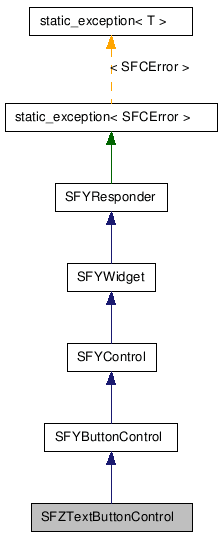
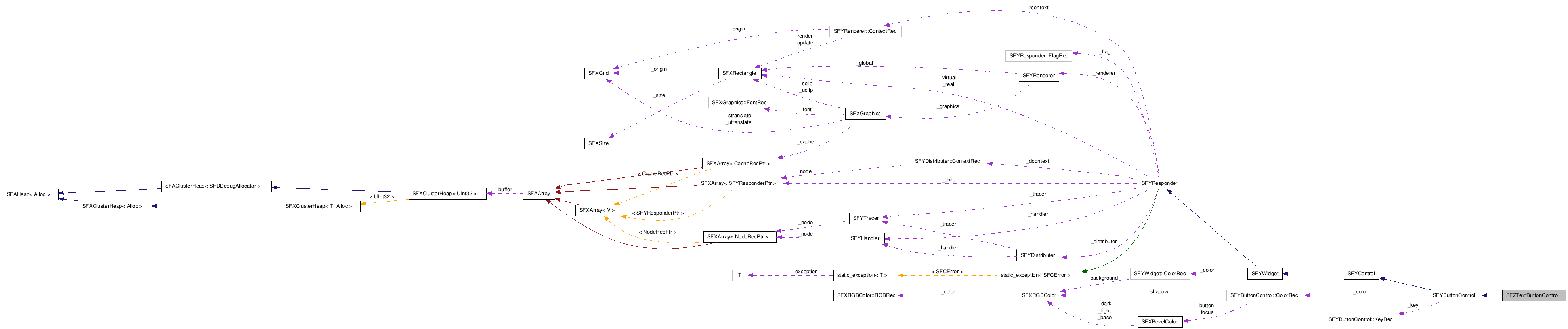
class SFZTextButtonControl : public SFYButtonControl;
SFMTYPEDEFRESPONDER(SFZTextButtonControl)
■ 仕様と使い方
テキストを表示するボタンコントロール(SFZTextButtonControl)は、 SFYButtonControl::SetOperateKey 関数で設定する操作キーを押下後に離すと、 結果イベント [SFXEvent(SFEVT_RESPONDER_RESULT, SFP16_RESULT_OK, SFYControl::GetCurrentValue())] を受信します。
![[Note]](images/note.png) |
注意 |
|---|---|
| この結果イベントは SFYButtonControl::HandleOperateKeyRelease 関数内で発生します。 | |
文字数が多くスクロールして表示する必要がある場合には、 フォーカスされているときに自動的にスクロールを開始します。
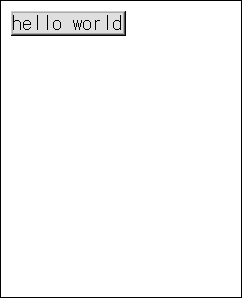
デフォルトの実装では、 テキストボタンコントロールは状態に応じて以下のように描画されます。
図 437. テキストボタンコントロールの拡大図[活性状態または操作可能状態]
![テキストボタンコントロールの拡大図[活性状態または操作可能状態、非押下時]](figure/new-responder/textbutton_enable.png)
テキストはボタンコントロール内ベベル領域の幅2ピクセル分の枠(フォーカス・フレーム)で囲まれるコンテンツ領域に描画されます。
詳細情報 : SFYButtonControl::DrawButton | SFYButtonControl::DrawShadow
図 438. テキストボタンコントロールの拡大図[非活性状態]
![テキストボタンコントロールの拡大図[非活性状態]](figure/new-responder/textbutton_inactive.png)
テキストは SFZTextButtonControl::SetTextColor 関数で設定した色を非活性状態に合わせて補正した色で描画されます。
詳細情報 : SFYButtonControl::DrawButton | SFYButtonControl::DrawShadow
テキストを表示するボタンコントロール [SFZTextButtonControl] | 状態 | SFYControl | SFYButtonControl | SFYSingleTextWidget
| コンストラクタ/デストラクタ |
|---|
|
SFZTextButtonControl( Void ) SFZTextButtonControl クラスのコンストラクタです。
|
|
~SFZTextButtonControl( Void ) SFZTextButtonControl クラスのデストラクタです。
|
| パブリック関数 | |
|---|---|
| AEEFont |
GetFont( Void ) フォントを取得します。
|
| HorizontalEnum |
GetHorizontalAlign( Void ) 水平アライメントの値を取得します。
|
| DirectionEnum |
GetScrollDirection( Void ) スクロールの移動方向を取得します。
|
| UInt32 |
GetScrollInterval( Void ) スクロールインターバルを取得します。[単位:ミリ秒]
|
| SInt16 |
GetScrollStep( Void ) スクロール移動量を取得します。[単位:ピクセル]
|
| SFXWideStringConstRef |
GetText( Void ) テキストを取得します。
|
| SFXRGBColorConstRef |
GetTextColor( Void ) テキストの色を取得します。
|
| VerticalEnum |
GetVerticalAlign( Void ) 垂直アライメントの値を取得します。
|
| UInt32 |
GetWaitInterval( Void ) スクロール開始までの待ち時間を取得します。[単位:ミリ秒]
|
| static SFZTextButtonControlSmp |
NewInstance(
SFCErrorPtr exception = null
) 新しいインスタンスを作成します。
|
| Void |
SetFont(
AEEFont param
) フォントを設定します。
|
| Void |
SetHorizontalAlign(
HorizontalEnum param
) 水平アライメントを設定します。
|
| Void |
SetScrollDirection(
DirectionEnum param
) スクロールの移動方向を設定します。
|
| Void |
SetScrollInterval(
UInt32 param
) スクロールインターバルを設定します。[単位:ミリ秒]
|
| Void |
SetScrollStep(
SInt16 param
) スクロール移動量を設定します。[単位:ピクセル]
|
| SFCError |
SetText(
SFXPathConstRef path
, UInt16 id
) テキストを設定します。
|
| SFCError |
SetText(
SFXWideStringConstRef param
) テキストを設定します。
|
| Void |
SetTextColor(
SFXRGBColorConstRef param
) テキストの色を設定します。
|
| Void |
SetVerticalAlign(
VerticalEnum param
) 垂直アライメントを設定します。
|
| Void |
SetWaitInterval(
UInt32 param
) スクロール開始までの待ち時間を設定します。[単位:ミリ秒]
|
| Void |
StartScroll( Void ) テキストのスクロールを開始します。
|
| Void |
StopScroll( Void ) テキストのスクロールを停止します。
|
| Void |
ClearHandler( Void )
(SFYResponder から継承)
このレスポンダのハンドラの登録をすべて解除します。
|
| Void |
ClearTracer( Void )
(SFYResponder から継承)
このレスポンダのトレーサの配信規則の登録をすべて解除します。
|
| SFCError |
Distribute(
SFXEventConstRef event
, BoolPtr result = null
)
(SFYResponder から継承)
指定された配信型イベントを
SFYDistributer インスタンスと、このレスポンダ以下のレスポンダツリーに配信します。
|
| SFXRGBColorConstRef |
GetBackgroundColor( Void )
(SFYWidget から継承)
背景の色を取得します。
|
| SFXBevelColorConstRef |
GetButtonColor( Void )
(SFYButtonControl から継承)
ボタンコントロール内ベベル領域を描画するベベルカラーを取得します。
|
| SFYResponderSmp |
GetChildBack( Void )
(SFYResponder から継承)
最背面に位置するこのレスポンダの子レスポンダを取得します。
|
| SFYResponderSmp |
GetChildBack(
Bool visible
, Bool active
, Bool enable
, Bool focus
)
(SFYResponder から継承)
最背面に位置するこのレスポンダの子レスポンダを取得します。
|
| SFYResponderSmp |
GetChildBack(
UInt32 id
)
(SFYResponder から継承)
最背面に位置するこのレスポンダの子レスポンダを取得します。
|
| SFYResponderSmp |
GetChildBack(
UInt32 id
, Bool visible
, Bool active
, Bool enable
, Bool focus
)
(SFYResponder から継承)
最背面に位置するこのレスポンダの子レスポンダを取得します。
|
| SFYResponderSmp |
GetChildBackward(
SInt32 index
)
(SFYResponder から継承)
背面から数えて指定された順番に位置するこのレスポンダの子レスポンダを取得します。
|
| SFYResponderSmp |
GetChildBackward(
SInt32 index
, Bool visible
, Bool active
, Bool enable
, Bool focus
)
(SFYResponder から継承)
背面から数えて指定された順番に位置するこのレスポンダの子レスポンダを取得します。
|
| SFYResponderSmp |
GetChildBackward(
SInt32 index
, UInt32 id
)
(SFYResponder から継承)
背面から数えて指定された順番に位置するこのレスポンダの子レスポンダを取得します。
|
| SFYResponderSmp |
GetChildBackward(
SInt32 index
, UInt32 id
, Bool visible
, Bool active
, Bool enable
, Bool focus
)
(SFYResponder から継承)
背面から数えて指定された順番に位置するこのレスポンダの子レスポンダを取得します。
|
| SInt32 |
GetChildCount( Void )
(SFYResponder から継承)
このレスポンダの子レスポンダの数を取得します。
|
| SInt32 |
GetChildCount(
Bool visible
, Bool active
, Bool enable
, Bool focus
)
(SFYResponder から継承)
このレスポンダの子レスポンダの数を取得します。
|
| SInt32 |
GetChildCount(
UInt32 id
)
(SFYResponder から継承)
このレスポンダの子レスポンダの数を取得します。
|
| SInt32 |
GetChildCount(
UInt32 id
, Bool visible
, Bool active
, Bool enable
, Bool focus
)
(SFYResponder から継承)
このレスポンダの子レスポンダの数を取得します。
|
| SFYResponderSmp |
GetChildForward(
SInt32 index
)
(SFYResponder から継承)
前面から数えて指定された順番に位置するこのレスポンダの子レスポンダを取得します。
|
| SFYResponderSmp |
GetChildForward(
SInt32 index
, Bool visible
, Bool active
, Bool enable
, Bool focus
)
(SFYResponder から継承)
前面から数えて指定された順番に位置するこのレスポンダの子レスポンダを取得します。
|
| SFYResponderSmp |
GetChildForward(
SInt32 index
, UInt32 id
)
(SFYResponder から継承)
前面から数えて指定された順番に位置するこのレスポンダの子レスポンダを取得します。
|
| SFYResponderSmp |
GetChildForward(
SInt32 index
, UInt32 id
, Bool visible
, Bool active
, Bool enable
, Bool focus
)
(SFYResponder から継承)
前面から数えて指定された順番に位置するこのレスポンダの子レスポンダを取得します。
|
| SFYResponderSmp |
GetChildFront( Void )
(SFYResponder から継承)
最前面に位置するこのレスポンダの子レスポンダを取得します。
|
| SFYResponderSmp |
GetChildFront(
Bool visible
, Bool active
, Bool enable
, Bool focus
)
(SFYResponder から継承)
最前面に位置するこのレスポンダの子レスポンダを取得します。
|
| SFYResponderSmp |
GetChildFront(
UInt32 id
)
(SFYResponder から継承)
最前面に位置するこのレスポンダの子レスポンダを取得します。
|
| SFYResponderSmp |
GetChildFront(
UInt32 id
, Bool visible
, Bool active
, Bool enable
, Bool focus
)
(SFYResponder から継承)
最前面に位置するこのレスポンダの子レスポンダを取得します。
|
| SInt32 |
GetCurrentValue( Void )
(SFYControl から継承)
コントロールの現在値を取得します。
|
| SFYDistributerPtr |
GetDistributer( Void )
(SFYResponder から継承)
このレスポンダに設定されている配信エンジンを取得します。
|
| SFXBevelColorConstRef |
GetFocusColor( Void )
(SFYButtonControl から継承)
フォーカス状態にあるときのボタンコントロール内ベベル領域の枠を描画するベベルカラーを取得します。
|
| SFYResponderSmp |
GetFrame( Void )
(SFYResponder から継承)
このレスポンダに装着されたフレームを取得します。
|
| SFXRectangle |
GetGlobalBound( Void )
(SFYResponder から継承)
このレスポンダのグローバル領域を取得します。
|
| UInt32 |
GetID( Void )
(SFYResponder から継承)
このレスポンダの ID を取得します。
|
| SFXRectangle |
GetLocalBound( Void )
(SFYResponder から継承)
このレスポンダのローカル領域を取得します。
|
| SInt32 |
GetMaximumValue( Void )
(SFYControl から継承)
コントロールの最大値を取得します。
|
| SInt32 |
GetMinimumValue( Void )
(SFYControl から継承)
コントロールの最小値を取得します。
|
| SInt32 |
GetNthBackward( Void )
(SFYResponder から継承)
このレスポンダが背面から数えて何番目に位置するかを取得します。
|
| SInt32 |
GetNthBackward(
Bool visible
, Bool active
, Bool enable
, Bool focus
)
(SFYResponder から継承)
このレスポンダが背面から数えて何番目に位置するかを取得します。
|
| SInt32 |
GetNthBackward(
UInt32 id
)
(SFYResponder から継承)
このレスポンダが背面から数えて何番目に位置するかを取得します。
|
| SInt32 |
GetNthBackward(
UInt32 id
, Bool visible
, Bool active
, Bool enable
, Bool focus
)
(SFYResponder から継承)
このレスポンダが背面から数えて何番目に位置するかを取得します。
|
| SInt32 |
GetNthForward( Void )
(SFYResponder から継承)
このレスポンダが前面から数えて何番目に位置するかを取得します。
|
| SInt32 |
GetNthForward(
Bool visible
, Bool active
, Bool enable
, Bool focus
)
(SFYResponder から継承)
このレスポンダが前面から数えて何番目に位置するかを取得します。
|
| SInt32 |
GetNthForward(
UInt32 id
)
(SFYResponder から継承)
このレスポンダが前面から数えて何番目に位置するかを取得します。
|
| SInt32 |
GetNthForward(
UInt32 id
, Bool visible
, Bool active
, Bool enable
, Bool focus
)
(SFYResponder から継承)
このレスポンダが前面から数えて何番目に位置するかを取得します。
|
| AVKType |
GetOperateKey( Void )
(SFYButtonControl から継承)
ボタンの操作キーを取得します。
|
| SFYResponderSmp |
GetParent( Void )
(SFYResponder から継承)
このレスポンダの親レスポンダを取得します。
|
| Bool |
GetPropertyTransparent( Void )
(SFYResponder から継承)
このレスポンダの透過属性を取得します。
|
| SFXRectangleConstRef |
GetRealBound( Void )
(SFYResponder から継承)
このレスポンダの実領域を取得します。
|
| VoidPtr |
GetReference( Void )
(SFYResponder から継承)
このレスポンダのリファレンス値を取得します。
|
| SFYRendererPtr |
GetRenderer( Void )
(SFYResponder から継承)
このレスポンダに設定されている描画エンジンを取得します。
|
| SFYResponderSmp |
GetRoot( Void )
(SFYResponder から継承)
このレスポンダが所属するレスポンダツリーのルートレスポンダを取得します。
|
| SFXRGBColorConstRef |
GetShadowColor( Void )
(SFYButtonControl から継承)
影の色を取得します。
|
| Bool |
GetStateActive(
Bool inherit = false
)
(SFYResponder から継承)
このレスポンダの活性状態を取得します。
|
| Bool |
GetStateEnable(
Bool inherit = false
)
(SFYResponder から継承)
このレスポンダの操作可能状態を取得します。
|
| Bool |
GetStateFocus(
Bool inherit = false
)
(SFYResponder から継承)
このレスポンダのフォーカス状態を取得します。
|
| Bool |
GetStatePress( Void )
(SFYButtonControl から継承)
ボタンコントロールの押下状態を取得します。
|
| Bool |
GetStateValid(
Bool inherit = false
)
(SFYResponder から継承)
このレスポンダの有効状態を取得します。
|
| Bool |
GetStateVisible(
Bool inherit = false
)
(SFYResponder から継承)
このレスポンダの可視状態を取得します。
|
| SFXRectangle |
GetSuitableBound( Void )
(SFYResponder から継承)
このレスポンダの最適な領域(サイズ)を取得します。
|
| SFXRectangle |
GetSuitableBound(
SFXRectangleConstRef rectangle
)
(SFYResponder から継承)
このレスポンダの最適な領域(サイズ)を取得します。
|
| SFXRectangle |
GetSuitableBound(
SFXRectangleConstRef param
, HorizontalEnum horizontal
, VerticalEnum vertical
)
(SFYResponder から継承)
このレスポンダの最適な領域(サイズ)を取得します。
|
| SFXMargin |
GetSuitableMargin( Void )
(SFYResponder から継承)
このレスポンダのフレーム余白領域を取得します。
|
| SFCType |
GetType( Void )
(SFYResponder から継承)
このレスポンダのタイプを取得します。
|
| SFXRectangleConstRef |
GetVirtualBound( Void )
(SFYResponder から継承)
このレスポンダの仮想領域を取得します。
|
| Bool |
HasFrame( Void )
(SFYResponder から継承)
このレスポンダがコンテントレスポンダであるかどうかを判定します。
|
| Void |
Initialize( Void )
(SFYResponder から継承)
このレスポンダを初期化します。
|
| Void |
Invalidate( Void )
(SFYResponder から継承)
指定された領域を再描画領域に登録します。
|
| Void |
Invalidate(
SFXRectangleConstRef param
)
(SFYResponder から継承)
指定された領域を再描画領域に登録します。
|
| Void |
InvokeBackward(
SFXEventConstRef event
, Bool overload
, BoolPtr result = null
)
(SFYResponder から継承)
指定されたコールバック型イベントをこのレスポンダに送信します
(ハンドラは登録順に起動されます)。
|
| Void |
InvokeForward(
SFXEventConstRef event
, Bool overload
, BoolPtr result = null
)
(SFYResponder から継承)
指定されたコールバック型イベントをこのレスポンダに送信します
(ハンドラは登録の逆順に起動されます)。
|
| Bool |
IsBack( Void )
(SFYResponder から継承)
このレスポンダが最背面に位置するかどうかを判定します。
|
| Bool |
IsBack(
Bool visible
, Bool active
, Bool enable
, Bool focus
)
(SFYResponder から継承)
このレスポンダが最背面に位置するかどうかを判定します。
|
| Bool |
IsBack(
UInt32 id
)
(SFYResponder から継承)
このレスポンダが最背面に位置するかどうかを判定します。
|
| Bool |
IsBack(
UInt32 id
, Bool visible
, Bool active
, Bool enable
, Bool focus
)
(SFYResponder から継承)
このレスポンダが最背面に位置するかどうかを判定します。
|
| Bool |
IsFrame( Void )
(SFYResponder から継承)
このレスポンダがアタッチメントフレームであるかどうかを判定します。
|
| Bool |
IsFront( Void )
(SFYResponder から継承)
このレスポンダが最前面に位置するかどうかを判定します。
|
| Bool |
IsFront(
Bool visible
, Bool active
, Bool enable
, Bool focus
)
(SFYResponder から継承)
このレスポンダが最前面に位置するかどうかを判定します。
|
| Bool |
IsFront(
UInt32 id
)
(SFYResponder から継承)
このレスポンダが最前面に位置するかどうかを判定します。
|
| Bool |
IsFront(
UInt32 id
, Bool visible
, Bool active
, Bool enable
, Bool focus
)
(SFYResponder から継承)
このレスポンダが最前面に位置するかどうかを判定します。
|
| Bool |
IsNthBackward(
SInt32 index
)
(SFYResponder から継承)
このレスポンダが背面から数えて指定された順番に位置するかどうかを判定します。
|
| Bool |
IsNthBackward(
SInt32 index
, Bool visible
, Bool active
, Bool enable
, Bool focus
)
(SFYResponder から継承)
このレスポンダが背面から数えて指定された順番に位置するかどうかを判定します。
|
| Bool |
IsNthBackward(
SInt32 index
, UInt32 id
)
(SFYResponder から継承)
このレスポンダが背面から数えて指定された順番に位置するかどうかを判定します。
|
| Bool |
IsNthBackward(
SInt32 index
, UInt32 id
, Bool visible
, Bool active
, Bool enable
, Bool focus
)
(SFYResponder から継承)
このレスポンダが背面から数えて指定された順番に位置するかどうかを判定します。
|
| Bool |
IsNthForward(
SInt32 index
)
(SFYResponder から継承)
このレスポンダが前面から数えて指定された順番に位置するかどうかを判定します。
|
| Bool |
IsNthForward(
SInt32 index
, Bool visible
, Bool active
, Bool enable
, Bool focus
)
(SFYResponder から継承)
このレスポンダが前面から数えて指定された順番に位置するかどうかを判定します。
|
| Bool |
IsNthForward(
SInt32 index
, UInt32 id
)
(SFYResponder から継承)
このレスポンダが前面から数えて指定された順番に位置するかどうかを判定します。
|
| Bool |
IsNthForward(
SInt32 index
, UInt32 id
, Bool visible
, Bool active
, Bool enable
, Bool focus
)
(SFYResponder から継承)
このレスポンダが前面から数えて指定された順番に位置するかどうかを判定します。
|
| Bool |
IsRoot( Void )
(SFYResponder から継承)
このレスポンダがルートレスポンダであるかどうかを判定します。
|
| SFCError |
Recover( Void )
(SFYResponder から継承)
デバイス画面保存用ビットマップを使用してこのレスポンダとレスポンダ空間との交差領域を復元します。
|
| SFCError |
RegisterHandler(
SFXEventRangeConstRef range
, SFYHandler::RuleRecConstRef rule
)
(SFYResponder から継承)
指定されたハンドラをこのレスポンダに登録します。
|
| SFCError |
RegisterHandler(
SFXEventRangeConstRef range
, SFYHandler::HandlerSPP spp
, VoidPtr reference
)
(SFYResponder から継承)
指定されたハンドラをこのレスポンダに登録します。
|
| SFCError |
RegisterHandler(
SFXEventRangeConstPtr range
, SFYHandler::RuleRecConstPtr rule
, SInt32 length
)
(SFYResponder から継承)
指定されたハンドラをこのレスポンダに登録します。
|
| SFCError |
RegisterHandler(
SFXEventRangeConstPtr range
, SFYHandler::HandlerSPPConstPtr spp
, VoidPtrConstPtr reference
, SInt32 length
)
(SFYResponder から継承)
指定されたハンドラをこのレスポンダに登録します。
|
| SFCError |
RegisterTracer(
SFXEventRangeConstRef range
, SFYTracer::RuleRecConstRef rule
)
(SFYResponder から継承)
指定された配信規則をこのレスポンダのトレーサに登録します。
|
| SFCError |
RegisterTracer(
SFXEventRangeConstRef range
, SFYTracer::OrderEnum order
, SFYTracer::StateEnum state
, Bool overload
)
(SFYResponder から継承)
指定された配信規則をこのレスポンダのトレーサに登録します。
|
| SFCError |
RegisterTracer(
SFXEventRangeConstPtr range
, SFYTracer::RuleRecConstPtr rule
, SInt32 length
)
(SFYResponder から継承)
指定された配信規則をこのレスポンダのトレーサに登録します。
|
| SFCError |
RegisterTracer(
SFXEventRangeConstPtr range
, SFYTracer::OrderEnumConstPtr order
, SFYTracer::StateEnumConstPtr state
, BoolConstPtr overload
, SInt32 length
)
(SFYResponder から継承)
指定された配信規則をこのレスポンダのトレーサに登録します。
|
| SFCError |
Render(
Bool force = false
)
(SFYResponder から継承)
このレスポンダ以下のレスポンダツリーをレスポンダ空間に再描画します。
|
| Void |
SetBackgroundColor(
SFXRGBColorConstRef param
)
(SFYWidget から継承)
背景の色を設定します。
|
| Void |
SetButtonColor(
SFXBevelColorConstRef param
)
(SFYButtonControl から継承)
ボタンコントロール内ベベル領域を描画するベベルカラーを設定します。
|
| Void |
SetCurrentValue(
SInt32 param
)
(SFYControl から継承)
コントロールの現在値を設定します。
|
| Void |
SetDistributer(
SFYDistributerPtr param
)
(SFYResponder から継承)
指定された配信エンジンをこのレスポンダに設定します。
|
| Void |
SetFocusColor(
SFXBevelColorConstRef param
)
(SFYButtonControl から継承)
フォーカス状態にあるときのボタンコントロール内ベベル領域の枠を描画するベベルカラーを設定します。
|
| SFCError |
SetFrame(
SFYResponderSmpConstRef param
)
(SFYResponder から継承)
このレスポンダにフレームを装着します。
|
| Void |
SetID(
UInt32 param
)
(SFYResponder から継承)
指定された ID をこのレスポンダに設定します。
|
| Void |
SetMaximumValue(
SInt32 param
)
(SFYControl から継承)
コントロールの最大値を設定します。
|
| Void |
SetMinimumValue(
SInt32 param
)
(SFYControl から継承)
コントロールの最小値を設定します。
|
| Void |
SetOperateKey(
AVKType param
)
(SFYButtonControl から継承)
操作キーを設定します。
|
| SFCError |
SetParent(
SFYResponderSmpConstRef param
)
(SFYResponder から継承)
指定されたレスポンダをこのレスポンダの親レスポンダに設定します。
|
| Void |
SetProperty(
Bool transparent
)
(SFYResponder から継承)
指定された属性をこのレスポンダに設定します。
|
| Void |
SetPropertyTransparent(
Bool param
)
(SFYResponder から継承)
指定された透過属性をこのレスポンダに設定します。
|
| Void |
SetRealBound(
SFXRectangleConstRef param
)
(SFYResponder から継承)
指定された領域をこのレスポンダの実領域に設定します。
|
| Void |
SetReference(
VoidPtr param
)
(SFYResponder から継承)
指定された値をこのレスポンダのリファレンスに設定します。
|
| Void |
SetRenderer(
SFYRendererPtr param
)
(SFYResponder から継承)
指定された描画エンジンをこのレスポンダに設定します。
|
| Void |
SetShadowColor(
SFXRGBColorConstRef param
)
(SFYButtonControl から継承)
影の色を設定します。
|
| Void |
SetState(
Bool visible
, Bool active
, Bool enable
, Bool focus
)
(SFYResponder から継承)
指定された値をこのレスポンダの可視、活性、操作可能、フォーカスの各状態フラグに設定します。
|
| Void |
SetStateActive(
Bool param
)
(SFYResponder から継承)
指定された値をこのレスポンダの活性状態フラグに設定します。
|
| Void |
SetStateEnable(
Bool param
)
(SFYResponder から継承)
指定された値をこのレスポンダの操作可能状態フラグに設定します。
|
| Void |
SetStateFocus(
Bool param
)
(SFYResponder から継承)
指定された値をこのレスポンダのフォーカス状態フラグに設定します。
|
| Void |
SetStatePress(
Bool param
)
(SFYButtonControl から継承)
ボタンコントロールの押下状態を設定します。
|
| Void |
SetStateVisible(
Bool param
)
(SFYResponder から継承)
指定された値をこのレスポンダの可視状態フラグに設定します。
|
| Void |
SetVirtualBound(
SFXRectangleConstRef param
)
(SFYResponder から継承)
指定された領域をこのレスポンダの仮想領域に設定します。
|
| SFCError |
Snapshot(
SFBBitmapSmpConstRef bitmap
)
(SFYResponder から継承)
デバイス画面保存用ビットマップからこのレスポンダとレスポンダ空間との交差領域のスナップショットを取得します。
|
| Void |
Terminate( Void )
(SFYResponder から継承)
このレスポンダの終了処理を行います。
|
| Void |
ToBack( Void )
(SFYResponder から継承)
このレスポンダを指定された条件の姉妹レスポンダのなかで最背面に移動します。
|
| Void |
ToBack(
Bool visible
, Bool active
, Bool enable
, Bool focus
)
(SFYResponder から継承)
このレスポンダを指定された条件の姉妹レスポンダのなかで最背面に移動します。
|
| Void |
ToBack(
UInt32 id
)
(SFYResponder から継承)
このレスポンダを指定された条件の姉妹レスポンダのなかで最背面に移動します。
|
| Void |
ToBack(
UInt32 id
, Bool visible
, Bool active
, Bool enable
, Bool focus
)
(SFYResponder から継承)
このレスポンダを指定された条件の姉妹レスポンダのなかで最背面に移動します。
|
| Void |
ToFront( Void )
(SFYResponder から継承)
このレスポンダを指定された条件の姉妹レスポンダのなかで最前面に移動します。
|
| Void |
ToFront(
Bool visible
, Bool active
, Bool enable
, Bool focus
)
(SFYResponder から継承)
このレスポンダを指定された条件の姉妹レスポンダのなかで最前面に移動します。
|
| Void |
ToFront(
UInt32 id
)
(SFYResponder から継承)
このレスポンダを指定された条件の姉妹レスポンダのなかで最前面に移動します。
|
| Void |
ToFront(
UInt32 id
, Bool visible
, Bool active
, Bool enable
, Bool focus
)
(SFYResponder から継承)
このレスポンダを指定された条件の姉妹レスポンダのなかで最前面に移動します。
|
| Void |
ToNthBackward(
SInt32 index
)
(SFYResponder から継承)
このレスポンダを指定された条件の姉妹レスポンダのなかで背面から数えて指定された位置に移動します。
|
| Void |
ToNthBackward(
SInt32 index
, Bool visible
, Bool active
, Bool enable
, Bool focus
)
(SFYResponder から継承)
このレスポンダを指定された条件の姉妹レスポンダのなかで背面から数えて指定された位置に移動します。
|
| Void |
ToNthBackward(
SInt32 index
, UInt32 id
)
(SFYResponder から継承)
このレスポンダを指定された条件の姉妹レスポンダのなかで背面から数えて指定された位置に移動します。
|
| Void |
ToNthBackward(
SInt32 index
, UInt32 id
, Bool visible
, Bool active
, Bool enable
, Bool focus
)
(SFYResponder から継承)
このレスポンダを指定された条件の姉妹レスポンダのなかで背面から数えて指定された位置に移動します。
|
| Void |
ToNthForward(
SInt32 index
)
(SFYResponder から継承)
このレスポンダを指定された条件の姉妹レスポンダのなかで前面から数えて指定された位置に移動します。
|
| Void |
ToNthForward(
SInt32 index
, Bool visible
, Bool active
, Bool enable
, Bool focus
)
(SFYResponder から継承)
このレスポンダを指定された条件の姉妹レスポンダのなかで前面から数えて指定された位置に移動します。
|
| Void |
ToNthForward(
SInt32 index
, UInt32 id
)
(SFYResponder から継承)
このレスポンダを指定された条件の姉妹レスポンダのなかで前面から数えて指定された位置に移動します。
|
| Void |
ToNthForward(
SInt32 index
, UInt32 id
, Bool visible
, Bool active
, Bool enable
, Bool focus
)
(SFYResponder から継承)
このレスポンダを指定された条件の姉妹レスポンダのなかで前面から数えて指定された位置に移動します。
|
| Void |
UnregisterHandler(
SFXEventRangeConstRef range
, SFYHandler::RuleRecConstRef rule
)
(SFYResponder から継承)
このレスポンダから指定されたハンドラの登録を解除します。
|
| Void |
UnregisterHandler(
SFXEventRangeConstRef range
, SFYHandler::HandlerSPP spp
, VoidPtr reference
)
(SFYResponder から継承)
このレスポンダから指定されたハンドラの登録を解除します。
|
| Void |
UnregisterHandler(
SFXEventRangeConstPtr range
, SFYHandler::RuleRecConstPtr rule
, SInt32 length
)
(SFYResponder から継承)
このレスポンダから指定されたハンドラの登録を解除します。
|
| Void |
UnregisterHandler(
SFXEventRangeConstPtr range
, SFYHandler::HandlerSPPConstPtr spp
, VoidPtrConstPtr reference
, SInt32 length
)
(SFYResponder から継承)
このレスポンダから指定されたハンドラの登録を解除します。
|
| Void |
UnregisterTracer(
SFXEventRangeConstRef range
)
(SFYResponder から継承)
このレスポンダのトレーサから指定された配信規則の登録を解除します。
|
| Void |
UnregisterTracer(
SFXEventRangeConstPtr range
, SInt32 length
)
(SFYResponder から継承)
このレスポンダのトレーサから指定された配信規則の登録を解除します。
|
| プロテクト関数 | |
|---|---|
| SFYSingleTextWidgetSmpConstRef |
GetWidget( Void ) ボタンテキスト描画用に内部で保持しているテキストウィジェットを取得します。
|
| Void |
HandleBoundOptimize(
SFXRectanglePtr rectangle
) (SFEVT_RESPONDER_BOUND, SFP16_BOUND_OPTIMIZE) イベントを受信したときに呼び出される関数です(指定した矩形に収まる範囲内で最適な領域を計算します)。
|
| Void |
HandleBoundRequest(
SFXRectanglePtr rectangle
) (SFEVT_RESPONDER_BOUND, SFP16_BOUND_REQUEST) イベントを受信したときに呼び出される関数です(最適な領域を計算します)。
|
| Void |
HandleBoundVirtual( Void )
(SFEVT_RESPONDER_BOUND, SFP16_BOUND_VIRTUAL) イベントを受信したときに呼び出される関数です
(仮想領域が変化したときの処理を行います)。
|
| Void |
HandleOperateKey( Void ) 操作キーの SFEVT_KEY イベントを受信したときに呼び出される関数です。
|
| Void |
HandleRenderRequest(
SFXGraphicsPtr graphics
) 描画イベントを受信したときに呼び出される関数です(レスポンダを描画します)。
|
| Void |
DrawButton(
SFXGraphicsPtr graphics
, SFXRectangleConstRef rectangle
)
(SFYButtonControl から継承)
ボタンコントロールのベベル領域を描画します。
|
| SFXRectangle |
DrawShadow(
SFXGraphicsPtr graphics
, SFXRectangleConstRef rectangle
)
(SFYButtonControl から継承)
ボタンコントロールの影領域を描画します。
|
| static SFYResponderSmp |
Factory(
SFYResponderPtr responder
, SFCErrorPtr exception = null
)
(SFYResponder から継承)
NewInstance 関数の実装を補助します。
|
| static SFXMarginConstRef |
GetButtonMargin( Void )
(SFYButtonControl から継承)
ボタンコントロールのマージンを取得します。
|
| static SFXGridConstRef |
GetPressOffset( Void )
(SFYButtonControl から継承)
プレスオフセットを取得します。
|
| static SFXMarginConstRef |
GetShadowMargin( Void )
(SFYButtonControl から継承)
ボタンコントロールの影領域のマージンを取得します。
|
| SFYResponderSmp |
GetThis( Void )
(SFYResponder から継承)
このレスポンダのスマートポインタを取得します。
|
| Void |
HandleBoundGlobal(
SFXRectangleConstRef rectangle
)
(SFYWidget から継承)
[非推奨(廃止予定 API)] グローバル領域が変化したときに呼び出される関数です。
|
| Void |
HandleBoundReal( Void )
(SFYControl から継承)
(SFEVT_RESPONDER_BOUND, SFP16_BOUND_REAL) イベントを受信したときに呼び出される関数です
(実領域が変化したときの処理を行います)。
|
| Void |
HandleOperateKeyPress( Void )
(SFYButtonControl から継承)
操作キーの SFEVT_KEY_PRESS イベントを受信したときに呼び出される関数です。
|
| Void |
HandleOperateKeyRelease( Void )
(SFYButtonControl から継承)
操作キーの SFEVT_KEY_RELEASE イベントを受信したときに呼び出される関数です。
|
| Void |
SetType(
SFCType param
)
(SFYResponder から継承)
指定された値をこのレスポンダのタイプに設定します。
|
| 型 |
|---|
|
CodeEnum SFZTextButtonControl クラスを表す定数です。
|
|
DefaultEnum 各種パラメータのデフォルト値を表します。
|
|
DirectionEnum スクロールの移動方向を表します。
|
|
HorizontalEnum 水平方向のアライメントを表す定数です。
|
|
VerticalEnum 垂直方向のアライメントを表す定数です。
|
[ protected, explicit ]
SFZTextButtonControl(Void);
このコンストラクタは、以下の初期化処理を行います。
表 274. イベントハンドラ
| イベント | ハンドラの内容 |
|---|---|
| フォーカス状態になったときの状態イベント[SFEVT_RESPONDER_STATE] | テキストのスクロールを開始します。 |
| 非フォーカス状態になったときの状態イベント[SFEVT_RESPONDER_STATE] | テキストのスクロールを停止します。 |
|
注意 |
|---|---|
| SFZTextButtonControl クラスを継承するレスポンダでは、 上記イベントが発生すると、それに対応するハンドラが呼び出されます。 | |
このコンストラクタの内部実装は以下の通りです。
/*protected */SFZTextButtonControl::SFZTextButtonControl(Void) static_throws
{
    static SFXEventRange::AtomRecConst          trange[] = {
        { SFEVT_RESPONDER_STATE,  SFEVT_RESPONDER_STATE,    SFP16_STATE_FOCUS,    SFP16_STATE_FOCUS},
        { SFEVT_RESPONDER_STATE,  SFEVT_RESPONDER_STATE,    SFP16_STATE_PRESS,    SFP16_STATE_PRESS}
    };
    static SFXEventRange::AtomRecConst          crange[] = {
        { SFEVT_RESPONDER_STYLE,  SFEVT_RESPONDER_STYLE,          SFP16_BEGIN,            SFP16_END}
    };
    SFYHandler::RuleRec                         trule[lengthof(trange)];
    SFYHandler::RuleRec                         crule[lengthof(crange)];
    SFCError                                    error;

    if (static_try()) {
        SetType(CODE_TYPE);
        trule[0].spp = XANDLER_FUNCTION(OnStateFocus);
        trule[0].reference = this;
        trule[1].spp = XANDLER_FUNCTION(OnStatePress);
        trule[1].reference = this;
        static_throw(RegisterHandler(atomic_cast(trange), trule, lengthof(trange)));
        if (static_try()) {
            if ((_widget = SFYSingleTextWidget::NewInstance(&error)) != null) {
                crule[0].spp = XANDLER_FUNCTION(OnWidgetStyle);
                crule[0].reference = this;
                static_throw(_widget->RegisterHandler(atomic_cast(crange), crule, lengthof(crange)));
                if (static_try()) {
                    static_throw(_widget->SetParent(GetThis()));
                    if (static_try()) {
                        _widget->SetState(true, true, false, false);
                        Relocate();
                    }
                }
            }
            else {
                static_throw(error);
            }
        }
    }
}// SFZTextButtonControl::SFZTextButtonControl //

/*private */XANDLER_IMPLEMENT_VOIDSTATE(SFZTextButtonControl, OnStateFocus, invoker, reason, state)
{
    unused(invoker);
    unused(reason);
    (state) ? (_widget->StartScroll()) : (_widget->StopScroll());
    return;
}// XANDLER_IMPLEMENT_VOIDSTATE(SFZTextButtonControl, OnStateFocus) //

/*private */XANDLER_IMPLEMENT_VOIDSTATE(SFZTextButtonControl, OnStatePress, invoker, reason, state)
{
    SFXRectangle                                lx;

    unused(invoker);
    unused(reason);
    lx.Set(_widget->GetRealBound());
    (state) ? (lx.Offset(GetPressOffset())) : (lx.Unoffset(GetPressOffset()));
    _widget->SetRealBound(lx);
    return;
}// XANDLER_IMPLEMENT_VOIDSTATE(SFZTextButtonControl, OnStatePress) //

/*private */XANDLER_IMPLEMENT_VOIDSTYLE(SFZTextButtonControl, OnWidgetStyle, invoker, reason)
{
    unused(invoker);
    InvokeBackward(SFXEvent(SFEVT_RESPONDER_STYLE, reason, 0), true);
    return;
}// XANDLER_IMPLEMENT_VOIDSTYLE(SFZTextButtonControl, OnWidgetStyle) //

/*private */Void SFZTextButtonControl::Relocate(Void)
{
    SFXRectangle                                lx;

    lx.Set(GetLocalBound());
    lx.Deflate(GetShadowMargin());
    lx.Deflate(GetButtonMargin());
    if (GetStatePress()) {
        lx.Offset(GetPressOffset());
    }
    _widget->SetRealBound(lx);
    return;
}// SFZTextButtonControl::Relocate //
SFYResponder::SetType | SFZTextButtonControl::CodeEnum | SFYResponder::SetParent | SFYResponder::SetState | SFZTextButtonControl::SetText | SFZTextButtonControl::SetFont | SFZTextButtonControl::SetTextColor | SFZTextButtonControl::SetHorizontalAlign | SFZTextButtonControl::SetVerticalAlign | SFZTextButtonControl::SetScrollDirection | SFZTextButtonControl::SetScrollInterval | SFZTextButtonControl::SetScrollStep | SFZTextButtonControl::SetWaitInterval | SFZTextButtonControl::HorizontalEnum | SFZTextButtonControl::VerticalEnum | SFZTextButtonControl::DirectionEnum | SFZTextButtonControl::DefaultEnum | SFYSingleTextWidget::NewInstance | SFYSingleTextWidget | SFXRGBColor | タイプ | 状態 | イベント | 状態イベント[SFEVT_RESPONDER_STATE]
[ protected, virtual ]
virtual ~SFZTextButtonControl(Void);
このデストラクタは、何も行いません。
このデストラクタの内部実装は以下の通りです。
/*protected virtual */SFZTextButtonControl::~SFZTextButtonControl(Void)
{
}// SFZTextButtonControl::~SFZTextButtonControl //
[ public, const ]
AEEFont GetFont(Void);
フォント。
この関数は、フォントを取得します。
[ public, const ]
HorizontalEnum GetHorizontalAlign(Void);
水平アライメントの値。
この関数は、水平アライメントの値を取得します。
[ public, const ]
DirectionEnum GetScrollDirection(Void);
スクロールの移動方向。
この関数は、スクロールの移動方向を取得します。
[ public, const ]
UInt32 GetScrollInterval(Void);
スクロールインターバル。[単位:ミリ秒]
この関数は、スクロールインターバルを取得します。[単位:ミリ秒]
[ public, const ]
SInt16 GetScrollStep(Void);
スクロール移動量。[単位:ピクセル]
この関数は、スクロール移動量を取得します。[単位:ピクセル]
[ public, const ]
SFXWideStringConstRef GetText(Void);
テキスト。
この関数は、テキストを取得します。
[ public, const ]
SFXRGBColorConstRef GetTextColor(Void);
テキストの色。
この関数は、テキストの色を取得します。
[ public, const ]
VerticalEnum GetVerticalAlign(Void);
垂直アライメントの値。
この関数は、垂直アライメントの値を取得します。
[ public, const ]
UInt32 GetWaitInterval(Void);
スクロール開始までの待ち時間。[単位:ミリ秒]
この関数は、スクロール開始までの待ち時間を取得します。[単位:ミリ秒]
[ protected, const ]
SFYSingleTextWidgetSmpConstRef GetWidget(Void);
ボタンテキスト描画用に子レスポンダとして内部で保持する SFYSingleTextWidget クラス。
ボタンテキスト描画用に子レスポンダとして内部で保持する SFYSingleTextWidget クラスを返します。
ボタンテキストの描画は、SFYSingleTextWidget クラスに委譲して処理します。
[ protected, virtual, const ]
Void HandleBoundOptimize(
    SFXRectanglePtr rectangle   // 矩形
);
この関数は、 領域イベント [SFXEvent(SFEVT_RESPONDER_BOUND, SFP16_BOUND_OPTIMIZE, rectangle)] を受信したときに呼び出されます。
引数 rectangle で指定した矩形領域に収まる範囲内で、レスポンダの最適な領域を計算します。
計算結果のレスポンダに最適なサイズは、rectangle 引数の size 要素(サイズ)に格納されます。 なお、領域イベントの P32 パラメータとして渡された rectangle 引数の origin 要素(始点)はこの関数内で変更しないことを推奨します。
デフォルトの実装は以下の通りです。
|
領域イベント[(SFEVT_RESPONDER_BOUND, SFP16_BOUND_OPTIMIZE) イベント] |
|---|---|
|
SFYResponder::GetSuitableBound 関数は、 引数にヒント領域を指定した場合は 領域イベント [SFXEvent(SFEVT_RESPONDER_BOUND, SFP16_BOUND_OPTIMIZE, rectangle)] をレスポンダに送信します。 SFYWidget クラスを継承するレスポンダが領域イベントを受信すると、 SFYWidget::SFYWidget コンストラクタで最初に登録した領域イベント専用ハンドラの処理により、 SFYWidget::HandleBoundOptimize 仮想関数が呼び出されます。 ※ 領域イベントの P32 パラメータ rectangle にはヒント領域が初期設定されています。 | |
|
(SFEVT_RESPONDER_BOUND, SFP16_BOUND_OPTIMIZE) イベント受信時の最適な領域計算 |
|---|---|
|
SFYWidget::HandleBoundOptimize 仮想関数をオーバーライドする以外に、 領域イベント専用ハンドラ[XANDLER_DECLARE_VOIDBOUND]を定義・実装し レスポンダに登録して行うことも可能です。 最適な領域の計算は、最初に SFYWidget::HandleBoundOptimize 仮想関数を実行し、 次に領域イベント専用ハンドラを登録した順に実行して行われます。 領域イベント専用ハンドラを宣言し登録する手間が省けるので、 通常は SFYWidget::HandleBoundOptimize 仮想関数をオーバーライドして処理を記述します。 | |
この関数の内部実装は以下の通りです。
SFYSingleTextWidgetSmp          _widget;

/*protected virtual */Void SFZTextButtonControl::HandleBoundOptimize(SFXRectanglePtr rectangle) const
{
    rectangle->Deflate(GetShadowMargin());
    rectangle->Deflate(GetButtonMargin());
    rectangle->SetSize(_widget->GetSuitableBound(*rectangle).GetSize());
    rectangle->Inflate(GetButtonMargin());
    rectangle->Inflate(GetShadowMargin());
    return;
}// SFZTextButtonControl::HandleBoundOptimize //
SFYResponder::GetSuitableBound | SFYButtonControl::GetButtonMargin | SFZTextButtonControl::SetText | SFZTextButtonControl::SetFont | SFYSingleTextWidget::HandleBoundOptimize | SFYSingleTextWidget | SFXEvent | 領域イベント[SFEVT_RESPONDER_BOUND]
[ protected, virtual, const ]
Void HandleBoundRequest(
    SFXRectanglePtr rectangle   // 計算された座標
);
この関数は、 領域イベント [SFXEvent(SFEVT_RESPONDER_BOUND, SFP16_BOUND_REQUEST, rectangle)] を受信したときに呼び出されます。
レスポンダの最適な領域を計算します。
計算結果のレスポンダに最適なサイズは、rectangle 引数の size 要素(サイズ)に格納されます。 なお、領域イベントの P32 パラメータとして渡された rectangle 引数の origin 要素(始点)はこの関数内で変更しないことを推奨します。
デフォルトの実装は以下の通りです。
|
領域イベント[(SFEVT_RESPONDER_BOUND, SFP16_BOUND_REQUEST) イベント] | ||||
|---|---|---|---|---|---|
|
SFYResponder::GetSuitableBound 関数は、 引数に何も指定しない場合は 領域イベント [SFXEvent(SFEVT_RESPONDER_BOUND, SFP16_BOUND_REQUEST, rectangle)] をレスポンダに送信します。 SFYWidget クラスを継承するレスポンダが領域イベントを受信すると、 SFYWidget::SFYWidget コンストラクタで最初に登録した領域イベント専用ハンドラの処理により、 SFYWidget::HandleBoundRequest 仮想関数が呼び出されます。 ※ 領域イベントの P32 パラメータ rectangle には実領域が初期設定されています。
| |||||
|
(SFEVT_RESPONDER_BOUND, SFP16_BOUND_REQUEST) イベント受信時の最適な領域計算 |
|---|---|
|
SFYWidget::HandleBoundRequest 仮想関数をオーバーライドする以外に、 領域イベント専用ハンドラ[XANDLER_DECLARE_VOIDBOUND]を定義・実装し レスポンダに登録して行うことも可能です。 最適な領域の計算は、最初に SFYWidget::HandleBoundRequest 仮想関数を実行し、 次に領域イベント専用ハンドラを登録した順に実行して行われます。 領域イベント専用ハンドラを宣言し登録する手間が省けるので、 通常は SFYWidget::HandleBoundRequest 仮想関数をオーバーライドして処理を記述します。 | |
この関数の内部実装は以下の通りです。
SFYSingleTextWidgetSmp          _widget;

/*protected virtual */Void SFZTextButtonControl::HandleBoundRequest(SFXRectanglePtr rectangle) const
{
    rectangle->Deflate(GetShadowMargin());
    rectangle->Deflate(GetButtonMargin());
    rectangle->SetSize(_widget->GetSuitableBound().GetSize());
    rectangle->Inflate(GetButtonMargin());
    rectangle->Inflate(GetShadowMargin());
    return;
}// SFZTextButtonControl::HandleBoundRequest //
SFYResponder::GetSuitableBound | SFYButtonControl::GetButtonMargin | SFZTextButtonControl::SetText | SFZTextButtonControl::SetFont | SFYSingleTextWidget::HandleBoundRequest | SFYSingleTextWidget | SFXEvent | 実領域 | 領域イベント[SFEVT_RESPONDER_BOUND]
[ protected, virtual ]
Void HandleBoundVirtual(Void);
この関数は、領域イベント [SFXEvent(SFEVT_RESPONDER_BOUND, SFP16_BOUND_VIRTUAL, rectangle)] を受信したときに呼び出されます。
仮想領域の変更時に追加の処理を行いたい場合は、この関数をオーバーライドします。
デフォルトの実装は、 ボタンコントロールのコンテンツ領域を内部で保持するテキストウィジェット(SFYSingleTextWidget)の実領域として設定します。
SFZTextButtonControl::SetText 関数によって設定されたテキストは、 内部でテキストウィジェット(SFYSingleTextWidget)として保持されます。
|
領域イベント[(SFEVT_RESPONDER_BOUND, SFP16_BOUND_VIRTUAL) イベント] |
|---|---|
|
SFYResponder::SetRealBound / SFYResponder::SetVirtualBound 関数は、 この関数内の処理により仮想領域が変化すると、 領域イベント [SFXEvent(SFEVT_RESPONDER_BOUND, SFP16_BOUND_VIRTUAL, rectangle)] をレスポンダに送信します。 SFYWidget クラスを継承するレスポンダが領域イベントを受信すると、 SFYWidget::SFYWidget コンストラクタで最初に登録した領域イベント専用ハンドラの処理により、 SFYWidget::HandleBoundVirtual 仮想関数が呼び出されます。 ※ 領域イベントの P32 パラメータ rectangle には変更後の仮想領域が設定されています。 | |
|
仮想領域の変更処理 |
|---|---|
|
SFYWidget::HandleBoundVirtual 仮想関数をオーバーライドする以外に、 領域イベント専用ハンドラ[XANDLER_DECLARE_VOIDBOUND]を定義・実装し レスポンダに登録して行うことも可能です。 仮想領域の変更処理は、最初に SFYWidget::HandleBoundVirtual 仮想関数を実行し、 次に領域イベント専用ハンドラを登録した順に実行して行われます。 領域イベント専用ハンドラを宣言し登録する手間が省けるので、 通常は SFYWidget::HandleBoundVirtual 仮想関数をオーバーライドして処理を記述します。 | |
この関数の内部実装は以下の通りです。
SFYSingleTextWidgetSmp          _widget;

/*protected virtual */Void SFZTextButtonControl::HandleBoundVirtual(Void)
{
    Relocate();
    return;
}// SFZTextButtonControl::HandleBoundVirtual //

/*private */Void SFZTextButtonControl::Relocate(Void)
{
    SFXRectangle                                lx;

    lx.Set(GetLocalBound());
    lx.Deflate(GetShadowMargin());
    lx.Deflate(GetButtonMargin());
    if (GetStatePress()) {
        lx.Offset(GetPressOffset());
    }
    _widget->SetRealBound(lx);
    return;
}// SFZTextButtonControl::Relocate //
SFYSingleTextWidget | SFZTextButtonControl::SetText | SFYResponder::SetRealBound | SFYResponder::SetVirtualBound | SFYSingleTextWidget | SFXEvent | 領域イベント[SFEVT_RESPONDER_BOUND]
[ protected, virtual ]
Void HandleOperateKey(Void);
この関数は、SFYButtonControl::SetOperateKey 関数で設定した操作キーの SFEVT_KEY イベント (キーイベント[SFEVT_KEY])を受信したときに呼び出されます。
独自のキーイベント処理を行いたい場合は、この関数をオーバーライドします。
デフォルトの実装は、テキストのスクロール位置を初期化します。
この関数の内部実装は以下の通りです。
SFYSingleTextWidgetSmp          _widget;

/*protected virtual */Void SFZTextButtonControl::HandleOperateKey(Void)
{
    _widget->StopScroll();
    _widget->StartScroll();
    return;
}// SFZTextButtonControl::HandleOperateKey //
[ protected, virtual, const ]
Void HandleRenderRequest(
    SFXGraphicsPtr graphics   // グラフィックスオブジェクト
);
この関数は、 描画イベント [SFXEvent(SFEVT_RESPONDER_RENDER, SFP16_RENDER_REQUEST, graphics)] を受信したときに呼び出されます。
独自の描画処理を行いたい場合は、この関数をオーバーライドします。
デフォルトの実装では、 状態に応じて以下のようにテキストボタンコントロールを描画します。
■テキストボタンコントロールの描画処理
図 441. テキストボタンコントロールの拡大図[活性状態または操作可能状態]
テキストはボタンコントロール内ベベル領域の幅2ピクセル分の枠(フォーカス・フレーム)で囲まれるコンテンツ領域に描画されます。
詳細情報 : SFYButtonControl::DrawButton | SFYButtonControl::DrawShadow
図 442. テキストボタンコントロールの拡大図[非活性状態]
テキストは SFZTextButtonControl::SetTextColor 関数で設定した色を非活性状態に合わせて補正した色で描画されます。
詳細情報 : SFYButtonControl::DrawButton | SFYButtonControl::DrawShadow
|
レスポンダの描画手順 | ||||
|---|---|---|---|---|---|
|
| |||||
この関数の内部実装は以下の通りです。
/*protected virtual */Void SFZTextButtonControl::HandleRenderRequest(SFXGraphicsPtr graphics) const
{
    DrawButton(graphics, DrawShadow(graphics, GetLocalBound()));
    return;
}// SFZTextButtonControl::HandleRenderRequest //
SFYButtonControl::DrawButton | SFYButtonControl::DrawShadow | SFZTextButtonControl::SetText | SFZTextButtonControl::SetHorizontalAlign | SFZTextButtonControl::SetVerticalAlign | SFZTextButtonControl::SetTextColor | SFZTextButtonControl::SetFont | SFYButtonControl::SetButtonColor | SFYButtonControl::SetFocusColor | SFYButtonControl::SetShadowColor | SFYButtonControl::SetOperateKey | SFZTextButtonControl::SetScrollDirection | SFZTextButtonControl::SetScrollInterval | SFZTextButtonControl::SetScrollStep | SFYSingleTextWidget::HandleRenderRequest | SFYResponder::Invalidate | SFYResponder::Render | SFYResponder::InvokeBackward | SFYSingleTextWidget | SFXEvent | 描画イベント[SFEVT_RESPONDER_RENDER] | 描画イベント専用ハンドラ[XANDLER_DECLARE_VOIDRENDER] | 描画処理 | 状態
[ public, static ]
SFZTextButtonControlSmp NewInstance(
    SFCErrorPtr exception = null   // エラー値
);
関数内部で発生したエラー値を返します。
この関数は、SFZTextButtonControl クラスの新しいインスタンスを作成します。
インスタンスの作成に成功した場合は null 以外のポインタを返します。 失敗した場合は、null ポインタを返します。
exception 引数を指定した場合、 この引数にはエラー値が返ります。
以下は、テキストボタンのインスタンスを生成するためのコードです。
// テキストボタンのインスタンスを生成する
SFZTextButtonControlSmp _textbutton;
SFCError error;

if ((_textbutton = SFZTextButtonControl::NewInstance(&error)) != null) {
    // ...
}
この関数は、フォントを設定します。
デフォルト値: AEE_FONT_NORMAL
[ public ]
Void SetHorizontalAlign(
    HorizontalEnum param   // 設定する値
);
この関数は、水平アライメントを設定します。
デフォルト値: SFYSingleTextWidget::DEFAULT_HORIZONTAL
SFYSingleTextWidget::DEFAULT_HORIZONTAL の値は SFYSingleTextWidget::HorizontalEnum を参照してください。
SFZTextButtonControl::GetHorizontalAlign | SFZTextButtonControl::HorizontalEnum | SFYSingleTextWidget::HorizontalEnum
[ public ]
Void SetScrollDirection(
    DirectionEnum param   // 設定する値
);
この関数は、スクロール移動方向を設定します。
デフォルト値: SFYSingleTextWidget::DEFAULT_DIRECTION
SFYSingleTextWidget::DEFAULT_DIRECTION の値は SFYSingleTextWidget::DirectionEnum を参照してください。
SFZTextButtonControl::GetScrollDirection | SFZTextButtonControl::DirectionEnum | SFYSingleTextWidget::DirectionEnum
この関数は、スクロールインターバルを設定します。[単位:ミリ秒]
デフォルト値 SFYSingleTextWidget::DEFAULT_SCROLL ミリ秒
SFYSingleTextWidget::DEFAULT_SCROLL の値は SFYSingleTextWidget::DefaultEnum を参照してください。
SFZTextButtonControl::GetScrollInterval | SFZTextButtonControl::DefaultEnum | SFYSingleTextWidget::DefaultEnum
この関数は、1 回のスクロールで移動するピクセル数を設定します。
-1(デフォルト値)を設定すると、使用しているフォントの半角空白文字 1 文字分(" ")の幅がスクロール移動量となります。
デフォルト値: SFYSingleTextWidget::DEFAULT_STEP [単位:ピクセル]
SFYSingleTextWidget::DEFAULT_STEP の値は SFYSingleTextWidget::DefaultEnum を参照してください。
SFZTextButtonControl::GetScrollStep | SFZTextButtonControl::DefaultEnum | SFYSingleTextWidget::DefaultEnum
[ public ]
SFCError SetText(
    SFXPathConstRef path   // リソースファイルパス
    UInt16 id              // リソース ID
);
[ public ]
SFCError SetText(
    SFXWideStringConstRef param   // 文字列
);
この関数は、テキストを設定します。
テキストを直接、あるいは、リソースファイルから読み込むように指定します。
デフォルト値: ""[空文字列]
SFZTextButtonControl::GetText | SFZTextButtonControl::SetTextColor | SFZTextButtonControl::SetScrollDirection | SFZTextButtonControl::SetScrollInterval | SFZTextButtonControl::SetScrollStep | SFZTextButtonControl::StartScroll | SFZTextButtonControl::StopScroll | SFZTextButtonControl::SetWaitInterval | SFZTextButtonControl::SetHorizontalAlign | SFZTextButtonControl::SetVerticalAlign
[ public ]
Void SetTextColor(
    SFXRGBColorConstRef param   // 設定する値
);
この関数は、テキストの色を設定します。
デフォルト値: SFXRGBColor(0x00, 0x00, 0x00, 0x00)[黒色]
非活性状態にあるときは、この関数で設定された色の明度が 0x7F より大きい場合はこの色の RGB 値からそれぞれ 0x44 を減算した色、 0x7F 以下の場合はこの色の RGB 値にそれぞれ 0x44 を加算した色でテキストは描画されます。
色の明度とは、SFXRGBColor::GetBrightness 関数によって得られる値です。
[ public ]
Void SetVerticalAlign(
    VerticalEnum param   //
);
この関数は、垂直アライメントを設定します。
デフォルト値: SFYSingleTextWidget::DEFAULT_VERTICAL
SFYSingleTextWidget::DEFAULT_VERTICAL の値は SFYSingleTextWidget::VerticalEnum を参照してください。
SFZTextButtonControl::GetVerticalAlign | SFZTextButtonControl::VerticalEnum | SFYSingleTextWidget::VerticalEnum
この関数は、スクロール開始までの待ち時間を設定します。[単位:ミリ秒]
デフォルト値: SFYSingleTextWidget::DEFAULT_WAIT ミリ秒
SFYSingleTextWidget::DEFAULT_WAIT の値は SFYSingleTextWidget::DefaultEnum を参照してください。
SFZTextButtonControl::GetWaitInterval | SFZTextButtonControl::DefaultEnum | SFYSingleTextWidget::DefaultEnum
[ public ]
Void StartScroll(Void);
この関数は、テキストのスクロールを開始します。
仮想領域の幅がテキストの幅よりも大きいときは何もしません。
SFEVT_APP_SUSPEND イベントと SFEVT_APP_RESUME イベントに自動的に応答しますが、 SFEVT_APP_SUSPEND イベントの受信後から SFEVT_APP_RESUME イベントの受信までの間にこの関数を呼び出したときの動作は未定です。
[ public ]
Void StopScroll(Void);
この関数は、テキストのスクロールを停止します。
enum CodeEnum {
    CODE_TYPE = four_char_code('c', 't', 'b', 'n')
};
SFMTYPEDEFTYPE(CodeEnum)
enum DefaultEnum {
    DEFAULT_WAIT   = SFYTextWidget::DEFAULT_WAIT,      // スクロール開始までの待ち時間(単位:ミリ秒)
    DEFAULT_SCROLL = SFYTextWidget::DEFAULT_SCROLL,    // スクロールインターバル(単位:ミリ秒)
    DEFAULT_STEP   = SFYTextWidget::DEFAULT_STEP       // スクロール移動量(単位:ピクセル)
};
SFMTYPEDEFTYPE(DefaultEnum)
enum DirectionEnum {
    DIRECTION_LEFT    = SFYTextWidget::DIRECTION_LEFT,      // 左へスクロール
    DIRECTION_RIGHT   = SFYTextWidget::DIRECTION_RIGHT,     // 右へスクロール
    DEFAULT_DIRECTION = SFYTextWidget::DEFAULT_DIRECTION    // デフォルト値
};
SFMTYPEDEFTYPE(DirectionEnum)
enum HorizontalEnum {
    HORIZONTAL_LEFT    = SFYSingleTextWidget::HORIZONTAL_LEFT,   // 左詰め
    HORIZONTAL_CENTER  = SFYSingleTextWidget::HORIZONTAL_CENTER, // 中央揃え
    HORIZONTAL_RIGHT   = SFYSingleTextWidget::HORIZONTAL_RIGHT,  // 右詰め
    DEFAULT_HORIZONTAL = SFYSingleTextWidget::DEFAULT_HORIZONTAL // デフォルト設定: 中央揃え
};
SFMTYPEDEFTYPE(HorizontalEnum)
enum VerticalEnum {
    VERTICAL_TOP     = SFYSingleTextWidget::VERTICAL_TOP,     // 上詰め
    VERTICAL_MIDDLE  = SFYSingleTextWidget::VERTICAL_MIDDLE,  // 中央揃え
    VERTICAL_BOTTOM  = SFYSingleTextWidget::VERTICAL_BOTTOM,  // 下詰め
    DEFAULT_VERTICAL = SFYSingleTextWidget::DEFAULT_VERTICAL  // デフォルト値: 中央揃え
};
SFMTYPEDEFTYPE(VerticalEnum)
|
Copyright(c) 2002 - 2024 Sophia Cradle Incorporated All Rights Reserved. |
|
![テキストボタンコントロールの拡大図[フォーカス状態・非押下時]](figure/new-responder/textbutton_focus.png)
![テキストボタンコントロールの拡大図[フォーカス状態・押下時]](figure/new-responder/textbutton_pressed.png)
![[Tip]](images/tip.png)