


|
|
SophiaFramework UNIVERSE 5.3 |
#include <SFXSSLSocket.h.hpp>
class SFXSSLSocket : public SFXStorage;
typedef SFXSSLSocket&   SFXSSLSocketRef;
typedef SFXSSLSocket*   SFXSSLSocketPtr;
typedef SFXSSLSocket*&  SFXSSLSocketPtrRef;
typedef SFXSSLSocket**  SFXSSLSocketHandle;
typedef const SFXSSLSocket     ConstSFXSSLSocket;
typedef const SFXSSLSocket&    ConstSFXSSLSocketRef;
typedef const SFXSSLSocket*    ConstSFXSSLSocketPtr;
typedef const SFXSSLSocket*&   ConstSFXSSLSocketPtrRef;
typedef const SFXSSLSocket**   ConstSFXSSLSocketHandle;
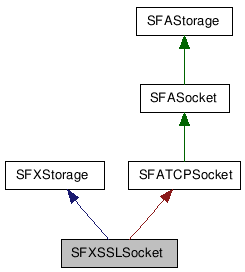
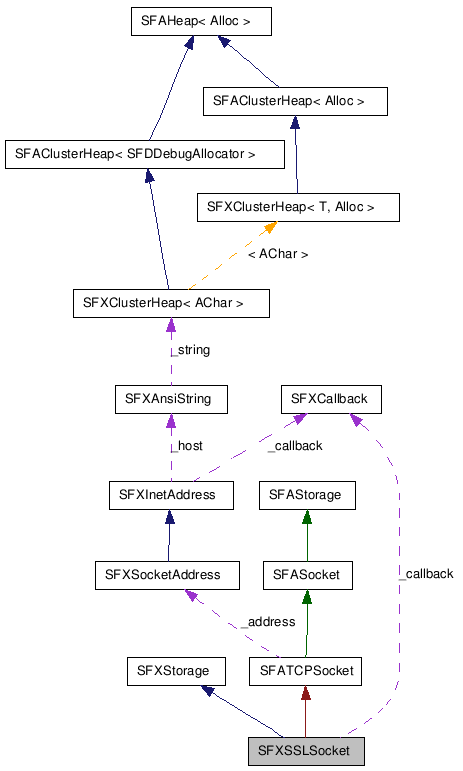
The SFXSSLSocket class provides the functions to implement the SSL client only.
In this class, data can be sent and received using the stream.
When the stream is not used, data can be sent and received with the SFXSSLSocket::Write / SFXSSLSocket::Read function.
![[Note]](images/note.png) |
Note |
|---|---|
The SFXSSLSocket class encapsulates BREW API ISocket/ BREW API ISSL interface to provide high level functions for the SSL socket communication. | |
How to implement the SSL client
The SSL client can be implemented by taking the following procedures with the SFXSSLSocket class.
Example 842. Implementation of the SSL Client
// *** segments different from TCP are in bold
// The _socket variable is defined as class member variable since used in the callback function
class MyClass {
private:
    SFXSSLSocket _socket;
    SFXAnsiStringStreamWriter _writer; // output stream
    SFXAnsiStringStreamReader _reader; // input stream

public:
    Void Start(Void);

    // callback functions
    XALLBACK_DECLARE_SFXSSLSOCKET(OnConnect)
    XALLBACK_DECLARE_SFXSSLSOCKET(OnNegotiate)
    XALLBACK_DECLARE_SFXANSISTRINGSTREAMWRITER(OnFlush)
    XALLBACK_DECLARE_SFXANSISTRINGSTREAMREADER(OnFetch)
};

Void MyClass::Start(Void)
{
    SFCError error;
    SFXSocketAddress host("www.example.com:995");

    // open SSL socket
    if ((error = _socket.Open()) == SFERR_NO_ERROR) {

        // connect to www.example.com:443
        // *1 the connection result will be notified to the OnConnect function
        // *2 host name is automatically resolved
        error = _socket.Connect(host, XALLBACK_INTERNAL(OnConnect));
    }
    if (error != SFERR_NO_ERROR) {
        // if an error occurs
        _socket.Close();
    }
    return;
}

// callback function notified of the connection result
XALLBACK_IMPLEMENT_SFXSSLSOCKET(MyClass, OnConnect, error)
{
    if (error == SFERR_NO_ERROR) {

        // perform SSL Negotiation with server
        // * result of SSL negotiation will be notified to the OnNegotiate function
        error = _socket.Negotiate(XALLBACK_INTERNAL(OnNegotiate));
    }
    if (error != SFERR_NO_ERROR) {

        // if an error occurs
        _socket.Close();
    }
    return;
}

// callback function notified of result of SSL negotiation
XALLBACK_IMPLEMENT_SFXSSLSOCKET(MyClass, OnNegotiate, error)
{
    static AChar message[] = "GET / HTTP/1.0\r\n\r\n";

    if (error == SFERR_NO_ERROR) {

        // get output stream for sending data to SSL socket (buffer size: 1024)
        if ((error = _socket.GetStreamWriter(1024, &_writer))
            == SFERR_NO_ERROR) {

            // write data from the message variable into output stream buffer
            if ((error = _writer.Write(message, lengthof(message))) == SFERR_NO_ERROR) {

                // perform flush: send data from output stream buffer to SSL socket actually
                // * the flush result will be notified to the OnFlush function
                error = _writer.Flush(XALLBACK_INTERNAL(OnFlush));
            }
            if (error != SFERR_NO_ERROR) {
                // if an error occurs
                 _writer.Release();
            }
        }
    }
    if (error != SFERR_NO_ERROR) {
       // if an error occurs
       _socket.Close();
    }
    return;
}

// callback function notified of the flush result
XALLBACK_IMPLEMENT_SFXANSISTRINGSTREAMWRITER(MyClass, OnFlush, error)
{
    // release output stream since all data is sent
    _writer.Release();

    if (error == SFERR_NO_ERROR) {

        // get input stream for receive data from SSL socket (buffer size: 1024)
        if ((error = _socket.GetStreamReader(1024, &_reader)) == SFERR_NO_ERROR) {

            // perform fetch: receive data from SSL socket to input stream  buffer actually
            // * the fetch result will be notified to the OnFetch function
            if ((error = _reader.Fetch(XALLBACK_INTERNAL(OnFetch))) != SFERR_NO_ERROR) {

                // if an error occurs
               _reader.Release();
            }
        }
    }

    if (error != SFERR_NO_ERROR) {
        // if an error occurs
        _socket.Close();
    }

    return;
}

// callback function notified of the fetch result
XALLBACK_IMPLEMENT_SFXANSISTRINGSTREAMREADER(MyClass, OnFetch, error)
{
    SFXAnsiString string;

    if (error == SFERR_NO_ERROR) {

        // read data from input stream buffer into the string variable
        _reader >> string;

        // display the received data on BREW Output Window
        TRACE("%s", string.GetCString());
    }

    // release input stream since all data is received
    _reader.Release();

    // close SSL socket
    _socket.Close();
    return;
}
SFXTCPSocket | SFXUDPSocket | SFXSocketAddress | SSL Socket Communication | BREW API ISocket | BREW API ISSL
| Constructor/Destructor |
|---|
|
SFXSSLSocket( Void ) Constructor of the SFXSSLSocket class.
|
|
~SFXSSLSocket( Void ) Destructor of the SFXSSLSocket class.
|
| Public Functions | |
|---|---|
| SFCError |
AsSFBAStream(
SFBAStreamSmpPtr result
) Convert the SFBSocket instance internally managed by this SFXSSLSocket storage into the SFBAStream instance.
|
| SFCError |
AsSFBSource(
SFBSourceSmpPtr result
) Convert the SFBSocket instance internally managed by this SFXSSLSocket storage into the SFBSource instance.
|
| SFCError |
Bind(
SFXSocketAddressConstRef address
) Bind(Or bind the specified local IP address and port number to this socket).
|
| Void |
Cancel( Void ) Cancel this SSL socket communication.
|
| Void |
Close( Void ) Close this SSL socket.
|
| SFCError |
Connect(
SFXSocketAddressConstRef address
, CallbackSPP spp
, VoidPtr reference
) Send the connection request to the specified server in order to establish the connection.
|
| SFCError |
GetLocalAddress(
SFXSocketAddressPtr result
) Get the local IP address and port number of this SSL socket.
|
| SFCError |
GetRemoteAddress(
SFXSocketAddressPtr result
) Get the remote IP address and port number of the peer of this SSL socket.
|
| SFBNetMgrSmpConstRef |
GetSFBNetMgr( Void ) Get the SFBNetMgr instance managed internally by this socket.
|
| SFBSSLSmpConstRef |
GetSFBSSL( Void ) Get the SFBSSL instance managed internally by this socket.
|
| SFBSocketSmpConstRef |
GetSFBSocket( Void ) Get the SFBSocket instance managed internally by this socket.
|
| SFCError |
GetStreamReader(
UInt32 size
, SFXStreamReaderPtr result
) Get the input stream for reading data from this SSL socket.
|
| SFCError |
GetStreamReader(
SFXStreamReaderPtr result
) Get the input stream for reading data from this SSL socket.
|
| SFCError |
GetStreamWriter(
UInt32 size
, SFXStreamWriterPtr result
) Get the output stream for writing data onto this SSL socket.
|
| SFCError |
GetStreamWriter(
SFXStreamWriterPtr result
) Get the output stream for writing data onto this SSL socket.
|
| UInt32 |
GetTrustMode( Void ) Get the SSL trust mode of this SSL socket.
|
| SFCError |
Negotiate(
CallbackSPP spp
, VoidPtr reference
) Perform the Negotiation for the SSL socket communication.
|
| SFCError |
Open(
SInt32 linger = -1
) Open this SSL socket.
|
| SFCError |
Permit( Void ) Set the non-SSL communication to this SSL socket.
|
| SFCError |
Read(
VoidPtr buffer
, UInt32Ptr size
) Read data from this SSL socket without input stream.
|
| SFCError |
ScheduleBind(
CallbackSPP spp
, VoidPtr reference
) Schedule to bind the local IP address and port number to this SSL socket.
|
| SFCError |
ScheduleRead(
CallbackSPP spp
, VoidPtr reference
) Schedule to read data from this SSL socket without input stream.
|
| SFCError |
ScheduleWrite(
CallbackSPP spp
, VoidPtr reference
) Schedule to write data onto this SSL socket without output stream.
|
| SFCError |
SetTrustMode(
UInt32 param
) Set the SSL trust mode of this SSL socket.
|
| SFCError |
Write(
VoidConstPtr buffer
, UInt32Ptr size
) Write data into this SSL socket without output stream.
|
| Types |
|---|
|
CallbackSPP
(inherits from SFXStorage)
Type of the callback function for the Storage class.
|
[ public, explicit ]
SFXSSLSocket(Void);
This constructor does nothing.
[ public, virtual ]
virtual ~SFXSSLSocket(Void);
This destructor calls the SFXSSLSocket::Close function.
|
Note |
|---|---|
Registered callback functions will be canceled. | |
[ public, virtual, const ]
SFCError AsSFBAStream(
    SFBAStreamSmpPtr result   // pointer to the SFBAStream instance
);
This function converts the SFBSocket instance internally managed by this SFXSSLSocket storage into the SFBAStream instance.
As a result, a pointer to the SFBAStream instance will be returned into the result argument.
|
Note |
|---|---|
| The contents of the SFXSSLSocket storage can be handled through the SFBAStream instance. | |
[ public, virtual, const ]
SFCError AsSFBSource(
    SFBSourceSmpPtr result   // pointer to the SFBSource instance
);
This function converts the SFBSocket instance internally managed by this SFXSSLSocket storage into the SFBSource instance.
As a result, a pointer to the SFBSource instance will be returned into the result argument.
|
Note |
|---|---|
This function internally calls the BREW API ISOURCEUTIL_SourceFromSocket function. | |
|
Note |
|---|---|
| The contents of the SFXSSLSocket storage can be handled as the SFBSource instance. | |
SFBSocket | SFBSource | BREW API ISOURCEUTIL_SourceFromSocket
[ public ]
SFCError Bind(
    SFXSocketAddressConstRef address   // local IP address and port number: Either SFXInetAddress::LoopbackInetAddress() or SFXInetAddress.AnyInetAddress() can be specified as local IP address
);
This function binds(or binds the specified local IP address and port number to this SSL socket).
In case of loopback communication within the device only, specify SFXInetAddress::LoopbackInetAddress() as the local IP address. Otherwise, i.e., when communicating with an external server, specify SFXInetAddress::AnyInetAddress(). For the limitation on BREW SDK, values other than these two are not supported.
* If this function returns AEE_NET_WOULDBLOCK, it will be necessary to register a callback function with the SFXSSLSocket::ScheduleBind function where binding will be performed with this function.
|
Note |
|---|---|
In the client side, you don't necessarily have to bind. If binding is omitted, default port number will be bound to this SSL socket. | |
|
Note |
|---|---|
This function internally calls the SFBSocket::Bind function. | |
|
Prerequisite |
|---|---|
This socket needs to be opened with the SFXSSLSocket::Open function before this function is called. | |
SFXSSLSocket::Open | SFXSSLSocket::ScheduleBind | SFXInetAddress::LoopbackInetAddress | SFXInetAddress::AnyInetAddress | SFXSocketAddress | SFBSocket::Bind | BREW API ISOCKET_Bind | BREW API ISOCKET_GetLastError | BREW API AEE_BREW_LOOPBACK | BREW API AEE_INADDR_LOOPBACK | BREW API AEE_INADDR_ANY
[ public, virtual ]
Void Cancel(Void);
This function cancels various operations on this SSL socket.
Concretely, the registered callback function for each operation will be canceled and the status will be returned to before that operation is performed.
The operations to be canceled and its details are in the following table:
Table 194. Operations to be canceled and its details
| Operations to be canceled | Details |
|---|---|
| Connecting to the server with the SFXSSLSocket::Connect function. | Cancel the callback function and restore the status to just after the SFXSSLSocket::Open function is executed. |
| Scheduling with the SFXSSLSocket::ScheduleBind function. | Cancel the callback function and restore the status to just after the SFXSSLSocket::Open function is executed. |
| Scheduling with the SFXSSLSocket::ScheduleRead function. | Cancel the callback function and restore the status to just after the SFXSSLSocket::Connect function is executed. |
| Scheduling with the SFXSSLSocket::ScheduleWrite function. | Cancel the callback function and restore the status to just after the SFXSSLSocket::Connect function is executed. |
|
Note |
|---|---|
This function is called in the SFXSSLSocket::Close function. | |
SFXSSLSocket::Open | SFXSSLSocket::Connect | SFXSSLSocket::ScheduleBind | SFXSSLSocket::ScheduleRead | SFXSSLSocket::ScheduleWrite | SFXSSLSocket::Negotiate | SFXSSLSocket::Close
[ public ]
Void Close(Void);
This function closes this SSL socket.
Concretely, this function calls the SFXSSLSocket::Cancel function and releases the SFBNetMgr, SFBSocket and SFBSSL instances that this SSL socket internally manages.
|
Note |
|---|---|
The registered callback functions will be canceled. | |
|
Note |
|---|---|
This function is called in the SFXSSLSocket::~SFXSSLSocket destructor. | |
![[Tip]](images/tip.png) |
Tip |
|---|---|
When suspending, resources should be released by calling this function. | |
SFXSSLSocket::Open | SFXSSLSocket::Cancel | SFXSSLSocket::~SFXSSLSocket | SFBNetMgr | SFBSocket | SFBSSL | BREW API INetMgr | BREW API ISocket | BREW API ISSL
[ public ]
SFCError Connect(
    SFXSocketAddressConstRef address   // domain (or IP address) and port number of the server
    CallbackSPP spp                    // callback function
    VoidPtr reference                  // data passed to callback function
);
Specify the domain (or IP address) and port number of the server. The domain will be automatically resolved, if necessary.
Specify the callback function notified of the connection result.
Specify the data passed to the callback function.
This function sends the connection request to the specified server in order to establish the connection. After the connection is established, communication with the server will be performed using this SSL socket.
This function can not gets the result (error code) of the connection establishment as the return value. The the connection result will be notified to the callback function specified in the first argument as follows:
Until the callback function is called, the state of this SSL socket is "Under connecting". When the callback function is called, it will be "Connected" if the connection is established. Otherwise, it will be restored to "Opened" just before this function is called.
And, if the SFXSSLSocket::Cancel function is called before the result of the connection establishment is notified to the callback function, the connection establishment will be canceled and the state of this SSL socket will be restored to "Opened" just before this function is called.
* If this function returns the value other than SFERR_NO_ERROR, the specified callback function will not be called.
|
Note |
|---|---|
This function internally calls the SFBSocket::Connect function. | |
|
Prerequisite |
|---|---|
This socket needs to be opend by calling the SFXSSLSocket::Open function. | |
SFXSSLSocket::Open | SFXSSLSocket::Cancel | SFBSocket::Connect | SFXSocketAddress | SFBNetMgr | SFXStorage::CallbackSPP | BREW API INetMgr | BREW API ISOCKET_Connect | BREW API ISOCKET_GetLastError | BREW API Network AEE error codes
[ public, const ]
SFCError GetLocalAddress(
    SFXSocketAddressPtr result   // pointer to the local IP address and port number of this SSL socket
);
This function gets the local IP address and port number of this SSL socket.
The actual physical IP address will be obtained from the socket for sending and receiving data after the connection is established. Until then, the value set with the SFXSSLSocket::Bind function will be return.
|
Tip |
|---|---|
The actual physical IP address can be also obtained by calling the SFXInetAddress::LocalInetAddress function. | |
|
Prerequisite |
|---|---|
To get the local IP address and port number, this socket needs to be bound with the SFXSSLSocket::Bind function or connected with the SFXSSLSocket::Connect function. | |
SFXSSLSocket::Bind | SFXSSLSocket::Connect | SFXInetAddress::LocalInetAddress | SFXSocketAddress | BREW API ISOCKET_GetLastError
[ public, const ]
SFCError GetRemoteAddress(
    SFXSocketAddressPtr result   // pointer to the remote IP address and port number of the peer of this SSL socket
);
This function gets the remote IP address and port number of the peer of this SSL socket.
|
Note |
|---|---|
This function internally calls the SFBSocket::GetPeerName function. | |
|
Prerequisite |
|---|---|
To get the remote IP address and port number, this socket needs to be connected with the SFXSSLSocket::Connect function. | |
SFBSocket::GetPeerName | SFXSSLSocket::Connect | SFXSocketAddress | BREW API ISOCKET_GetPeerName | BREW API ISOCKET_GetLastError
[ public, const ]
SFBNetMgrSmpConstRef GetSFBNetMgr(Void);
SFBNetMgr instance managed internally by this socket.
This function gets the SFBNetMgr instance managed internally by this socket.
[ public, const ]
SFBSSLSmpConstRef GetSFBSSL(Void);
SFBSSL instance managed internally by this socket.
This function gets the SFBSSL instance managed internally by this socket.
[ public, const ]
SFBSocketSmpConstRef GetSFBSocket(Void);
SFBSocket instance managed internally by this socket.
This function gets the SFBSocket instance managed internally by this socket.
[ public, virtual ]
SFCError GetStreamReader(
    UInt32 size                 // buffer size
    SFXStreamReaderPtr result   // pointer to the input stream
);
[ public, virtual ]
SFCError GetStreamReader(
    SFXStreamReaderPtr result   // pointer to the input stream
);
This function gets the input stream for reading data from this SSL socket.
If the size argument is specified, the buffer size of the input stream will be fixed with the specified value. Otherwise, the buffer size will be variable and the SFXElasticStreamReader class will be used internally.
|
Tip |
|---|---|
| You have to use the SFXBinaryStreamReader, SFXAnsiStringStreamReader, or SFXWideStringStreamReader class for the input stream properly depending on the type of data to be read. | |
|
Prerequisite |
|---|---|
To get the input stream, this socket needs to be connected with the SFXSSLSocket::Connect function. | |
SFXSSLSocket::GetStreamWriter | SFXBinaryStreamReader | SFXAnsiStringStreamReader | SFXWideStringStreamReader SFXSSLSocket::Connect | Stream Buffer
[ public, virtual ]
SFCError GetStreamWriter(
    UInt32 size                 // buffer size
    SFXStreamWriterPtr result   // pointer to the output stream
);
[ public, virtual ]
SFCError GetStreamWriter(
    SFXStreamWriterPtr result   // pointer to the output stream
);
This function gets the output stream for writing data onto this SSL socket.
If the size argument is specified, the buffer size of the output stream will be fixed with the specified value. Otherwise, the buffer size will be variable and the SFXElasticStreamWriter class will be used internally.
|
Tip |
|---|---|
| You have to use the SFXBinaryStreamWriter, SFXAnsiStringStreamWriter, or SFXWideStringStreamWriter class for the output stream properly depending on the type of data to write. | |
|
Prerequisite |
|---|---|
To get the output stream, this socket needs to be connected with the SFXSSLSocket::Connect function. | |
SFXSSLSocket::GetStreamReader | SFXBinaryStreamWriter | SFXAnsiStringStreamWriter | SFXWideStringStreamWriter SFXSSLSocket::Connect | Stream Buffer
[ public, const ]
UInt32 GetTrustMode(Void);
SSL trust mode of this SSL socket
This function gets the SSL trust mode of this SSL socket.
The SSL trust mode is one of the following values.
|
Note |
|---|---|
For more details, see BREW API ISSL_NegotiateV in the BREW API Reference | |
[ public ]
SFCError Negotiate(
    CallbackSPP spp     // callback function
    VoidPtr reference   // data passed to callback function
);
This function performs the Negotiation for the SSL socket communication. Negotiation needs to be done after the connection is established with the SFXSSLSocket::Connect function.
|
Note |
|---|---|
|
This function internally calls the SFBSocket::Writeable / SFBSSL::SetSocket / SFBSSL::NegotiateV function. And it creates the SFBSSLRootCerts instance to set the BREW API WebOpt structure that will be passed to the BREW API ISSL_NegotiateV function. | |
SFXSSLSocket::Connect | SFBSSL::NegotiateV | SFBSocket::Writeable | SFBSSL::SetSocket | SFBSSLRootCerts | SFXStorage::CallbackSPP | BREW API ISSL_SetSocket | BREW API ISSL_NegotiateV | BREW API ISOCKET_Writeable | BREW API ISSLRootCerts | BREW API IWebOpts | BREW API WebOpt
[ public ]
SFCError Open(
    SInt32 linger = -1   // linger time ( linger time is not set up when linger = -1  )
);
This function opens (or initializes) this this SSL socket.
Concretely, this function creates the SFBNetMgr instance and calls the BREW API INETMGR_OpenSocket function to create the SFBSocket instance of the AEE_SOCK_STREAM type. These instances are internally managed by this SSL socket. And the SSL trust mode set with the SFXSSLSocket::SetTrustMode function will be set to SSL_TRUST_MODE_FAIL automatically.
The SFBNetMgr / SFBSocket instance can be obtained with the SFXSSLSocket::GetSFBNetMgr / SFXSSLSocket::GetSFBSocket function. More detailed setting can be realized by using these instances.
|
Linger time(waiting time for connecting a network) |
|---|---|
The linger time(waiting time for connecting a network) set up by the BREW API INETMGR_SetLinger function, can be specified by the linger argument of this function. Default value of this argument is -1. At this time the linger time is not set up. For more details on the linger time settings, refer to BREW API INETMGR_SetLinger. | |
|
Tip |
|---|---|
If the SFXSSLSocket::Close function is called, this SSL socket will be closed. | |
SFXSSLSocket::Close | SFXSSLSocket::GetSFBNetMgr | SFXSSLSocket::GetSFBSocket | SFXSSLSocket::SetTrustMode | SFBNetMgr | SFBSocket | BREW API INetMgr | BREW API ISocket | BREW API ISSL | BREW API INETMGR_SetLinger | BREW API INETMGR_OpenSocket
[ public ]
SFCError Permit(Void);
This function sets the non-SSL communication(i.e. TCP communication) to this SSL socket.
After connection is established, the non-SSL communication(i.e. TCP communication) is available if calling this function before Negotiation is performed or after Negotiation fails.
|
Raison d'entre of the SFXSSLSocket::Permit function |
|---|---|
|
The raison d'entre of the SFXSSLSocket::Permit function lies in that the SFXSSLSocket class can be used like the SFXTCPSocket class. In some applet, the TCP or SSL communication is performed depending on the settings. At this time, if the SFXSSLSocket::Permit function is called, the SFXSSLSocket class will become the TCP mode to peform not SSL but TCP communication, that is, the SFXTCPSocket needs not to be used. | |
[ public, virtual ]
SFCError Read(
    VoidPtr buffer   // buffer to read data into
    UInt32Ptr size
// before this function is called: size of the buffer to read data into;
just after this function is returned: size of the data to be read actually

);
Specify the buffer to read data into.
Before calling this function, specify the size of the buffer to read data into. Just after this function is returned, the size of data to be read actually will be stored into this argument.
This function reads data from this SSL socket without input stream.
When the peer closes the connection, this function will return SFERR_NO_ERROR and 0 will be returned into the area that the size argument points to.
* If this function returns AEE_NET_WOULDBLOCK, it will be necessary to register a callback function with the SFXSSLSocket::ScheduleRead function where data will be read with this function.
|
Note |
|---|---|
This function internally calls the SFBAStream::Read function. | |
|
Prerequisite |
|---|---|
The connection of this socket needs to be established with the SFXSSLSocket::Connect function before this function is called. | |
SFXSSLSocket::ScheduleRead | SFBAStream::Read | BREW API ISOCKET_Read
[ public ]
SFCError ScheduleBind(
    CallbackSPP spp     // callback function
    VoidPtr reference   // data passed to callback function
);
This function schedules to bind the local IP address and port number to this SSL socket.
Concretely, this function registers the callback function that will bind the local IP address and port number to this SSL socket with the SFXSSLSocket::Bind function. The registered callback function will be called by BREW AEE when it is possible to bind.
The status of this socket is "under scheduling to bind" until the callback function is called. And after the callback function is called, it will become the status before calling this function, i.e., "this socket is opened".
If you call the SFXSSLSocket::Cancel function before the callback function is called, binding will be canceled and the status will be returned to the status before calling this function, i.e., "this socket is opened".
*1. If the SFXSSLSocket::Bind function returns AEE_NET_WOULDBLOCK, it will be necessary to register a callback function with this function where binding will be performed with the SFXSSLSocket::Bind function.
*2. If this function returns the value other than SFERR_NO_ERROR, the specified callback function will not be called.
|
Note |
|---|---|
This function internally calls the SFBSocket::Writeable function. | |
|
Prerequisite |
|---|---|
|
Before this function is called, this socket needs to be opened with the SFXSSLSocket::Open function. However, if it is connected or under being connected, the SFERR_INVALID_STATE error will be returned. In addition, if binding has already been scheduled, the SFERR_INVALID_STATE error will be returned too. | |
SFXSSLSocket::Bind | SFXSSLSocket::Cancel | SFXSSLSocket::Open | SFBSocket::Writeable | SFXStorage::CallbackSPP | BREW API ISOCKET_Writeable
[ public, virtual ]
SFCError ScheduleRead(
    CallbackSPP spp     // callback function
    VoidPtr reference   // data passed to callback function
);
This function schedules to read data from this SSL socket without input stream.
Concretely, this function registers the callback function that will read data with the SFXSSLSocket::Read function. The registered callback function will be called by BREW AEE when it is possible to read data.
The status of this socket is "under scheduling to read data" until the callback function is called. And after the callback function is called, it will become the status before calling this function, i.e., "the connection of this socket is established".
If you call the SFXSSLSocket::Cancel function before the callback function is called, reading data will be canceled and the status will be returned to the status before calling this function, i.e., "the connection of this socket is established".
*1. If the SFXSSLSocket::Read function returns AEE_NET_WOULDBLOCK, it will be necessary to register a callback function with this function where data will be read with the SFXSSLSocket::Read function.
*2. If this function returns the value other than SFERR_NO_ERROR, the specified callback function will not be called.
|
Note |
|---|---|
This function internally calls the SFBAStream::Readable function. | |
|
Prerequisite |
|---|---|
|
The connection of this socket needs to be established with the SFXSSLSocket::Connect function before this function is called. And if this socket has been already scheduled to read data, the SFERR_INVALID_STATE error will be returned. | |
SFXSSLSocket::Read | SFBAStream::Readable | SFXStorage::CallbackSPP | BREW API ISOCKET_Readable
[ public, virtual ]
SFCError ScheduleWrite(
    CallbackSPP spp     // callback function
    VoidPtr reference   // data passed to callback function
);
This function schedules to write data onto this SSL socket without output stream.
Concretely, this function registers the callback function that will write data with the SFXSSLSocket::Read function. The registered callback function will be called by BREW AEE when it is possible to write data.
The status of this socket is "under scheduling to write data" until the callback function is called. And after the callback function is called, it will become the status before calling this function, i.e., "the connection of this socket is established".
If you call the SFXSSLSocket::Cancel function before the callback function is called, writing data will be canceled and the status will be returned to the status before calling this function, i.e., "the connection of this socket is established".
*1. If the SFXSSLSocket::Write function returns AEE_NET_WOULDBLOCK, it will be necessary to register a callback function with this function where data will be written with the SFXSSLSocket::Write function.
*2. If this function returns the value other than SFERR_NO_ERROR, the specified callback function will not be called.
|
Note |
|---|---|
This function internally calls the SFBSocket::Writeable function. | |
|
Prerequisite |
|---|---|
|
The connection of this socket needs to be established with the SFXSSLSocket::Connect function before this function is called. And if this socket has been already scheduled to write data, the SFERR_INVALID_STATE error will be returned. | |
SFXSSLSocket::Write | SFBSocket::Writeable | SFXStorage::CallbackSPP | BREW API ISOCKET_Writeable
This function sets the SSL trust mode of this SSL socket.
The SSL trust mode will be until the SFXSSLSocket::Close function is called.
The SSL_RESULT_SERV_VERS error might occur depending on the handset device when calling the SFXSSLSocket::Connect function immediately after this value is changed.
If the SSL_RESULT_SERV_VERS error occurs, it is necessary to close this SSL socket with the SFXSSLSocket::Close function, set the SSL trust mode with this function, and then connect to the server with the SFXSSLSocket::Connect function.
One of the following values are available for the SSL trust mode:
|
Note |
|---|---|
For more details, see BREW API ISSL_NegotiateV in the BREW API Reference | |
SFXSSLSocket::GetTrustMode | SFXSSLSocket::Open | SFXStorage::CallbackSPP | BREW API ISSL_NegotiateV
[ public, virtual ]
SFCError Write(
    VoidConstPtr buffer   // buffer to write data into
    UInt32Ptr size
// before this function is called: size of the buffer to write data into;
just after this function is returned: size of the data to be written actually

);
Specify the buffer to write data into.
Before calling this function, specify the size of the buffer to write data into. Just after this function is returned, the size of data to be written into the buffer actually will be stored into this argument.
This function writes data into this SSL socket without output stream.
* If this function returns AEE_NET_WOULDBLOCK, it will be necessary to register a callback function with the SFXSSLSocket::ScheduleWrite function where data will be written with this function.
|
Note |
|---|---|
This function internally calls the SFBSocket::Write function. | |
|
Prerequisite |
|---|---|
The connection of this socket needs to be established with the SFXSSLSocket::Connect function before this function is called. | |
|
Copyright(c) 2002 - 2024 Sophia Cradle Incorporated All Rights Reserved. |
|