![]() ![]() ![]()
|
BREW C++ Class Library & GUI Framework & XML Middleware : SophiaFramework 4.1 |
There are six types of stream classes as follows.
Table 17.1. Stream
| Data Type | Input Stream | Output Stream |
|---|---|---|
| String stream for AChar string | SFXAnsiStringStreamReader | SFXAnsiStringStreamWriter |
| String stream for WChar string | SFXWideStringStreamReader | SFXWideStringStreamWriter |
| Binary stream for binary sequence | SFXBinaryStreamReader | SFXBinaryStreamWriter |
![]() |
About AChar and WChar |
|---|---|
|
In the BREW environment, there are two kinds of character types: one is the char type that represents single byte character or multi-byte character, and the other is the AECHAR type that represents 2 byte character. SophiaFramewok defines these two kinds of types as AChar and WChar respectively. And SophiaFramework provides two kinds of String classes: the SFXAnsiString class for the string of AChar characters and the SFXWideString class for the string of WChar characters. | |
The String stream is for reading and writing a string.
Example 17.2. Read the string
SFXAnsiStringStreamReader reader; SFXAnsiString string; reader >> string; // get data string until '\0' is reached string = "abcd" reader >> string; // get string up to next '\0' string = "efgh" reader >> string; // get until end string = "ijkl" reader >> string; // get until end string = empty
If the '\0' character is not found, get the string up to the end of stream.
Example 17.3. Write the string
SFXAnsiStringStreamWriter writer;
SFXAnsiString string("abcd");
writer << string; // write string "abcd"
writer << "efgh"; // write string "efgh"
writer << string; // write string "abcd"
The result string will be "abcdefghabcd". The '\0' character will not be inserted into the result string.
The Binary stream is for reading and writing a binary sequence.
Example 17.6. Read the binary sequence
SFXBinaryStreamReader reader; // input binary sequence // part to obtain reader is omitted // interpret binary sequence as little-endian reader >> little; UInt32 v; reader >> v; // interpret 4 bytes from head as UInt32 // since it is little endian, 0x78563412 is assigned to v // the following binary sequence are interpreted as big-endian reader >> big; reader.ReadUInt32(&v); // interpret next 4 bytes as UInt32 // since it is big endian, v = 0x11223344 // same as reader >> v UInt08 c; reader >> c; // interpret 1 bytes from head as UInt08: c = 0x55 reader.ReadUInt08(&c); // c is not changed because it has come to end despite that it is tried to get 1 byte from head // this function returns error
![]() |
Note |
|---|---|
| The Read?????? function for stream differs from the inserter operator (>>) in that the former returns the error value. | |
Example 17.7. Write the binary sequence
SFXBinaryStreamWriter writer; // part to obtain writer is omitted // interpret binary sequence as little-endian. writer << little; writer.WriteUInt08(0x22); // write as UInt08 writer.WriteUInt16(0x22); // write as UInt16 writer.WriteUInt32(0x22); // write as UInt32 // writer << 0x22; causes error since it is ambigous // writer << static_cast<UInt08>(0x22); is acceptable // the following binary sequence is interpreted as big-endian writer << big; writer.WriteUInt32(0x22); // write as UInt32 writer.Flush();
The variable of SFXBuffer or SFXAnsiString (SFXWideString) type can be also specified as an argument or operand of stream.
Example 17.10. Read data from the buffer
SFXBuffer buffer; buffer.SetSize(4); // it is necessary to set buffer size in advance. reader >> buffer; // get irst 4 bytes: 11 22 33 44 (hexadecimal number), store in buffer reader >> buffer; // get next 4 bytes: 55 11 22 33 (hexadecimal number), store in buffer reader >> buffer; // error: remaining two bytes are not read
It is neccesary to specify the buffer size. The buffer cannot be automatically expanded.
Moreover, if a specified size is bigger than the remaining data to be read, an error will occur.
Example 17.13. The Character string in hexadecimal to be read
61 62 63 64 00 65 66 67 68 00 69 6A 6B 6C
Example 17.14. Read data from the Character string
SFXAnsiString string; reader >> string; // get data string until '\0' is met string = "abcd" reader >> string; // get string up to next '\0' string = "efgh" reader >> string; // error occurs since there is no '\0' at end, string is not changed
Read data up to the separator of '\0' character and interpret it as the SFXAnsiString string. If the '\0' character is not found, an error will occur and the string will not be stored.
The Binary stream can be used as a simple parser.
For example, in the code below,
SFXAnsiString data1("ansi string1");
SFXAnsiString data2("ansi string2");
SFXWideString data3("wide string");
SInt32 data4 = -10;
UInt16 data5 = 20;
Bool data6 = true;
SFXBuffer buffer;
AChar temp[] = {0x11, 0x22, 0x33, 0x44, 0x55};
buffer.Set(temp, 5);
write the data as following
writer << data1 << data2 << data3 << data4 << data5 << data6 << buffer;
the data can be read as following
buffer.SetSize(5); reader >> data1 >> data2 >> data3 >> data4 >> data5 >> data6 >> buffer;
![]() |
Note |
|---|---|
| It may not work correctly if the type or the reading order is changed. | |
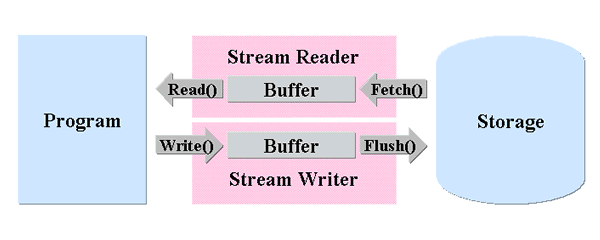
The I/O stream buffer is automatically expanded according to data read from the storage.
In order to save the memory, fix the size of stream buffer and read data in multiple times.
Example 17.17. Input from the file with the buffer of fixed length
SFCError error; // error value SFXFile file; // input file SFXAnsiStringStreamReader reader; // input stream SFXAnsiString stringFromFile; // for storing data SFXAnsiString tempString; // open file in read only mode if ((error = file.OpenReadOnly(SFXPath("/dir1/data.txt"))) == SFERR_NO_ERROR) { // get input stream (buffer size: 1024) if ((error = file.GetStreamReader(1024, &reader)) == SFERR_NO_ERROR) { while (!reader.Ends()) { // repeat until reaching end of stream. // read data from input stream to input stream buffer actually // since buffer size is fixed by 1024 bytes, more than 1024 bytes cannot be read per the fetch operation if ((error = reader.Fetch()) != SFERR_NO_ERROR) { // if error break; } // read data from input stream buffer to a specified variable(tempString) if ((error = reader.ReadSFXAnsiString(&tempString)) != SFERR_NO_ERROR) { // if error break; } // append tempString to end of stringFromFile stringFromFile += tempString; } reader.Release(); } file.Close(); }
In the above example, since the buffer size is set to 1024 bytes, more than 1024 bytes cannot be read per the fetch operation. To read data more than 1024 bytes, repeat the fetch operation several times.
Example 17.18. Output into the file with the buffer of fixed length
SFCError error; // error value SFXFile file; // output file SFXAnsiStringStreamWriter writer; // output stream SFXAnsiString string("abcdefghijklmnopqrstuvwxyz"); // data to write ACharConstPtr p = string.GetBuffer(); // pointer to string ACharConstPtr endOfString = p + string.GetLength(); // end of string SInt32 bufferSize = 1024; // open file in read write mode if ((error = file.OpenReadWrite(SFXPath("/dir1/data.txt"))) == SFERR_NO_ERROR) { // get output stream if ((error = file.GetStreamWriter(bufferSize, &writer)) == SFERR_NO_ERROR) { for (; p < endOfString; p += bufferSize) { // write size SInt32 size = (endOfString - p < bufferSize) ? endOfString - p : bufferSize; // write data to output stream buffer if ((error = writer.Write(p, size)) != SFERR_NO_ERROR) { break; // error } // write data from output stream buffer to output file actually if ((error = writer.Flush()) != SFERR_NO_ERROR) { // if error break; } } writer.Release(); } file.Close(); }
Example 17.19. TCP socket communication with the buffer of fixed length
class MyClass {
private:
SFXTCPSocket _socket; // TCP Socket instance
SFXAnsiStringStreamReader _reader; // input stream
SFXAnsiStringStreamWriter _writer; // output stream
SFXAnsiString _writingString; // string to send
ACharConstPtr _p;
ACharConstPtr _end;
SInt32 _bufferSize;
SFXAnsiString _readingString; // receiving string
public:
Void Start(Void);
CALLBACK_DECLARE_SFXTCPSOCKET(OnConnect)
CALLBACK_DECLARE_SFXANSISTRINGSTREAMREADER(OnFetch)
CALLBACK_DECLARE_SFXANSISTRINGSTREAMWRITER(OnFlush)
};
Void MyClass::Start(Void)
{
// string to send
_writingString = "GET / HTTP/1.1\r\n\r\n";
_bufferSize = 1024;
// initiation
_socket.Open();
// start to connect (connection establishment will be notified to OnConnect function)
_socket.Connect(SFXSocketAddress("www.example.com:80"), CALLBACK_FUNCTION(OnConnect));
}
// callback function notified of connection establishment
CALLBACK_IMPLEMENT_SFXTCPSOCKET(MyClass, OnConnect, error)
{
// get input stream
_socket.GetStreamReader(1024, &_reader);
// get output stream
_socket.GetStreamWriter(_bufferSize, &_writer);
_p = _writingString.GetBuffer();
_end = _p + _writingString.GetLength();
SInt32 size = (_end - _p < _bufferSize) ? _end - _p : _bufferSize;
// write data
_writer.Write(_p, size);
_p += size;
// send data actually (completion of sending data will be notified to OnFlush function)
_writer.Flush(CALLBACK_FUNCTION(OnFlush));
}
// callback function called after sending data
CALLBACK_IMPLEMENT_SFXANSISTRINGSTREAMWRITER(MyClass, OnFlush, error)
{
if (_p < _end) { // when there is data to be transmitted
// write data to output stream again
SInt32 size = (_end - _p < _bufferSize) ? _end - _p : _bufferSize;
// write data
_writer.Write(_p, size);
_p += size;
// send data actually again (completion of sending data will be notified to OnFlush function)
_writer.Flush(CALLBACK_FUNCTION(OnFlush));
}
else { // receive data
// receive data into input stream buffer (completion of receiving data will be notified to OnFecth function)
_reader.Fetch(CALLBACK_FUNCTION(OnFetch));
// if _reader.Read is called here, error will occur
}
}
// callback function notified of completion of receiving data
CALLBACK_IMPLEMENT_SFXANSISTRINGSTREAMREADER(MyClass, OnFetch, error)
{
SFXAnsiString temp;
// read data from input stream buffer to specified variable(temp)
_reader.ReadSFXAnsiString(&temp);
_readingString += temp;
if (!_reader.Ends()) { // when input stream does not end
// receive data into input stream buffer again (completion of receiving data will be notified to OnFecth function)
_reader.Fetch(CALLBACK_FUNCTION(OnFetch));
}
}
To read or receive a big data, call the Fetch function multiple times. And the OnFecth function(callback function) will be called each time after the Fetch function is executed.
Similarly, to write or send big data, call the Flush function multiple times. And the OnFlush function(callback function) will be called each time after the Flush function is executed.
The callback function registered by the Fetch/Flush function is called when the end of data is reached or there is no data left in the stream buffer.
Other timing can be specified as the trigger using the SetTrigger function.
Example 17.20. In the TCP socket communication, set the trigger that makes the callback function be called each time the linefeed "\r\n" appears.
// error handling is omitted // callback function notified of connection establishment CALLBACK_IMPLEMENT_SFXTCPSOCKET(MyClass, OnConnect, error) { // get input stream _socket.GetStreamReader(&_reader); // specify timing _reader.SetTrigger("\r\n", 2); // receive data ( completion of receiving data will be notified to OnFetch function) _reader.Fetch(CALLBACK_FUNCTION(OnFetch)); } // callback function notified of completion of receiving data CALLBACK_IMPLEMENT_SFXANSISTRINGSTREAMREADER(MyClass, OnFetch, error) { SFXAnsiString string; // whether or not this callback function is notified of the trigger that is set using the SetTrigger function // (in this case, triger is that line feed and carriage return characters appear) if (_reader.Triggers()) { TRACE("by CRLF"); } // read received string _reader.ReadSFXAnsiString(&string); while (!_reader.Ends()) { // while not reach end of stream // receive data (completion of receiving data will be notified to OnFetch function) _reader.Fetch(CALLBACK_FUNCTION(OnFetch)); } }
The callback function can be set to be called each time when a specified number of characters is received.
|
Copyright (C) 2002 - 2008 Sophia Cradle, Inc. All Rights Reserved. |
![]() ![]() ![]()
|