








BREW POP / SMTP Mailer - 3 / 6 -


User Interface
MainWindow
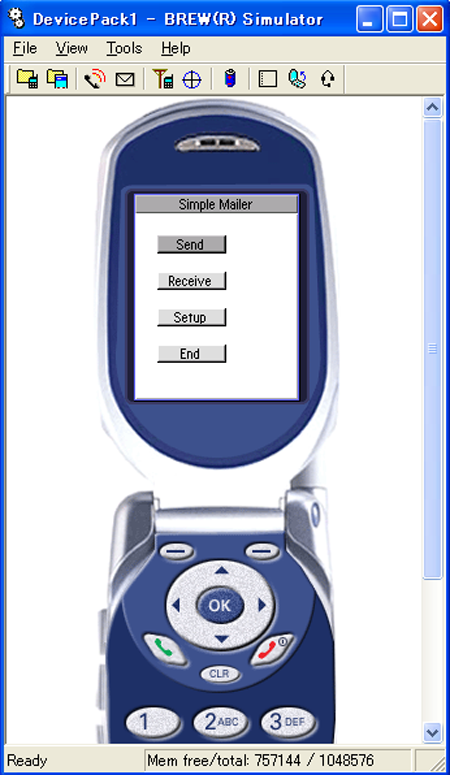 |
The MainWindow has four different buttons:
|
|---|
Constructor
MainWindow::MainWindow(Void) : SFRTitleWindow(SFRApplication::GetInstance(),
	SFXGraphics::GetDeviceRectangle(), "Simple Mailer") static_throws
{
    // register key handler
    if (static_try()) {
        static_throw(
            RegisterHandler(SFEVT_KEY, HANDLER_AFTER,
            HANDLER_FUNCTION(OnKey)));
    }

    // Get the height of font
    SInt16 fontHeight = SFXGraphics::GetFontHeight(AEE_FONT_NORMAL);

    // Calculation of button width
    SInt16 width = SFXGraphics::MeasureText
    (AEE_FONT_NORMAL, "Send Mail");

	// Get the width and height of the screen
	SFXDevice device;
	UInt16 ScreenWidth = device.GetScreenWidth();
	SInt16 ScreenHeight = device.GetScreenHeight();
	// Calculate the position of buttons, in the center of the screen
	SInt16 position_X = ( ScreenWidth- (width + 2 * MARGIN))/2;
	SInt16 position_Y = ( ScreenHeight- ( 4 * fontHeight + 3 * MARGIN )- fontHeight )/2;
	SFXRectangle rectangle(position_X, position_Y, width + 4 * MARGIN, fontHeight + 2);


    // Make button

    SFRButtonControlPtr button1 = ::new SFRButtonControl(this,
        rectangle, "Send");

    rectangle.AddY(fontHeight + MARGIN);

    SFRButtonControlPtr button2 = ::new SFRButtonControl(this,
        rectangle, "Receive");

    rectangle.AddY(fontHeight + MARGIN);

    SFRButtonControlPtr button3 = ::new SFRButtonControl(this,
        rectangle, "Setup");

    rectangle.AddY(fontHeight + MARGIN);

    SFRButtonControlPtr button4 = ::new SFRButtonControl(this,
        rectangle, "End");

    // Registration of button handler
    if (static_try() && button1 != null) {
        static_throw(
            button1->RegisterHandler(
                SREVT_CONTROL, HANDLER_BEFORE,
                HANDLER_FUNCTION(OnButtonControl1)));
        if (static_try()) {
            // set focus
            button1->SetStatusFocus(true);
        }
    }
    if (static_try() && button2 != null) {
        static_throw(
            button2->RegisterHandler(
                SREVT_CONTROL, HANDLER_BEFORE,
                HANDLER_FUNCTION(OnButtonControl2)));
    }
    if (static_try() && button3 != null) {
        static_throw(
            button3->RegisterHandler(
                SREVT_CONTROL, HANDLER_BEFORE,
                HANDLER_FUNCTION(OnButtonControl3)));
    }
    if (static_try() && button4 != null) {
        static_throw(
            button4->RegisterHandler(
                SREVT_CONTROL, HANDLER_BEFORE,
                HANDLER_FUNCTION(OnButtonControl4)));
    }
    return;
}
Button Handler
Define Button Handler
// when "Send Mail" button is pressed
HANDLER_IMPLEMENT_VOIDCONTROL(MainWindow, OnButtonControl1, result, control)
{
    // make window for sending mail
    ::new SendingWindow();
}

// when "Receive Mail" button is pressed
HANDLER_IMPLEMENT_VOIDCONTROL(MainWindow, OnButtonControl2, result, control)
{
    // prepare and start to receive mail

    // as for detailed codes, see this
}

// when "Setup" button is pressed
HANDLER_IMPLEMENT_VOIDCONTROL(MainWindow, OnButtonControl3, result, control)
{
    // make window for setup
    ::new OptionWindow();
}

// when "End" button is pressed
HANDLER_IMPLEMENT_VOIDCONTROL(MainWindow, OnButtonControl4, result, control)
{
    // terminate application
    SFRApplication::Terminate();
}
Declare Handler in defining MainWindow
SFMTYPEDEFCLASS(MainWindow)
class MainWindow : public SFRTitleWindow {
    SFMSEALCOPY(MainWindow)
private:
    SFXPOP3Receiver _receiver; // For POP3 reception
    SFRMessageDialogPtr _dialog;
public:
    MainWindow(Void) static_throws;
    virtual ~MainWindow(Void);
private:
    HANDLER_DECLARE_BOOLEVENT(OnKey)     // Key handler
    HANDLER_DECLARE_VOIDDIALOG(OnDialog) // Dialog handler

    // Button handler
    HANDLER_DECLARE_VOIDCONTROL(OnButtonControl1)
    HANDLER_DECLARE_VOIDCONTROL(OnButtonControl2)
    HANDLER_DECLARE_VOIDCONTROL(OnButtonControl3)
    HANDLER_DECLARE_VOIDCONTROL(OnButtonControl4)
    CALLBACK_DECLARE_SFXPOP3RECEIVER(POP3Callback)

    // Callback that notifies mail reception completion
};
OptionWindow for Setup
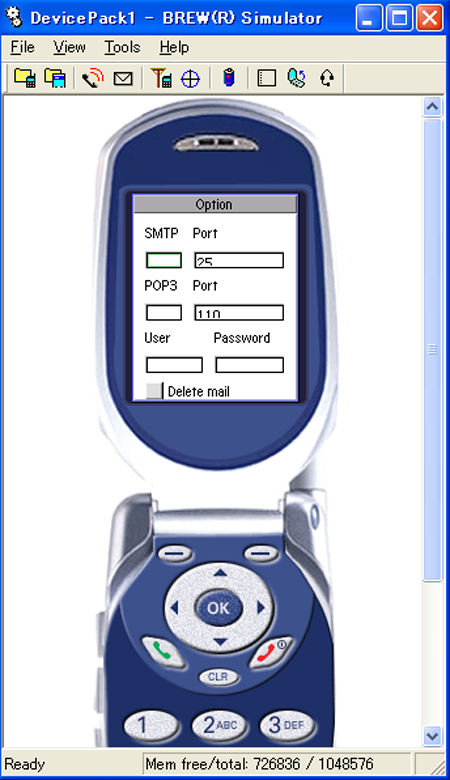 |
The OptionWindow has text boxes for address and port numbers of SMTP server, address and port numbers of POP3 servers, and user name and password. It also has a checkbox that allows for the selection of the delete mail option, a button for saving and a cancel button. |
|---|
Define OptionWindow for Setup
There are 6 kinds of text controls and a checkbox included in OptionWindow . All are declared as member variables.
SFMTYPEDEFCLASS(OptionWindow)
class OptionWindow : public SFRTitleWindow {
    SFMSEALCOPY(OptionWindow)
private:
    // Text control
    SFRBrewTextControlPtr _textControlSMTPServer;
    SFRBrewTextControlPtr _textControlSMTPPort;
    SFRBrewTextControlPtr _textControlPOP3Server;
    SFRBrewTextControlPtr _textControlPOP3Port;
    SFRBrewTextControlPtr _textControlUser;
    SFRBrewTextControlPtr _textControlPassword;
    // Checkbox Control
    SFRCheckboxControlPtr _checkboxEraseMail;
public:
    OptionWindow(Void);
    virtual ~OptionWindow(Void);
private:
    HANDLER_DECLARE_BOOLEVENT(OnKey) // Key handler
    HANDLER_DECLARE_VOIDCONTROL(OnButtonControlOk) // OK button handler
    HANDLER_DECLARE_VOIDCONTROL(OnButtonControlCancel)
    // Cancel button handler
};
Constructors : create control and register handlers
The first step here should be getting the data needed for setup such as the address of the SMTP server in SimpleMailer application class.
Executing the following statement will display the address of the SMTP server in its own text control.
option->ReadSFXAnsiString(OPTION_SMTPSERVER, "");
The SelectHandler, registered in the last part of the code, enables text control input
OptionWindow::OptionWindow(Void) : SFRTitleWindow(
    SFRApplication::GetInstance(), SFXGraphics::GetDeviceRectangle(), "Setup")
{
    // Set up data is obtained from the application class.
    SFXConfigPtr option = SimpleMailer::GetOption();

         ...


    // Make label

    ::new SFRLabelControl(this, rectLeft, "SMTP Server");
    ::new SFRLabelControl(this, rectRight, "Port");

         ...


    // Make text control

    _textControlSMTPServer = ::new SFREditboxControl(this,
        rectLeft, option->ReadSFXAnsiString(OPTION_SMTPSERVER, ""));

         ...


    // Make checkbox
    _checkboxEraseMail = ::new SFRCheckboxControl(this, rectLeft,
        "delete mail");
    if (_checkboxEraseMail != null) {
        // read data and set checkbox
        _checkboxEraseMail->SetStatusCheck(
            option->ReadBool(OPTION_ERASEMAIL, false));
    }

         ...


    // Make button
    SFRButtonControlPtr buttonOk = ::new SFRButtonControl(this,
        rectLeft, BUTTON_LABEL_OK);

         ...


   if (_textControlSMTPServer != null) {
        // set the maximum size of text control
        _textControlSMTPServer->SetMaxSize(64);
        // set forcus
        _textControlSMTPServer->SetStatusFocus(true);
    }

         ...


    // Register handler for when "SELECT" key is pressed
    // ( For text control )
    if (static_try()) {
        static_throw(
            RegisterHandler(
                SFEVT_KEY, AVK_SELECT, HANDLER_AFTER,
                HANDLER_FUNCTION(SelectHandler)));
    }

    return;
}
Button Handler
You should save the data inputted in the text contols of OptionWindow for setup.
You get texts through the GetText() function of Text Control and write data through the WriteSFXAnsiString() function of SFXConfig.
The first argument of WriteSFXAnsiString() should be one of the following values.
// tag for data saved in SFXConfig
// address of SMTP server, SFXAnsiString
#define OPTION_SMTPSERVER  1
// port number of SMTP server, UInt16
#define OPTION_SMTPPOPT    2
// address of POP3 server, SFXAnsiString
#define OPTION_POP3SERVER  3
// port number of POP3 server, UInt16
#define OPTION_POP3PORT    4
// user, SFXAnsiString
#define OPTION_USER        5
// password, SFXAnsiString
#define OPTION_PASSWORD    6
// option for deleting mail, Bool
#define OPTION_ERASEMAIL   7
HANDLER_IMPLEMENT_VOIDCONTROL(OptionWindow, OnButtonControlOk, result, control)
{
    // Save data inputted in text controls of OptionWindow
    SFXConfigPtr option = SimpleMailer::GetOption();
    option->WriteSFXAnsiString(OPTION_SMTPSERVER,
        _textControlSMTPServer->GetText());
    option->WriteUInt16(OPTION_SMTPPOPT,
        static_cast<UInt16>
        (_textControlSMTPPort->GetText().AsUInt32()));
    option->WriteSFXAnsiString(OPTION_POP3SERVER,
        _textControlPOP3Server->GetText());
    option->WriteUInt16(OPTION_POP3PORT,
        static_cast<UInt16>
        (_textControlPOP3Port->GetText().AsUInt32()));
    option->WriteSFXAnsiString(OPTION_USER,
        _textControlUser->GetText());
    option->WriteSFXAnsiString(OPTION_PASSWORD,
        _textControlPassword->GetText());
    option->WriteBool(OPTION_ERASEMAIL,
        _checkboxEraseMail->GetStatusCheck());
    option->Save();
    // Close window
    Invoke(SFXEvent(SREVT_RESPONDER_TERMINATE, SRP16_TERMINATE_INVOKE, true));
}
SendingWindow for sending mail
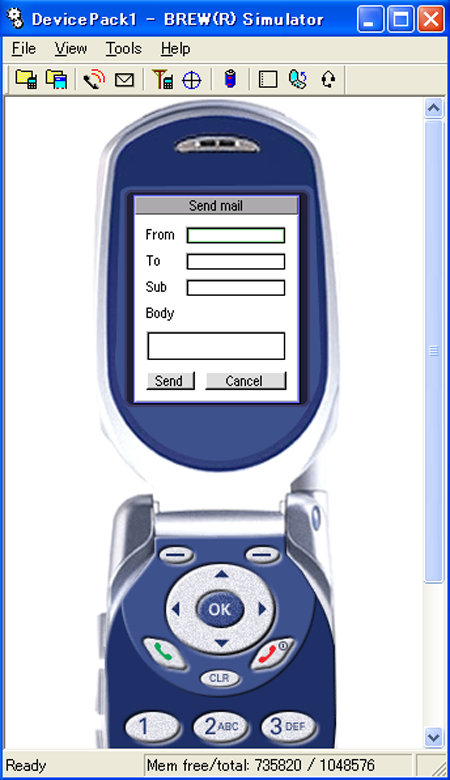 |
The SendingWindow has 4 kinds of text boxes.
It also has Send and Cancel buttons. Programming here is the same as with the OptionWindow. |
|---|
