|
|
SophiaFramework UNIVERSE 5.3 |
Dialog is the Responder class that inherits from the SFRWindow class.
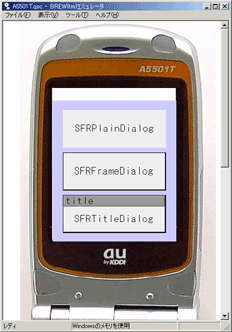
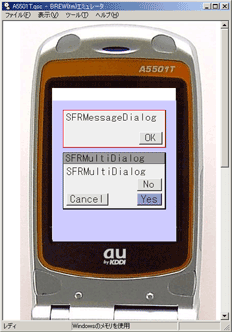
Table 10.5. Dialog Types
| Class Name | Description |
|---|---|
| SFRPlainDialog | Responder which represents a plain dialog without title and frame. |
| SFRFrameDialog | Responder which represents a dialog with a frame |
| SFRTitleDialog | Responder which represents a dialog with a title |
| SFRMessageDialog | Responder which represents a dialog with maximum 1 button to display text. |
| SFRMultiDialog | Responder which represents a dialog with maximum 3 buttons |
Reference: Development with SFR GUI Framework: Dialog
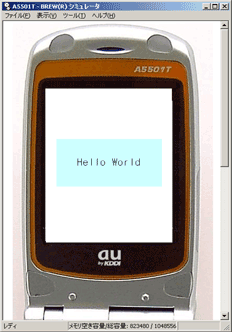
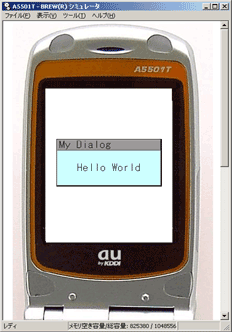
Create the instance(PlainDialog) of MyDialog class that inherits from the SFRPlainDialog class.
Example 10.18. Define, Implement, and Create the PlainDialog
SFMTYPEDEFCLASS(MyDialog)
class MyDialog : public SFRPlainDialog {
    SFMSEALCOPY(MyDialog)
public:
    MyDialog(Void) static_throws;
    virtual ~MyDialog(Void);
private:
    HANDLER_DECLARE_VOIDRENDER(OnRenderContent)
};

// Constructor
MyDialog::MyDialog() : SFRPlainDialog(SFXRectangle(20, 80, 200, 100)) static_throws {
    if (static_try()) {
        static_throw(
            RegisterHandler(SREVT_RESPONDER_RENDER,
                            SRP16_RENDER_CONTENT,
                            HANDLER_BEFORE,
                            HANDLER_FUNCTION(OnRenderContent)));
    }
}

// Destructor
MyDialog::~MyDialog(Void)
{
    return;
}

// Drawing handler
HANDLER_IMPLEMENT_VOIDRENDER(MyDialog, OnRenderContent, graphics) {

    // draw using SFXGraphics instance

    // set dialog's inside to light blue
    // GetContentWorld() returns rectangle (SFXRectangle) represents drawing area inside window
    // SFXRGBColor(0xCE, 0xFF, 0xFF, 0x00) defines light blue
    graphics->FillRectangle(GetContentWorld(),
                            SFXRGBColor(0xCE, 0xFF, 0xFF, 0x00));

    // display "Hello Window"
    // SFXRGBColor(0x00, 0x00, 0x00, 0x00) defines black
    graphics->DrawText("Hello Window",
                       GetContentWorld(),
                       SFXRGBColor(0x00, 0x00, 0x00, 0x00));
}

// create PlainDialog
MyDialogPtr dialog;
dialog = new MyDialog();
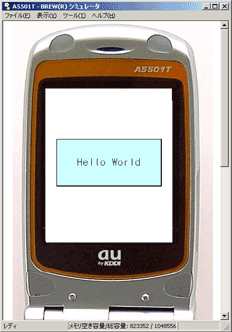
Create the instance(FrameDialog) of MyDialog class that inherits from the SFRFrameDialog class.
Example 10.19. Define, Implement, and Create the FrameDialog
SFMTYPEDEFCLASS(MyDialog)
class MyDialog : public SFRFrameDialog {
    SFMSEALCOPY(MyDialog)
public:
    MyDialog(Void) static_throws;
    virtual ~MyDialog(Void);
private:
    HANDLER_DECLARE_VOIDRENDER(OnRenderContent)
};

// Constructor
MyDialog::MyDialog() : SFRFrameDialog(SFXRectangle(20, 80, 200, 100)) static_throws {
    if (static_try()) {
        static_throw(
            RegisterHandler(SREVT_RESPONDER_RENDER,
                            SRP16_RENDER_CONTENT,
                            HANDLER_BEFORE,
                            HANDLER_FUNCTION(OnRenderContent)));
    }
}

// Destructor
MyDialog::~MyDialog(Void)
{
    return;
}

// Drawing handler
HANDLER_IMPLEMENT_VOIDRENDER(MyDialog, OnRenderContent, graphics) {

    // draw using SFXGraphics instance

    // set dialog's inside to light blue
    // GetContentWorld() returns rectangle (SFXRectangle) represents drawing area inside window
    // SFXRGBColor(0xCE, 0xFF, 0xFF, 0x00) defines light blue
    graphics->FillRectangle(GetContentWorld(),
                            SFXRGBColor(0xCE, 0xFF, 0xFF, 0x00));

    // display "Hello Window"
    // SFXRGBColor(0x00, 0x00, 0x00, 0x00) defines black
    graphics->DrawText("Hello Window",
                       GetContentWorld(),
                       SFXRGBColor(0x00, 0x00, 0x00, 0x00));
}

// create FrameDialog
MyDialogPtr dialog;
dialog = new MyDialog();
Create the instance(TitleDialog) of MyDialog class that inherits from the SFRTitleDialog class.
Example 10.20. Define, Implement, and Create the TitleDialog
SFMTYPEDEFCLASS(MyDialog)
class MyDialog : public SFRTitleDialog {
    SFMSEALCOPY(MyDialog)
public:
    MyDialog(Void) static_throws;
    virtual ~MyDialog(Void);
private:
    HANDLER_DECLARE_VOIDRENDER(OnRenderContent)
};

// Constructor
MyDialog::MyDialog() : SFRTitleDialog(SFXRectangle(20, 80, 200, 100), "my dialog") static_throws {
    if (static_try()) {
        static_throw(
            RegisterHandler(SREVT_RESPONDER_RENDER,
                            SRP16_RENDER_CONTENT,
                            HANDLER_BEFORE,
                            HANDLER_FUNCTION(OnRenderContent)));
    }
}

// Destructor
MyDialog::~MyDialog(Void)
{
    return;
}

// Drawing handler
HANDLER_IMPLEMENT_VOIDRENDER(MyDialog, OnRenderContent, graphics) {

    // draw using SFXGraphics instance

    // set dialog's inside to light blue
    // GetContentWorld() returns rectangle (SFXRectangle) represents drawing area inside window
    // SFXRGBColor(0xCE, 0xFF, 0xFF, 0x00) defines light blue
    graphics->FillRectangle(GetContentWorld(),
                            SFXRGBColor(0xCE, 0xFF, 0xFF, 0x00));

    // display "Hello Window"
    // SFXRGBColor(0x00, 0x00, 0x00, 0x00) defines black
    graphics->DrawText("Hello Window",
                       GetContentWorld(),
                       SFXRGBColor(0x00, 0x00, 0x00, 0x00));
}

// create TitleDialog
MyDialogPtr dialog;
dialog = new MyDialog();
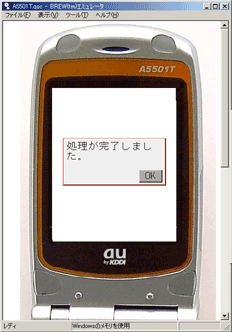
Messagedialog is a dialog with maximum 1 button.
Example 10.21. Create the MessageDialog
new SFRMessageDialog(SFXRectangle(20, 80, 200, 100), "Processing completed", "OK");
By default, the MessageDialog instance closes when the button is pressed. To change the default behaviour of handler function when the button is pressed, declare, implement, and register another handler function.
Example 10.22. Declare, Implement, and Register the Message Dialog
class ExampleAppli : public SFRApplication {
    ...

    // declare dialog handler
    HANDLER_DECLARE_VOIDDIALOG(OnDialog)

    ...
};

// Dialog handler
HANDLER_IMPLEMENT_VOIDDIALOG(ExampleAppli, OnDialog, result, dialog)
{

     ...  // some processing

    // close the dialog
    // dialog : pointer to dialog
    dialog->Invoke(SFXEvent(SREVT_RESPONDER_TERMINATE,
                            SRP16_TERMINATE_INVOKE,
                            true));
}

// register dialog handler
SFRDialogPtr dialog;
dialog = new SFRMessageDialog(SFXRectangle(20, 80, 200, 100),
                              "Processing completed",
                              "OK");

dialog->RegisterHandler(SREVT_DIALOG,
                        HANDLER_BEFORE,
                        HANDLER_FUNCTION(OnDialog));
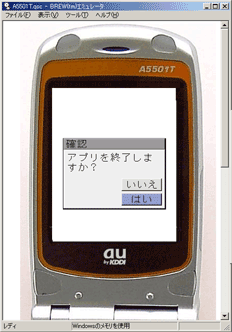
MultiDialog is a dialog with maximum 3 buttons.
![[Note]](images/note.png) |
Not Displaying the Button |
|---|---|
If the text for button is empty, the button will not be displayed. | |
Example 10.23. Create the MultiDialog
SFRMultiDialog::ParamRec param;
param.text = "Exit the application?";
param.ok = "Yes";
param.cancel = "No";
param.another = ";                  // in case of empty text, button is not displayed
param.focus = SFRMultiDialog::FOCUS_OK,  // initial focus position
param.image = SFBImageSmp(null);         // icon image
new SFRMultiDialog(SFXRectangle(20, 80, 200, 150), "Confirmation", param);
The SFRMultiDialog::ParamRec structure is used to specify arguments for the SFRMultiDialog constructor.
Write the processing when the button is pressed in the handler function for MultiDialog.
Example 10.24. Implement the MultiDialog handler
HANDLER_IMPLEMENT_VOIDDIALOG(ExampleAppli, OnDialog, result, dialog)
{

    // switch according to type of pressed button
    switch (result) {
        case SRP16_OK:         // OK button
            ...

        case SRP16_CANCEL:     // CANCEL button
            ...

        case SRP16_ANOTHER:    // ANOTHER button
            ...

    }
}
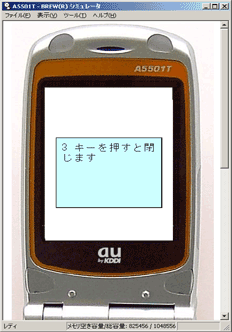
Create and customize the FrameDialog class that inherits from the SFRFrameDialog class. The drawing handler and key handler can be registered just like the Window class.
Example 10.25. Customize the FrameDialog
SFMTYPEDEFCLASS(MyDialog)
class MyDialog : public SFRFrameDialog {
    SFMSEALCOPY(MyDialog)
public:
    MyDialog(Void) static_throws;
    virtual ~MyDialog(Void);
private:
    HANDLER_DECLARE_VOIDRENDER(OnRenderContent)
    HANDLER_DECLARE_BOOLEVENT(OnKey)
};

// Constructor
// register drawing and key handlers
MyDialog::MyDialog() : SFRFrameDialog(SFXRectangle(20, 80, 200, 150)) static_throws {
    if (static_try()) {
        static_throw(
            RegisterHandler(SREVT_RESPONDER_RENDER,
                            SRP16_RENDER_CONTENT,
                            HANDLER_BEFORE,
                            HANDLER_FUNCTION(OnRenderContent)));
    }
    if (static_try()) {
        static_throw(
            RegisterHandler(SFEVT_KEY,
                            HANDLER_AFTER,
                            HANDLER_FUNCTION(OnKey)));
    }
}

// Destructor
MyDialog::~MyDialog(Void)
{
    return;
}

// Drawing handler
HANDLER_IMPLEMENT_VOIDRENDER(MyDialog, OnRenderContent, graphics) {

    // set background to light blue
    graphics->FillRectangle(GetContentWorld(),
                            SFXRGBColor(0xCC, 0xFF, 0xFF, 0x00));

    // draw string that automatically turning back in specified rectangle
    // 1st arg: string to be drawn
    // 2nd arg: drawing rectangular
    // 3rd arg: drawing color
    // 4th arg: text alignment
    graphics->DrawString("Press 3 key to close",
                         SFXRectangle(10, 10, 180, 80),
                         SFXRGBColor(0, 0, 0, 0),
                         IDF_ALIGN_LEFT | IDF_ALIGN_MIDDLE);
}

// implement key handler
HANDLER_IMPLEMENT_BOOLEVENT(MyDialog, OnKey, event)
{
    switch (event.GetP16()) {
        case AVK_3: // 3 has been pressed
            // close itself
            return Invoke(SFXEvent(SREVT_RESPONDER_TERMINATE,
                                   SRP16_TERMINATE_INVOKE,
                                   true));
    }
    return false;
}
|
Copyright(c) 2002 - 2024 Sophia Cradle Incorporated All Rights Reserved. |
|