


|
|
SophiaFramework UNIVERSE 5.3 |
#include <SFZTabControl.h.hpp>
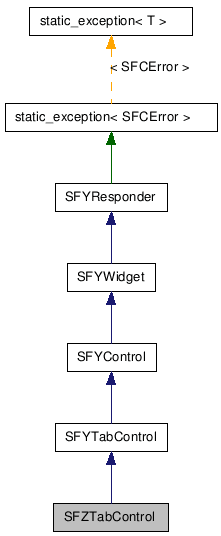
class SFZTabControl : public SFYTabControl;
SFMTYPEDEFRESPONDER(SFZTabControl)
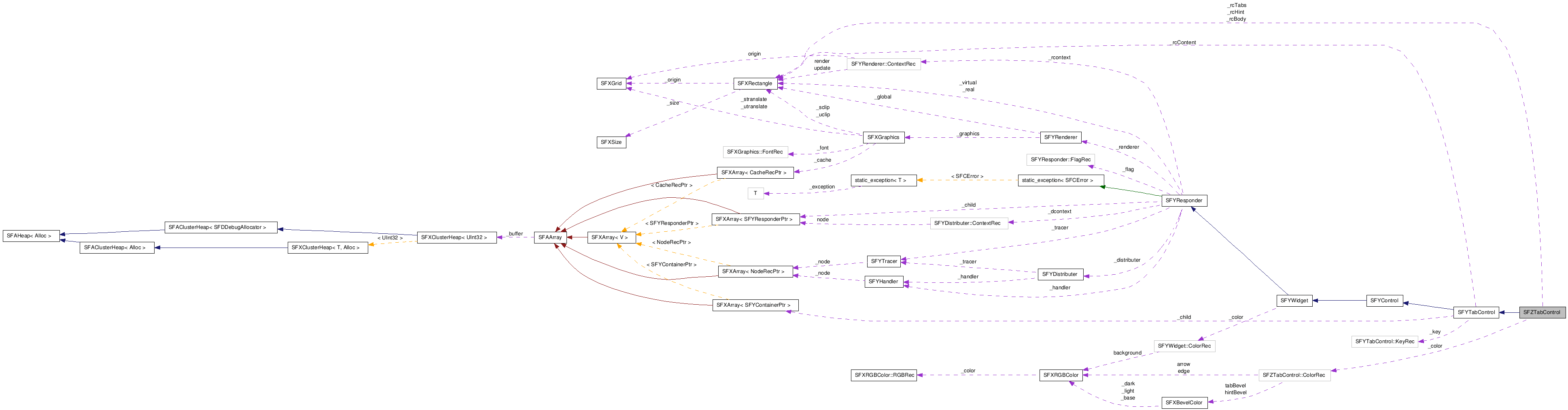
タブコントロール(SFZTabControl)は、 複数のタブページ(SFZTabPage)をタブ形式のユーザーインターフェースで管理する機能を提供します。
タブコントロールへのタブページの挿入は、 タブページの親レスポンダをタブコントロールに設定することにより行います。
タブページの表示切り替えは、タブコントロールのタブのフォーカス移動によって行います。
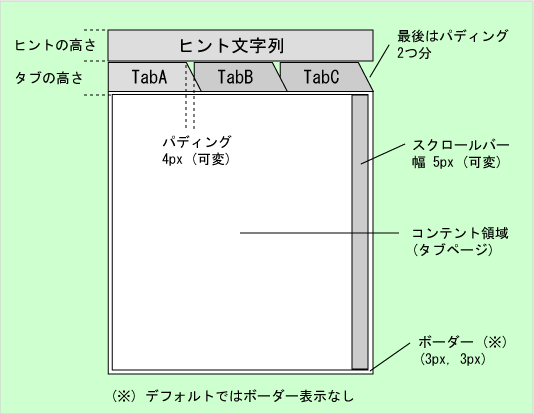
SFZTabControl のレイアウト
タブページの追加
タブコントロールへのタブページ追加は、 タブページの SFYResponder::SetParent 関数を呼び出して親レスポンダにタブコントロールを設定することにより行います。
![[Note]](images/note.png) |
注意 |
|---|---|
|
タブページは、タブコントロールに追加された順に並びます。 この順序を変更するには、タブページを削除して追加しなおす必要があります。 なお、タブページのインデックスは、タブページがタブコントロールに追加された順を表します。 | |
|
注意 |
|---|---|
コントロールは子レスポンダとしてコンテナ(SFYContainer クラスを継承するレスポンダ)を持ちませんが、 タブコントロールだけは例外的に子レスポンダとしてコンテナを持ちます。 | |
領域の設定
SFYResponder::SetRealBound 関数を呼び出してタブコントロールの実領域を設定します。
|
注意 |
|---|---|
内部処理により、 タブコントロールの仮想領域は、 常に実領域に一致します。 | |
タブページの実領域は、 内部処理により自動的にタブコントロールのコンテント領域に設定されます。 開発者はタブページの実領域を設定する必要はありません。
|
タブコントロールのコンテント領域 |
|---|---|
タブコントロールのコンテント領域とは、 タブコントロールの領域からヒント領域、タブ領域、ボーダー領域、スクロールバー領域を除いた矩形領域のことです。 タブページの内容が表示される領域であるので、コンテント領域と呼びます。 | |
タブページの仮想領域は、 タブコントロールにすべてのタブページを追加し終えてから一度だけ 明示的に SFYTabControl::AdjustPages 関数を呼び出すことにより行います。 このとき、仮想領域は自動的に計算されて、 タブコントロールのコンテント領域とタブページの子レスポンダを含む最小の矩形領域に設定されます (始点は (0, 0) で、タブページの実領域の始点と同じ)。
|
注意 |
|---|---|
タブページのすべての子レスポンダがタブコントロールのコンテント領域内に配置される場合、 SFYTabControl::AdjustPages 関数の呼び出しは省略できます。 | |
状態について
タブコントロールは、 以下のようにタブページの状態に応じて描画や、 フォーカス時の振る舞いが異なります。
|
注意 |
|---|---|
上記のラベルとは、タブコントロールのタブに表示されるタブページのタイトルラベルのことです。 | |
|
タブページの初期状態 |
|---|---|
|
インスタンス生成直後、タブページの状態は「可視+活性+操作可能+非フォーカス」に初期化されます。 大抵の場合は、この設定で十分なので、タブページの状態を設定する必要はありません。 | |
タブコントロールのデザイン
タブ領域やヒント領域、ボーダー領域を表示するための関数が利用可能です。 詳しくは、SFZTabControl / SFZTabPage クラスのリファレンスを参照してください。
タブページの選択
タブコントロールには、SFYTabControl::SetFieldValue 関数で設定した数のタブが表示されます。
各タブには対応するタブページが存在し、タブには対応するタブページのタイトルテキストが表示されます (ヒント領域が設定されている場合はヒントテキストも表示されます)。 そのうちの 1 つのタブページだけがフォーカス状態になり、その内容がコンテント領域に表示されます。
SFZTabControl::SetFocusTabTopEdgeEnable 関数で上境界線を有効に設定している場合、 フォーカス状態のタブページに対応するタブの上境界線は SFZTabControl::SetFocusTabTopEdgeColor 関数で設定した色で描画されます。
特定のタブページにフォーカスを移動するには、 SFYTabControl::FocusPage 関数を呼び出します。 現在フォーカスを持つタブページのフォーカスを前後(左右)のタブページに移動するには、 SFYTabControl::FocusLeft / SFYTabControl::FocusRight 関数を呼び出します。
フォーカスの移動先であるタブページのタイトルテキストがタブコントロールのタブ領域に表示されていない場合は、 自動的にタブ領域が左右にスクロールして表示されます。
|
注意 |
|---|---|
SFYTabControl::FocusLeft / SFYTabControl::FocusRight 関数は、 SFYTabControl::SetFocusLeftKey / SFYTabControl::SetFocusRightKey 関数で設定した左右のフォーカス移動キーを押下すると呼び出されます。 | |
![[Caution]](images/caution.png) |
注意 |
|---|---|
|
選択されたタブページは、 フォーカス状態は "true"に設定され、 同じ姉妹タブページの中で最前面に配置されます。 タブコントロールの表示内容の整合性が崩れるので、 タブページに対して SFYResponder::ToFront / SFYResponder::SetStateFocus 関数を呼び出すことは禁止されています。 タブページの内容を表示する場合は、SFYTabControl::FocusPage 関数を使用してください。 | |
タブページの削除
タブコントロールからタブページを削除する方法は以下の通りです。
タブコントロールからタブページを動的に削除するコードは以下の通りです。
// CASE 1. タブページを保持する場合 (親を空にする)
page->SetParent(SFYResponder::EmptyInstance());

// CASE 2. タブページを他のタブコントロールで利用する場合(親を他のタブコントロールに設定する)
SFYTabControlSmp othertab;
page->SetParent(othertab);

// CASE 3. タブページを破棄する場合
page->Terminate();
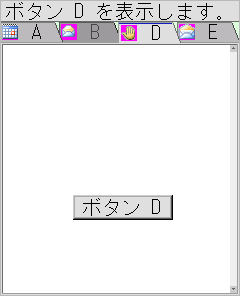
5つのタブページを持つタブコントロールを生成するためのコード
Void UserAppClass::Main(Void)
{
    SFBShellSmp         shell = SFBShell::GetInstance();
    SFBImageSmp         image;
    SFCError            error(SFERR_NO_ERROR);

    // ウインドウを生成する
    SFZWindowSmp window = SFZWindow::NewInstance();
    window->SetParent(GetThis());                  // UserAppClass を親にする
    window->SetRealBound(GetLocalBound());         // UserAppClass のローカル領域を実領域にする
    window->SetState(true, true, true, true);      // 可視・活性・操作可能・フォーカス状態

    // [必須] タブコントロールを生成する
    SFZTabControlSmp tab = SFZTabControl::NewInstance(&error);

    // [必須] 親を設定する
    tab->SetParent(window);

    // [必須] 実領域を設定する
    tab->SetRealBound(window->GetLocalBound());

    // [任意] タブの背景色 (薄緑色) を設定する
    tab->SetBackgroundColor(SFXRGBColor(0xDD, 0xFF, 0xDD, 0x00));

    // [必須] 可視・活性・操作可能・フォーカス状態に設定する
    tab->SetState(true, true, true, true);

    // [必須] タブページを生成する
    SFZTabPageSmp pageA = SFZTabPage::NewInstance(&error);
    SFZTabPageSmp pageB = SFZTabPage::NewInstance(&error);
    SFZTabPageSmp pageC = SFZTabPage::NewInstance(&error);
    SFZTabPageSmp pageD = SFZTabPage::NewInstance(&error);
    SFZTabPageSmp pageE = SFZTabPage::NewInstance(&error);

    // [必須] タブページの親をタブコントロールに設定する
    // ( 親を設定した順番でタブには表示される )
    pageA->SetParent(tab);
    pageB->SetParent(tab);
    pageC->SetParent(tab);
    pageD->SetParent(tab);
    pageE->SetParent(tab);

    // [任意] タブページタイトル文字列を設定する
    pageA->SetTitle("A");
    pageB->SetTitle("B");
    pageC->SetTitle("C");
    pageD->SetTitle("D");
    pageE->SetTitle("E");

    // [任意] タブページタイトル画像を設定する
    image = shell->LoadResImage(SAMPLETAB_RES_FILE, IDI_OBJECT_5001);
    pageA->SetImage(image);
    image = shell->LoadResImage(SAMPLETAB_RES_FILE, IDI_OBJECT_5002);
    pageB->SetImage(image);
    image = shell->LoadResImage(SAMPLETAB_RES_FILE, IDI_OBJECT_5003);
    pageD->SetImage(image);
    image = shell->LoadResImage(SAMPLETAB_RES_FILE, IDI_OBJECT_5004);
    pageE->SetImage(image);

    // [任意] タブページのヒントテキストを設定する
    pageA->SetHint("ボタン A を表示します。");
    pageB->SetHint("タブに表示されません。");
    pageC->SetHint("選択できません。");
    pageD->SetHint("ボタン D を表示します。");
    pageE->SetHint("ボタン E を表示します。");

    // [必須] 各タブページの状態を設定する
    // (タブページ B は表示されず、タブページ C は選択不可になる)
    pageA->SetState(true, true, true, false);       // 操作可能
    pageB->SetState(true, false, false, false);     // 非活性
    pageC->SetState(false, false, false, false);    // 非可視
    pageD->SetState(true, true, true, false);       // 操作可能
    pageE->SetState(true, true, true, false);       // 操作可能

    // [任意] タブページ内のアイテムを設定する
    SFZTextButtonControlSmp buttonA = SFZTextButtonControl::NewInstance();
    SFZTextButtonControlSmp buttonD = SFZTextButtonControl::NewInstance();
    SFZTextButtonControlSmp buttonE = SFZTextButtonControl::NewInstance();
    buttonA->SetParent(pageA);
    buttonD->SetParent(pageD);
    buttonE->SetParent(pageE);
    buttonA->SetText("ボタン A");
    buttonD->SetText("ボタン D");
    buttonE->SetText("ボタン E");
    buttonA->SetRealBound(SFXRectangle(70, 0, 100, 25));
    buttonD->SetRealBound(SFXRectangle(70, 150, 100, 25));
    buttonE->SetRealBound(SFXRectangle(70, 250, 100, 25));
    buttonA->SetState(true, true, true, true);
    buttonD->SetState(true, true, true, true);
    buttonE->SetState(true, true, true, true);

    // [任意] タブコントロール領域に同時に 4 つのタブページが表示されるように設定する
    tab->SetFieldValue(4);

    // [任意] ボーダーを描画する
    tab->SetDrawBorder(true);

    // [任意] スクロールバーの幅を設定する
    tab->SetScrollBarWidth(7);

    // [任意] パディング値を設定する (必ず0以上)
    tab->SetPadding(4);

    // [推奨] タブページ pageD を選択する (pageD を最前面に移動させ表示する)
    tab->FocusPage(3);

    // 選択されているタブが現在表示されているタブページに一致しなくなる可能性があるため、
    // 下記の方法により pageD を最前面に移動させてはいけない(禁止事項)
    // × pageD->ToFront();

    // ■□■  タブページの仮想領域設定  ■□■
    // ※1. タブページの内容(子レスポンダ)がタブコントロールのコンテント領域外に配置される場合は、
    //      SFYTabControl::AdjustPages 関数を呼び出してタブページの仮想領域を設定する必要がある
    // ※2. この例では、タブページの内容がすべてタブコントロールのコンテント領域内に収まっているので、
    //      SFYTabControl::AdjustPages 関数を呼び出す必要はない

    return;
}
実行結果:
コントロール値の役割と制限について
最小値は、常に 0 です。
現在値は、選択されているタブページのインデックスを表します。 タブページが存在しない場合は -1 になります。 タブページの選択は、 SFYControl::SetCurrentValue 関数ではなく SFYTabControl::FocusPage 関数を使用します。
最大値は、タブコントロールのタブページ数を表します(※この機能は将来的に廃止される予定です)。 タブページ数の取得には、SFYTabControl::GetPageCount 関数を使用してください。
フィールド値は、タブの数を表します。 必ず 1 以上の値を設定する必要があります。
トップ値は、一番左側のタブに対応するタブページのインデックスを表します。
仕様上の制限
タブコントロールの子レスポンダに、 SFZTabPage クラスかそれを継承するクラス以外のレスポンダを登録した時の動作は未定義です。
SFYControl::SetMinimumValue, SFYControl::SetMaximumValue, SFYControl::SetCurrentValue で最小値、最大値、現在値を変更してはいけません。
タブコントロールとタブページ [SFZTabControl] | SFYControl | SFYTabControl | SFZTabPage | SFYResponder::SetRealBound | SFYResponder::SetVirtualBound | SFYTabControl::AdjustPages | SFYTabControl::FocusPage | 実領域 | 仮想領域
| コンストラクタ/デストラクタ |
|---|
|
SFZTabControl( Void ) SFZTabControl クラスのコンストラクタです。
|
|
~SFZTabControl( Void ) SFZTabControl クラスのデストラクタです。
|
| パブリック関数 | |
|---|---|
| SFXRGBColorConstRef |
GetArrowColor( Void ) タブの左右にある矢印の色を取得します。
|
| SFXRGBColorConstRef |
GetFocusTabTopEdgeColor( Void ) フォーカスタブの上境界線の色を取得します。
|
| Bool |
GetFocusTabTopEdgeEnable( Void ) フォーカスタブの上境界線に関する有効フラグの値を取得します。
|
| AEEFont |
GetFont( Void ) フォントを取得します。
|
| SFXBevelColorConstRef |
GetHintBevelColor( Void ) ヒント領域のベベルカラーを取得します。
|
| SInt16 |
GetHintHeight( Void ) ヒント領域の高さを取得します。[単位:ピクセル]
|
| SInt16 |
GetPadding( Void )
パディングサイズを取得します。[単位:ピクセル]
|
| SFZTabPageSmp |
GetPage(
SInt16 index
) 指定されたインデックスのタブページを取得します。
|
| SFXBevelColorConstRef |
GetTabBevelColor( Void ) タブ領域のベベルカラーを取得します。
|
| SInt16 |
GetTabHeight( Void ) タブ領域の高さを取得します。[単位:ピクセル]
|
| static SFZTabControlSmp |
NewInstance(
SFCErrorPtr exception = null
) 新しいインスタンスを作成します。
|
| Void |
SetArrowColor(
SFXRGBColorConstRef param
) タブの左右にある矢印の色を設定します。
|
| Void |
SetDrawBorder(
Bool param
) タブコントロールの境界線に関する有効フラグを設定します。
|
| Void |
SetFocusTabTopEdgeColor(
SFXRGBColorConstRef param
) フォーカスタブの上境界線の色を設定します。
|
| Void |
SetFocusTabTopEdgeEnable(
Bool param
) フォーカスタブの上境界線に関する有効フラグを設定します。
|
| Void |
SetFont(
AEEFont param
) フォントを設定します。
|
| Void |
SetHintBevelColor(
SFXBevelColorConstRef param
) ヒント領域のベベルカラーを設定します。
|
| Void |
SetHintHeight(
SInt16 param
) ヒント領域の高さを設定します。[単位:ピクセル]
|
| Void |
SetPadding(
SInt16 param
) パディングサイズを設定します。[単位:ピクセル]
|
| Void |
SetTabBevelColor(
SFXBevelColorConstRef param
) タブ領域のベベルカラーを設定します。
|
| Void |
SetTabHeight(
SInt16 param
) タブ領域の高さを設定します。
|
| Void |
ClearHandler( Void )
(SFYResponder から継承)
このレスポンダのハンドラの登録をすべて解除します。
|
| Void |
ClearTracer( Void )
(SFYResponder から継承)
このレスポンダのトレーサの配信規則の登録をすべて解除します。
|
| SFCError |
Distribute(
SFXEventConstRef event
, BoolPtr result = null
)
(SFYResponder から継承)
指定された配信型イベントを
SFYDistributer インスタンスと、このレスポンダ以下のレスポンダツリーに配信します。
|
| SInt32 |
FirstIndexOf(
Bool visible
, Bool active
, Bool enable
)
(SFYTabControl から継承)
指定された条件に一致する最初のタブページのインデックスを取得します。
|
| Void |
FocusLeft( Void )
(SFYTabControl から継承)
フォーカスを左のタブページに移動します。
|
| SFCError |
FocusPage(
SInt32 index
)
(SFYTabControl から継承)
指定されたインデックスのタブページにフォーカスを移動します。
|
| Void |
FocusRight( Void )
(SFYTabControl から継承)
フォーカスを右のタブページに移動します。
|
| SFXRGBColorConstRef |
GetBackgroundColor( Void )
(SFYWidget から継承)
背景の色を取得します。
|
| SInt32 |
GetBottomValue( Void )
(SFYTabControl から継承)
現在最右端に表示されているタブに対応するタブページのインデックスを取得します。
|
| SFYResponderSmp |
GetChildBack( Void )
(SFYResponder から継承)
最背面に位置するこのレスポンダの子レスポンダを取得します。
|
| SFYResponderSmp |
GetChildBack(
Bool visible
, Bool active
, Bool enable
, Bool focus
)
(SFYResponder から継承)
最背面に位置するこのレスポンダの子レスポンダを取得します。
|
| SFYResponderSmp |
GetChildBack(
UInt32 id
)
(SFYResponder から継承)
最背面に位置するこのレスポンダの子レスポンダを取得します。
|
| SFYResponderSmp |
GetChildBack(
UInt32 id
, Bool visible
, Bool active
, Bool enable
, Bool focus
)
(SFYResponder から継承)
最背面に位置するこのレスポンダの子レスポンダを取得します。
|
| SFYResponderSmp |
GetChildBackward(
SInt32 index
)
(SFYResponder から継承)
背面から数えて指定された順番に位置するこのレスポンダの子レスポンダを取得します。
|
| SFYResponderSmp |
GetChildBackward(
SInt32 index
, Bool visible
, Bool active
, Bool enable
, Bool focus
)
(SFYResponder から継承)
背面から数えて指定された順番に位置するこのレスポンダの子レスポンダを取得します。
|
| SFYResponderSmp |
GetChildBackward(
SInt32 index
, UInt32 id
)
(SFYResponder から継承)
背面から数えて指定された順番に位置するこのレスポンダの子レスポンダを取得します。
|
| SFYResponderSmp |
GetChildBackward(
SInt32 index
, UInt32 id
, Bool visible
, Bool active
, Bool enable
, Bool focus
)
(SFYResponder から継承)
背面から数えて指定された順番に位置するこのレスポンダの子レスポンダを取得します。
|
| SInt32 |
GetChildCount( Void )
(SFYResponder から継承)
このレスポンダの子レスポンダの数を取得します。
|
| SInt32 |
GetChildCount(
Bool visible
, Bool active
, Bool enable
, Bool focus
)
(SFYResponder から継承)
このレスポンダの子レスポンダの数を取得します。
|
| SInt32 |
GetChildCount(
UInt32 id
)
(SFYResponder から継承)
このレスポンダの子レスポンダの数を取得します。
|
| SInt32 |
GetChildCount(
UInt32 id
, Bool visible
, Bool active
, Bool enable
, Bool focus
)
(SFYResponder から継承)
このレスポンダの子レスポンダの数を取得します。
|
| SFYResponderSmp |
GetChildForward(
SInt32 index
)
(SFYResponder から継承)
前面から数えて指定された順番に位置するこのレスポンダの子レスポンダを取得します。
|
| SFYResponderSmp |
GetChildForward(
SInt32 index
, Bool visible
, Bool active
, Bool enable
, Bool focus
)
(SFYResponder から継承)
前面から数えて指定された順番に位置するこのレスポンダの子レスポンダを取得します。
|
| SFYResponderSmp |
GetChildForward(
SInt32 index
, UInt32 id
)
(SFYResponder から継承)
前面から数えて指定された順番に位置するこのレスポンダの子レスポンダを取得します。
|
| SFYResponderSmp |
GetChildForward(
SInt32 index
, UInt32 id
, Bool visible
, Bool active
, Bool enable
, Bool focus
)
(SFYResponder から継承)
前面から数えて指定された順番に位置するこのレスポンダの子レスポンダを取得します。
|
| SFYResponderSmp |
GetChildFront( Void )
(SFYResponder から継承)
最前面に位置するこのレスポンダの子レスポンダを取得します。
|
| SFYResponderSmp |
GetChildFront(
Bool visible
, Bool active
, Bool enable
, Bool focus
)
(SFYResponder から継承)
最前面に位置するこのレスポンダの子レスポンダを取得します。
|
| SFYResponderSmp |
GetChildFront(
UInt32 id
)
(SFYResponder から継承)
最前面に位置するこのレスポンダの子レスポンダを取得します。
|
| SFYResponderSmp |
GetChildFront(
UInt32 id
, Bool visible
, Bool active
, Bool enable
, Bool focus
)
(SFYResponder から継承)
最前面に位置するこのレスポンダの子レスポンダを取得します。
|
| SFXRectangleConstRef |
GetContentBound( Void )
(SFYTabControl から継承)
タブコントロールに設定されるタブページの実領域を取得します。
|
| SInt32 |
GetCurrentValue( Void )
(SFYControl から継承)
コントロールの現在値を取得します。
|
| SFYDistributerPtr |
GetDistributer( Void )
(SFYResponder から継承)
このレスポンダに設定されている配信エンジンを取得します。
|
| SInt32 |
GetFieldValue( Void )
(SFYTabControl から継承)
タブの数を取得します。
|
| AVKType |
GetFocusLeftKey( Void )
(SFYTabControl から継承)
左のタブにフォーカスを移動させるキーを取得します。
|
| AVKType |
GetFocusRightKey( Void )
(SFYTabControl から継承)
右のタブにフォーカスを移動させるキーを取得します。
|
| SFYResponderSmp |
GetFrame( Void )
(SFYResponder から継承)
このレスポンダに装着されたフレームを取得します。
|
| SFXRectangle |
GetGlobalBound( Void )
(SFYResponder から継承)
このレスポンダのグローバル領域を取得します。
|
| UInt32 |
GetID( Void )
(SFYResponder から継承)
このレスポンダの ID を取得します。
|
| SInt32 |
GetIndex(
SFYContainerSmpConstRef tabpage
)
(SFYTabControl から継承)
指定されたタブページのインデックスを取得します。
|
| SFXRectangle |
GetLocalBound( Void )
(SFYResponder から継承)
このレスポンダのローカル領域を取得します。
|
| SInt32 |
GetMaximumValue( Void )
(SFYTabControl から継承)
[廃止予定] タブページの総数を取得します。
|
| SInt32 |
GetMinimumValue( Void )
(SFYControl から継承)
コントロールの最小値を取得します。
|
| SInt32 |
GetNthBackward( Void )
(SFYResponder から継承)
このレスポンダが背面から数えて何番目に位置するかを取得します。
|
| SInt32 |
GetNthBackward(
Bool visible
, Bool active
, Bool enable
, Bool focus
)
(SFYResponder から継承)
このレスポンダが背面から数えて何番目に位置するかを取得します。
|
| SInt32 |
GetNthBackward(
UInt32 id
)
(SFYResponder から継承)
このレスポンダが背面から数えて何番目に位置するかを取得します。
|
| SInt32 |
GetNthBackward(
UInt32 id
, Bool visible
, Bool active
, Bool enable
, Bool focus
)
(SFYResponder から継承)
このレスポンダが背面から数えて何番目に位置するかを取得します。
|
| SInt32 |
GetNthForward( Void )
(SFYResponder から継承)
このレスポンダが前面から数えて何番目に位置するかを取得します。
|
| SInt32 |
GetNthForward(
Bool visible
, Bool active
, Bool enable
, Bool focus
)
(SFYResponder から継承)
このレスポンダが前面から数えて何番目に位置するかを取得します。
|
| SInt32 |
GetNthForward(
UInt32 id
)
(SFYResponder から継承)
このレスポンダが前面から数えて何番目に位置するかを取得します。
|
| SInt32 |
GetNthForward(
UInt32 id
, Bool visible
, Bool active
, Bool enable
, Bool focus
)
(SFYResponder から継承)
このレスポンダが前面から数えて何番目に位置するかを取得します。
|
| SInt32 |
GetPageCount( Void )
(SFYTabControl から継承)
検索条件に一致するタブページの数を取得します。
|
| SInt32 |
GetPageCount(
Bool visible
, Bool active
, Bool enable
)
(SFYTabControl から継承)
検索条件に一致するタブページの数を取得します。
|
| SFYResponderSmp |
GetParent( Void )
(SFYResponder から継承)
このレスポンダの親レスポンダを取得します。
|
| Bool |
GetPropertyTransparent( Void )
(SFYResponder から継承)
このレスポンダの透過属性を取得します。
|
| SFXRectangleConstRef |
GetRealBound( Void )
(SFYResponder から継承)
このレスポンダの実領域を取得します。
|
| VoidPtr |
GetReference( Void )
(SFYResponder から継承)
このレスポンダのリファレンス値を取得します。
|
| SFYRendererPtr |
GetRenderer( Void )
(SFYResponder から継承)
このレスポンダに設定されている描画エンジンを取得します。
|
| SFYResponderSmp |
GetRoot( Void )
(SFYResponder から継承)
このレスポンダが所属するレスポンダツリーのルートレスポンダを取得します。
|
| SFXRGBColorConstRef |
GetSafePageBackgroundColor( Void )
(SFYTabControl から継承)
セーフページの背景色を取得します。
|
| SFYScrollBarControlSmpConstRef |
GetScrollBarControl( Void )
(SFYTabControl から継承)
タブコントロールで使用するスクロールバーコントロールを取得します。
|
| SInt16 |
GetScrollBarWidth( Void )
(SFYTabControl から継承)
タブコントロールで使用するスクロールバーコントロールの幅を取得します。[単位:ピクセル]
|
| Bool |
GetStateActive(
Bool inherit = false
)
(SFYResponder から継承)
このレスポンダの活性状態を取得します。
|
| Bool |
GetStateEnable(
Bool inherit = false
)
(SFYResponder から継承)
このレスポンダの操作可能状態を取得します。
|
| Bool |
GetStateFocus(
Bool inherit = false
)
(SFYResponder から継承)
このレスポンダのフォーカス状態を取得します。
|
| Bool |
GetStateValid(
Bool inherit = false
)
(SFYResponder から継承)
このレスポンダの有効状態を取得します。
|
| Bool |
GetStateVisible(
Bool inherit = false
)
(SFYResponder から継承)
このレスポンダの可視状態を取得します。
|
| SFXRectangle |
GetSuitableBound( Void )
(SFYResponder から継承)
このレスポンダの最適な領域(サイズ)を取得します。
|
| SFXRectangle |
GetSuitableBound(
SFXRectangleConstRef rectangle
)
(SFYResponder から継承)
このレスポンダの最適な領域(サイズ)を取得します。
|
| SFXRectangle |
GetSuitableBound(
SFXRectangleConstRef param
, HorizontalEnum horizontal
, VerticalEnum vertical
)
(SFYResponder から継承)
このレスポンダの最適な領域(サイズ)を取得します。
|
| SFXMargin |
GetSuitableMargin( Void )
(SFYResponder から継承)
このレスポンダのフレーム余白領域を取得します。
|
| Bool |
GetTabLoop( Void )
(SFYTabControl から継承)
タブのフォーカス移動ループフラグの値を取得します。
|
| SInt32 |
GetTopValue( Void )
(SFYTabControl から継承)
現在最左端に表示されているタブに対応するタブページのインデックスを取得します。
|
| SFCType |
GetType( Void )
(SFYResponder から継承)
このレスポンダのタイプを取得します。
|
| SFXRectangleConstRef |
GetVirtualBound( Void )
(SFYResponder から継承)
このレスポンダの仮想領域を取得します。
|
| Bool |
HasFrame( Void )
(SFYResponder から継承)
このレスポンダがコンテントレスポンダであるかどうかを判定します。
|
| Void |
Initialize( Void )
(SFYResponder から継承)
このレスポンダを初期化します。
|
| Void |
Invalidate( Void )
(SFYResponder から継承)
指定された領域を再描画領域に登録します。
|
| Void |
Invalidate(
SFXRectangleConstRef param
)
(SFYResponder から継承)
指定された領域を再描画領域に登録します。
|
| Void |
InvokeBackward(
SFXEventConstRef event
, Bool overload
, BoolPtr result = null
)
(SFYResponder から継承)
指定されたコールバック型イベントをこのレスポンダに送信します
(ハンドラは登録順に起動されます)。
|
| Void |
InvokeForward(
SFXEventConstRef event
, Bool overload
, BoolPtr result = null
)
(SFYResponder から継承)
指定されたコールバック型イベントをこのレスポンダに送信します
(ハンドラは登録の逆順に起動されます)。
|
| Bool |
IsBack( Void )
(SFYResponder から継承)
このレスポンダが最背面に位置するかどうかを判定します。
|
| Bool |
IsBack(
Bool visible
, Bool active
, Bool enable
, Bool focus
)
(SFYResponder から継承)
このレスポンダが最背面に位置するかどうかを判定します。
|
| Bool |
IsBack(
UInt32 id
)
(SFYResponder から継承)
このレスポンダが最背面に位置するかどうかを判定します。
|
| Bool |
IsBack(
UInt32 id
, Bool visible
, Bool active
, Bool enable
, Bool focus
)
(SFYResponder から継承)
このレスポンダが最背面に位置するかどうかを判定します。
|
| Bool |
IsFrame( Void )
(SFYResponder から継承)
このレスポンダがアタッチメントフレームであるかどうかを判定します。
|
| Bool |
IsFront( Void )
(SFYResponder から継承)
このレスポンダが最前面に位置するかどうかを判定します。
|
| Bool |
IsFront(
Bool visible
, Bool active
, Bool enable
, Bool focus
)
(SFYResponder から継承)
このレスポンダが最前面に位置するかどうかを判定します。
|
| Bool |
IsFront(
UInt32 id
)
(SFYResponder から継承)
このレスポンダが最前面に位置するかどうかを判定します。
|
| Bool |
IsFront(
UInt32 id
, Bool visible
, Bool active
, Bool enable
, Bool focus
)
(SFYResponder から継承)
このレスポンダが最前面に位置するかどうかを判定します。
|
| Bool |
IsNthBackward(
SInt32 index
)
(SFYResponder から継承)
このレスポンダが背面から数えて指定された順番に位置するかどうかを判定します。
|
| Bool |
IsNthBackward(
SInt32 index
, Bool visible
, Bool active
, Bool enable
, Bool focus
)
(SFYResponder から継承)
このレスポンダが背面から数えて指定された順番に位置するかどうかを判定します。
|
| Bool |
IsNthBackward(
SInt32 index
, UInt32 id
)
(SFYResponder から継承)
このレスポンダが背面から数えて指定された順番に位置するかどうかを判定します。
|
| Bool |
IsNthBackward(
SInt32 index
, UInt32 id
, Bool visible
, Bool active
, Bool enable
, Bool focus
)
(SFYResponder から継承)
このレスポンダが背面から数えて指定された順番に位置するかどうかを判定します。
|
| Bool |
IsNthForward(
SInt32 index
)
(SFYResponder から継承)
このレスポンダが前面から数えて指定された順番に位置するかどうかを判定します。
|
| Bool |
IsNthForward(
SInt32 index
, Bool visible
, Bool active
, Bool enable
, Bool focus
)
(SFYResponder から継承)
このレスポンダが前面から数えて指定された順番に位置するかどうかを判定します。
|
| Bool |
IsNthForward(
SInt32 index
, UInt32 id
)
(SFYResponder から継承)
このレスポンダが前面から数えて指定された順番に位置するかどうかを判定します。
|
| Bool |
IsNthForward(
SInt32 index
, UInt32 id
, Bool visible
, Bool active
, Bool enable
, Bool focus
)
(SFYResponder から継承)
このレスポンダが前面から数えて指定された順番に位置するかどうかを判定します。
|
| Bool |
IsRoot( Void )
(SFYResponder から継承)
このレスポンダがルートレスポンダであるかどうかを判定します。
|
| SInt32 |
LastIndexOf(
Bool visible
, Bool active
, Bool enable
)
(SFYTabControl から継承)
指定された条件に一致する最後のタブページのインデックスを取得します。
|
| SInt32 |
NextIndexOf(
SInt32 index
, Bool visible
, Bool active
, Bool enable
)
(SFYTabControl から継承)
指定された条件に一致する次のタブページのインデックスを取得します。
|
| SInt32 |
PrevIndexOf(
SInt32 index
, Bool visible
, Bool active
, Bool enable
)
(SFYTabControl から継承)
指定された条件に一致する前のタブページのインデックスを取得します。
|
| SFCError |
Recover( Void )
(SFYResponder から継承)
デバイス画面保存用ビットマップを使用してこのレスポンダとレスポンダ空間との交差領域を復元します。
|
| SFCError |
RegisterHandler(
SFXEventRangeConstRef range
, SFYHandler::RuleRecConstRef rule
)
(SFYResponder から継承)
指定されたハンドラをこのレスポンダに登録します。
|
| SFCError |
RegisterHandler(
SFXEventRangeConstRef range
, SFYHandler::HandlerSPP spp
, VoidPtr reference
)
(SFYResponder から継承)
指定されたハンドラをこのレスポンダに登録します。
|
| SFCError |
RegisterHandler(
SFXEventRangeConstPtr range
, SFYHandler::RuleRecConstPtr rule
, SInt32 length
)
(SFYResponder から継承)
指定されたハンドラをこのレスポンダに登録します。
|
| SFCError |
RegisterHandler(
SFXEventRangeConstPtr range
, SFYHandler::HandlerSPPConstPtr spp
, VoidPtrConstPtr reference
, SInt32 length
)
(SFYResponder から継承)
指定されたハンドラをこのレスポンダに登録します。
|
| SFCError |
RegisterTracer(
SFXEventRangeConstRef range
, SFYTracer::RuleRecConstRef rule
)
(SFYResponder から継承)
指定された配信規則をこのレスポンダのトレーサに登録します。
|
| SFCError |
RegisterTracer(
SFXEventRangeConstRef range
, SFYTracer::OrderEnum order
, SFYTracer::StateEnum state
, Bool overload
)
(SFYResponder から継承)
指定された配信規則をこのレスポンダのトレーサに登録します。
|
| SFCError |
RegisterTracer(
SFXEventRangeConstPtr range
, SFYTracer::RuleRecConstPtr rule
, SInt32 length
)
(SFYResponder から継承)
指定された配信規則をこのレスポンダのトレーサに登録します。
|
| SFCError |
RegisterTracer(
SFXEventRangeConstPtr range
, SFYTracer::OrderEnumConstPtr order
, SFYTracer::StateEnumConstPtr state
, BoolConstPtr overload
, SInt32 length
)
(SFYResponder から継承)
指定された配信規則をこのレスポンダのトレーサに登録します。
|
| SFCError |
Render(
Bool force = false
)
(SFYResponder から継承)
このレスポンダ以下のレスポンダツリーをレスポンダ空間に再描画します。
|
| Void |
SetBackgroundColor(
SFXRGBColorConstRef param
)
(SFYWidget から継承)
背景の色を設定します。
|
| Void |
SetCurrentValue(
SInt32 param
)
(SFYControl から継承)
コントロールの現在値を設定します。
|
| Void |
SetDistributer(
SFYDistributerPtr param
)
(SFYResponder から継承)
指定された配信エンジンをこのレスポンダに設定します。
|
| Void |
SetFieldValue(
SInt32 param
)
(SFYTabControl から継承)
タブの数を設定します。
|
| Void |
SetFocusLeftKey(
AVKType param
)
(SFYTabControl から継承)
左のタブにフォーカスを移動させるキーを設定します。
|
| Void |
SetFocusRightKey(
AVKType param
)
(SFYTabControl から継承)
右のタブにフォーカスを移動させるキーを設定します。
|
| SFCError |
SetFrame(
SFYResponderSmpConstRef param
)
(SFYResponder から継承)
このレスポンダにフレームを装着します。
|
| Void |
SetID(
UInt32 param
)
(SFYResponder から継承)
指定された ID をこのレスポンダに設定します。
|
| Void |
SetMaximumValue(
SInt32 param
)
(SFYControl から継承)
コントロールの最大値を設定します。
|
| Void |
SetMinimumValue(
SInt32 param
)
(SFYControl から継承)
コントロールの最小値を設定します。
|
| SFCError |
SetParent(
SFYResponderSmpConstRef param
)
(SFYResponder から継承)
指定されたレスポンダをこのレスポンダの親レスポンダに設定します。
|
| Void |
SetProperty(
Bool transparent
)
(SFYResponder から継承)
指定された属性をこのレスポンダに設定します。
|
| Void |
SetPropertyTransparent(
Bool param
)
(SFYResponder から継承)
指定された透過属性をこのレスポンダに設定します。
|
| Void |
SetRealBound(
SFXRectangleConstRef param
)
(SFYResponder から継承)
指定された領域をこのレスポンダの実領域に設定します。
|
| Void |
SetReference(
VoidPtr param
)
(SFYResponder から継承)
指定された値をこのレスポンダのリファレンスに設定します。
|
| Void |
SetRenderer(
SFYRendererPtr param
)
(SFYResponder から継承)
指定された描画エンジンをこのレスポンダに設定します。
|
| Void |
SetSafePageBackgroundColor(
SFXRGBColorConstRef param
)
(SFYTabControl から継承)
セーフページの背景色を設定します。
|
| SFCError |
SetScrollBarControl(
SFYScrollBarControlSmpConstRef param
)
(SFYTabControl から継承)
タブコントロールで使用するスクロールバーを設定します。
|
| Void |
SetScrollBarWidth(
SInt16 param
)
(SFYTabControl から継承)
タブコントロールで使用するスクロールバーコントロールの幅を設定します。[単位:ピクセル]
|
| Void |
SetState(
Bool visible
, Bool active
, Bool enable
, Bool focus
)
(SFYResponder から継承)
指定された値をこのレスポンダの可視、活性、操作可能、フォーカスの各状態フラグに設定します。
|
| Void |
SetStateActive(
Bool param
)
(SFYResponder から継承)
指定された値をこのレスポンダの活性状態フラグに設定します。
|
| Void |
SetStateEnable(
Bool param
)
(SFYResponder から継承)
指定された値をこのレスポンダの操作可能状態フラグに設定します。
|
| Void |
SetStateFocus(
Bool param
)
(SFYResponder から継承)
指定された値をこのレスポンダのフォーカス状態フラグに設定します。
|
| Void |
SetStateVisible(
Bool param
)
(SFYResponder から継承)
指定された値をこのレスポンダの可視状態フラグに設定します。
|
| Void |
SetTabLoop(
Bool param
)
(SFYTabControl から継承)
タブのフォーカス移動ループフラグを設定します。
|
| Void |
SetVirtualBound(
SFXRectangleConstRef param
)
(SFYResponder から継承)
指定された領域をこのレスポンダの仮想領域に設定します。
|
| SFCError |
Snapshot(
SFBBitmapSmpConstRef bitmap
)
(SFYResponder から継承)
デバイス画面保存用ビットマップからこのレスポンダとレスポンダ空間との交差領域のスナップショットを取得します。
|
| Void |
Terminate( Void )
(SFYResponder から継承)
このレスポンダの終了処理を行います。
|
| Void |
ToBack( Void )
(SFYResponder から継承)
このレスポンダを指定された条件の姉妹レスポンダのなかで最背面に移動します。
|
| Void |
ToBack(
Bool visible
, Bool active
, Bool enable
, Bool focus
)
(SFYResponder から継承)
このレスポンダを指定された条件の姉妹レスポンダのなかで最背面に移動します。
|
| Void |
ToBack(
UInt32 id
)
(SFYResponder から継承)
このレスポンダを指定された条件の姉妹レスポンダのなかで最背面に移動します。
|
| Void |
ToBack(
UInt32 id
, Bool visible
, Bool active
, Bool enable
, Bool focus
)
(SFYResponder から継承)
このレスポンダを指定された条件の姉妹レスポンダのなかで最背面に移動します。
|
| Void |
ToFront( Void )
(SFYResponder から継承)
このレスポンダを指定された条件の姉妹レスポンダのなかで最前面に移動します。
|
| Void |
ToFront(
Bool visible
, Bool active
, Bool enable
, Bool focus
)
(SFYResponder から継承)
このレスポンダを指定された条件の姉妹レスポンダのなかで最前面に移動します。
|
| Void |
ToFront(
UInt32 id
)
(SFYResponder から継承)
このレスポンダを指定された条件の姉妹レスポンダのなかで最前面に移動します。
|
| Void |
ToFront(
UInt32 id
, Bool visible
, Bool active
, Bool enable
, Bool focus
)
(SFYResponder から継承)
このレスポンダを指定された条件の姉妹レスポンダのなかで最前面に移動します。
|
| Void |
ToNthBackward(
SInt32 index
)
(SFYResponder から継承)
このレスポンダを指定された条件の姉妹レスポンダのなかで背面から数えて指定された位置に移動します。
|
| Void |
ToNthBackward(
SInt32 index
, Bool visible
, Bool active
, Bool enable
, Bool focus
)
(SFYResponder から継承)
このレスポンダを指定された条件の姉妹レスポンダのなかで背面から数えて指定された位置に移動します。
|
| Void |
ToNthBackward(
SInt32 index
, UInt32 id
)
(SFYResponder から継承)
このレスポンダを指定された条件の姉妹レスポンダのなかで背面から数えて指定された位置に移動します。
|
| Void |
ToNthBackward(
SInt32 index
, UInt32 id
, Bool visible
, Bool active
, Bool enable
, Bool focus
)
(SFYResponder から継承)
このレスポンダを指定された条件の姉妹レスポンダのなかで背面から数えて指定された位置に移動します。
|
| Void |
ToNthForward(
SInt32 index
)
(SFYResponder から継承)
このレスポンダを指定された条件の姉妹レスポンダのなかで前面から数えて指定された位置に移動します。
|
| Void |
ToNthForward(
SInt32 index
, Bool visible
, Bool active
, Bool enable
, Bool focus
)
(SFYResponder から継承)
このレスポンダを指定された条件の姉妹レスポンダのなかで前面から数えて指定された位置に移動します。
|
| Void |
ToNthForward(
SInt32 index
, UInt32 id
)
(SFYResponder から継承)
このレスポンダを指定された条件の姉妹レスポンダのなかで前面から数えて指定された位置に移動します。
|
| Void |
ToNthForward(
SInt32 index
, UInt32 id
, Bool visible
, Bool active
, Bool enable
, Bool focus
)
(SFYResponder から継承)
このレスポンダを指定された条件の姉妹レスポンダのなかで前面から数えて指定された位置に移動します。
|
| Void |
UnregisterHandler(
SFXEventRangeConstRef range
, SFYHandler::RuleRecConstRef rule
)
(SFYResponder から継承)
このレスポンダから指定されたハンドラの登録を解除します。
|
| Void |
UnregisterHandler(
SFXEventRangeConstRef range
, SFYHandler::HandlerSPP spp
, VoidPtr reference
)
(SFYResponder から継承)
このレスポンダから指定されたハンドラの登録を解除します。
|
| Void |
UnregisterHandler(
SFXEventRangeConstPtr range
, SFYHandler::RuleRecConstPtr rule
, SInt32 length
)
(SFYResponder から継承)
このレスポンダから指定されたハンドラの登録を解除します。
|
| Void |
UnregisterHandler(
SFXEventRangeConstPtr range
, SFYHandler::HandlerSPPConstPtr spp
, VoidPtrConstPtr reference
, SInt32 length
)
(SFYResponder から継承)
このレスポンダから指定されたハンドラの登録を解除します。
|
| Void |
UnregisterTracer(
SFXEventRangeConstRef range
)
(SFYResponder から継承)
このレスポンダのトレーサから指定された配信規則の登録を解除します。
|
| Void |
UnregisterTracer(
SFXEventRangeConstPtr range
, SInt32 length
)
(SFYResponder から継承)
このレスポンダのトレーサから指定された配信規則の登録を解除します。
|
| プロテクト関数 | |
|---|---|
| Void |
HandleBoundReal( Void )
(SFEVT_RESPONDER_BOUND, SFP16_BOUND_REAL) イベントを受信したときに呼び出される関数です
(実領域が変化したときの処理を行います)。
|
| Void |
HandleBoundVirtual( Void )
(SFEVT_RESPONDER_BOUND, SFP16_BOUND_VIRTUAL) イベントを受信したときに呼び出される関数です
(仮想領域が変化したときの処理を行います)。
|
| Void |
HandleRenderRequest(
SFXGraphicsPtr graphics
) 描画イベントを受信したときに呼び出される関数です(レスポンダを描画します)。
|
| Void |
AdjustPages( Void )
(SFYTabControl から継承)
タブページの実領域と仮想領域を設定します。
|
| static SFYResponderSmp |
Factory(
SFYResponderPtr responder
, SFCErrorPtr exception = null
)
(SFYResponder から継承)
NewInstance 関数の実装を補助します。
|
| SFYContainerSmpConstRef |
GetSafePage( Void )
(SFYTabControl から継承)
セーフページを取得します。
|
| SFYResponderSmp |
GetThis( Void )
(SFYResponder から継承)
このレスポンダのスマートポインタを取得します。
|
| Void |
HandleBoundGlobal(
SFXRectangleConstRef rectangle
)
(SFYWidget から継承)
[非推奨(廃止予定 API)] グローバル領域が変化したときに呼び出される関数です。
|
| Void |
HandleBoundOptimize(
SFXRectanglePtr rectangle
)
(SFYWidget から継承)
(SFEVT_RESPONDER_BOUND, SFP16_BOUND_OPTIMIZE) イベントを受信したときに呼び出される関数です(指定した矩形に収まる範囲内で最適な領域を計算します)。
|
| Void |
HandleBoundRequest(
SFXRectanglePtr rectangle
)
(SFYWidget から継承)
(SFEVT_RESPONDER_BOUND, SFP16_BOUND_REQUEST) イベントを受信したときに呼び出される関数です(最適な領域を計算します)。
|
| Void |
SetContentBound(
SFXRectangleConstRef rectangle
)
(SFYTabControl から継承)
タブコントロールのコンテント領域を設定します。
|
| Void |
SetType(
SFCType param
)
(SFYResponder から継承)
指定された値をこのレスポンダのタイプに設定します。
|
| 型 |
|---|
|
CodeEnum SFZTabControl クラスを表す定数です。
|
|
HorizontalEnum
(SFYResponder から継承)
水平方向のアライメントを表す定数です。
|
|
VerticalEnum
(SFYResponder から継承)
垂直方向のアライメントを表す定数です。
|
[ protected, explicit ]
SFZTabControl(Void);
このコンストラクタは、以下の初期化処理を行います。
このコンストラクタの内部実装は以下の通りです。
/*protected */SFZTabControl::SFZTabControl(Void) static_throws
{
    static SFXBevelColor::AtomRecConst          bevel[] = {
        {{{{0x00, 0x9F, 0x9F, 0x9F}}}, {{{0x00, 0xDD, 0xDD, 0xDD}}}, {{{0x00, 0x6C, 0x6C, 0x6C}}}}
    };
    static SFXRGBColor::AtomRecConst            rgb[] = {
        {{{0x00, 0x00, 0xBF, 0xF3}}},           // light blue : arrow
        {{{0x00, 0x11, 0x22, 0xBB}}}            // blue : edge
    };
    static SFXEventRange::AtomRecConst          range[] = {
        { SFEVT_RESPONDER_STYLE,  SFEVT_RESPONDER_STYLE,       SFP16_STYLE_ALIGN,       SFP16_STYLE_ALIGN},
        { SFEVT_RESPONDER_OWNER,  SFEVT_RESPONDER_OWNER,    SFP16_OWNER_REGISTER,    SFP16_OWNER_REGISTER},
        { SFEVT_RESPONDER_OWNER,  SFEVT_RESPONDER_OWNER,  SFP16_OWNER_UNREGISTER,  SFP16_OWNER_UNREGISTER},
    };
    SFYHandler::RuleRec                         rule[lengthof(range)];

    if (static_try()) {
        SetType(CODE_TYPE);
        rule[0].spp = XANDLER_FUNCTION(OnStyle);
        rule[0].reference = this;
        rule[1].spp = XANDLER_FUNCTION(OnChildInsert);
        rule[1].reference = this;
        rule[2].spp = XANDLER_FUNCTION(OnChildRemove);
        rule[2].reference = this;
        static_throw(RegisterHandler(atomic_cast(range), rule, lengthof(range)));
        if (static_try()) {
            _color.tabBevel.Set(bevel[0]);
            _color.hintBevel.Set(bevel[0]);
            _color.arrow.Set(rgb[0]);
            _color.edge.Set(rgb[1]);
            _font = AEE_FONT_NORMAL;
            _hintHeight = 2 + SFXGraphics::GetFontHeight(_font);
            _tabHeight = TAB_BASE_HEIGHT + SFXGraphics::GetFontHeight(_font);
            _padding = DEFAULT_PADDING;
            _border = false;
            _edgeEnable = true;
        }
    }
}// SFZTabControl::SFZTabControl //

/*private */XANDLER_IMPLEMENT_VOIDSTYLE(SFZTabControl, OnStyle, invoker, reason)
{
    unused(invoker);
    unused(reason);

    Relocate();
    return;
}// XANDLER_IMPLEMENT_VOIDSTYLE(SFZTabControl, OnStyle, invoker, reason) //

/*private */XANDLER_IMPLEMENT_VOIDOWNER(SFZTabControl, OnChildInsert, invoker, reason, responder)
{
    SFZTabPageSmp                               page;
    unused(invoker);
    unused(reason);

    if (static_pointer_cast<SFYResponder>(GetScrollBarControl()) != responder) {
        page = static_pointer_cast<SFZTabPage>(SFYResponderSmp(responder));
        if (static_try()) {
            static_throw(page->RegisterHandler(
                SFXEventRange(SFEVT_RESPONDER_STYLE, SFEVT_RESPONDER_STYLE, SFP16_BEGIN, SFP16_END),
                XANDLER_INTERNAL(OnPageStyle)
            ));
        }
    }
    return;
}// XANDLER_IMPLEMENT_VOIDOWNER(SFZTabControl, OnChildInsert) //

/*private */XANDLER_IMPLEMENT_VOIDOWNER(SFZTabControl, OnChildRemove, invoker, reason, responder)
{
    SFZTabPageSmp                               page;
    unused(invoker);
    unused(reason);

    if (static_pointer_cast<SFYResponder>(GetScrollBarControl()) != responder) {
        page = static_pointer_cast<SFZTabPage>(SFYResponderSmp(responder));
        page->UnregisterHandler(
            SFXEventRange(SFEVT_RESPONDER_STYLE, SFEVT_RESPONDER_STYLE, SFP16_BEGIN, SFP16_END),
            XANDLER_INTERNAL(OnPageStyle)
        );
    }
    return;
}// XANDLER_IMPLEMENT_VOIDOWNER(SFZTabControl, OnChildRemove) //

/*private */XANDLER_IMPLEMENT_VOIDSTYLE(SFZTabControl, OnPageStyle, invoker, reason)
{
    unused(invoker); unused(reason);
    Invalidate();
    return;
}// XANDLER_IMPLEMENT_VOIDSTYLE(SFZTabControl, OnPageStyle) //
SFYResponder::SetType | SFZTabControl::CodeEnum | SFZTabControl::SetTabBevelColor | SFZTabControl::SetHintBevelColor | SFZTabControl::SetArrowColor | SFZTabControl::SetFocusTabTopEdgeColor | SFZTabControl::SetFont | SFZTabControl::SetTabHeight | SFZTabControl::SetHintHeight | SFZTabControl::SetPadding | SFZTabControl::SetDrawBorder | SFZTabControl::SetFocusTabTopEdgeEnable | SFXBevelColor | SFXRGBColor | タイプ
[ protected, virtual ]
virtual ~SFZTabControl(Void);
このデストラクタは、何も行いません。
このデストラクタの内部実装は以下の通りです。
/*protected virtual */SFZTabControl::~SFZTabControl(Void)
{
}// SFZTabControl::~SFZTabControl //
[ public, const ]
SFXRGBColorConstRef GetArrowColor(Void);
タブの左右にある矢印(三角形)の色。
この関数は、 タブの左右にある矢印(三角形)の色を取得します。
[ public, const ]
SFXRGBColorConstRef GetFocusTabTopEdgeColor(Void);
フォーカスタブの上境界線の色。
この関数は、フォーカスタブの上境界線の色を取得します。
|
注意 |
|---|---|
|
フォーカスタブとは、タブコントロールでフォーカスを持つ(現在選択中の状態にある)タブのことです。 このタブに対応するタブページはフォーカス状態にあります。 有効フラグの値が true、かつ、タブコントロールのフォーカス状態が ON であるときに限り フォーカスタブの上境界線は描画されます。 なお、フォーカスタブの上境界線に関する有効フラグと色は、 SFZTabControl::SetFocusTabTopEdgeEnable / SFZTabControl::SetFocusTabTopEdgeColor 関数で設定します。 | |
[ public, const ]
Bool GetFocusTabTopEdgeEnable(Void);
フォーカスタブの上境界線に関する有効フラグの値。
この関数は、フォーカスタブの上境界線に関する有効フラグの値を取得します。
|
注意 |
|---|---|
|
フォーカスタブとは、タブコントロールでフォーカスを持つ(現在選択中の状態にある)タブのことです。 このタブに対応するタブページはフォーカス状態にあります。 有効フラグの値が true、かつ、タブコントロールのフォーカス状態が ON であるときに限り フォーカスタブの上境界線は描画されます。 なお、フォーカスタブの上境界線に関する有効フラグと色は、 SFZTabControl::SetFocusTabTopEdgeEnable / SFZTabControl::SetFocusTabTopEdgeColor 関数で設定します。 | |
[ public, const ]
AEEFont GetFont(Void);
タブページのタイトルテキストとヒントテキストを描画するフォント。
この関数は、タブページのタイトルテキストとヒントテキストを描画するフォントを取得します。
[ public, const ]
SFXBevelColorConstRef GetHintBevelColor(Void);
ヒント領域のベベルカラー。
[ public, const ]
SInt16 GetHintHeight(Void);
ヒント領域の高さ。[単位:ピクセル]
[ public, const ]
SInt16 GetPadding(Void);
パディングサイズ。[単位:ピクセル]
この関数は、パディングサイズを取得します。[単位:ピクセル]
|
注意 |
|---|---|
|
パディングサイズとは、隣接する 2 つのタブとタブの間の空白サイズのことです。 なお、この空白領域は、 SFYWidget::SetBackgroundColor 関数で設定する、 タブコントロールの背景色で塗り潰されます。 | |
[ public, const ]
SFZTabPageSmp GetPage(
    SInt16 index   // タブページのインデックス
);
指定されたインデックスのタブページ。
[ public, const ]
SFXBevelColorConstRef GetTabBevelColor(Void);
活性状態にあるタブページに対応するタブ領域のベベルカラー。
この関数は、タブ領域のベベルカラーを取得します。
|
注意 |
|---|---|
このベベルカラーは、活性状態のタブページに対応するタブ領域の色です。 可視かつ非活性状態のタブページに対応するタブ領域の色は、 このベベルカラーに基づいて自動計算されます。 | |
|
注意 |
|---|---|
タブ領域とは、 SFZTabPage::SetTitle / SFZTabPage::SetImage 関数で設定する、 タブページのタイトルテキスト・画像を描画する領域です。 | |
SFZTabControl::SetTabBevelColor | SFZTabPage::SetTitle | SFZTabPage::SetImage | SFXBevelColor | SFXRGBColor
[ public, const ]
SInt16 GetTabHeight(Void);
対応するタブページのタイトルを描画するためのタブ領域の高さ。[単位:ピクセル]
この関数は、タブ領域の高さを取得します。[単位:ピクセル]
|
注意 |
|---|---|
タブ領域とは、 SFZTabPage::SetTitle / SFZTabPage::SetImage 関数で設定する、 タブページのタイトルテキスト・画像を描画する領域です。 | |
[ protected, virtual ]
Void HandleBoundReal(Void);
この関数は、 領域イベント [SFXEvent(SFEVT_RESPONDER_BOUND, SFP16_BOUND_REAL, rectangle)] を受信したときに呼び出されます。
実領域の変更時に追加の処理を行いたい場合は、 この関数をオーバーライドします。
デフォルトの実装では、タブコントロールのすべてのコンポーネントの位置とサイズを再計算し、スクロールバーも再計算します。 また仮想領域を実領域に一致させます。そして再描画領域に登録します。
|
領域イベント[(SFEVT_RESPONDER_BOUND, SFP16_BOUND_REAL) イベント] |
|---|---|
|
SFYResponder::SetRealBound 関数は、この関数内の処理により実領域が変化すると、 領域イベント [SFXEvent(SFEVT_RESPONDER_BOUND, SFP16_BOUND_REAL, rectangle)] をレスポンダに送信します。 SFYWidget クラスを継承するレスポンダが領域イベントを受信すると、 SFYWidget::SFYWidget コンストラクタで最初に登録した領域イベント専用ハンドラの処理により、 SFYWidget::HandleBoundReal 仮想関数が呼び出されます。 ※ 領域イベントの P32 パラメータ rectangle には変更後の実領域が設定されています。 | |
|
実領域が変化した時の処理 |
|---|---|
|
SFYWidget::HandleBoundReal 仮想関数をオーバーライドする以外に、 領域イベント専用ハンドラ[XANDLER_DECLARE_VOIDBOUND]を定義・実装し レスポンダに登録して行うことも可能です。 実領域の変更処理は、最初に SFYWidget::HandleBoundReal 仮想関数を実行し、 次に領域イベント専用ハンドラを登録した順に実行して行われます。 領域イベント専用ハンドラを宣言し登録する手間が省けるので、 通常は SFYWidget::HandleBoundReal 仮想関数をオーバーライドして処理を記述します。 | |
この関数の内部実装は以下の通りです。
/*protected virtual */Void SFZTabControl::HandleBoundReal(Void)
{
    SetVirtualBound(SFXRectangle(SFXGrid::ZeroInstance(), GetRealBound().GetSize()));
    Relocate();
    Invalidate();
    return;
}// SFZTabControl::HandleBoundReal //

/*private */Void SFZTabControl::Relocate()
{
    SFXRectangle                                lx;
    SFXRectangle                                content;
    SFYScrollBarControlSmp                      bar;

    lx.Set(GetLocalBound());
    _rcHint.Set(SFXGrid::ZeroInstance(), SFXSize(lx.GetWidth(), _hintHeight));
    _rcTabs.Set(_rcHint.GetLeftBottom(), SFXSize(lx.GetWidth(), _tabHeight));
    _rcBody.Set(lx).SetTop(_rcTabs.GetBottom());
    content.Set(_rcBody);
    if (_border) {
        content.Deflate(TAB_BORDER_WIDTH, 0, TAB_BORDER_WIDTH, TAB_BORDER_WIDTH);
    }
    if ((bar = GetScrollBarControl()) != null) {
        if (bar->GetStateVisible()) {
            content.SubWidth(GetScrollBarWidth());
            bar->SetRealBound(SFXRectangle(content.GetRight(), content.GetY(), GetScrollBarWidth(), content.GetHeight()));
        }
    }
    SetContentBound(content);
    return;
}// SFZTabControl::Relocate //
[ protected, virtual ]
Void HandleBoundVirtual(Void);
この関数は、領域イベント [SFXEvent(SFEVT_RESPONDER_BOUND, SFP16_BOUND_VIRTUAL, rectangle)] を受信したときに呼び出されます。
仮想領域の変更時に追加の処理を行いたい場合は、この関数をオーバーライドします。
デフォルトの実装は、仮想領域を実領域に一致させます。
|
領域イベント[(SFEVT_RESPONDER_BOUND, SFP16_BOUND_VIRTUAL) イベント] |
|---|---|
|
SFYResponder::SetRealBound / SFYResponder::SetVirtualBound 関数は、 この関数内の処理により仮想領域が変化すると、 領域イベント [SFXEvent(SFEVT_RESPONDER_BOUND, SFP16_BOUND_VIRTUAL, rectangle)] をレスポンダに送信します。 SFYWidget クラスを継承するレスポンダが領域イベントを受信すると、 SFYWidget::SFYWidget コンストラクタで最初に登録した領域イベント専用ハンドラの処理により、 SFYWidget::HandleBoundVirtual 仮想関数が呼び出されます。 ※ 領域イベントの P32 パラメータ rectangle には変更後の仮想領域が設定されています。 | |
|
仮想領域の変更処理 |
|---|---|
|
SFYWidget::HandleBoundVirtual 仮想関数をオーバーライドする以外に、 領域イベント専用ハンドラ[XANDLER_DECLARE_VOIDBOUND]を定義・実装し レスポンダに登録して行うことも可能です。 仮想領域の変更処理は、最初に SFYWidget::HandleBoundVirtual 仮想関数を実行し、 次に領域イベント専用ハンドラを登録した順に実行して行われます。 領域イベント専用ハンドラを宣言し登録する手間が省けるので、 通常は SFYWidget::HandleBoundVirtual 仮想関数をオーバーライドして処理を記述します。 | |
この関数の内部実装は以下の通りです。
/*protected virtual */Void SFZTabControl::HandleBoundVirtual(Void)
{
    SetVirtualBound(SFXRectangle(SFXGrid::ZeroInstance(), GetRealBound().GetSize()));
    return;
}// SFZTabControl::HandleBoundVirtual //
[ protected, virtual, const ]
Void HandleRenderRequest(
    SFXGraphicsPtr graphics   // グラフィックスオブジェクト
);
この関数は、 描画イベント [SFXEvent(SFEVT_RESPONDER_RENDER, SFP16_RENDER_REQUEST, graphics)] を受信したときに呼び出されます。
開発者は、独自の処理のためにこの関数をオーバーライドできます。
デフォルトの実装は、タブコントロールを描画します。
|
レスポンダの描画手順 | ||||
|---|---|---|---|---|---|
|
| |||||
この関数の内部実装は以下の通りです。
/*protected virtual */Void SFZTabControl::HandleRenderRequest(SFXGraphicsPtr graphics) const
{
    DrawAllTab(graphics);
    if (_border) {
        DrawBorder(graphics);
    }
    return;
}// SFZTabControl::HandleRenderRequest //

/*private */Void SFZTabControl::DrawAllTab(SFXGraphicsPtr graphics) const
{
    SFXRectangle                                rAllTab;
    SFXRectangle                                rBase;
    SFXRectangle                                rLeft;
    SFXRectangle                                rRight;
    SFXRectangle                                r1;
    SInt32                                      visPageNum;
    SInt16                                      oneTabWidth;
    SInt16                                      arrow;

    if (_hintHeight > 0) {
        SFXBevelColor                           cHint;

        cHint.Set(_color.hintBevel);
        if (!GetStateActive(true)) {
            (cHint.GetBase().GetBrightness() > 0x7F) ? cHint.SubRGB(OFFSET_INACTIVE) : cHint.AddRGB(OFFSET_INACTIVE);
        }
        graphics->FillBevelRectangle(_rcHint, cHint);
    }
    rAllTab.Set(_rcTabs);
    rAllTab.SubHeight(TAB_BASE_HEIGHT);
    rBase.Set(_rcTabs);
    rBase.SetTop(rAllTab.GetBottom());
    graphics->FillBevelRectangle(rBase, _color.tabBevel);
    if (GetFieldValue() > 0) {
        if ((visPageNum = GetPageCount(true, false, false)) > GetFieldValue()) {
            arrow = SFXGraphics::MeasureSingleText(_font, "<");
            rLeft.Set(rAllTab);
            rLeft.SetWidth(arrow);
            rRight.Set(rLeft);
            rRight.AddX(rAllTab.GetWidth() - rLeft.GetWidth());
            rAllTab.Deflate(arrow, 0);
            if (GetTabLoop() || GetTopValue() > FirstIndexOf(true, false, false)) {
                DrawLeftTriangle(graphics, rLeft);
            }
            if (GetTabLoop() || GetBottomValue() < LastIndexOf(true, false, false)) {
                DrawRightTriangle(graphics, rRight);
            }
        }
        oneTabWidth = static_cast<SInt16>((rAllTab.GetWidth() - (GetFieldValue() + 1) * _padding) / GetFieldValue());
        r1.Set(rAllTab);
        r1.SetWidth(oneTabWidth);
        if (visPageNum > 0) {
            SFXRectangle                            cx;
            SInt32                                  i;
            SInt32                                  k;
            SInt32                                  offsetNum;

            if (visPageNum >= GetFieldValue()) {
                offsetNum = GetFieldValue() - 1;
            }
            else {
                offsetNum = visPageNum - 1;
            }
            r1.AddX(static_cast<SInt16>(offsetNum * (oneTabWidth + _padding)));
            for (i = 0, k = GetBottomValue(); i < GetFieldValue(); ++i) {
                if (k >= 0 && k >= GetTopValue()) {
                    if (k != GetCurrentValue()) {
                        DrawOneTab(graphics, r1, k);
                    }
                    else {
                        cx.Set(r1);
                    }
                    r1.SubX(oneTabWidth + _padding);
                    k = PrevIndexOf(k, true, false, false);
                }
                else {
                    break;
                }
            }
            if (GetTopValue() <= GetCurrentValue() && GetCurrentValue() <= GetBottomValue()) {
                DrawOneTab(graphics, cx, GetCurrentValue());
            }
        }
        else {
            DrawOneTab(graphics, r1, -1);
        }
    }
    return;
}// SFZTabControl::DrawAllTab //

/*private */Void SFZTabControl::DrawOneTab(SFXGraphicsPtr graphics, SFXRectangleConstRef rectangle, SInt32 index) const
{
    SFXRectangle                                rOne;
    SFXTriangle                                 triPiece;
    SFXBevelColor                               cBevel;
    SFZTabPageSmp                               page;
    UInt08                                      diffBevel;
    Bool                                        visible;
    Bool                                        active;

    page = GetPage(index);
    if (page != null || index == -1) {
        if (page != null) {
            visible = page->GetStateVisible();
            active = page->GetStateActive();
        }
        else {
            visible = true;
            active = false;
        }
        rOne.Set(rectangle);
        cBevel.Set(_color.tabBevel);
        diffBevel = 0;
        if (index != GetCurrentValue()) {
            diffBevel = OFFSET_SELECT;
        }
        if (!active) {
            diffBevel = OFFSET_INACTIVE;
        }
        (cBevel.GetBase().GetBrightness() > 0x7F) ? cBevel.SubRGB(diffBevel) : cBevel.AddRGB(diffBevel);
        if (index == GetCurrentValue()) {
            rOne.AddHeight(1);
        }
        triPiece.Set(rOne.GetRightTop().GetLeftTop(), rOne.GetRightBottom().GetLeftTop(), (rOne.GetRightBottom().AddX(_padding * 2)).GetLeftTop());
        graphics->FillTriangle(triPiece, cBevel.GetBase());
        graphics->DrawLine(SFXLine(triPiece.GetFirst(), triPiece.GetThird()), cBevel.GetDark());
        graphics->FillBevel(rOne, cBevel, true, true, _padding == 0, false);
        if (index == GetCurrentValue()) {
            if (GetStateFocus(true) && GetFocusTabTopEdgeEnable()) {
                graphics->DrawLine(SFXLine(rOne.GetEdgeTop()).Offset(0, 1).AddStartX(1).SubEndX(1), _color.edge);
            }
            rOne.AddHeight(TAB_BASE_HEIGHT - 1);
        }
        if (index != -1 && page != null) {
            SFXRectangle                                rImage;
            SFXRectangle                                rText;
            SFXWideStringConstRef                       title(page->GetTitle());
            SFBImageSmp                                 image(page->GetImage());
            SFXWideStringConstRef                       hint(page->GetHint());
            SFXRGBColor                                 cText;

            cText.Set(page->GetTextColor());
            if (!page->GetStateActive(true)) {
                (cText.GetBrightness() > 0x7F) ? cText.SubRGB(OFFSET_INACTIVE) : cText.AddRGB(OFFSET_INACTIVE);
            }
            rText.Set(rOne);
            if (image != null) {
                AEEImageInfo                        info;
                SInt16                              dx;
                SInt16                              dy;

                rImage.Set(rOne.GetOrigin(), SFXSize(rOne.GetHeight(), rOne.GetHeight()));
                if (title.IsEmpty()) {
                    rImage.AddX((rOne.GetWidth() - rImage.GetWidth()) / 2);
                }
                else {
                    rText.AddLeft(rImage.GetWidth());
                }
                image->GetInfo(&info);
                if (info.cx > 0 && info.cy > 0) {
                    dx = (rImage.GetWidth() - info.cx) / 2;
                    dy = (rImage.GetHeight() - info.cy) / 2;
                    rImage.SetSize(info.cx, info.cy);
                    graphics->DrawImage(image, rImage.GetOrigin() + SFXGrid(dx, dy));
                }
            }
            graphics->SetFont(_font);
            rText.AddY(graphics->GetFontDescent() / 2);
            graphics->DrawSingleText(title, rText, cText, IDF_ALIGN_CENTER);
            if (index == GetCurrentValue() && _hintHeight > 0) {
                rText.Set(_rcHint);
                graphics->SetFont(_font);
                rText.AddY(graphics->GetFontDescent() / 2);
                graphics->DrawSingleText(hint, rText, cText, IDF_ALIGN_CENTER);
            }
        }
    }
    return;
}// SFZTabControl::DrawOneTab //

/*private */ Void  SFZTabControl::DrawLeftTriangle(SFXGraphicsPtr graphics, SFXRectangleConstRef rectangle) const
{
    SFXRGBColor                                 color(_color.arrow);
    SInt16                                      w(rectangle.GetWidth() / 4);
    SInt16                                      h(w * 2);
    SInt16                                      x(rectangle.GetX() + (rectangle.GetWidth() - w) / 2);
    SInt16                                      y(rectangle.GetY() + (rectangle.GetHeight() - h) / 2);

    if (!GetStateFocus(true)) {
        (color.GetBrightness() > 0x7F) ? color.SubRGB(OFFSET_FOCUS) : color.SubRGB(OFFSET_FOCUS);
    }
    graphics->FillTriangle(SFXTriangle(x + w, y, x, y + h / 2, x + w, y + h), color);
    return;
}// SFZTabControl::DrawLeftTriangle //

/*private */Void  SFZTabControl::DrawRightTriangle(SFXGraphicsPtr graphics, SFXRectangleConstRef rectangle) const
{
    SFXRGBColor                                 color(_color.arrow);
    SInt16                                      w(rectangle.GetWidth() / 4);
    SInt16                                      h(w * 2);
    SInt16                                      x(rectangle.GetX() + (rectangle.GetWidth() - w) / 2);
    SInt16                                      y(rectangle.GetY() + (rectangle.GetHeight() - h) / 2);

    if (!GetStateFocus(true)) {
        (color.GetBrightness() > 0x7F) ? color.SubRGB(OFFSET_FOCUS) : color.SubRGB(OFFSET_FOCUS);
    }
    graphics->FillTriangle(SFXTriangle(x + w, y + h / 2, x, y, x, y + h), color);
    return;

}// SFZTabControl::DrawRightTriangle //

/*private */Void SFZTabControl::DrawBorder(SFXGraphicsPtr graphics) const
{
    SFXRGBColor                                 light;
    SFXRGBColor                                 dark;
    SFXLine                                     left;
    SFXLine                                     bottom;
    SFXLine                                     right;

    left.Set(_rcBody.GetEdgeLeft());
    left.SubStartY(1);
    graphics->DrawLine(left, _color.tabBevel.GetLight());
    left.Offset(1, 0);
    left.SubEndY(1);
    graphics->DrawLine(left, _color.tabBevel.GetBase());
    left.Offset(1, 0);
    left.SubEndY(1);
    graphics->DrawLine(left, _color.tabBevel.GetDark());
    bottom.Set(_rcBody.GetEdgeBottom());
    graphics->DrawLine(bottom, _color.tabBevel.GetDark());
    bottom.Offset(0, -1);
    bottom.AddStartX(1);
    bottom.SubEndX(1);
    graphics->DrawLine(bottom, _color.tabBevel.GetBase());
    bottom.Offset(0, -1);
    bottom.AddStartX(1);
    bottom.SubEndX(1);
    graphics->DrawLine(bottom, _color.tabBevel.GetLight());
    right.Set(_rcBody.GetEdgeRight());
    right.SubStartY(1);
    graphics->DrawLine(right, _color.tabBevel.GetDark());
    right.Offset(-1, 0);
    right.SubEndY(1);
    graphics->DrawLine(right, _color.tabBevel.GetBase());
    right.Offset(-1, 0);
    right.SubEndY(1);
    graphics->DrawLine(right, _color.tabBevel.GetLight());
    return;
}// SFZTabControl::DrawBorder //
SFYResponder::Invalidate | SFYResponder::Render | SFYResponder::InvokeBackward | 描画イベント[SFEVT_RESPONDER_RENDER] | 描画イベント専用ハンドラ[XANDLER_DECLARE_VOIDRENDER] | 描画処理
[ public, static ]
SFZTabControlSmp NewInstance(
    SFCErrorPtr exception = null   // エラー値
);
関数内部で発生したエラー値を返します。
この関数は、SFZTabControl クラスの新しいインスタンスを作成します。
インスタンスの作成に成功した場合は null 以外のポインタを返します。 失敗した場合は、null ポインタを返します。
exception 引数を指定した場合、 この引数にはエラー値が返ります。
以下は、タブコントロールのインスタンスを生成するためのコードです。
// タブコントロールのインスタンスを生成する
SFZTabControlSmp _tab;
SFCError error;

if ((_tab = SFZTabControl::NewInstance(&error)) != null) {
    // ...
}
[ public ]
Void SetArrowColor(
    SFXRGBColorConstRef param   // 設定する色
);
この関数は、タブコントロールの境界線に関する有効フラグを設定します。
デフォルト値: false
タブコントロールの境界線を描画する場合は true、描画しない場合は false を設定します。
|
注意 |
|---|---|
タブコントロールの境界線を描画するかどうかを設定することにより、タブコントロールのコンテント領域が変化します。 このため、タブコントロールに挿入されているタブページの実領域と仮想領域の変更を行う必要がありますが、 この処理は内部で呼び出される SFYTabControl::SetContentBound 関数により自動的に行われますので、 開発者は考慮する必要はありません。 | |
[ public ]
Void SetFocusTabTopEdgeColor(
    SFXRGBColorConstRef param   // 設定する色
);
この関数は、フォーカスタブの上境界線の色を設定します。
デフォルト値: SFXRGBColor(0x11, 0x22, 0xBB, 0x00)
|
注意 |
|---|---|
|
フォーカスタブとは、タブコントロールでフォーカスを持つ(現在選択中の状態にある)タブのことです。 このタブに対応するタブページはフォーカス状態にあります。 有効フラグの値が true、かつ、タブコントロールのフォーカス状態が ON であるときに限り フォーカスタブの上境界線は描画されます。 なお、フォーカスタブの上境界線に関する有効フラグと色は、 SFZTabControl::SetFocusTabTopEdgeEnable / SFZTabControl::SetFocusTabTopEdgeColor 関数で設定します。 | |
この関数は、フォーカスタブの上境界線に関する有効フラグを設定します。
デフォルト値: true
|
注意 |
|---|---|
|
フォーカスタブとは、タブコントロールでフォーカスを持つ(現在選択中の状態にある)タブのことです。 このタブに対応するタブページはフォーカス状態にあります。 有効フラグの値が true、かつ、タブコントロールのフォーカス状態が ON であるときに限り フォーカスタブの上境界線は描画されます。 なお、フォーカスタブの上境界線に関する有効フラグと色は、 SFZTabControl::SetFocusTabTopEdgeEnable / SFZTabControl::SetFocusTabTopEdgeColor 関数で設定します。 | |
この関数は、タブページのタイトルテキストとヒントテキストを描画するフォントを設定します。
デフォルト値: AEE_FONT_NORMAL
[ public ]
Void SetHintBevelColor(
    SFXBevelColorConstRef param   // 設定するベベルカラー
);
この関数は、ヒント領域のベベルカラーを設定します。
デフォルト値: SFXBevelColor(SFXRGBColor(0x9F, 0x9F, 0x9F, 0x00), SFXRGBColor(0xDD, 0xDD, 0xDD, 0x00), SFXRGBColor(0x6C, 0x6C, 0x6C, 0x00))
|
注意 |
|---|---|
ヒント領域とは、 SFZTabPage::SetHint 関数で設定する、 タブページのヒントテキストを描画する領域です。 | |
この関数は、ヒント領域の高さを設定します。[単位:ピクセル]
デフォルト値:(AEE_FONT_NORMAL フォントの高さ)+ 2 ピクセル
ヒントテキストを表示しない場合は、0 を設定します。
|
注意 |
|---|---|
ヒント領域とは、 SFZTabPage::SetHint 関数で設定する、 タブページのヒントテキストを描画する領域です。 | |
|
注意 |
|---|---|
ヒント領域の高さを変更することにより、タブコントロールのコンテント領域が変化します。 このため、タブコントロールに挿入されているタブページの実領域と仮想領域の変更を行う必要がありますが、 この処理は内部で呼び出される SFYTabControl::SetContentBound 関数により自動的に行われますので、 開発者は考慮する必要はありません。 | |
この関数は、パディングサイズを設定します。[単位:ピクセル]
デフォルト値: 4 ピクセル
|
注意 |
|---|---|
|
パディングサイズとは、隣接する 2 つのタブとタブの間の空白サイズのことです。 なお、この空白領域は、 SFYWidget::SetBackgroundColor 関数で設定する、 タブコントロールの背景色で塗り潰されます。 | |
[ public ]
Void SetTabBevelColor(
    SFXBevelColorConstRef param   // 設定するベベルカラー
);
この関数は、タブ領域のベベルカラーを設定します。
デフォルト値: SFXBevelColor(SFXRGBColor(0x9F, 0x9F, 0x9F, 0x00), SFXRGBColor(0xDD, 0xDD, 0xDD, 0x00), SFXRGBColor(0x6C, 0x6C, 0x6C, 0x00))
|
注意 |
|---|---|
このベベルカラーは、活性状態のタブページに対応するタブ領域の色です。 可視かつ非活性状態のタブページに対応するタブ領域の色は、 このベベルカラーに基づいて自動計算されます。 | |
|
注意 |
|---|---|
タブ領域とは、 SFZTabPage::SetTitle / SFZTabPage::SetImage 関数で設定する、 タブページのタイトルテキスト・画像を描画する領域です。 | |
SFZTabControl::GetTabBevelColor | SFZTabPage::SetTitle | SFZTabPage::SetImage | SFXBevelColor | SFXRGBColor
この関数は、タブ領域の高さを設定します。[単位:ピクセル]
デフォルト値:(AEE_FONT_NORMAL フォントの高さ)+ 3 ピクセル
|
注意 |
|---|---|
タブ領域とは、 SFZTabPage::SetTitle / SFZTabPage::SetImage 関数で設定する、 タブページのタイトルテキスト・画像を描画する領域です。 | |
|
注意 |
|---|---|
タブ領域の高さを変更することにより、タブコントロールのコンテント領域が変化します。 このため、タブコントロールに挿入されているタブページの実領域と仮想領域の変更を行う必要がありますが、 この処理は内部で呼び出される SFYTabControl::SetContentBound 関数により自動的に行われますので、 開発者は考慮する必要はありません。 | |
SFZTabControl::GetTabHeight | SFZTabPage::SetTitle | SFZTabPage::SetImage | SFYTabControl::SetContentBound
enum CodeEnum {
     CODE_TYPE = four_char_code('c', 't', 'a', 'b')
};
SFMTYPEDEFTYPE(CodeEnum)
|
Copyright(c) 2002 - 2024 Sophia Cradle Incorporated All Rights Reserved. |
|
![[Tip]](images/tip.png)