


|
|
SophiaFramework UNIVERSE 5.3 |
#include <SFZQuestionDialog.h.hpp>
class SFZQuestionDialog : public SFZDialog;
SFMTYPEDEFCLASS(SFZQuestionDialog)
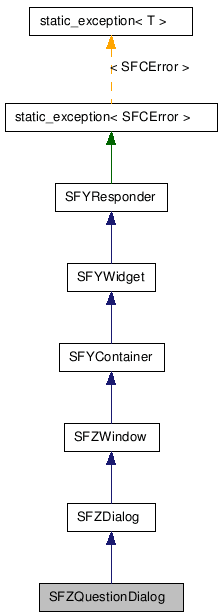

■ 仕様と使い方
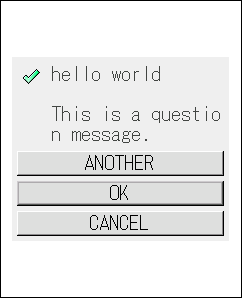
選択メッセージを表示するダイアログ[SFZQuestionDialog]は、 アイコン画像、 メッセージテキスト、 その他ボタン・OK ボタン・キャンセルボタンから構成されます。
それぞれの要素は省略することも可能です(Set 関数で何も設定しなかった場合、省略されたものとみなされます)。
アイコン画像、 メッセージテキスト、 その他ボタン・OK ボタン・キャンセルボタンは、それぞれ SFZImageLabelControl、 SFZMultipleTextLabelControl、 SFZTextButtonControl インスタンスとして内部で保持されています。 これらのインスタンスを取得するための API も用意されています。
アイコン画像とメッセージテキストは、操作不能状態に設定されているので、これらにフォーカスを移動できません。 その他ボタン、OK ボタン、キャンセルボタンは操作可能状態に設定されているので、 SFYContainer::SetScrollUpKey や SFYContainer::SetScrollDownKey 関数で設定するスクロールキーを使用してフォーカス移動できます。 なお、最初にダイアログの画面が表示された段階では、 SFZQuestionDialog::SetButtonText 関数を使用して最後にテキストを設定したボタンがフォーカスを持ちます。
SFZQuestionDialog::SetIconImage 関数、 SFZQuestionDialog::SetMessageText 関数、 SFZQuestionDialog::SetButtonText 関数を使用してアイコン画像やメッセージ、ボタンのテキストを設定しなかった場合、 それらは省略されたことになり、 ダイアログには表示されません。
デフォルトの実装では、 選択メッセージを表示するダイアログ[SFZQuestionDialog]は 下記の結果イベント[SFEVT_RESPONDER_RESULT]を受信します。
開発者は、これらのイベントを受信するハンドラを登録できます。 デフォルトのハンドラは、ダイアログを閉じる処理だけを行います。
ダイアログ操作キーは、SFZDialog::SetOperateKey 関数を使用して設定します。 その他ボタン、OK ボタン、キャンセルボタンを操作するためのボタン操作キーは、 SFYButtonControl::SetOperateKey 関数を使用して設定します。 デフォルトでは、セレクトキーがダイアログ操作キーとボタン操作キーとして割り当てられています。 ボタンが表示されている場合、セレクトキーはボタン操作キーとして処理されます。
ESCAPE キーは、SFZDialog::SetEscapeKey 関数を使用して設定します。 デフォルトでは、クリアキーが ESCAPE キーとして割り当てられています。
![[Note]](images/note.png) |
タイマーのキャンセル |
|---|---|
|
SFZDialog::ScheduleTimer 関数で設定したタイマー処理は、 ダイアログ操作キー、ESCAPE キー、OK ボタン、キャンセルボタン、またはその他ボタンを押したときに自動的にキャンセルされます。 サスペンド時もタイマーはキャンセルされますが、 レジューム時に SFZDialog::ScheduleTimer 関数の引数に指定した時間でタイマー処理は再開されます。 ダイアログの有効状態が無効になったときもタイマーはキャンセルされます。 | |
|
ダイアログ操作キーによるダイアログの処理 |
|---|---|
|
すべてのボタンを省略したり、操作不能状態に設定した場合、 ダイアログはダイアログ操作キーで操作します。デフォルトの実装では、OK ボタンを押したときの動作と同じになります。 つまり、ダイアログ操作キーを押すと (SFEVT_RESPONDER_RESULT, SFP16_RESULT_OK) イベントが送信されてダイアログは閉じることになります。 この機能は、警告文だけのボタンを持たないダイアログを表示し、ダイアログ操作キーの押下でダイアログを閉じる場面などで利用できます。 | |
|
デフォルトの背景色 |
|---|---|
SFZQuestionDialog クラスでは、 SFYWidget::SetBackgroundColor 関数で設定する背景色がデフォルトで灰色[SFXRGBColor(0xEE, 0xEE, 0xEE,0x00)]に設定されています。 | |
|
重要 |
|---|---|
SFYResponder::SetParent 関数、 SFYResponder::SetState 関数、 SFYResponder::SetRealBound 関数の呼び出しは必須です。 その他の関数の呼び出しは省略可能です。 | |
□ダイアログのサンプルコード
選択メッセージを表示するダイアログ(SFZQuestionDialog)のサンプルコードです。
例 903. サンプルコード : 選択メッセージを表示するダイアログ[SFZQuestionDialog]
// クラスの定義
SFMTYPEDEFCLASS(USRApplication)
class USRApplication : public SFYApplication {
  SFMSEALCOPY(USRApplication)
public:
  static SFCInvokerPtr Factory(Void);
private:
  explicit USRApplication(Void) static_throws;
  virtual ~USRApplication(Void);

  XANDLER_DECLARE_VOIDRESULT(OnResult)        // ダイアログ選択の結果イベントを受信するハンドラ
};


// コンストラクタ
USRApplication::USRApplication(Void) static_throws
{
  // ...(省略)...

  SFZQuestionDialogSmp dialog;  // SFZQuestionDialog のスマートポインタ
  SFCError error(SFERR_NO_ERROR);

  // ダイアログを生成する
  if ((dialog = SFZQuestionDialog::NewInstance(&error)) != null) {

    // 親レスポンダをアプリケーション(ルート)に設定する
    error = dialog->SetParent(GetThis());
    if (error == SFERR_NO_ERROR) {

      // ダイアログ選択の結果イベントを受信するハンドラを登録する
      error = dialog->RegisterHandler(
                  SFXEventRange(SFEVT_RESPONDER_RESULT, SFEVT_RESPONDER_RESULT, SFP16_BEGIN, SFP16_END),
                  XANDLER_INTERNAL(OnResult)
      );
      if (error == SFERR_NO_ERROR) {

      // アイコン画像を設定する
      error = dialog->SetIconImage(SFXPath(USRApplication_RES_FILE), ICON);
      if (error == SFERR_NO_ERROR) {

        // メッセージを "SFZQuestionDialog:\n\nThis is a question dialog" に設定する
        error = dialog->SetMessageText("SFZQuestionDialog:\n\nThis is a question dialog.");
        if (error == SFERR_NO_ERROR) {

          // その他ボタンのテキストを "ANOTHER" に設定する
          error = dialog->SetButtonText(SFZQuestionDialog::BUTTON_ANOTHER, "ANOTHER");
          if (error == SFERR_NO_ERROR) {

            // キャンセルボタンのテキストを "CANCEL" に設定する
            error = dialog->SetButtonText(SFZQuestionDialog::BUTTON_CANCEL, "CANCEL");
            if (error == SFERR_NO_ERROR) {

              // OK ボタンのテキストを "OK" に設定する
              // 最後にOK ボタンにテキストを設定したので、始めに『 OK ボタン』がフォーカス状態で表示される
              error = dialog->SetButtonText(SFZQuestionDialog::BUTTON_OK, "OK");
              if (error == SFERR_NO_ERROR) {

                // 携帯画面領域を (20, 20) だけ縮小した領域をヒント領域にして
                // ダイアログに最適な領域を取得してヒント領域の中央に配置し、
                // ダイアログの実領域として設定する
                dialog->SetRealBound(dialog->GetSuitableBound(GetLocalBound().Deflate(20, 20), SFYResponder::HORIZONTAL_CENTER, SFYResponder::VERTICAL_MIDDLE));

                // 状態を「可視+活性+操作可能+フォーカス」にまとめて設定する
                dialog->SetState(true, true, true, true);

                // 最前面に移動する
                dialog->ToFront();
              }
            }
          }
        }
      }
    }
  }
  static_throw(error);
}

// ダイアログ選択の結果イベントを受信するハンドラ
XANDLER_IMPLEMENT_VOIDRESULT(USRApplication, OnResult, invoker, reason, result)
{
    // invoker にはダイアログが渡される
    // reason には結果イベントの P16 値が渡される
    // result には 0 が渡される

    switch (reason) {

        case SFP16_RESULT_OK:

            // OK ボタン押下時、または操作キー押下時

            // ...(省略)...
            break;

        case SFP16_RESULT_CANCEL:

            // キャンセルボタン押下時

            // ...(省略)...
            break;

        case SFP16_RESULT_ANOTHER:

            // その他ボタン押下時

            // ...(省略)...
            break;

        case SFP16_RESULT_ESCAPE:

            // ESCAPE キー押下時、または ScheduleTimer 関数で設定した時間が経過した時

            // ...(省略)...
            break;
    }

    // ダイアログを閉じる
    invoker->Terminate();

    return;
}
□タイトルと枠を持つダイアログのサンプルコード
フレームの機能を利用して、 ダイアログにタイトルや枠を付けることが可能です。
タイトル付きベベルフレーム(SFZTitleBevelFrame)を持つ選択メッセージを表示するダイアログ(SFZQuestionDialog)のコードです。
例 904. サンプルコード : タイトル付きベベルフレームを持つ選択メッセージを表示するダイアログ[SFZQuestionDialog と SFZTitleBevelFrame]
// クラスの定義
SFMTYPEDEFCLASS(USRApplication)
class USRApplication : public SFYApplication {
  SFMSEALCOPY(USRApplication)
public:
  static SFCInvokerPtr Factory(Void);
private:
  explicit USRApplication(Void) static_throws;
  virtual ~USRApplication(Void);

  XANDLER_DECLARE_VOIDRESULT(OnResult)        // ダイアログ選択の結果イベントを受信するハンドラ
};


// コンストラクタ
USRApplication::USRApplication(Void) static_throws
{

  // ... (省略) ...

  SFZTitleBevelFrameSmp frame;  // フレームのスマートポインタ
  SFZQuestionDialogSmp  dialog; // ダイアログのスマートポインタ
  SFCError              error(SFERR_NO_ERROR);

  // フレームを生成する
  if ((frame = SFZTitleBevelFrame::NewInstance(&error)) != null) {

    // フレームのタイトルを "SFZQuestionDialog" に設定する
    frame->SetText("SFXQuestionDialog");

    // 通常、フレームの状態は「可視+活性+操作可能+フォーカス」に設定する
    frame->SetState(true, true, true, true);

    // ダイアログを生成する
    if ( ( dialog = SFZQuestionDialog::NewInstance(&error) ) != null) {

      // ダイアログの親レスポンダをアプリケーションクラス(ルート)に設定する
      error = dialog->SetParent(GetThis());
      if (error == SFERR_NO_ERROR) {

        // ダイアログにフレームを装着する
        error = dialog->SetFrame(frame);
        if (error == SFERR_NO_ERROR) {

          // ダイアログ選択の結果イベントを受信するハンドラを登録する
          error = dialog->RegisterHandler(
                      SFXEventRange(SFEVT_RESPONDER_RESULT, SFEVT_RESPONDER_RESULT, SFP16_BEGIN, SFP16_END),
                      XANDLER_INTERNAL(OnResult)
          );
          if (error == SFERR_NO_ERROR) {

            // アイコン画像を設定する
            error = dialog->SetIconImage(SFXPath(USRApplication_RES_FILE), ICON);
            if (error == SFERR_NO_ERROR) {

              // メッセージを "This is a question dialog with a title bevel frame." に設定する
              error = dialog->SetMessageText("This is a question dialog with a title bevel frame.");
              if (error == SFERR_NO_ERROR) {

                // その他ボタンのテキストを "ANOTHER" に設定する
                error = dialog->SetButtonText(SFZQuestionDialog::BUTTON_ANOTHER, "ANOTHER");
                if (error == SFERR_NO_ERROR) {

                  // キャンセルボタンのテキストを "CANCEL" に設定する
                  error = dialog->SetButtonText(SFZQuestionDialog::BUTTON_CANCEL, "CANCEL");
                  if (error == SFERR_NO_ERROR) {

                    // OK ボタンのテキストを "OK" に設定する
                    // 最後にOK ボタンにテキストを設定したので、始めにOK ボタンがフォーカス状態で表示される
                    error = dialog->SetButtonText(SFZQuestionDialog::BUTTON_OK, "OK");
                    if (error == SFERR_NO_ERROR) {

                      // 携帯画面領域を (20, 20) だけ縮小した領域をヒント領域にして
                      // ダイアログに最適な領域を取得しヒント領域内の中央に配置し、
                      // ダイアログの実領域に設定する
                      // ※自動的にダイアログの実領域をフレーム余白領域だけ拡大した領域がフレームの実領域に設定される
                      dialog->SetRealBound(dialog->GetSuitableBound(GetLocalBound().Deflate(20, 20), SFYResponder::HORIZONTAL_CENTER, SFYResponder::VERTICAL_MIDDLE));

                      // ダイアログの状態を「可視+活性+操作可能+フォーカス」にまとめて設定する
                      dialog->SetState(true, true, true, true);

                      // ダイアログを最前面に移動する
                      // ※自動的にフレームも最前面に移動する
                      dialog->ToFront();
                    }
                  }
                }
              }
            }
          }
        }
      }
    }
  }
  static_throw(error);
}


// ダイアログ選択の結果イベントを受信するハンドラ
XANDLER_IMPLEMENT_VOIDRESULT(USRApplication, OnResult, invoker, reason, result)
{
    // invoker にはダイアログが渡される
    // reason には結果イベントの P16 値が渡される
    // result には 0 が渡される

    switch (reason) {

        case SFP16_RESULT_OK:

            // OK ボタン押下時、または操作キー押下時

            // ...(省略)...
            break;

        case SFP16_RESULT_CANCEL:

            // キャンセルボタン押下時

            // ...(省略)...
            break;

        case SFP16_RESULT_ANOTHER:

            // その他ボタン押下時の処理

            // ...(省略)...
            break;

        case SFP16_RESULT_ESCAPE:

            // ESCAPE キー押下時、または ScheduleTimer 関数で設定した時間が経過した時

            // ...(省略)...
            break;
    }

  // ダイアログだけを閉じる
  // ※自動的にフレームはダイアログから切り離されて見えなくなる
  invoker->Terminate();

  return;
}
![[Caution]](images/caution.png) |
引数(矩形領域)を指定しないで GetSuitableBound 関数を呼び出すときの注意 |
|---|---|
|
このレスポンダの SFYResponder::GetSuitableBound 関数を呼び出すときに引数(矩形領域)を指定しない場合は、 予め SFYResponder::SetRealBound 関数を使用して実領域(=ローカル領域※)を設定する必要があります。 設定された実領域の横幅は領域計算に必要なヒント値として利用されます。 ※仮想領域を設定しない限り、 実領域はローカル領域と同じです。 また、ヒント値として使われる実領域を設定する際は、 SFZMessageDialog::SetFrameSize 関数で設定するフレームマージンの幅も考慮する必要があります。 | |
選択メッセージを表示するダイアログ [SFZQuestionDialog] | SFZDialog | SFZMessageDialog | SFZImageLabelControl | SFZMultipleTextLabelControl | SFZTextButtonControl | SFYWidget | SFXRGBColor | SFYWidget::SetBackgroundColor | SFZQuestionDialog::SetIconImage | SFZQuestionDialog::SetMessageText | SFZQuestionDialog::SetButtonText | SFZDialog::SetOperateKey | SFZDialog::SetEscapeKey | SFYButtonControl::SetOperateKey | SFYContainer::SetScrollUpKey | SFYContainer::SetScrollDownKey | SFZDialog::ScheduleTimer | SFYResponder::ToFront | SFYResponder::Terminate | フレーム | SFZTitleBevelFrame | 実領域 | ローカル領域 | 仮想領域 | 複数行のテキストを表示するレスポンダに最適な大きさを取得する | SFZMessageDialog::SetFrameSize
| コンストラクタ/デストラクタ |
|---|
|
SFZQuestionDialog( Void ) SFZQuestionDialog クラスのコンストラクタです。
|
|
~SFZQuestionDialog( Void ) SFZQuestionDialog クラスのデストラクタです。
|
| パブリック関数 | |
|---|---|
| SFXWideStringConstRef |
GetButton(
ButtonEnum button
) ボタンコントロールを取得します。
|
| SFXWideStringConstRef |
GetButtonText(
ButtonEnum button
) ボタンコントロールのテキストを取得します。
|
| SInt16 |
GetFrameSize( Void ) フレームマージンのサイズを取得します。[単位 : ピクセル]
|
| SFZImageLabelControlSmpConstRef |
GetIcon( Void ) アイコンを取得します。
|
| SFBImageSmpConstRef |
GetIconImage( Void ) アイコン画像を取得します。
|
| SFZMultipleTextLabelControlSmpConstRef |
GetMessage( Void ) メッセージテキストの複数行テキストラベルコントロールを取得します。
|
| SFXWideStringConstRef |
GetMessageText( Void ) メッセージテキストを取得します。
|
| SInt16 |
GetSpaceSize( Void ) スペースマージンのサイズを取得します。[単位 : ピクセル]
|
| static SFZQuestionDialogSmp |
NewInstance(
SFCErrorPtr exception = null
) 新しいインスタンスを作成します。
|
| SFCError |
SetButtonText(
ButtonEnum button
, SFXPathConstRef path
, UInt16 id
) ボタンのテキストを設定します。
|
| SFCError |
SetButtonText(
ButtonEnum button
, SFXWideStringConstRef param
) ボタンのテキストを設定します。
|
| Void |
SetFrameSize(
SInt16 param
) フレームマージンのサイズを設定します。[単位 : ピクセル]
|
| SFCError |
SetIconImage(
SFXPathConstRef path
) アイコン画像を設定します。
|
| SFCError |
SetIconImage(
SFXPathConstRef path
, UInt16 id
) アイコン画像を設定します。
|
| SFCError |
SetIconImage(
SFBImageSmpConstRef param
) アイコン画像を設定します。
|
| SFCError |
SetMessageText(
SFXPathConstRef path
, UInt16 id
) メッセージテキストを設定します。
|
| SFCError |
SetMessageText(
SFXWideStringConstRef param
) メッセージテキストを設定します。
|
| Void |
SetSpaceSize(
SInt16 param
) スペースマージンのサイズを設定します。[単位 : ピクセル]
|
| Void |
CancelTimer( Void )
(SFZDialog から継承)
タイマーをキャンセルします。
|
| Void |
ClearHandler( Void )
(SFYResponder から継承)
このレスポンダのハンドラの登録をすべて解除します。
|
| Void |
ClearTracer( Void )
(SFYResponder から継承)
このレスポンダのトレーサの配信規則の登録をすべて解除します。
|
| SFCError |
Distribute(
SFXEventConstRef event
, BoolPtr result = null
)
(SFYResponder から継承)
指定された配信型イベントを
SFYDistributer インスタンスと、このレスポンダ以下のレスポンダツリーに配信します。
|
| SFXRGBColorConstRef |
GetBackgroundColor( Void )
(SFYWidget から継承)
背景の色を取得します。
|
| SFYResponderSmp |
GetChildBack( Void )
(SFYResponder から継承)
最背面に位置するこのレスポンダの子レスポンダを取得します。
|
| SFYResponderSmp |
GetChildBack(
Bool visible
, Bool active
, Bool enable
, Bool focus
)
(SFYResponder から継承)
最背面に位置するこのレスポンダの子レスポンダを取得します。
|
| SFYResponderSmp |
GetChildBack(
UInt32 id
)
(SFYResponder から継承)
最背面に位置するこのレスポンダの子レスポンダを取得します。
|
| SFYResponderSmp |
GetChildBack(
UInt32 id
, Bool visible
, Bool active
, Bool enable
, Bool focus
)
(SFYResponder から継承)
最背面に位置するこのレスポンダの子レスポンダを取得します。
|
| SFYResponderSmp |
GetChildBackward(
SInt32 index
)
(SFYResponder から継承)
背面から数えて指定された順番に位置するこのレスポンダの子レスポンダを取得します。
|
| SFYResponderSmp |
GetChildBackward(
SInt32 index
, Bool visible
, Bool active
, Bool enable
, Bool focus
)
(SFYResponder から継承)
背面から数えて指定された順番に位置するこのレスポンダの子レスポンダを取得します。
|
| SFYResponderSmp |
GetChildBackward(
SInt32 index
, UInt32 id
)
(SFYResponder から継承)
背面から数えて指定された順番に位置するこのレスポンダの子レスポンダを取得します。
|
| SFYResponderSmp |
GetChildBackward(
SInt32 index
, UInt32 id
, Bool visible
, Bool active
, Bool enable
, Bool focus
)
(SFYResponder から継承)
背面から数えて指定された順番に位置するこのレスポンダの子レスポンダを取得します。
|
| SInt32 |
GetChildCount( Void )
(SFYResponder から継承)
このレスポンダの子レスポンダの数を取得します。
|
| SInt32 |
GetChildCount(
Bool visible
, Bool active
, Bool enable
, Bool focus
)
(SFYResponder から継承)
このレスポンダの子レスポンダの数を取得します。
|
| SInt32 |
GetChildCount(
UInt32 id
)
(SFYResponder から継承)
このレスポンダの子レスポンダの数を取得します。
|
| SInt32 |
GetChildCount(
UInt32 id
, Bool visible
, Bool active
, Bool enable
, Bool focus
)
(SFYResponder から継承)
このレスポンダの子レスポンダの数を取得します。
|
| SFYResponderSmp |
GetChildForward(
SInt32 index
)
(SFYResponder から継承)
前面から数えて指定された順番に位置するこのレスポンダの子レスポンダを取得します。
|
| SFYResponderSmp |
GetChildForward(
SInt32 index
, Bool visible
, Bool active
, Bool enable
, Bool focus
)
(SFYResponder から継承)
前面から数えて指定された順番に位置するこのレスポンダの子レスポンダを取得します。
|
| SFYResponderSmp |
GetChildForward(
SInt32 index
, UInt32 id
)
(SFYResponder から継承)
前面から数えて指定された順番に位置するこのレスポンダの子レスポンダを取得します。
|
| SFYResponderSmp |
GetChildForward(
SInt32 index
, UInt32 id
, Bool visible
, Bool active
, Bool enable
, Bool focus
)
(SFYResponder から継承)
前面から数えて指定された順番に位置するこのレスポンダの子レスポンダを取得します。
|
| SFYResponderSmp |
GetChildFront( Void )
(SFYResponder から継承)
最前面に位置するこのレスポンダの子レスポンダを取得します。
|
| SFYResponderSmp |
GetChildFront(
Bool visible
, Bool active
, Bool enable
, Bool focus
)
(SFYResponder から継承)
最前面に位置するこのレスポンダの子レスポンダを取得します。
|
| SFYResponderSmp |
GetChildFront(
UInt32 id
)
(SFYResponder から継承)
最前面に位置するこのレスポンダの子レスポンダを取得します。
|
| SFYResponderSmp |
GetChildFront(
UInt32 id
, Bool visible
, Bool active
, Bool enable
, Bool focus
)
(SFYResponder から継承)
最前面に位置するこのレスポンダの子レスポンダを取得します。
|
| SFYDistributerPtr |
GetDistributer( Void )
(SFYResponder から継承)
このレスポンダに設定されている配信エンジンを取得します。
|
| AVKType |
GetEscapeKey( Void )
(SFZDialog から継承)
ESCAPE キーを取得します。
|
| SFYResponderSmp |
GetFrame( Void )
(SFYResponder から継承)
このレスポンダに装着されたフレームを取得します。
|
| SFXRectangle |
GetGlobalBound( Void )
(SFYResponder から継承)
このレスポンダのグローバル領域を取得します。
|
| UInt32 |
GetID( Void )
(SFYResponder から継承)
このレスポンダの ID を取得します。
|
| SFXRectangle |
GetLocalBound( Void )
(SFYResponder から継承)
このレスポンダのローカル領域を取得します。
|
| SInt32 |
GetNthBackward( Void )
(SFYResponder から継承)
このレスポンダが背面から数えて何番目に位置するかを取得します。
|
| SInt32 |
GetNthBackward(
Bool visible
, Bool active
, Bool enable
, Bool focus
)
(SFYResponder から継承)
このレスポンダが背面から数えて何番目に位置するかを取得します。
|
| SInt32 |
GetNthBackward(
UInt32 id
)
(SFYResponder から継承)
このレスポンダが背面から数えて何番目に位置するかを取得します。
|
| SInt32 |
GetNthBackward(
UInt32 id
, Bool visible
, Bool active
, Bool enable
, Bool focus
)
(SFYResponder から継承)
このレスポンダが背面から数えて何番目に位置するかを取得します。
|
| SInt32 |
GetNthForward( Void )
(SFYResponder から継承)
このレスポンダが前面から数えて何番目に位置するかを取得します。
|
| SInt32 |
GetNthForward(
Bool visible
, Bool active
, Bool enable
, Bool focus
)
(SFYResponder から継承)
このレスポンダが前面から数えて何番目に位置するかを取得します。
|
| SInt32 |
GetNthForward(
UInt32 id
)
(SFYResponder から継承)
このレスポンダが前面から数えて何番目に位置するかを取得します。
|
| SInt32 |
GetNthForward(
UInt32 id
, Bool visible
, Bool active
, Bool enable
, Bool focus
)
(SFYResponder から継承)
このレスポンダが前面から数えて何番目に位置するかを取得します。
|
| AVKType |
GetOperateKey( Void )
(SFZDialog から継承)
操作キーを取得します。
|
| AVKType |
GetPageDownKey( Void )
(SFYContainer から継承)
仮想領域を下方向に 1 ページ分スクロールする PageDown キーを取得します。
|
| AVKType |
GetPageUpKey( Void )
(SFYContainer から継承)
仮想領域を上方向に 1 ページ分スクロールする PageUp キーを取得します。
|
| SFYResponderSmp |
GetParent( Void )
(SFYResponder から継承)
このレスポンダの親レスポンダを取得します。
|
| Bool |
GetPropertyTransparent( Void )
(SFYResponder から継承)
このレスポンダの透過属性を取得します。
|
| SFXRectangleConstRef |
GetRealBound( Void )
(SFYResponder から継承)
このレスポンダの実領域を取得します。
|
| VoidPtr |
GetReference( Void )
(SFYResponder から継承)
このレスポンダのリファレンス値を取得します。
|
| SFYRendererPtr |
GetRenderer( Void )
(SFYResponder から継承)
このレスポンダに設定されている描画エンジンを取得します。
|
| SFYResponderSmp |
GetRoot( Void )
(SFYResponder から継承)
このレスポンダが所属するレスポンダツリーのルートレスポンダを取得します。
|
| AVKType |
GetScrollDownKey( Void )
(SFYContainer から継承)
仮想領域を下方向にスクロールステップ分スクロールする ScrollDown キーを取得します。
|
| Bool |
GetScrollRepeat( Void )
(SFYContainer から継承)
連続スクロールフラグの値を取得します。
|
| SInt16 |
GetScrollStep( Void )
(SFYContainer から継承)
スクロールステップを取得します。[単位 : ピクセル]
|
| AVKType |
GetScrollUpKey( Void )
(SFYContainer から継承)
仮想領域を上方向にスクロールステップ分スクロールする ScrollUp キーを取得します。
|
| AVKType |
GetSnapDownKey( Void )
(SFYContainer から継承)
仮想領域を下端までスクロールする SnapDown キーを取得します。
|
| AVKType |
GetSnapUpKey( Void )
(SFYContainer から継承)
仮想領域を上端までスクロールする SnapUp キーを取得します。
|
| Bool |
GetStateActive(
Bool inherit = false
)
(SFYResponder から継承)
このレスポンダの活性状態を取得します。
|
| Bool |
GetStateEnable(
Bool inherit = false
)
(SFYResponder から継承)
このレスポンダの操作可能状態を取得します。
|
| Bool |
GetStateFocus(
Bool inherit = false
)
(SFYResponder から継承)
このレスポンダのフォーカス状態を取得します。
|
| Bool |
GetStateValid(
Bool inherit = false
)
(SFYResponder から継承)
このレスポンダの有効状態を取得します。
|
| Bool |
GetStateVisible(
Bool inherit = false
)
(SFYResponder から継承)
このレスポンダの可視状態を取得します。
|
| SFXRectangle |
GetSuitableBound( Void )
(SFYResponder から継承)
このレスポンダの最適な領域(サイズ)を取得します。
|
| SFXRectangle |
GetSuitableBound(
SFXRectangleConstRef rectangle
)
(SFYResponder から継承)
このレスポンダの最適な領域(サイズ)を取得します。
|
| SFXRectangle |
GetSuitableBound(
SFXRectangleConstRef param
, HorizontalEnum horizontal
, VerticalEnum vertical
)
(SFYResponder から継承)
このレスポンダの最適な領域(サイズ)を取得します。
|
| SFXMargin |
GetSuitableMargin( Void )
(SFYResponder から継承)
このレスポンダのフレーム余白領域を取得します。
|
| SFCType |
GetType( Void )
(SFYResponder から継承)
このレスポンダのタイプを取得します。
|
| SFXRectangleConstRef |
GetVirtualBound( Void )
(SFYResponder から継承)
このレスポンダの仮想領域を取得します。
|
| Bool |
HasFrame( Void )
(SFYResponder から継承)
このレスポンダがコンテントレスポンダであるかどうかを判定します。
|
| Void |
Initialize( Void )
(SFYResponder から継承)
このレスポンダを初期化します。
|
| Void |
Invalidate( Void )
(SFYResponder から継承)
指定された領域を再描画領域に登録します。
|
| Void |
Invalidate(
SFXRectangleConstRef param
)
(SFYResponder から継承)
指定された領域を再描画領域に登録します。
|
| Void |
InvokeBackward(
SFXEventConstRef event
, Bool overload
, BoolPtr result = null
)
(SFYResponder から継承)
指定されたコールバック型イベントをこのレスポンダに送信します
(ハンドラは登録順に起動されます)。
|
| Void |
InvokeForward(
SFXEventConstRef event
, Bool overload
, BoolPtr result = null
)
(SFYResponder から継承)
指定されたコールバック型イベントをこのレスポンダに送信します
(ハンドラは登録の逆順に起動されます)。
|
| Bool |
IsBack( Void )
(SFYResponder から継承)
このレスポンダが最背面に位置するかどうかを判定します。
|
| Bool |
IsBack(
Bool visible
, Bool active
, Bool enable
, Bool focus
)
(SFYResponder から継承)
このレスポンダが最背面に位置するかどうかを判定します。
|
| Bool |
IsBack(
UInt32 id
)
(SFYResponder から継承)
このレスポンダが最背面に位置するかどうかを判定します。
|
| Bool |
IsBack(
UInt32 id
, Bool visible
, Bool active
, Bool enable
, Bool focus
)
(SFYResponder から継承)
このレスポンダが最背面に位置するかどうかを判定します。
|
| Bool |
IsFrame( Void )
(SFYResponder から継承)
このレスポンダがアタッチメントフレームであるかどうかを判定します。
|
| Bool |
IsFront( Void )
(SFYResponder から継承)
このレスポンダが最前面に位置するかどうかを判定します。
|
| Bool |
IsFront(
Bool visible
, Bool active
, Bool enable
, Bool focus
)
(SFYResponder から継承)
このレスポンダが最前面に位置するかどうかを判定します。
|
| Bool |
IsFront(
UInt32 id
)
(SFYResponder から継承)
このレスポンダが最前面に位置するかどうかを判定します。
|
| Bool |
IsFront(
UInt32 id
, Bool visible
, Bool active
, Bool enable
, Bool focus
)
(SFYResponder から継承)
このレスポンダが最前面に位置するかどうかを判定します。
|
| Bool |
IsNthBackward(
SInt32 index
)
(SFYResponder から継承)
このレスポンダが背面から数えて指定された順番に位置するかどうかを判定します。
|
| Bool |
IsNthBackward(
SInt32 index
, Bool visible
, Bool active
, Bool enable
, Bool focus
)
(SFYResponder から継承)
このレスポンダが背面から数えて指定された順番に位置するかどうかを判定します。
|
| Bool |
IsNthBackward(
SInt32 index
, UInt32 id
)
(SFYResponder から継承)
このレスポンダが背面から数えて指定された順番に位置するかどうかを判定します。
|
| Bool |
IsNthBackward(
SInt32 index
, UInt32 id
, Bool visible
, Bool active
, Bool enable
, Bool focus
)
(SFYResponder から継承)
このレスポンダが背面から数えて指定された順番に位置するかどうかを判定します。
|
| Bool |
IsNthForward(
SInt32 index
)
(SFYResponder から継承)
このレスポンダが前面から数えて指定された順番に位置するかどうかを判定します。
|
| Bool |
IsNthForward(
SInt32 index
, Bool visible
, Bool active
, Bool enable
, Bool focus
)
(SFYResponder から継承)
このレスポンダが前面から数えて指定された順番に位置するかどうかを判定します。
|
| Bool |
IsNthForward(
SInt32 index
, UInt32 id
)
(SFYResponder から継承)
このレスポンダが前面から数えて指定された順番に位置するかどうかを判定します。
|
| Bool |
IsNthForward(
SInt32 index
, UInt32 id
, Bool visible
, Bool active
, Bool enable
, Bool focus
)
(SFYResponder から継承)
このレスポンダが前面から数えて指定された順番に位置するかどうかを判定します。
|
| Bool |
IsRoot( Void )
(SFYResponder から継承)
このレスポンダがルートレスポンダであるかどうかを判定します。
|
| Bool |
PageDown( Void )
(SFYContainer から継承)
仮想領域を下方向に 1 ページ分スクロールします。
|
| Bool |
PageUp( Void )
(SFYContainer から継承)
仮想領域を上方向に 1 ページ分スクロールします。
|
| SFCError |
Recover( Void )
(SFYResponder から継承)
デバイス画面保存用ビットマップを使用してこのレスポンダとレスポンダ空間との交差領域を復元します。
|
| SFCError |
RegisterHandler(
SFXEventRangeConstRef range
, SFYHandler::RuleRecConstRef rule
)
(SFYResponder から継承)
指定されたハンドラをこのレスポンダに登録します。
|
| SFCError |
RegisterHandler(
SFXEventRangeConstRef range
, SFYHandler::HandlerSPP spp
, VoidPtr reference
)
(SFYResponder から継承)
指定されたハンドラをこのレスポンダに登録します。
|
| SFCError |
RegisterHandler(
SFXEventRangeConstPtr range
, SFYHandler::RuleRecConstPtr rule
, SInt32 length
)
(SFYResponder から継承)
指定されたハンドラをこのレスポンダに登録します。
|
| SFCError |
RegisterHandler(
SFXEventRangeConstPtr range
, SFYHandler::HandlerSPPConstPtr spp
, VoidPtrConstPtr reference
, SInt32 length
)
(SFYResponder から継承)
指定されたハンドラをこのレスポンダに登録します。
|
| SFCError |
RegisterTracer(
SFXEventRangeConstRef range
, SFYTracer::RuleRecConstRef rule
)
(SFYResponder から継承)
指定された配信規則をこのレスポンダのトレーサに登録します。
|
| SFCError |
RegisterTracer(
SFXEventRangeConstRef range
, SFYTracer::OrderEnum order
, SFYTracer::StateEnum state
, Bool overload
)
(SFYResponder から継承)
指定された配信規則をこのレスポンダのトレーサに登録します。
|
| SFCError |
RegisterTracer(
SFXEventRangeConstPtr range
, SFYTracer::RuleRecConstPtr rule
, SInt32 length
)
(SFYResponder から継承)
指定された配信規則をこのレスポンダのトレーサに登録します。
|
| SFCError |
RegisterTracer(
SFXEventRangeConstPtr range
, SFYTracer::OrderEnumConstPtr order
, SFYTracer::StateEnumConstPtr state
, BoolConstPtr overload
, SInt32 length
)
(SFYResponder から継承)
指定された配信規則をこのレスポンダのトレーサに登録します。
|
| SFCError |
Render(
Bool force = false
)
(SFYResponder から継承)
このレスポンダ以下のレスポンダツリーをレスポンダ空間に再描画します。
|
| Void |
RewindTimer( Void )
(SFZDialog から継承)
ダイアログが自動的に閉じるまでの時間を再設定します。
|
| Void |
ScheduleTimer(
UInt32 param
)
(SFZDialog から継承)
指定時間経過後に、
ESCAPE キー押下と同等の処理が行われるようにタイマーをスケジュールします。
|
| Bool |
ScrollDown( Void )
(SFYContainer から継承)
仮想領域を下方向にスクロールします。
|
| Bool |
ScrollUp( Void )
(SFYContainer から継承)
仮想領域を上方向にスクロールします。
|
| Void |
SetBackgroundColor(
SFXRGBColorConstRef param
)
(SFYWidget から継承)
背景の色を設定します。
|
| Void |
SetDistributer(
SFYDistributerPtr param
)
(SFYResponder から継承)
指定された配信エンジンをこのレスポンダに設定します。
|
| Void |
SetEscapeKey(
AVKType param
)
(SFZDialog から継承)
ESCAPE キーを設定します。
|
| SFCError |
SetFrame(
SFYResponderSmpConstRef param
)
(SFYResponder から継承)
このレスポンダにフレームを装着します。
|
| Void |
SetID(
UInt32 param
)
(SFYResponder から継承)
指定された ID をこのレスポンダに設定します。
|
| Void |
SetOperateKey(
AVKType param
)
(SFZDialog から継承)
操作キーを設定します。
|
| Void |
SetPageDownKey(
AVKType param
)
(SFYContainer から継承)
仮想領域を下方向に 1 ページ分スクロールする PageDown キーを設定します。
|
| Void |
SetPageUpKey(
AVKType param
)
(SFYContainer から継承)
仮想領域を上方向に 1 ページ分スクロールする PageUp キーを設定します。
|
| SFCError |
SetParent(
SFYResponderSmpConstRef param
)
(SFYResponder から継承)
指定されたレスポンダをこのレスポンダの親レスポンダに設定します。
|
| Void |
SetProperty(
Bool transparent
)
(SFYResponder から継承)
指定された属性をこのレスポンダに設定します。
|
| Void |
SetPropertyTransparent(
Bool param
)
(SFYResponder から継承)
指定された透過属性をこのレスポンダに設定します。
|
| Void |
SetRealBound(
SFXRectangleConstRef param
)
(SFYResponder から継承)
指定された領域をこのレスポンダの実領域に設定します。
|
| Void |
SetReference(
VoidPtr param
)
(SFYResponder から継承)
指定された値をこのレスポンダのリファレンスに設定します。
|
| Void |
SetRenderer(
SFYRendererPtr param
)
(SFYResponder から継承)
指定された描画エンジンをこのレスポンダに設定します。
|
| Void |
SetScrollDownKey(
AVKType param
)
(SFYContainer から継承)
仮想領域を下方向にスクロールステップ分スクロールする ScrollDown キーを設定します。
|
| Void |
SetScrollRepeat(
Bool param
)
(SFYContainer から継承)
連続スクロールフラグを設定します。
|
| Void |
SetScrollStep(
SInt16 param
)
(SFYContainer から継承)
スクロールステップを設定します。[単位 : ピクセル]
|
| Void |
SetScrollUpKey(
AVKType param
)
(SFYContainer から継承)
仮想領域を上方向にスクロールステップ分スクロールする ScrollUp キーを設定します。
|
| Void |
SetSnapDownKey(
AVKType param
)
(SFYContainer から継承)
仮想領域を下端までスクロールする SnapDown キーを設定します。
|
| Void |
SetSnapUpKey(
AVKType param
)
(SFYContainer から継承)
仮想領域を上端までスクロールする SnapUp キーを設定します。
|
| Void |
SetState(
Bool visible
, Bool active
, Bool enable
, Bool focus
)
(SFYResponder から継承)
指定された値をこのレスポンダの可視、活性、操作可能、フォーカスの各状態フラグに設定します。
|
| Void |
SetStateActive(
Bool param
)
(SFYResponder から継承)
指定された値をこのレスポンダの活性状態フラグに設定します。
|
| Void |
SetStateEnable(
Bool param
)
(SFYResponder から継承)
指定された値をこのレスポンダの操作可能状態フラグに設定します。
|
| Void |
SetStateFocus(
Bool param
)
(SFYResponder から継承)
指定された値をこのレスポンダのフォーカス状態フラグに設定します。
|
| Void |
SetStateVisible(
Bool param
)
(SFYResponder から継承)
指定された値をこのレスポンダの可視状態フラグに設定します。
|
| Void |
SetVirtualBound(
SFXRectangleConstRef param
)
(SFYResponder から継承)
指定された領域をこのレスポンダの仮想領域に設定します。
|
| Bool |
SnapDown( Void )
(SFYContainer から継承)
仮想領域を下端までスクロールします。
|
| Bool |
SnapUp( Void )
(SFYContainer から継承)
仮想領域を上端までスクロールします。
|
| SFCError |
Snapshot(
SFBBitmapSmpConstRef bitmap
)
(SFYResponder から継承)
デバイス画面保存用ビットマップからこのレスポンダとレスポンダ空間との交差領域のスナップショットを取得します。
|
| Void |
Terminate( Void )
(SFYResponder から継承)
このレスポンダの終了処理を行います。
|
| Void |
ToBack( Void )
(SFYResponder から継承)
このレスポンダを指定された条件の姉妹レスポンダのなかで最背面に移動します。
|
| Void |
ToBack(
Bool visible
, Bool active
, Bool enable
, Bool focus
)
(SFYResponder から継承)
このレスポンダを指定された条件の姉妹レスポンダのなかで最背面に移動します。
|
| Void |
ToBack(
UInt32 id
)
(SFYResponder から継承)
このレスポンダを指定された条件の姉妹レスポンダのなかで最背面に移動します。
|
| Void |
ToBack(
UInt32 id
, Bool visible
, Bool active
, Bool enable
, Bool focus
)
(SFYResponder から継承)
このレスポンダを指定された条件の姉妹レスポンダのなかで最背面に移動します。
|
| Void |
ToFront( Void )
(SFYResponder から継承)
このレスポンダを指定された条件の姉妹レスポンダのなかで最前面に移動します。
|
| Void |
ToFront(
Bool visible
, Bool active
, Bool enable
, Bool focus
)
(SFYResponder から継承)
このレスポンダを指定された条件の姉妹レスポンダのなかで最前面に移動します。
|
| Void |
ToFront(
UInt32 id
)
(SFYResponder から継承)
このレスポンダを指定された条件の姉妹レスポンダのなかで最前面に移動します。
|
| Void |
ToFront(
UInt32 id
, Bool visible
, Bool active
, Bool enable
, Bool focus
)
(SFYResponder から継承)
このレスポンダを指定された条件の姉妹レスポンダのなかで最前面に移動します。
|
| Void |
ToNthBackward(
SInt32 index
)
(SFYResponder から継承)
このレスポンダを指定された条件の姉妹レスポンダのなかで背面から数えて指定された位置に移動します。
|
| Void |
ToNthBackward(
SInt32 index
, Bool visible
, Bool active
, Bool enable
, Bool focus
)
(SFYResponder から継承)
このレスポンダを指定された条件の姉妹レスポンダのなかで背面から数えて指定された位置に移動します。
|
| Void |
ToNthBackward(
SInt32 index
, UInt32 id
)
(SFYResponder から継承)
このレスポンダを指定された条件の姉妹レスポンダのなかで背面から数えて指定された位置に移動します。
|
| Void |
ToNthBackward(
SInt32 index
, UInt32 id
, Bool visible
, Bool active
, Bool enable
, Bool focus
)
(SFYResponder から継承)
このレスポンダを指定された条件の姉妹レスポンダのなかで背面から数えて指定された位置に移動します。
|
| Void |
ToNthForward(
SInt32 index
)
(SFYResponder から継承)
このレスポンダを指定された条件の姉妹レスポンダのなかで前面から数えて指定された位置に移動します。
|
| Void |
ToNthForward(
SInt32 index
, Bool visible
, Bool active
, Bool enable
, Bool focus
)
(SFYResponder から継承)
このレスポンダを指定された条件の姉妹レスポンダのなかで前面から数えて指定された位置に移動します。
|
| Void |
ToNthForward(
SInt32 index
, UInt32 id
)
(SFYResponder から継承)
このレスポンダを指定された条件の姉妹レスポンダのなかで前面から数えて指定された位置に移動します。
|
| Void |
ToNthForward(
SInt32 index
, UInt32 id
, Bool visible
, Bool active
, Bool enable
, Bool focus
)
(SFYResponder から継承)
このレスポンダを指定された条件の姉妹レスポンダのなかで前面から数えて指定された位置に移動します。
|
| Void |
UnregisterHandler(
SFXEventRangeConstRef range
, SFYHandler::RuleRecConstRef rule
)
(SFYResponder から継承)
このレスポンダから指定されたハンドラの登録を解除します。
|
| Void |
UnregisterHandler(
SFXEventRangeConstRef range
, SFYHandler::HandlerSPP spp
, VoidPtr reference
)
(SFYResponder から継承)
このレスポンダから指定されたハンドラの登録を解除します。
|
| Void |
UnregisterHandler(
SFXEventRangeConstPtr range
, SFYHandler::RuleRecConstPtr rule
, SInt32 length
)
(SFYResponder から継承)
このレスポンダから指定されたハンドラの登録を解除します。
|
| Void |
UnregisterHandler(
SFXEventRangeConstPtr range
, SFYHandler::HandlerSPPConstPtr spp
, VoidPtrConstPtr reference
, SInt32 length
)
(SFYResponder から継承)
このレスポンダから指定されたハンドラの登録を解除します。
|
| Void |
UnregisterTracer(
SFXEventRangeConstRef range
)
(SFYResponder から継承)
このレスポンダのトレーサから指定された配信規則の登録を解除します。
|
| Void |
UnregisterTracer(
SFXEventRangeConstPtr range
, SInt32 length
)
(SFYResponder から継承)
このレスポンダのトレーサから指定された配信規則の登録を解除します。
|
| プロテクト関数 | |
|---|---|
| Void |
HandleBoundOptimize(
SFXRectanglePtr rectangle
) (SFEVT_RESPONDER_BOUND, SFP16_BOUND_OPTIMIZE) イベントを受信したときに呼び出される関数です(指定した矩形に収まる範囲内で最適な領域を計算します)。
|
| Void |
HandleBoundReal( Void )
(SFEVT_RESPONDER_BOUND, SFP16_BOUND_REAL) イベントを受信したときに呼び出される関数です
(実領域が変化したときの処理を行います)。
|
| Void |
HandleBoundRequest(
SFXRectanglePtr rectangle
) (SFEVT_RESPONDER_BOUND, SFP16_BOUND_REQUEST) イベントを受信したときに呼び出される関数です(最適な領域を計算します)。
|
| Void |
HandleBoundVirtual( Void )
(SFEVT_RESPONDER_BOUND, SFP16_BOUND_VIRTUAL) イベントを受信したときに呼び出される関数です
(仮想領域が変化したときの処理を行います)。
|
| static SFYResponderSmp |
Factory(
SFYResponderPtr responder
, SFCErrorPtr exception = null
)
(SFYResponder から継承)
NewInstance 関数の実装を補助します。
|
| SFYResponderSmp |
GetThis( Void )
(SFYResponder から継承)
このレスポンダのスマートポインタを取得します。
|
| Void |
HandleBoundGlobal(
SFXRectangleConstRef rectangle
)
(SFYWidget から継承)
[非推奨(廃止予定 API)] グローバル領域が変化したときに呼び出される関数です。
|
| Void |
HandleEscapeKey( Void )
(SFZDialog から継承)
ESCAPE キーの SFEVT_KEY イベントを受信したとき、
または ScheduleTimer 関数で指定した時間が経過したときに呼び出される関数です。
|
| Void |
HandleOperateKey( Void )
(SFZDialog から継承)
操作キーの SFEVT_KEY イベントを受信したときに呼び出される関数です。
|
| Bool |
HandlePageDownKey( Void )
(SFYContainer から継承)
PageDown キーの SFEVT_KEY イベントを受信したときに呼び出される関数です。
|
| Bool |
HandlePageUpKey( Void )
(SFYContainer から継承)
PageUp キーの SFEVT_KEY イベントを受信したときに呼び出される関数です。
|
| Void |
HandleRenderRequest(
SFXGraphicsPtr graphics
)
(SFYWidget から継承)
描画イベントを受信したときに呼び出される関数です(レスポンダを描画します)。
|
| Bool |
HandleScrollDownKey( Void )
(SFYContainer から継承)
ScrollDown キーの SFEVT_KEY イベントを受信したときに呼び出される関数です。
|
| Bool |
HandleScrollUpKey( Void )
(SFYContainer から継承)
ScrollUp キーの SFEVT_KEY イベントを受信したときに呼び出される関数です。
|
| Bool |
HandleSnapDownKey( Void )
(SFYContainer から継承)
SnapDown キーの SFEVT_KEY イベントを受信したときに呼び出される関数です。
|
| Bool |
HandleSnapUpKey( Void )
(SFYContainer から継承)
SnapUp キーの SFEVT_KEY イベントを受信したときに呼び出される関数です。
|
| Void |
SetType(
SFCType param
)
(SFYResponder から継承)
指定された値をこのレスポンダのタイプに設定します。
|
| 型 |
|---|
|
ButtonEnum ダイアログのボタン識別子を表す定数です.
|
|
CodeEnum SFZQuestionDialog クラスを表す定数です。
|
|
DefaultEnum FRAME 定数と SPACE 定数のデフォルト値です。
|
|
HorizontalEnum
(SFYResponder から継承)
水平方向のアライメントを表す定数です。
|
|
VerticalEnum
(SFYResponder から継承)
垂直方向のアライメントを表す定数です。
|
[ protected, explicit ]
SFZQuestionDialog(Void);
このコンストラクタは、以下の初期化処理を行います。
このコンストラクタの内部実装は以下の通りです。
/*protected */SFZQuestionDialog::SFZQuestionDialog(Void) static_throws
{
    static SFXEventRange::AtomRecConst          crange[] = {
        {             SFEVT_KEY,              SFEVT_KEY,          SFP16_BEGIN,            SFP16_END},
        { SFEVT_RESPONDER_STYLE,  SFEVT_RESPONDER_STYLE,          SFP16_BEGIN,            SFP16_END}
    };
    static SFXEventRange::AtomRecConst          brange[] = {
        {             SFEVT_KEY,              SFEVT_KEY,          SFP16_BEGIN,            SFP16_END},
        { SFEVT_RESPONDER_STYLE,  SFEVT_RESPONDER_STYLE,          SFP16_BEGIN,            SFP16_END},
        {SFEVT_RESPONDER_RESULT, SFEVT_RESPONDER_RESULT,          SFP16_BEGIN,            SFP16_END}
    };
    SFYHandler::RuleRec                         crule[lengthof(crange)];
    SFYHandler::RuleRec                         brule[lengthof(brange)];
    SInt32                                      r0;
    SFCError                                    error;

    if (static_try()) {
        SetType(CODE_TYPE);
        if ((_icon = SFZImageLabelControl::NewInstance(&error)) != null) {
            static_throw(_icon->SetParent(GetThis()));
            if (static_try()) {
                crule[0].spp = XANDLER_FUNCTION(OnRewind);
                crule[0].reference = this;
                crule[1].spp = XANDLER_FUNCTION(OnIconStyle);
                crule[1].reference = this;
                static_throw(_icon->RegisterHandler(atomic_cast(crange), crule, lengthof(crange)));
                if (static_try()) {
                    if ((_message = SFZMultipleTextLabelControl::NewInstance(&error)) != null) {
                        static_throw(_message->SetParent(GetThis()));
                        if (static_try()) {
                            crule[0].spp = XANDLER_FUNCTION(OnRewind);
                            crule[0].reference = this;
                            crule[1].spp = XANDLER_FUNCTION(OnMessageStyle);
                            crule[1].reference = this;
                            static_throw(_message->RegisterHandler(atomic_cast(crange), crule, lengthof(crange)));
                            for (r0 = 0; r0 < BUTTON_LIMIT && static_try(); ++r0) {
                                if ((_button[r0] = SFZTextButtonControl::NewInstance(&error)) != null) {
                                    static_throw(_button[r0]->SetParent(GetThis()));
                                    if (static_try()) {
                                        brule[0].spp = XANDLER_FUNCTION(OnRewind);
                                        brule[0].reference = this;
                                        brule[1].spp = XANDLER_FUNCTION(OnButtonStyle);
                                        brule[1].reference = this;
                                        brule[2].spp = XANDLER_FUNCTION(OnButtonResult);
                                        brule[2].reference = this;
                                        static_throw(_button[r0]->RegisterHandler(atomic_cast(brange), brule, lengthof(brange)));
                                    }
                                }
                                else {
                                    static_throw(error);
                                }
                            }
                            if (static_try()) {
                                _message->SetHorizontalAlign(SFZMultipleTextLabelControl::HORIZONTAL_LEFT);
                                _message->SetVerticalAlign(SFZMultipleTextLabelControl::VERTICAL_TOP);
                                _frame = DEFAULT_FRAME;
                                _space = DEFAULT_SPACE;
                                Relocate();
                            }
                        }
                    }
                    else {
                        static_throw(error);
                    }
                }
            }
        }
        else {
            static_throw(error);
        }
    }
}// SFZQuestionDialog::SFZQuestionDialog //

/*private */XANDLER_IMPLEMENT_BOOLEVENT(SFZQuestionDialog, OnRewind, invoker, event)
{
    unused(invoker);
    unused(event);
    RewindTimer();
    return false;
}// XANDLER_IMPLEMENT_BOOLEVENT(SFZQuestionDialog, OnRewind) //

/*private */XANDLER_IMPLEMENT_VOIDSTYLE(SFZQuestionDialog, OnIconStyle, invoker, reason)
{
    switch (reason) {
        case SFP16_STYLE_IMAGE:
            invoker->SetState(static_cast<SFZImageLabelControlPtr>(invoker)->GetImage() != null, true, false, false);
            Relocate();
            break;
        default:
            break;
    }
    InvokeBackward(SFXEvent(SFEVT_RESPONDER_STYLE, reason, 0), true);
    return;
}// XANDLER_IMPLEMENT_VOIDSTYLE(SFZQuestionDialog, OnIconStyle) //

/*private */XANDLER_IMPLEMENT_VOIDSTYLE(SFZQuestionDialog, OnMessageStyle, invoker, reason)
{
    switch (reason) {
        case SFP16_STYLE_TEXT:
            invoker->SetState(!static_cast<SFZMultipleTextLabelControlPtr>(invoker)->GetText().IsEmpty(), true, false, false);
        case SFP16_STYLE_FONT:
            Relocate();
            break;
        default:
            break;
    }
    InvokeBackward(SFXEvent(SFEVT_RESPONDER_STYLE, reason, 0), true);
    return;
}// XANDLER_IMPLEMENT_VOIDSTYLE(SFZQuestionDialog, OnMessageStyle) //

/*private */XANDLER_IMPLEMENT_VOIDSTYLE(SFZQuestionDialog, OnButtonStyle, invoker, reason)
{
    switch (reason) {
        case SFP16_STYLE_TEXT:
            invoker->SetState(!static_cast<SFZTextButtonControlPtr>(invoker)->GetText().IsEmpty(), true, true, true);
        case SFP16_STYLE_FONT:
            Relocate();
            break;
        default:
            break;
    }
    InvokeBackward(SFXEvent(SFEVT_RESPONDER_STYLE, reason, 0), true);
    return;
}// XANDLER_IMPLEMENT_VOIDSTYLE(SFZQuestionDialog, OnButtonStyle) //

/*private */XANDLER_IMPLEMENT_VOIDRESULT(SFZQuestionDialog, OnButtonResult, invoker, reason, result)
{
    static UInt16Const                          p16[] = {
        SFP16_RESULT_ANOTHER,
        SFP16_RESULT_OK,
        SFP16_RESULT_CANCEL
    };
    SInt32                                      index;

    unused(reason);
    unused(result);
    if ((index = invoker->GetNthForward(false, false, false, false)) >= 0) {
        index -= 2;
        if (0 <= index && index < BUTTON_LIMIT) {
            CancelTimer();
            InvokeForward(SFXEvent(SFEVT_RESPONDER_RESULT, p16[index], 0), false);
        }
    }
    return;
}// XANDLER_IMPLEMENT_VOIDRESULT(SFZQuestionDialog, OnButtonResult) //

/*private */Void SFZQuestionDialog::Relocate(Void)
{
    SFXRectangle                                lx;
    SFXRectangle                                icon;
    SFXRectangle                                message;
    SFXRectangle                                button[BUTTON_LIMIT];
    SInt32                                      r0;

    lx.Set(GetLocalBound());
    lx.Deflate(_frame, _frame);
    icon.Set(SFXRectangle::ZeroInstance());
    message.Set(SFXRectangle::ZeroInstance());
    for (r0 = 0; r0 < BUTTON_LIMIT; ++r0) {
        button[r0].Set(SFXRectangle::ZeroInstance());
    }
    for (r0 = BUTTON_LIMIT - 1; r0 >= 0; --r0) {
        if (_button[r0]->GetStateVisible()) {
            button[r0].Set(_button[r0]->GetSuitableBound(lx));
            button[r0].SnapLeftBottom(lx.GetLeftBottom());
            if (!button[r0].IsEmpty()) {
                button[r0].SetRight(lx.GetRight());
                lx.SubBottom(button[r0].GetHeight() + _space);
            }
        }
    }
    if (_icon->GetStateVisible()) {
        icon.Set(_icon->GetSuitableBound(lx));
        icon.SnapLeftTop(lx.GetLeftTop());
        if (!icon.IsEmpty()) {
            lx.AddLeft(icon.GetWidth() + _space);
        }
    }
    if (_message->GetStateVisible()) {
        message.Set(_message->GetSuitableBound(lx));
        message.SnapRightTop(lx.GetRightTop());
        if (!message.IsEmpty()) {
            message.SetLeftBottom(lx.GetLeftBottom());
        }
    }
    _icon->SetRealBound(icon);
    _message->SetRealBound(message);
    for (r0 = 0; r0 < BUTTON_LIMIT; ++r0) {
        _button[r0]->SetRealBound(button[r0]);
    }
    return;
}// SFZQuestionDialog::Relocate //
SFYResponder::SetType | SFZQuestionDialog::CodeEnum | SFZQuestionDialog::DefaultEnum | SFZMultipleTextLabelControl::HorizontalEnum | SFZMultipleTextLabelControl::VerticalEnum | SFZMultipleTextLabelControl | SFXEvent | SFXRGBColor | タイプ | イベント | 結果イベント[SFEVT_RESPONDER_RESULT]
[ protected, virtual ]
virtual ~SFZQuestionDialog(Void);
このデストラクタは、何も行いません。
このデストラクタの内部実装は以下の通りです。
/*protected virtual */SFZQuestionDialog::~SFZQuestionDialog(Void)
{
}// SFZQuestionDialog::~SFZQuestionDialog //
[ public, const ]
SFXWideStringConstRef GetButtonText(
    ButtonEnum button   // ボタンの定数
);
引数に指定されたボタンコントロール(SFZTextButtonControl)。
この関数は、 引数に指定されたボタンコントロール(このダイアログが内部で保持するボタンコントロール)を取得します。
SFZTextButtonControl クラスの API を使用してボタンのテキストの色や配置の変更などが行えます。
[ public, const ]
SFXWideStringConstRef GetButtonText(
    ButtonEnum button   // ボタンの定数
);
引数に指定されたボタンコントロールのテキスト。
引数に指定されたボタンコントロールのテキストを取得します。
[ public, const ]
SInt16 GetFrameSize(Void);
フレームマージンのサイズ。[単位 : ピクセル]
この関数は、フレームマージンのサイズを取得します。
|
フレームマージン |
|---|---|
|
ダイアログの枠と、ダイアログが内包しているコントロールまでのマージン。 このマージンはダイアログの枠から上下左右同じ値だけ効きます。 アイコンイメージとメッセージテキストは上から、ボタンは下からフレームマージンの間隔を空けてダイアログ内に配置されます。 | |
[ public, const ]
SFZImageLabelControlSmpConstRef GetIcon(Void);
アイコン画像として内部で保持するイメージラベル(SFZImageLabelControl)。
この関数は、 このダイアログのアイコン画像として内部で保持する SFZImageLabelControl インスタンスを取得します。
SFZImageLabelControl クラスの API を使用して画像や配置の変更などが行えます。
[ public, const ]
SFBImageSmpConstRef GetIconImage(Void);
ダイアログのアイコン画像。
この関数は、このダイアログのアイコン画像を取得します。
[ public, const ]
SFZMultipleTextLabelControlSmpConstRef GetMessage(Void);
内部で保持する複数行テキストラベルコントロール(SFZMultipleTextLabelControl)。
この関数は、 このダイアログがメッセージとして内部で保持する複数行テキストラベルコントロール SFZMultipleTextLabelControl インスタンスを取得します。
SFZMultipleTextLabelControl クラスの API を使用してメッセージの色や配置の変更などが行えます。
[ public, const ]
SFXWideStringConstRef GetMessageText(Void);
ダイアログのメッセージテキスト。
この関数は、メッセージテキストを取得します。
[ public, const ]
SInt16 GetSpaceSize(Void);
ダイアログのスペースマージンのサイズ。[単位 : ピクセル]
この関数は、 ダイアログのスペースマージンのサイズを取得します。
ダイアログに最適なサイズを自動計算する場合、 スペースマージンのサイズの間隔でコントロールは配置されます。
|
スペースマージン |
|---|---|
|
コントロール同士のマージン。 アイコンイメージとメッセージテキスト、ボタンとメッセージテキストの間のスペースです。 ダイアログの縦幅が大きい場合、ボタンとメッセージテキストの間隔はスペースマージンより大きくなります。 | |
[ protected, virtual, const ]
Void HandleBoundOptimize(
    SFXRectanglePtr rectangle   //
);
この関数は、 領域イベント [SFXEvent(SFEVT_RESPONDER_BOUND, SFP16_BOUND_OPTIMIZE, rectangle)] を受信したときに呼び出されます。
引数 rectangle で指定した矩形領域に収まる範囲内で、レスポンダの最適な領域を計算します。
計算結果のレスポンダに最適なサイズは、rectangle 引数の size 要素(サイズ)に格納されます。 なお、領域イベントの P32 パラメータとして渡された rectangle 引数の origin 要素(始点)はこの関数内で変更しないことを推奨します。
デフォルトの実装は以下の通りです。
以下で、アイコン、メッセージ、その他ボタン、OK ボタン、キャンセルボタンが省略されている場合は、 それらの領域は計算されません。また、その分だけスペースマージンも計算対象に含まれません。
|
領域イベント[(SFEVT_RESPONDER_BOUND, SFP16_BOUND_OPTIMIZE) イベント] |
|---|---|
|
SFYResponder::GetSuitableBound 関数は、 引数にヒント領域を指定した場合は 領域イベント [SFXEvent(SFEVT_RESPONDER_BOUND, SFP16_BOUND_OPTIMIZE, rectangle)] をレスポンダに送信します。 SFYWidget クラスを継承するレスポンダが領域イベントを受信すると、 SFYWidget::SFYWidget コンストラクタで最初に登録した領域イベント専用ハンドラの処理により、 SFYWidget::HandleBoundOptimize 仮想関数が呼び出されます。 ※ 領域イベントの P32 パラメータ rectangle にはヒント領域が初期設定されています。 | |
|
(SFEVT_RESPONDER_BOUND, SFP16_BOUND_OPTIMIZE) イベント受信時の最適な領域計算 |
|---|---|
|
SFYWidget::HandleBoundOptimize 仮想関数をオーバーライドする以外に、 領域イベント専用ハンドラ[XANDLER_DECLARE_VOIDBOUND]を定義・実装し レスポンダに登録して行うことも可能です。 最適な領域の計算は、最初に SFYWidget::HandleBoundOptimize 仮想関数を実行し、 次に領域イベント専用ハンドラを登録した順に実行して行われます。 領域イベント専用ハンドラを宣言し登録する手間が省けるので、 通常は SFYWidget::HandleBoundOptimize 仮想関数をオーバーライドして処理を記述します。 | |
この関数の内部実装は以下の通りです。
/*protected virtual */Void SFZQuestionDialog::HandleBoundOptimize(SFXRectanglePtr rectangle) const
{
    SFXRectangle                                rx;
    SFXSize                                     icon;
    SFXSize                                     message;
    SFXSize                                     button[BUTTON_LIMIT];
    SInt32                                      r0;
    SInt16                                      horizontal;
    SInt16                                      vertical;

    rectangle->Deflate(_frame, _frame);
    rx.Set(*rectangle);
    icon.Set(SFXSize::ZeroInstance());
    message.Set(SFXSize::ZeroInstance());
    for (r0 = 0; r0 < BUTTON_LIMIT; ++r0) {
        button[r0].Set(SFXSize::ZeroInstance());
    }
    horizontal = 0;
    vertical = 0;
    for (r0 = BUTTON_LIMIT - 1; r0 >= 0; --r0) {
        if (_button[r0]->GetStateVisible()) {
            button[r0].Set(_button[r0]->GetSuitableBound(rx).GetSize());
            if (!button[r0].IsEmpty()) {
                rx.SubBottom(button[r0].GetHeight() + _space);
                ++vertical;
            }
        }
    }
    if (_icon->GetStateVisible()) {
        icon.Set(_icon->GetSuitableBound(rx).GetSize());
        if (!icon.IsEmpty()) {
            rx.AddLeft(icon.GetWidth() + _space);
            ++horizontal;
            if (message.IsEmpty()) {
                ++vertical;
            }
        }
    }
    if (_message->GetStateVisible()) {
        message.Set(_message->GetSuitableBound(rx).GetSize());
        if (!message.IsEmpty()) {
            ++horizontal;
            if (icon.IsEmpty()) {
                ++vertical;
            }
        }
    }
    rx.SetSize(icon.GetWidth() + message.GetWidth(), (icon.GetHeight() > message.GetHeight()) ? (icon.GetHeight()) : (message.GetHeight()));
    if (--horizontal > 0) {
        rx.AddWidth(_space * horizontal);
    }
    if (--vertical > 0) {
        rx.AddHeight(_space * vertical);
    }
    for (r0 = 0; r0 < BUTTON_LIMIT; ++r0) {
        rx.SetWidth((rx.GetWidth() > button[r0].GetWidth()) ? (rx.GetWidth()) : (button[r0].GetWidth()));
        rx.AddHeight(button[r0].GetHeight());
    }
    rectangle->SetSize(rx.GetSize());
    rectangle->Inflate(_frame, _frame);
    return;
}// SFZQuestionDialog::HandleBoundOptimize //
SFYResponder::GetSuitableBound | SFZTextButtonControl::HandleBoundOptimize | SFZMultipleTextLabelControl::HandleBoundOptimize | SFZImageLabelControl::HandleBoundOptimize | SFZQuestionDialog::SetFrameSize | SFZQuestionDialog::SetSpaceSize | SFXEvent | 領域イベント[SFEVT_RESPONDER_BOUND]
[ protected, virtual ]
Void HandleBoundReal(Void);
この関数は、領域イベント [SFXEvent(SFEVT_RESPONDER_BOUND, SFP16_BOUND_REAL, rectangle)] を受信したときに呼び出されます。
実領域が変化したときに実行される処理です。
デフォルトの実装では、仮想領域を実領域に一致させます。
|
領域イベント[(SFEVT_RESPONDER_BOUND, SFP16_BOUND_REAL) イベント] |
|---|---|
|
SFYResponder::SetRealBound 関数は、この関数内の処理により実領域が変化すると、 領域イベント [SFXEvent(SFEVT_RESPONDER_BOUND, SFP16_BOUND_REAL, rectangle)] をレスポンダに送信します。 SFYWidget クラスを継承するレスポンダが領域イベントを受信すると、 SFYWidget::SFYWidget コンストラクタで最初に登録した領域イベント専用ハンドラの処理により、 SFYWidget::HandleBoundReal 仮想関数が呼び出されます。 ※ 領域イベントの P32 パラメータ rectangle には変更後の実領域が設定されています。 | |
|
実領域が変化した時の処理 |
|---|---|
|
SFYWidget::HandleBoundReal 仮想関数をオーバーライドする以外に、 領域イベント専用ハンドラ[XANDLER_DECLARE_VOIDBOUND]を定義・実装し レスポンダに登録して行うことも可能です。 実領域の変更処理は、 最初に仮想関数を実行し、 次に領域イベント専用ハンドラを登録した順に実行して行われます。 領域イベント専用ハンドラを宣言し登録する手間が省けるので、 通常はこの仮想関数をオーバーライドだけして実領域が変化したときの処理を行います。 | |
この関数の内部実装は以下の通りです。
/*protected virtual */Void SFZQuestionDialog::HandleBoundReal(Void)
{
    SetVirtualBound(SFXRectangle(SFXGrid::ZeroInstance(), GetRealBound().GetSize()));
    return;
}// SFZQuestionDialog::HandleBoundReal //
SFYResponder::SetRealBound | SFZImageLabelControl::HandleBoundRequest | 実領域 | 仮想領域 | 領域イベント[SFEVT_RESPONDER_BOUND]
[ protected, virtual, const ]
Void HandleBoundRequest(
    SFXRectanglePtr rectangle   // 計算された座標
);
この関数は、 領域イベント [SFXEvent(SFEVT_RESPONDER_BOUND, SFP16_BOUND_REQUEST, rectangle)] を受信したときに呼び出されます。
レスポンダの最適な領域を計算します。
計算結果のレスポンダに最適なサイズは、rectangle 引数の size 要素(サイズ)に格納されます。 なお、領域イベントの P32 パラメータとして渡された rectangle 引数の origin 要素(始点)はこの関数内で変更しないことを推奨します。
デフォルトの実装は以下の通りです。
以下で、アイコン、メッセージ、その他ボタン、OK ボタン、キャンセルボタンが省略されている場合は、 それらの領域は計算されません。 また、その分だけスペースマージンも計算対象に含まれません。
|
前提条件 |
|---|---|
|
予め SFYResponder::SetRealBound 関数を使用して実領域(=ローカル領域※)を設定する必要があります。 設定された実領域の横幅は領域計算に必要なヒント値として利用されます。 通常、実領域の横幅には [ 使用しているフォントの横幅 + フレームマージンの幅 × 2 ] 以上の値を設定します。 ※仮想領域を設定しない限り、 実領域はローカル領域と同じです。また、ヒント値として使われる実領域を設定する際は、 SFZQuestionDialog::SetFrameSize 関数で設定するフレームマージンの幅も考慮する必要があります。 | |
|
領域イベント[(SFEVT_RESPONDER_BOUND, SFP16_BOUND_REQUEST) イベント] | ||||
|---|---|---|---|---|---|
|
SFYResponder::GetSuitableBound 関数は、 引数に何も指定しない場合は 領域イベント [SFXEvent(SFEVT_RESPONDER_BOUND, SFP16_BOUND_REQUEST, rectangle)] をレスポンダに送信します。 SFYWidget クラスを継承するレスポンダが領域イベントを受信すると、 SFYWidget::SFYWidget コンストラクタで最初に登録した領域イベント専用ハンドラの処理により、 SFYWidget::HandleBoundRequest 仮想関数が呼び出されます。 ※ 領域イベントの P32 パラメータ rectangle には実領域が初期設定されています。
| |||||
|
(SFEVT_RESPONDER_BOUND, SFP16_BOUND_REQUEST) イベント受信時の最適な領域計算 |
|---|---|
|
SFYWidget::HandleBoundRequest 仮想関数をオーバーライドする以外に、 領域イベント専用ハンドラ[XANDLER_DECLARE_VOIDBOUND]を定義・実装し レスポンダに登録して行うことも可能です。 最適な領域の計算は、最初に SFYWidget::HandleBoundRequest 仮想関数を実行し、 次に領域イベント専用ハンドラを登録した順に実行して行われます。 領域イベント専用ハンドラを宣言し登録する手間が省けるので、 通常は SFYWidget::HandleBoundRequest 仮想関数をオーバーライドして処理を記述します。 | |
この関数の内部実装は以下の通りです。
/*protected virtual */Void SFZQuestionDialog::HandleBoundRequest(SFXRectanglePtr rectangle) const
{
    SFXRectangle                                rx;
    SFXRectangle                                lx;
    SFXSize                                     icon;
    SFXSize                                     message;
    SFXSize                                     button[BUTTON_LIMIT];
    SInt32                                      r0;
    SInt16                                      horizontal;
    SInt16                                      vertical;

    rectangle->Deflate(_frame, _frame);
    rx.Set(*rectangle);
    icon.Set(SFXSize::ZeroInstance());
    message.Set(SFXSize::ZeroInstance());
    for (r0 = 0; r0 < BUTTON_LIMIT; ++r0) {
        button[r0].Set(SFXSize::ZeroInstance());
    }
    horizontal = 0;
    vertical = 0;
    for (r0 = BUTTON_LIMIT - 1; r0 >= 0; --r0) {
        if (_button[r0]->GetStateVisible()) {
            button[r0].Set(_button[r0]->GetSuitableBound().GetSize());
            if (!button[r0].IsEmpty()) {
                rx.SetWidth((rx.GetWidth() > button[r0].GetWidth()) ? (rx.GetWidth()) : (button[r0].GetWidth()));
                rx.SubBottom(button[r0].GetHeight() + _space);
                ++vertical;
            }
        }
    }
    if (_icon->GetStateVisible()) {
        icon.Set(_icon->GetSuitableBound().GetSize());
        if (!icon.IsEmpty()) {
            rx.AddLeft(icon.GetWidth() + _space);
            rx.SetHeight((rx.GetHeight() > icon.GetHeight()) ? (rx.GetHeight()) : (icon.GetHeight()));
            ++horizontal;
            if (message.IsEmpty()) {
                ++vertical;
            }
        }
    }
    if (_message->GetStateVisible()) {
        lx.Set(_message->GetRealBound());
        _message->SetRealBound(rx);
        message.Set(_message->GetSuitableBound().GetSize());
        _message->SetRealBound(lx);
        if (!message.IsEmpty()) {
            ++horizontal;
            if (icon.IsEmpty()) {
                ++vertical;
            }
        }
    }
    rx.SetSize(icon.GetWidth() + message.GetWidth(), (icon.GetHeight() > message.GetHeight()) ? (icon.GetHeight()) : (message.GetHeight()));
    if (--horizontal > 0) {
        rx.AddWidth(_space * horizontal);
    }
    if (--vertical > 0) {
        rx.AddHeight(_space * vertical);
    }
    for (r0 = 0; r0 < BUTTON_LIMIT; ++r0) {
        rx.SetWidth((rx.GetWidth() > button[r0].GetWidth()) ? (rx.GetWidth()) : (button[r0].GetWidth()));
        rx.AddHeight(button[r0].GetHeight());
    }
    rectangle->SetSize(rx.GetSize());
    rectangle->Inflate(_frame, _frame);
    return;
}// SFZQuestionDialog::HandleBoundRequest //
SFYResponder::GetSuitableBound | SFZTextButtonControl::HandleBoundRequest | SFZMultipleTextLabelControl::HandleBoundRequest | SFZImageLabelControl::HandleBoundRequest | 実領域 | ローカル領域 | 仮想領域 | 複数行のテキストを表示するレスポンダに最適な大きさを取得する | SFZQuestionDialog::SetFrameSize | SFZQuestionDialog::SetSpaceSize | SFXEvent | 領域イベント[SFEVT_RESPONDER_BOUND]
[ protected, virtual ]
Void HandleBoundVirtual(Void);
この関数は、領域イベント [SFXEvent(SFEVT_RESPONDER_BOUND, SFP16_BOUND_VIRTUAL, rectangle)] を受信したときに呼び出されます。
仮想領域が変化したときに実行される処理です。
デフォルトの実装では、 以下のようにしてダイアログ内のアイコン、 メッセージ、その他ボタン、OK ボタン、キャンセルボタンの再配置を行います。
|
注意 |
|---|---|
アイコン、メッセージ、その他ボタン、OK ボタン、キャンセルボタンが省略されている場合は、それらは再配置されません。 | |
|
領域イベント[(SFEVT_RESPONDER_BOUND, SFP16_BOUND_VIRTUAL) イベント] |
|---|---|
|
SFYResponder::SetRealBound / SFYResponder::SetVirtualBound 関数は、 この関数内の処理により仮想領域が変化すると、 領域イベント [SFXEvent(SFEVT_RESPONDER_BOUND, SFP16_BOUND_VIRTUAL, rectangle)] をレスポンダに送信します。 SFYWidget クラスを継承するレスポンダが領域イベントを受信すると、 SFYWidget::SFYWidget コンストラクタで最初に登録した領域イベント専用ハンドラの処理により、 SFYWidget::HandleBoundVirtual 仮想関数が呼び出されます。 ※ 領域イベントの P32 パラメータ rectangle には変更後の仮想領域が設定されています。 | |
|
仮想領域の変更処理 |
|---|---|
|
SFYWidget::HandleBoundVirtual 仮想関数をオーバーライドする以外に、 領域イベント専用ハンドラ[XANDLER_DECLARE_VOIDBOUND]を定義・実装し レスポンダに登録して行うことも可能です。 仮想領域の変更処理は、最初に SFYWidget::HandleBoundVirtual 仮想関数を実行し、 次に領域イベント専用ハンドラを登録した順に実行して行われます。 領域イベント専用ハンドラを宣言し登録する手間が省けるので、 通常は SFYWidget::HandleBoundVirtual 仮想関数をオーバーライドして処理を記述します。 | |
この関数の内部実装は以下の通りです。
/*protected virtual */Void SFZQuestionDialog::HandleBoundVirtual(Void)
{
    Relocate();
    return;
}// SFZQuestionDialog::HandleBoundVirtual //

/*private */Void SFZQuestionDialog::Relocate(Void)
{
    SFXRectangle                                lx;
    SFXRectangle                                icon;
    SFXRectangle                                message;
    SFXRectangle                                button[BUTTON_LIMIT];
    SInt32                                      r0;

    lx.Set(GetLocalBound());
    lx.Deflate(_frame, _frame);
    icon.Set(SFXRectangle::ZeroInstance());
    message.Set(SFXRectangle::ZeroInstance());
    for (r0 = 0; r0 < BUTTON_LIMIT; ++r0) {
        button[r0].Set(SFXRectangle::ZeroInstance());
    }
    for (r0 = BUTTON_LIMIT - 1; r0 >= 0; --r0) {
        if (_button[r0]->GetStateVisible()) {
            button[r0].Set(_button[r0]->GetSuitableBound(lx));
            button[r0].SnapLeftBottom(lx.GetLeftBottom());
            if (!button[r0].IsEmpty()) {
                button[r0].SetRight(lx.GetRight());
                lx.SubBottom(button[r0].GetHeight() + _space);
            }
        }
    }
    if (_icon->GetStateVisible()) {
        icon.Set(_icon->GetSuitableBound(lx));
        icon.SnapLeftTop(lx.GetLeftTop());
        if (!icon.IsEmpty()) {
            lx.AddLeft(icon.GetWidth() + _space);
        }
    }
    if (_message->GetStateVisible()) {
        message.Set(_message->GetSuitableBound(lx));
        message.SnapRightTop(lx.GetRightTop());
        if (!message.IsEmpty()) {
            message.SetLeftBottom(lx.GetLeftBottom());
        }
    }
    _icon->SetRealBound(icon);
    _message->SetRealBound(message);
    for (r0 = 0; r0 < BUTTON_LIMIT; ++r0) {
        _button[r0]->SetRealBound(button[r0]);
    }
    return;
}// SFZQuestionDialog::Relocate //
SFYResponder::SetRealBound | SFYResponder::SetVirtualBound | 仮想領域 | 領域イベント[SFEVT_RESPONDER_BOUND] | 領域イベント専用ハンドラ[XANDLER_DECLARE_VOIDBOUND] | SFZTextButtonControl::HandleBoundRequest | SFZMultipleTextLabelControl::HandleBoundRequest | SFZImageLabelControl::HandleBoundRequest | SFZQuestionDialog::SetFrameSize | SFZQuestionDialog::SetSpaceSize
[ public, static ]
SFZQuestionDialogSmp NewInstance(
    SFCErrorPtr exception = null   // エラー値
);
関数内部で発生したエラー値を返します。
この関数は、SFZQuestionDialog クラスの新しいインスタンスを作成します。
インスタンスの作成に成功した場合は null 以外のポインタを返します。 失敗した場合は、null ポインタを返します。
exception 引数を指定した場合、 この引数にはエラー値が返ります。
以下は、クエスチョンダイアログのインスタンスを生成するためのコードです。
// クエスチョンダイアログのインスタンスを生成する
SFZQuestionDialogSmp _questiondialog;
SFCError error;

if ((_questiondialog = SFZQuestionDialog::NewInstance(&error)) != null) {
    // ...
}
[ public ]
SFCError SetButtonText(
    ButtonEnum button      // 設定するボタンの定数
    SFXPathConstRef path   // リソースファイルのパス
    UInt16 id              // テキストオブジェクト ID
);
[ public ]
SFCError SetButtonText(
    ButtonEnum button             // 設定するボタンの定数
    SFXWideStringConstRef param   // 設定する文字列
);
この関数は、 ダイアログの指定したボタンのテキストを設定します。
この関数を使用してボタンのテキストを設定しない場合は、 ダイアログにボタンは表示されません。
なお、この関数で設定したボタンのテキストは、 内部で SFZTextButtonControl インスタンスとして保持されます。 このインスタンスは、SFZQuestionDialog::GetButton 関数を呼び出して取得できます。
SFZQuestionDialog::GetButtonText | SFZQuestionDialog::ButtonEnum | SFZQuestionDialog::GetButton | SFZTextButtonControl | SFXWideString
この関数は、 ダイアログのフレームマージンのサイズを設定します。[単位 : ピクセル]
デフォルト値: SFZQuestionDialog::DEFAULT_FRAME ピクセル (5 ピクセル)
|
フレームマージン |
|---|---|
|
ダイアログの枠と、ダイアログが内包しているコントロールまでのマージン。 このマージンはダイアログの枠から上下左右同じ値だけ効きます。 アイコンは左上、メッセージは右上から、ボタンは下からフレームマージンの間隔を空けてダイアログ内に配置されます。 | |
[ public ]
SFCError SetIconImage(
    SFXPathConstRef path   // リソースファイルのパス
);
[ public ]
SFCError SetIconImage(
    SFXPathConstRef path   // リソースファイルのパス
    UInt16 id              // 画像オブジェクト ID
);
[ public ]
SFCError SetIconImage(
    SFBImageSmpConstRef param   // 設定する画像
);
この関数は、 ダイアログのアイコン画像を設定します。
画像オブジェクトを直接、あるいは、リソースファイルから読み込むように指定します。
画像サイズの X または Y 成分が 0 以下のときや画像にアニメーションが含まれるときは、SFERR_INVALID_PARAM が返ります。
この関数を使用してダイアログのアイコン画像を設定しない場合は、 ダイアログにアイコンは表示されません。
なお、この関数で設定したアイコン画像は、 内部で SFZImageLabelControl インスタンスとして保持されます。 このインスタンスは、SFZQuestionDialog::GetIcon 関数を呼び出して取得できます。
SFZQuestionDialog::GetIconImage | SFZQuestionDialog::GetIcon | SFZImageLabelControl | SFBImage | BREW API IImage
[ public ]
SFCError SetMessageText(
    SFXPathConstRef path   // リソースファイルのパス
    UInt16 id              // テキストオブジェクト ID
);
[ public ]
SFCError SetMessageText(
    SFXWideStringConstRef param   // 設定する文字列
);
この関数は、 ダイアログのメッセージテキストを設定します。
この関数を使用してメッセージテキストを設定しない場合は、 ダイアログにメッセージは表示されません。
なお、この関数で設定したメッセージは、 内部で SFZMultipleTextLabelControl インスタンスとして保持されます。 このインスタンスは、SFZQuestionDialog::GetMessage 関数を呼び出して取得できます。
SFZQuestionDialog::GetMessageText | SFZQuestionDialog::GetMessage | SFZMultipleTextLabelControl | SFXWideString
この関数は、 ダイアログのスペースマージンのサイズを設定します。[単位 : ピクセル]
ダイアログに最適なサイズを自動計算する場合、 スペースマージンのサイズの間隔でコントロールは配置されます。
デフォルト値: SFZQuestionDialog::DEFAULT_SPACE [5ピクセル]
|
スペースマージン |
|---|---|
|
コントロール同士のマージン。 アイコンとメッセージ、ボタンとメッセージ、およびボタン同士の間のスペースです。 ダイアログの領域の縦幅が大きく設定されている場合は、ボタンとメッセージの間隔はスペースマージンより広くなります。 | |
enum ButtonEnum {
    BUTTON_ANOTHER  = 0,
    BUTTON_OK,
    BUTTON_CANCEL,
    BUTTON_LIMIT
};
SFMTYPEDEFTYPE(CodeEnum)
enum CodeEnum {
    CODE_TYPE = four_char_code('d', 'q', 's', 't')
};
SFMTYPEDEFTYPE(CodeEnum)
enum DefaultEnum {
    DEFAULT_FRAME  = 5,  // フレームマージンのデフォルト値 [5ピクセル]
    DEFAULT_SPACE  = 5   // スペースマージンのデフォルト値 [5ピクセル]
};
SFMTYPEDEFTYPE(CodeEnum)
|
フレームマージン |
|---|---|
|
ダイアログの枠と、ダイアログが内包しているコントロールまでのマージン。 このマージンはダイアログの枠から上下左右同じ値だけ効きます。 アイコンは左上、メッセージは右上から、ボタンは下からフレームマージンの間隔を空けてダイアログ内に配置されます。 | |
|
スペースマージン |
|---|---|
|
コントロール同士のマージン。 アイコンとメッセージ、ボタンとメッセージ、およびボタン同士の間のスペースです。 ダイアログの領域の縦幅が大きく設定されている場合は、ボタンとメッセージの間隔はスペースマージンより広くなります。 | |
|
Copyright(c) 2002 - 2024 Sophia Cradle Incorporated All Rights Reserved. |
|
![サンプルコードの実行結果 : 選択メッセージを表示するダイアログ[SFZQuestionDialog]](figure/new-responder/questiondialog.png)
![サンプルコードの実行結果 : タイトル付きベベルフレームを持つ選択メッセージを表示するダイアログ[SFZQuestionDialog と SFZTitleBevelFrame]](figure/new-responder/questiondialog_frame.png)
![[Tip]](images/tip.png)
![フレームマージン[SFZQuestionDialog(拡大図)]](figure/new-responder/SFZQuestionDialog-framesize.png)
![スペースマージン[SFZQuestionDialog(拡大図)]](figure/new-responder/SFZQuestionDialog-spacesize.png)